
Good meeting minutes start with a recording you can actually hear. The right recorder can help you check decisions, confirm action items, and capture details you missed while taking notes.
These 10 picks span traditional digital recorders and AI-enabled devices that offer transcription or summaries. The best choice depends on your meeting room, workflow, and whether you need an audio record, a draft of the minutes, or both.
Best 10 Voice Recorders for Meeting Minutes Picks for 2026
Best for Follow-Up Documents

- Creates editable follow-up documents
- 113-language transcription and summaries
- Up to 70 hours of recording
Best For: Teams turning discussions into action items and drafts
Best for Long Recording Days

- 45-hour continuous recording claim
- 64 GB local storage
- Unlimited basic transcription on free plan
Best For: Frequent recorders prioritizing storage and basic transcripts
Best for Hybrid Meetings
- Records calls, in-person, and online meetings
- Speaker-labeled notes in 112 languages
- Free plan includes 300 transcription min/mo
Best For: Hybrid teams organizing decisions and follow-ups
Best for Portable Meeting Notes

- Slim, 30 g magnetic design
- Automatic call and in-person modes
- Speaker-labeled 112-language transcripts
Best For: Mobile professionals recording meetings and calls
Best Wearable

- Four included ways to wear it
- 112-language transcription
- 20-hour recording; 64GB local storage
Best For: Wearable capture and structured meeting follow-ups
Best for Unlimited Starter Transcription

- Unlimited Starter transcription
- Ambient and call recording modes
- Speaker labels and action items
Best For: High-volume transcription from a slim smartphone companion
Best Phone Stand Combo

- 360° magnetic phone stand
- 100+ languages with speaker recognition
- Recording without a monthly fee
Best For: Hands-free phone setup with optional AI meeting notes
Long-Recording Pick
EVIDA 128GB Digital Voice Recorder

- Up to 54 hours per charge
- Voice activation with six sensitivity levels
- Four folders and USB file transfer
Best For: Long meetings and app-free audio organization
Wired AI Workflow Pick

- App transcription in 113 languages
- Wired OTG transfer to a phone
- Up to 33 hours per charge
Best For: AI-assisted notes with wired phone transfer
Multilingual AI Pick

- Stated support for 152 languages
- One year of included premium access
- 64GB storage; claimed 35-hour battery
Best For: Multilingual meetings and app-based summaries
Best for Follow-Up Documents – Comu Action Pro
For teams comparing voice recorders for meeting minutes, the Comu Action Pro goes beyond a transcript: it can turn conversations into editable action items, email drafts, reminders, and presentation slides. Its six-microphone setup is designed for meetings, calls, and interviews.
Best For: Professionals who want meeting notes converted into ready-to-edit follow-up documents.
Pros:
- Transcribes and summarizes in 113 languages.
- Dedicated AI button lets you request follow-ups by speaking.
- Up to 70 hours of recording per charge; basic recording, transcription, and summaries are listed as unlimited.
Cons:
- 16 GB of built-in storage is less than the 64 GB listed for other recorders here.
- MagSafe attachment is intended for compatible iPhones.
Choose this one if drafting the next email or action list matters as much as capturing the discussion. Bluetooth and Wi-Fi syncing provide ways to access recordings and generated content through the app or website.
Best for Long Recording Days – Comulytic Note Pro
The Comulytic Note Pro is a compact option among voice recorders for meeting minutes if you need substantial local storage and a free basic transcription plan. It pairs 64 GB of storage with a stated 45-hour continuous recording time and transfers files to its app over Wi-Fi.
Best For: Frequent meeting recorders who want ample local storage and unlimited basic transcripts without a monthly Starter Plan fee.
Pros:
- Free Starter Plan includes unlimited transcription and basic summaries.
- Triple-mic array and AI noise reduction are designed to capture speech within 5 meters.
- 64 GB of local storage and Wi-Fi transfers support a busy recording schedule.
Cons:
- Deep Dive Analysis, the AI assistant, and Contact Insight Hub require an optional paid Premium Plan.
- Cloud sync and storage availability depend on the plan.
Its slim magnetic design makes it easy to keep close during back-to-back sessions. Check which analysis features your workflow needs before deciding whether the free plan is enough.
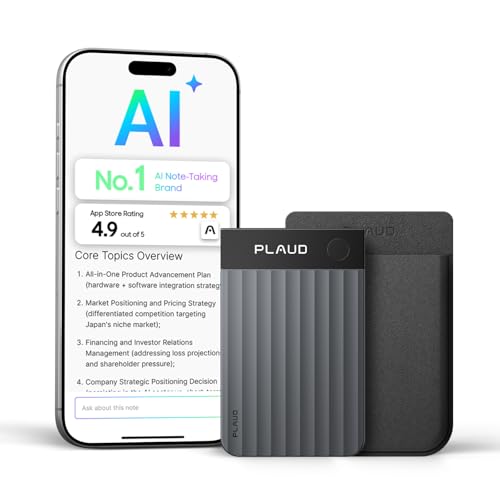
Best for Hybrid Meetings – Plaud Note Pro (Black)
The black Plaud Note Pro suits shoppers looking at voice recorders for meeting minutes across conference rooms, phone calls, and online meetings. It switches between calls and in-person recording, while the included Plaud Desktop software captures online meetings without a meeting bot.
Best For: Hybrid teams that want speaker-labeled minutes, decisions, and follow-ups in one workspace.
Pros:
- Transcribes in 112 languages with speaker labels and structured action items.
- Auto Transfer and AutoFlow can move recordings to the app and generate summaries automatically.
- Free Starter Plan includes 300 minutes of AI transcription per month.
Cons:
- The free plan’s 300-minute monthly transcription allowance may be restrictive for heavy use.
- Stated battery life is 30 hours, shorter than the Comu and Comulytic models listed here.
This is a strong fit when meeting formats change throughout the day. Plaud lists several security and privacy compliance standards, but you should still get participants’ permission before recording.
Best for Portable Meeting Notes – Plaud Note Pro (Silver)
The silver Plaud Note Pro is a slim pick among voice recorders for meeting minutes when you want to carry your recorder on your phone or in a wallet. Its magnetic case and 0.95-inch display complement transcription that organizes recordings into decisions, action items, and follow-ups.
Best For: Mobile professionals who want a pocketable recorder for in-person meetings and calls.
Pros:
- Credit-card-size design weighs a stated 30 g.
- Smart Dual-Mode Recording switches between phone calls and in-person conversations.
- 112-language transcription includes speaker labels; the free plan provides 300 minutes per month.
Cons:
- More than 300 minutes of monthly AI transcription requires a plan upgrade.
- No headphone jack for listening directly from the device.
It offers the same listed core meeting features as the black Plaud Note Pro, so color and the specific listing may decide between them. For online meetings, Plaud Desktop adds bot-free capture; let participants know before recording.
Best Wearable – Plaud NotePin S
For voice recorders for meeting minutes, the Plaud NotePin S offers a hands-free way to capture discussions and turn them into transcripts, summaries, and to-do lists. Its included pin, clip, lanyard, and wristband let you choose how to wear it.
Best For: Professionals who move between in-person and online meetings and want wearable recording with structured follow-up notes.
Pros:
- Dedicated record button also lets you mark important moments.
- Supports transcription in 112 languages and offers meeting-note templates.
- Provides up to 20 hours of continuous recording and 64GB of local storage.
- Includes a free Starter Plan with 300 transcription minutes per month.
Cons:
- Transcription beyond the free monthly allowance requires a plan upgrade.
- No headphone jack.
Choose this if flexible wear options and post-meeting organization matter more than avoiding a transcription plan. Let participants know and get their permission before recording.
Best for Unlimited Starter Transcription – EurekaMind 1.0 Lite
The EurekaMind 1.0 Lite is a slim option among voice recorders for meeting minutes, pairing one-tap capture with transcripts, speaker recognition, summaries, and action items. Its free Starter Plan includes unlimited transcription and AI summaries for everyday use.
Best For: Smartphone users who want a pocketable meeting and call recorder with no stated Starter Plan transcription-minute cap.
Pros:
- Separate ambient and call recording modes cover in-person conversations and phone calls.
- Free Starter Plan includes unlimited transcription and AI summaries.
- Recognizes speakers and pulls action items into structured notes.
- Credit-card-sized body is 3mm thin and can attach magnetically to a phone.
Cons:
- Reminders, calendar sync, and Ask Agent require an upgrade.
- Listed device compatibility is limited to smartphones.
This is a practical pick if transcription volume is your priority; check whether the Starter Plan covers the additional workflow features your team needs.
Best Phone Stand Combo – BOVOGAVA RS01
The BOVOGAVA RS01 combines a recorder with a 360° MagSafe-compatible phone stand, making it a useful desk setup for shoppers comparing voice recorders for meeting minutes. Its AI tools turn recordings into editable transcripts, summaries, key points, and action items.
Best For: People who want a magnetic phone stand and meeting recorder in one device, with AI features activated as needed.
Pros:
- MagSafe-compatible stand supports hands-free phone positioning.
- Offers real-time transcription in 100+ languages with speaker recognition.
- Supports cloud sync across phone, tablet, and computer, plus transcript export.
- Recording is available without a recurring monthly fee.
Cons:
- AI transcription and summaries require activation; the notes do not specify their pricing.
- Listed device compatibility is for smartphones.
Its strongest appeal is the stand-and-recorder combination. Before buying, check the terms for activating AI features if automated minutes are central to your workflow.
Long-Recording Pick – EVIDA 128GB Digital Voice Recorder
For voice recorders for meeting minutes, the EVIDA offers substantial onboard storage and up to 54 hours of continuous recording on a full battery. Its voice activation can help cut down silent stretches when you review a meeting.
Best For: Long meetings and users who want to organize audio files without an app.
Pros:
- 128GB capacity, with up to 9,296 hours at the stated recording setting.
- Six voice-activation sensitivity levels and four folders for file management.
- MP3 or WAV recording, password protection, and USB computer transfers.
Cons:
- No transcription or automatic meeting summaries are listed.
- The maximum storage-hours figure depends on recording settings; higher-quality WAV files use more space.
This is a practical choice for capturing and sorting lengthy discussions, provided you are comfortable turning recordings into minutes yourself.
Wired AI Workflow Pick – EVISTR L359 128GB Recorder
Among voice recorders for meeting minutes, the EVISTR L359 stands out for pairing audio capture with app-based transcription and summaries. The included OTG cable lets you transfer recordings to a phone for processing without relying on Bluetooth.
Best For: Meeting attendees who want AI-assisted notes and prefer a wired phone connection.
Pros:
- AI DVR Link app supports transcription in 113 languages, summaries, and speaker identification.
- 128GB storage and up to 33 hours of continuous recording per charge.
- One-button recording, voice activation, password protection, and a HOLD switch.
Cons:
- AI processing requires transferring recordings to a phone and using the app.
- The quoted 9,216-hour storage capacity is based on 32kbps recording, not the maximum 3072Kbps setting.
If you plan to turn conversations into draft minutes, its connected workflow may save review time; keep the cable and phone handy for the AI features.
Multilingual AI Pick – YESTRYS Z01 AI Voice Recorder
For multilingual voice recorders for meeting minutes, the YESTRYS Z01 combines recording with app-based transcription and summaries across a stated 152 languages. It also includes 64GB of internal storage and a claimed 35-hour battery life.
Best For: People documenting meetings in multiple languages who want app-based summaries.
Pros:
- Transcription and summarization support a stated 152 languages.
- Includes one year of DOWAY premium access with unlimited transcription and note-organization tools.
- 64GB internal storage, Bluetooth connectivity, and a claimed 35 hours per charge.
Cons:
- Its advertised transcription and organization workflow depends on the companion app.
- The supplied notes specify one year of included premium access but do not state what it costs afterward.
This model is most compelling when language coverage matters more than a standalone recorder workflow. Check the app and ongoing access terms before making it central to your meeting process.
How We Picked Voice Recorders for Meeting Minutes
We focused on the features that matter when turning a meeting into reliable notes: clear speech capture, practical battery life and storage, simple file access, and playback controls. For AI-enabled models, we also considered the usefulness of transcription and summaries as advertised features, while recognizing that output quality depends on the audio and the service behind it. The selected products include both dedicated audio recorders and app-connected AI note takers; their listings alone do not establish how accurately they perform in every room.
Quick Comparison: Which Type Fits Your Workflow?
Traditional digital recorders are a sensible choice if you want an audio file to review or transcribe yourself. Look for easy playback, ample storage, and dependable recording controls. AI recorders suit buyers who want a transcript or summary to speed up drafting, but may require an app, account, internet access, or a paid plan. Wearable recorders can be convenient when you move between conversations, though placement is especially important for capturing everyone around a table. If you mainly record phone calls, verify that the specific device and recording method support your phone and calling apps before buying.
Key Buying Factors for Voice Recorders for Meeting Minutes
Speech Clarity and Placement
A microphone cannot recover speech buried under HVAC noise, overlapping voices, or a laptop fan. Check how the recorder will sit in a typical meeting: centered on the table for group discussions, or close to the main speaker for presentations. Noise reduction can help, but it is not a substitute for good placement. Test a short recording before an important meeting.
Transcription, Summaries, and Costs
If you need searchable notes, check the supported languages, speaker-labeling options, export formats, and whether transcription works without an internet connection. “Unlimited” transcription claims deserve a close look at plan terms and usage policies. Treat AI summaries as drafts: confirm names, decisions, deadlines, and assigned owners against the audio before distributing official minutes.
Battery, Storage, and File Access
Choose enough battery life for your longest meeting day, not just one session. Storage matters most if you retain many recordings or use higher-quality audio settings. Confirm how files transfer to your computer or phone, whether playback is available on the device, and how recordings are backed up.
Privacy and Permission
Meeting recordings may contain confidential information. Check where audio and transcripts are stored, who can access them, and whether deletion and password protections meet your organization’s needs. Follow applicable consent laws and workplace policies, and tell participants when a meeting is being recorded.
Who Should Buy Which Voice Recorders for Meeting Minutes?
Choose a straightforward digital recorder if you mainly need a dependable source recording and prefer to manage notes yourself. Choose an AI-enabled model if you regularly produce minutes and can review its transcript against the audio. Consider a wearable option for mobile, small-group use, provided its microphone placement fits the setting. For formal or sensitive meetings, prioritize clear audio, secure handling, and a human accuracy check over the promise of instant summaries.