
A mini projector can make an impromptu presentation easier, but portability alone does not make it meeting-ready. The right choice depends on room lighting, slide readability, device connections, and how quickly you can get set up.
These 10 options range from pocket-size battery models to brighter business-oriented and app-equipped projectors. Use the guide below to match their capabilities to the rooms and devices you actually use.
Best 10 Mini Projectors for Small Meetings Picks for 2026
Best for Wireless Sharing
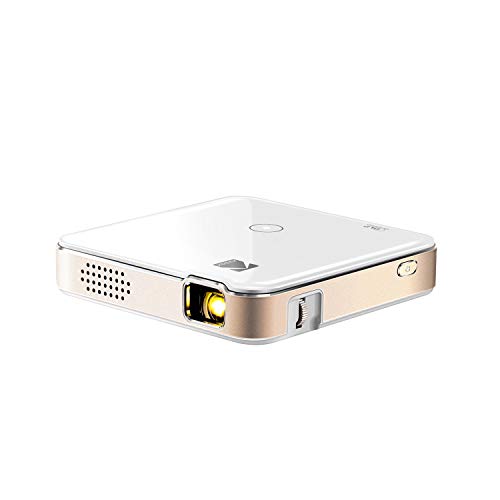
- HDMI, AirPlay, and Miracast options
- Up to 2.5 hours of battery power
- 60 ANSI lumens; listed 854 × 480 projection
Best For: Portable presentations in darkened rooms
Best for Flexible Placement

- 360° stand with auto keystone
- Native 1280 × 720 resolution
- 317 g; HDMI, USB, and TF ports
Best For: Informal meetings with limited setup space
Best for PC-Free Presentations

- 500 ANSI lumens; native 1280 × 800
- USB and 7GB internal memory for files
- Pocket-sized with included carrying case
Best For: Traveling presenters using Office files
Best for Battery-Powered Setup

- Up to 2.5 hours on battery
- Tripod and remote included
- 50 ANSI lumens; native 720 × 480
Best For: Short presentations in dark rooms
Best for Travel

- 360 g portable design
- P2P phone casting without Wi-Fi
- Native 720p; 200 ANSI lumens
Best For: Traveling presenters in dim rooms
Best for Everyday Use

- 180° rotating design
- Automatic keystone correction
- Native 720p with HDMI and USB
Best For: Informal meetings with limited setup space
Best for Sharper Slides

- Native 1080p image
- Stated 300 ANSI lumens
- HDMI plus wireless phone mirroring
Best For: Small-group presentations with detailed slides
Wireless Small-Room Pick

- 0.9:1 short throw; 35–135-inch image
- HDMI, USB, Wi-Fi 6 and Bluetooth 5.4
- Native 720p; rated 200 ANSI lumens
Best For: Informal meetings in dim, space-constrained rooms
Wired Laptop Pick

- HDMI, USB and AUX ports
- 270° stand; electric focus and keystone
- Native 720p; no Wi-Fi or Bluetooth
Best For: Occasional wired laptop presentations
Adjustable-Stand Pick
Portable Short-Throw Projector

- Short throw for limited room depth
- 270° stand; electric focus and keystone
- HDMI, USB and AUX; no Bluetooth
Best For: Informal wired meetings needing flexible placement
Best for Wireless Sharing – KODAK Luma 150
Among mini projectors for small meetings, the pocket-sized KODAK Luma 150 is a flexible choice for sharing slides or images from a laptop or phone. HDMI and mobile screen mirroring give you options when moving between meeting spaces.
Best For: Occasional presentations in a darkened room when portability and connection options matter more than fine text detail.
Pros:
- HDMI connection plus AirPlay and Miracast mirroring.
- Rechargeable battery runs for up to 2.5 hours.
- Built-in speaker and onboard controls reduce what you need to carry.
Cons:
- At 60 ANSI lumens, it is better suited to dim rooms.
- Listed projection resolution is 854 × 480, despite support for higher-resolution input; small spreadsheet text may be hard to read.
The Luma 150 makes sense for quick, visually simple presentations. If your meetings involve dense documents, prioritize a projector with higher native resolution.
Best for Flexible Placement – Yoton Y3 Mini Projector
For mini projectors for small meetings, the Yoton Y3 offers a lightweight way to set up a temporary display. Its 360° rotating stand and auto keystone correction are useful when the available table or wall is not ideally positioned.
Best For: Informal presentations in dimly lit rooms where flexible positioning matters.
Pros:
- 360° rotating stand and auto keystone correction simplify placement.
- Native 1280 × 720 resolution.
- Weighs 317 g and provides HDMI, USB, and TF connections.
Cons:
- The maker positions it for dimly lit environments.
- Phone mirroring may require a compatible data cable or adapter; not all Android phones support wired mirroring.
The Y3 is a practical pick if you frequently rearrange a small meeting space. For a laptop presentation, HDMI is the more straightforward connection to plan around.
Best for PC-Free Presentations – Dell Mobile Projector M318WL
Dell Mobile Projector M318WL 500 ANSI lumens WXGA (1280 x 800) 16:10 (Pocket Size)
Check Price On AmazonThe Dell M318WL stands out among mini projectors for small meetings because it can show supported Microsoft Office files from USB or its 7GB internal memory. That gives presenters an alternative to keeping a laptop connected throughout the meeting.
Best For: Traveling presenters who want a pocket-sized projector with PC-free file playback.
Pros:
- 500 ANSI lumens and native 1280 × 800 resolution.
- Projects supported Office files and multimedia from USB or internal memory.
- Compact 4.1 × 4.1 × 1.4-inch body, carrying case, and instant on/off operation.
Cons:
- The supplied components include an AC adapter and power cord; no rechargeable battery is listed.
- Built-in speaker is rated at just 1 watt.
This is the most presentation-focused option here if you need to travel light without giving up resolution or brightness. Check file compatibility before relying on PC-free playback for an important meeting.
Best for Battery-Powered Setup – AKASO Mini Projector
For mini projectors for small meetings away from a convenient outlet, the pocket-sized AKASO offers a rechargeable battery rated for up to 2.5 hours. Its included tripod and remote also help make a temporary setup less fiddly.
Best For: Brief, image-led presentations or small gatherings in a dark room.
Pros:
- Up to 2.5 hours of battery operation.
- HDMI and Type-C ports, plus AirPlay or EZCast wireless mirroring.
- Includes a tripod and remote control.
Cons:
- 50 ANSI lumens calls for a dark environment.
- Native 720 × 480 resolution is a poor fit for dense slides or fine text.
- Copyrighted streaming content cannot be mirrored or screencast as described in the supplied notes.
The AKASO is handy when quick setup and battery power come first. Keep slides bold and simple rather than relying on small type.
Best for Travel – AKIYO Pocket-Size Projector
Among mini projectors for small meetings, the AKIYO is a portable option when you need to show material from a phone or laptop away from your usual setup. It weighs 360 grams and offers phone casting without a Wi-Fi network, plus HDMI for a wired connection.
Best For: Traveling presenters who can dim the room and want flexible phone or laptop connections.
Pros:
- P2P casting works without connecting to a Wi-Fi network.
- 360° rotating stand and automatic vertical keystone help with placement.
- HDMI, USB, and 3.5 mm audio output broaden connection options.
Cons:
- Native resolution is 1280 × 720; 1080p is supported input, not native resolution.
- The listing recommends a dark environment for the 200 ANSI-lumen image.
Choose this for portability and quick setup rather than bright-room projection. Its wired HDMI option is useful if wireless casting is unreliable at a meeting site.
Best for Everyday Use – Thunrlge HY300 Pro
If your small meeting space has limited places to set a projector, this Thunrlge model brings a 180° rotating design and automatic keystone correction to the mini projectors for small meetings category. It also lists HDMI and USB connections for external devices.
Best For: Informal meetings where flexible projection angles matter more than high native resolution.
Pros:
- 180° rotation allows projection toward a wall or ceiling.
- Automatic keystone helps square up the image after repositioning.
- HDMI and USB provide alternatives to phone projection.
Cons:
- Native resolution is 1280 × 720 despite the 4K wording in the title.
- No measured brightness is provided in the supplied specifications.
The adjustable body may simplify setup in a cramped room. For slides with fine text, weigh the native 720p specification carefully rather than relying on the 4K label.
Best for Sharper Slides – YGSKK Native 1080p Projector
For mini projectors for small meetings, the YGSKK stands out in the supplied notes for its native 1080p resolution and stated 300 ANSI-lumen brightness. HDMI connectivity gives laptop presenters a straightforward wired option, while wireless phone mirroring offers another way to share content.
Best For: Small-group presenters who prioritize native 1080p detail and have access to HDMI or a shared Wi-Fi network.
Pros:
- Native 1080p resolution is useful for showing detailed slides.
- Stated 300 ANSI lumens and a built-in speaker.
- HDMI, USB, and audio ports support several setup options.
Cons:
- Phone mirroring requires the phone and projector to use the same network.
- Android phone users need to download a program for wireless connection.
This is the strongest paper-spec choice here for slide detail, but bring an HDMI cable when network access is uncertain. The supplied notes say an HDMI cable is included.
Wireless Small-Room Pick – Alwtniet HY300Pro
Among mini projectors for small meetings, the HY300Pro is a portable option when you need to set up close to a wall and connect a laptop by HDMI. Its 0.9:1 throw ratio, 180° swivel and automatic vertical keystone correction offer placement flexibility, while its native resolution is 720p.
Best For: Informal meetings in a dim room where portability and short-throw placement matter more than fine text detail.
Pros:
- Projects a stated 35–135-inch image from 0.75–2.65 meters.
- Supports HDMI, USB, Wi-Fi 6 and Bluetooth 5.4 connections.
- Weighs 0.77 lb and has a built-in 5W speaker.
Cons:
- Native 1280 × 720 resolution is a limitation for text-heavy slides.
- Rated 200 ANSI lumens, so it is better suited to controlled lighting.
This is the flexible setup choice of the three, particularly if a meeting space has little room between the projector and wall. Do not mistake its 4K input support for native 4K projection.
Wired Laptop Pick – Q100 Mini Projector
For shoppers comparing mini projectors for small meetings, the Q100 offers a straightforward wired setup: connect a laptop through HDMI, then use its rotating stand, electric focus and electric keystone correction to adjust the image. It also has USB and AUX ports, but no Wi-Fi, Bluetooth or built-in apps.
Best For: Occasional presentations where a wired laptop connection and flexible placement are sufficient.
Pros:
- 270° rotating stand allows wall or ceiling projection.
- Electric focus and keystone correction help with setup.
- HDMI, USB and AUX ports provide wired connection options.
Cons:
- No wireless connectivity or built-in apps.
- Native 1280 × 720 resolution may limit small slide text.
Its short-throw design is useful when meeting-room depth is limited, but the advertised up-to-200-inch image is not a requirement for a small group. Plan to bring the appropriate cable or adapter for your source device.
Adjustable-Stand Pick – Portable Short-Throw Projector
This portable model is an option among mini projectors for small meetings when you want short-throw placement and quick image adjustments. Its 270° rotating stand, electric focus and electric keystone correction can help adapt a temporary setup, and its HDMI port accommodates a laptop.
Best For: Small, informal meetings that need a movable wired projector with flexible aiming.
Pros:
- Short-throw design is intended for smaller spaces.
- 270° stand and ±60° angle adjustment offer placement options.
- HDMI, USB and AUX ports support multiple wired devices.
Cons:
- Bluetooth and built-in apps are not supported.
- Its 1080p and 4K claims describe supported content, not a stated native resolution.
Choose this model for its adjustable physical setup rather than its advertised up-to-200-inch screen. The supplied notes do not specify native resolution or brightness, so check those details before relying on it for detailed slides or a bright room.
How We Picked These Mini Projectors for Small Meetings
We focused on the details that matter when several people need to read the same screen: stated brightness, image resolution, input options, portability, power requirements, and setup features such as stands and keystone correction. The selected models cover different priorities, from an ultra-compact travel projector to a business-oriented WXGA model and several smart projectors.
Specifications do not tell the whole story. A claim of “1080p support” or “4K support” usually describes a signal the projector can accept, not necessarily its native display resolution. Brightness figures are most useful when stated in ANSI lumens; unlabeled numbers are difficult to compare. Check current specifications and connection compatibility before buying.
Quick Comparison: Match the Projector to the Meeting
For slides in a room with some ambient light, start with a model that provides a clear ANSI-lumen rating. The Dell M318WL lists 500 ANSI lumens and native WXGA (1280 × 800) resolution; its 16:10 format can suit laptop presentations. For maximum portability, the KODAK Luma 150 has a built-in battery, while the Yoton Y3 emphasizes a 317 g body and adjustable stand. Confirm each model’s runtime, brightness, and required adapters for your setup.
Smart models with built-in apps and wireless features may be convenient when a laptop is unavailable. For a work presentation, however, a dependable wired input is often more valuable than streaming features. Check that your laptop, phone, or tablet can connect as intended.
Key Buying Factors
Brightness and Room Conditions
Mini Projectors for Small Meetings generally work best with dimmed lights and a modest image size. If you cannot control daylight, prioritize a clearly specified ANSI-lumen rating and consider a larger, brighter projector instead. A smaller projected image will usually look brighter and keep text easier to read.
Readable Slides and Reliable Connections
Look for a stated native resolution rather than relying on supported-input claims. WXGA or native 1080p can make spreadsheets and fine print easier to read, but presentation design matters too: use large fonts and high contrast. Confirm HDMI availability and whether your device needs a USB-C or other video adapter. Wi-Fi, Bluetooth, and casting support do not automatically mean your specific device can mirror its screen.
Placement, Power, and Audio
Check throw distance against the space between your table and wall. A short-throw design can help in a cramped room, but verify the image size at your planned distance. Stands and auto keystone simplify positioning; excessive digital correction may soften text. For travel, check battery runtime at usable brightness and whether the projector can run from mains power during a longer session. Built-in speakers may suffice for basic clips, while video-heavy meetings may need external audio.
Who Should Buy Which Mini Projectors for Small Meetings?
Frequent presenters should favor documented brightness, a native resolution suitable for slides, and a reliable wired connection; the Dell is a logical starting point for comparison. Travelers who value a compact kit can compare the battery-equipped KODAK and AKASO models with the lightweight Yoton, then verify their actual connection and power needs. Buyers planning casual, dim-room meetings may prefer a smart model for flexible setup, provided it has the input their work device requires. If attendees must read dense spreadsheets in a sunlit room, step up to a brighter projector rather than choosing solely by size.