
The best book scanners for Windows make it easier to digitize bound books, oversized documents, classroom materials, and business records without repeatedly forcing pages through a flatbed scanner.
Our 2026 roundup covers overhead and document scanners with Windows compatibility, OCR, page-flattening features, large capture areas, and different speed and resolution priorities.
Best 10 Book Scanners for Windows Picks for 2026
Premium AI Book Camera

- 18MP 4K capture with up to 600 dpi scanning
- AI flattening, finger erasing, and OCR
- Supports A3 materials and cloud exports
Best For: Windows users needing high-quality book scans and OCR
Large-Format Workhorse

- Scans A3 materials in a large frameless bed
- 4-second A3 color scans at 200 dpi
- Windows support through TWAIN/WIA drivers
Best For: Flat large-format books, drawings, and office documents
Portable Teaching Scanner

- Foldable A4 document camera for Windows
- Automatic correction and batch scanning
- Live projection, video recording, and AI OCR
Best For: Portable classroom, teaching, and everyday A4 scanning
Archival Large-Book Specialist
VIISAN S48 Duo Overhead Scanner
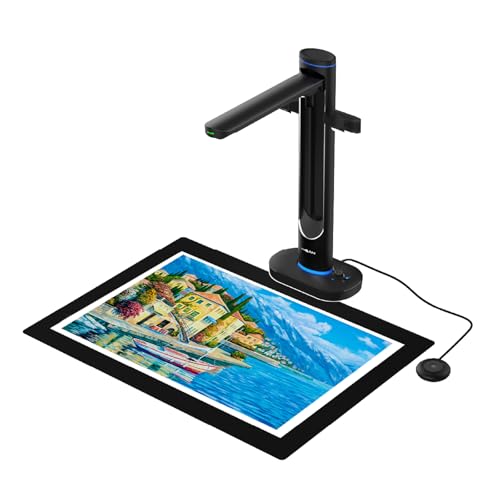
- Overhead design supports books and documents up to A2
- Dual 48MP cameras capture up to 600 dpi
- AI flattening, OCR, and text-to-speech included
Best For: Fragile large books, archives, and accessibility-focused scanning
Best Wireless Document Scanner

- 45 ppm double-sided scanning
- 100-sheet feeder with jam prevention
- Wi-Fi 6, USB-C, and cloud support
Best For: High-volume Windows document scanning
Best A3 Overhead Book Scanner

- Overhead scanning for bound books
- A3 capture with 16MP camera
- Page flattening and anti-glare lighting
Best For: Books, archives, artwork, and large pages
Best Portable OCR Book Scanner

- Portable A3 overhead capture
- OCR to Word, Excel, PDF, and TXT
- Scans in under three seconds per page
Best For: Portable Windows book scanning with OCR
Best Overhead Pick

- Scans bound books without cutting them
- Automatically corrects curved pages
- Supports page-turn detection
Best For: Digitizing books, newspapers, and mixed documents on Windows
Best Large-Format Value

- Covers documents up to A2 size
- Handles pages in under 1.5 seconds
- Folds through a 90-degree hinge
Best For: Large newspapers, maps, and thick books
Best OCR Features

- Flattens pages and hides fingers with AI
- OCR supports 138+ languages
- Exports searchable and editable files
Best For: Book digitization, OCR, teaching, and document-camera use
Premium AI Book Camera – IRIScan Desk 7 Pro
If you want versatile book scanners for Windows, the IRIScan Desk 7 Pro combines an 18MP 4K camera with OCR, automatic book flattening, and document cleanup tools. It supports A3 landscape materials, searchable PDFs, office files, and cloud destinations, making it suitable for more than basic page capture.
Best For: Windows users who need high-resolution book scanning, OCR, presentations, and flexible digital exports.
Pros:
- 18MP optical capture with up to 600 dpi scanning and 4K video.
- AI book-curve flattening and finger-mark removal help clean bound-page scans.
- OCR supports more than 130 languages, with text-to-speech and searchable PDF output.
- Exports to formats and destinations including Office files, Dropbox, OneDrive, FTP, and email.
Cons:
- Its document-camera design may require more desk space than a conventional flatbed.
- The extensive feature set may be more than needed for occasional simple scans.
The Desk 7 Pro is a strong all-around choice when Windows compatibility, book handling, OCR, and presentation features matter as much as image quality.
Large-Format Workhorse – VIISAN VF3240 A3 Scanner
For shoppers comparing book scanners for Windows, the VIISAN VF3240 stands out as a conventional A3 flatbed-style scanner built for oversized flat materials. Its 4-second A3 color scan speed at 200 dpi, frameless glass, and automatic scan start suit offices, schools, and document-heavy workflows.
Best For: Windows users scanning flat books, magazines, blueprints, legal documents, and other large-format materials.
Pros:
- Handles A3 materials, including drawings, newspapers, textbooks, and albums.
- Advertised 4-second A3 color scans at 200 dpi under specified conditions.
- Frameless glass enables edge-to-edge scanning, while auto-scan starts when the lid closes.
- Works with Windows 7 through 11 using TWAIN/WIA drivers.
Cons:
- Windows users achieve up to 1200 dpi for A3 through ViiScan; the listed 2400 dpi A3 mode requires macOS with ICA.
- The CIS sensor is intended for flat materials rather than bound or three-dimensional objects.
- Its large A3 format is less practical for users who only scan standard pages.
The VF3240 is best viewed as a fast, large-format Windows scanner for flat pages and oversized documents, rather than a dedicated curved-book camera.
Portable Teaching Scanner – NetumScan 13MP Book Camera
The NetumScan 13MP is a compact option among book scanners for Windows, with automatic correction, batch scanning, adjustable LED lighting, and a foldable aluminum-alloy body. It captures up to A4 size and also works as a live camera for teaching, meetings, and distance learning.
Best For: Windows users who want a portable A4 book camera for classroom work, remote teaching, and routine document capture.
Pros:
- 13MP CMOS sensor captures up to A4-size pages with built-in LED illumination.
- One-key correction helps fix skewed images, and automatic batch scanning reduces page-by-page work.
- Supports word, PDF, and text formats with AI-based multilingual OCR recognition.
- Foldable construction, adjustable stand, live projection, and video recording add flexibility.
Cons:
- Its A4 capture area is smaller than the A3 and A2 options in this roundup.
- It connects by USB and requires software installation from the included flash drive.
- The notes do not specify a maximum optical dpi.
This is a practical pick for teachers and mobile users who value portability and live display features over oversized-page scanning or maximum resolution.
Archival Large-Book Specialist – VIISAN S48 Duo Overhead Scanner
For oversized or fragile books, the VIISAN S48 Duo is one of the more specialized book scanners for Windows. Its overhead design captures books and documents up to A2 without pressing on bindings, while dual 48MP cameras, AI processing, OCR, and text-to-speech support archival and accessibility-focused workflows.
Best For: Windows users digitizing large, bound, fragile, or valuable books for archives, education, and professional sharing.
Pros:
- Overhead capture handles books, maps, and documents up to A2 without flattening them.
- Dual 48MP cameras provide detailed images at up to 600 dpi.
- AI tools flatten curved pages, remove finger marks, correct edge distortion, and clean backgrounds.
- OCR, text-to-speech, and UVC camera functionality support accessible archives and live teaching.
Cons:
- The overhead system is heavier and less compact than a small portable document camera.
- It requires a computer with at least 4GB RAM, with 16GB recommended, plus available storage.
- Its A2 capability may be unnecessary for users scanning only standard-size pages.
The S48 Duo is the strongest fit here for non-destructive large-book scanning, especially when high detail, accessibility tools, and live collaboration are priorities.
Best Wireless Document Scanner – ScanSnap iX2500
If you need book scanners for Windows but primarily scan loose pages, the ScanSnap iX2500 is a fast, well-equipped choice. It combines 45-page-per-minute duplex scanning with a 100-sheet feeder, automatic image optimizations, and both Wi-Fi and USB-C connectivity.
Best For: Windows users scanning large batches of documents, receipts, business cards, and photos.
Pros:
- Fast double-sided scanning at up to 45 pages per minute.
- 100-sheet automatic document feeder with skew and multi-feed detection.
- Wi-Fi 6 and USB-C connectivity, plus cloud-service support.
- Large touchscreen with customizable profiles and Quick Menu shortcuts.
Cons:
- Designed for loose documents rather than bound books.
- At 7.7 pounds, it is less portable than overhead book scanners.
The iX2500 is the strongest option here for high-volume Windows document workflows. Choose it when speed, paper handling, and flexible connections matter more than scanning bound pages.
Best A3 Overhead Book Scanner – VIISAN DL16
The VIISAN DL16 is a purpose-built option among book scanners for Windows, using an overhead design to capture bound books, oversized pages, artwork, and sheet music. Its 16MP camera, 300 DPI scanning, page-flattening capability, and anti-glare lighting are suited to materials that do not work well with a conventional feeder.
Best For: Windows users digitizing books, archives, artwork, and A3-size documents.
Pros:
- Overhead A3 capture handles bound books and large documents.
- 16MP camera provides up to 300 DPI scanning.
- Automatic page flattening helps with curved book pages.
- Anti-glare LED lighting improves visibility on glossy materials.
Cons:
- USB is the listed connection type, so wireless scanning is not available.
- Its 300 DPI resolution is lower than the ScanSnap iX2500’s 600 DPI specification.
For actual book digitization, the DL16 is the most specialized pick in this roundup. It trades high-speed batch feeding for overhead capture that accommodates bound and oversized materials.
Best Portable OCR Book Scanner – JOYUSING 14MP HD Scanner
The JOYUSING 14MP HD Document Scanner is a compact choice for shoppers comparing book scanners for Windows. It supports A3 capture, books up to 3 cm thick, multi-language OCR, and conversions to PDF, Word, TXT, and Excel on Windows, while scanning a page in less than three seconds.
Best For: Windows users who want portable book and document capture with OCR file conversion.
Pros:
- Portable design weighs about 0.97 kg.
- Captures pages up to A3 size and books up to 3 cm thick.
- Multi-language OCR supports PDF, Word, TXT, and Excel output on Windows.
- Three-level LED lighting helps in dim environments.
Cons:
- USB is the listed connection type, with no wireless option specified.
- Users must download the software from JOYUSING’s support page.
- The black pad must be positioned before scanning books.
The JOYUSING is a practical fit when portability and OCR flexibility are priorities. Its Windows support is broad, but setup requires downloading the appropriate software and using the supplied scanning pad correctly.
Best Overhead Pick – ScanSnap SV600
If you need book scanners for Windows that can capture bound materials without cutting or damaging them, the ScanSnap SV600 is a practical overhead option. Its page-turn detection, book correction, and multi-document features are designed to streamline scanning books, newspapers, photos, and loose documents.
Best For: Windows users digitizing books, newspapers, magazines, and mixed documents.
Pros:
- Scans books and other materials without cutting or damaging them.
- Automatically flattens curved book pages and corrects distortion.
- Page Turning Detection can start scans as pages are turned.
- Multi Document Detection automatically crops and rotates multiple items.
Cons:
- The 6.6-pound overhead design takes more desk space than a compact portable scanner.
- Its USB connection requires a nearby Windows computer.
The SV600 is a strong choice when book preservation and hands-free page capture matter most. Point Retouch can also remove captured fingers, while the included software and Windows 10/11 support make it well suited to a dedicated scanning setup.
Best Large-Format Value – VIISAN A2 Document Scanner
For shoppers comparing book scanners for Windows, the VIISAN Document Scanner stands out for its large A2 capture area and fast page handling. Its adjustable, foldable design is aimed at oversized materials such as newspapers, maps, and thick books.
Best For: Windows users scanning large-format documents and oversized books.
Pros:
- Captures A2 documents up to 16.54 by 23.39 inches.
- Also supports A3 materials and smaller items.
- Scans A2-size pages in under 1.5 seconds per page.
- Its 90-degree foldable hinge helps with storage and positioning.
Cons:
- The listed 300 dpi resolution is lower than some specialized book scanners.
- The supplied notes do not specify automatic book-page flattening or OCR features.
The VIISAN is best suited to users who prioritize coverage and speed over advanced book-correction features. Windows 7 through Windows 11 compatibility and USB connectivity make it a straightforward option for a computer-based scanning station.
Best OCR Features – IRIScan Desk 6 Pro
The IRIScan Desk 6 Pro is a versatile choice among book scanners for Windows, combining overhead book scanning with document-camera functions and OCR. It uses AI-assisted flattening, finger hiding, auto scanning, and Readiris software to turn captured pages into searchable and editable files.
Best For: Windows users who need book scanning, OCR, document-camera features, and multiple output formats.
Pros:
- Scans A3 documents and books at speeds of less than one second per page.
- AI features flatten curved pages, hide fingers, and adjust scanning settings.
- OCR supports more than 138 languages and exports to searchable PDF, Word, Excel, and EPUB.
- Works as a document camera with Zoom, Google Meet, and Skype.
Cons:
- Its extensive software and camera features may be more than basic scanning requires.
- The supplied notes specify USB connectivity but do not list wireless operation.
Choose the IRIScan Desk 6 Pro if searchable text and flexible output formats are priorities. Its foldable, approximately 2-pound design, USB power, A3 coverage, and included Readiris PDF software make it useful for home offices, teaching, and book digitization.
How We Picked the Best Book Scanners for Windows
We compared these models by the features that matter most when scanning books and loose documents on a Windows computer: operating-system compatibility, capture area, optical resolution, scan speed, OCR support, page-flattening technology, lighting, connectivity, and workflow flexibility. We also considered whether each scanner is better suited to occasional home use, classroom work, office documents, or large archival projects.
Overhead scanners receive particular attention because they can capture bound books without removing pages. Models with automatic flattening, finger removal, and glare reduction may produce cleaner results with less manual editing, while conventional high-speed scanners can be more efficient for stacks of loose sheets.
Quick Comparison
| What to Compare | Best For | Models to Consider |
|---|---|---|
| Compact book scanning | Home users and occasional projects | IRIScan Desk 6 Pro, NetumScan 13MP |
| Large-format capture | A3 or A2 books, drawings, and documents | VIISAN S48 Duo, VIISAN 23MP, VIISAN VF3240 |
| OCR and page correction | Searchable archives and editable text | IRIScan Desk 7 Pro, VIISAN DL16, JOYUSING 14MP |
| Loose-document speed | Office batches and paperwork | ScanSnap iX2500 |
| Established overhead scanning | Books and mixed documents | ScanSnap SV600 |
Key Buying Factors for Book Scanners for Windows
Windows Software and Connectivity
Confirm that the scanner supports your Windows version and that the required drivers or scanning software are available. USB is usually the simplest connection, while wireless models can make shared office workflows more convenient.
Capture Size and Book Clearance
A4 scanners suit standard paperwork, but A3 and A2 models are better for oversized books, maps, artwork, and open documents. Check the usable capture area rather than relying only on the product name.
OCR and Image Correction
OCR converts scanned pages into searchable or editable text. Auto-flattening, curved-page correction, finger removal, anti-glare lighting, and automatic cropping can significantly reduce post-processing time.
Resolution and Speed
Higher resolution helps preserve small type and illustrations, but it can create larger files. For routine text, moderate optical resolution is often sufficient; archival images and fine graphics benefit from more detail. Also check whether advertised speed applies to a specific resolution or scan size.
Who Should Buy Which Book Scanners for Windows?
Choose an IRIScan Desk or NetumScan model if you want a practical overhead scanner for home, teaching, or occasional book projects. Consider a VIISAN A3 or A2 scanner for oversized materials, professional archiving, CAD documents, or frequent large-format work. The ScanSnap SV600 is a strong fit for users who prefer a dedicated overhead book scanner, while the iX2500 is better for fast batches of loose pages. For searchable archives, prioritize a model with OCR and automatic page correction; for simple image capture, a lower-cost document camera may be enough.