
Not every laptop, tablet, or monitor includes a Kensington-style security slot. Laptop locking cables with adhesive anchors provide a practical alternative by attaching a low-profile plate to the device and connecting it to a cut-resistant cable.
This roundup compares 10 options based on anchor design, locking method, cable construction, installation requirements, and everyday usability. Whether you need keyed security for an office or a combination lock for shared spaces, the right setup can add a useful layer of theft deterrence.
Best 10 Laptop Locking Cables with Adhesive Anchor Picks for 2026
Complete Kit Pick
AboveTEK Laptop and Tablet Lock

- Two adhesive anchor sets included
- Six-foot galvanized steel cable
- Works with many device types
Best For: Securing multiple laptops, tablets, and phones
Desk-Mount Anchor Pick

- Full-steel anchor construction
- Resists up to 88 pounds of force
- Includes screws and mounting tape
Best For: Adding a fixed anchor to a desk or workstation
Multi-Anchor Value Pick
3-Pack Adhesive Security Plates

- Three metal anchor plates
- Adhesive and screw mounting options
- Cable sold separately
Best For: Creating multiple cable anchor points
Long-Reach Kit Pick
Laptop Lock with Adhesive Anchors

- 6.6-foot, 5 mm steel cable
- Two keys and two anchor plates
- Works with slot and non-slot devices
Best For: Shared spaces needing flexible, long-reach security
Best Adhesive Anchor Plate Pack

- Five adhesive lock plates included
- Stainless steel construction
- Fits many electronics
Best For: Securing multiple devices with compatible locking cables
Best Keyed Versatility
Cable Lock with Adhesive Anchor Plate

- 6.5-foot PVC-coated steel cable
- Works with standard slots or anchor plate
- Rotating stainless steel lock head
Best For: Mixed devices with and without built-in security slots
Best Heavy-Duty Adhesive Setup

- 6.7-foot cut-resistant steel cable
- 100-pound adhesive holding capacity stated
- Three keys with traceable codes
Best For: Securing slot-free devices in cafes, libraries, and shared offices
Best All-Around Fit
Universal Laptop Cable Lock with Adhesive Anchor

- Supports standard slots and adhesive-anchor devices
- 6.5-foot cut-resistant self-coiling cable
- Includes stainless lock head and two keys
Best For: Mixed laptop, tablet, and smartphone setups
Best Accessory Bundle
QWORK Universal Cable Lock with Anchor Plate
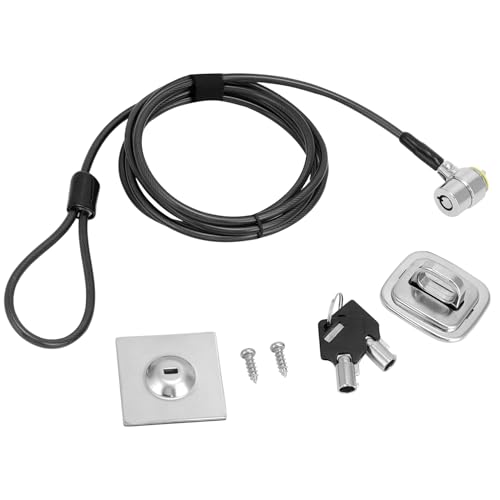
- Includes adhesive plate and steel desk mount anchor
- 6.5-foot cut-resistant cable with PVC coating
- Key lock includes two keys and rotating lock head
Best For: Flexible desk and device mounting setups
Best Two-Pack
Carbon-Steel Cable Locks with Adhesive Plates

- Includes two locks for multi-device coverage
- Adhesive plates support slot-free electronics
- 5mm twisted carbon-steel cable construction
Best For: Offices, classrooms, and multi-device setups
Complete Kit Pick – AboveTEK Laptop and Tablet Lock
For shoppers comparing laptop locking cables with adhesive anchor plates, the AboveTEK kit stands out as a multi-device package. It includes a six-foot galvanized steel cable, two keys, and two adhesive anchor sets for securing laptops, tablets, smartphones, monitors, and other electronics.
Best For: Households, offices, retail counters, and public spaces that need to secure multiple devices with one adaptable kit.
Pros:
- Includes two adhesive sticker-and-anchor sets for use with multiple devices.
- Six-foot cut-resistant galvanized steel cable allows convenient device movement.
- Designed for broad compatibility with laptops, tablets, smartphones, monitors, and notebooks.
- Includes two keys and a minimalist installation design.
Cons:
- Adhesive anchors are intended for flat surfaces, so they may not suit every device or mounting location.
- The kit uses a keyed lock rather than a combination mechanism.
Its combination of extra anchors, flexible cable length, and wide device compatibility makes this a practical choice when you want one security setup for several electronics.
Desk-Mount Anchor Pick – Security Anchor Base Plate
This desk-mount anchor is a useful component for shoppers who already have a cable and need a fixed attachment point. It provides a full-steel base plate, tamper-resistant one-way screws, and industrial-strength mounting tape for workstations where drilling is not practical.
Best For: Office desks and workstations that need a dedicated anchor point for keyed or combination cable locks.
Pros:
- Full-steel construction is designed to resist cutting.
- Can resist up to 88 pounds of force, according to the supplied product notes.
- Includes two one-way security screws and industrial-strength mounting tape.
- Eliminates the need to search for a suitable fixed object under a desk.
Cons:
- It is an anchor accessory, not a complete laptop locking cable kit.
- Only one anchor is included in the package.
Choose this plate when your priority is a permanent-looking desk anchor for an existing cable lock. The included tape also provides a no-drill installation option.
Multi-Anchor Value Pick – 3-Pack Adhesive Security Plates
If you already own a cable and need several mounting points, this three-pack offers a straightforward way to expand your setup. Each metal plate includes self-adhesive backing, while the package also supplies six screws for additional installation options.
Best For: Home offices, businesses, and display areas that need multiple anchor locations for laptops, tablets, monitors, or other electronics.
Pros:
- Three security plates provide multiple anchor points.
- Includes three adhesive pieces and six screws.
- Metal construction is described as resistant to wear and aging.
- Compatible with a broad range of electronics, including laptops, tablets, phones, monitors, and TVs.
Cons:
- Steel cable is not included.
- The supplied product dimensions are unusually small, so verify the fit and mounting area before installation.
This is best viewed as an economical accessory pack rather than a complete locking system. It makes sense when you need multiple adhesive anchor locations and already have compatible cables.
Long-Reach Kit Pick – Laptop Lock with Adhesive Anchors
This complete kit combines a 5 mm steel cable, two keys, and two self-adhesive anchor plates. It can connect directly to devices with a standard 3 x 7 mm security slot or attach to non-slot electronics through the included plates, making it a flexible option among laptop locking cables with adhesive anchor plates.
Best For: Shared workspaces, classrooms, retail counters, libraries, and other areas where devices need a long reach and flexible attachment options.
Pros:
- Includes the cable lock, two keys, and two adhesive anchor plates.
- Six-foot-six-inch cable can loop around desks, table legs, counters, shelves, and monitor arms.
- Supports both standard security slots and non-slot devices with adhesive plates.
- Installation guidance specifies waiting 24 hours before locking and up to 72 hours for full bond strength.
Cons:
- Adhesive plates require clean, dry, smooth, flat surfaces such as metal, glass, or hard plastic.
- The keyed design requires keeping track of the included keys.
With its 6.6-foot reach and two installation methods, this kit is particularly suitable for mixed-device environments. Allow the adhesive adequate curing time before relying on an anchor plate.
Best Adhesive Anchor Plate Pack – 5-Pack Security Plate
If you already have laptop locking cables with adhesive anchor and need extra mounting points, this five-pack of adhesive security plates is a practical option. Each stainless steel plate is designed to add a lock slot to laptops, tablets, monitors, televisions, and other electronics without drilling.
Best For: Users securing several compatible devices or keeping replacement adhesive anchor plates on hand.
Pros:
- Five plates are included for multi-device use.
- Stainless steel construction is designed to resist falling off.
- Adhesive installation is simple, and the sticker is described as removable without residue.
- Works with computers, tablets, smartphones, monitors, televisions, and other electronics.
Cons:
- This package contains anchor plates, not a complete cable lock.
- Compatibility depends on the locking cable and device surface.
This is a useful add-on for expanding a device-security setup, especially when multiple electronics need an adhesive lock slot. Check the dimensions and cable compatibility before installation.
Best Keyed Versatility – Cable Lock with Adhesive Anchor Plate
This keyed cable lock is suited to shoppers comparing laptop locking cables with adhesive anchor for devices that may or may not have a built-in security slot. It can connect directly to standard laptop slots or use the included adhesive anchor plate with compatible tablets, phones, and other slot-free devices.
Best For: Users who want one cable lock for standard-slot laptops and devices requiring an adhesive anchor.
Pros:
- Includes a 6.5-foot cut-resistant twisted steel cable with PVC coating.
- Works with standard security slots or the included adhesive anchor plate.
- Stainless steel lock head rotates 360 degrees.
- Keyed operation is included for the single-pack lock.
Cons:
- Some models require an I3C adhesive security plate.
- Only one lock is included.
- Adhesive installation requires a suitable hard device surface.
Its dual installation approach makes this a flexible choice for mixed device collections. Confirm whether your specific model requires the referenced I3C plate before buying.
Best Heavy-Duty Adhesive Setup – 6.7-Foot Cable Lock
For shoppers seeking laptop locking cables with adhesive anchor for modern slot-free devices, this 6.7-foot keyed cable lock includes an industrial-strength adhesive plate. It also connects directly to standard Kensington 3×7mm slots, making it suitable for laptops, MacBooks, tablets, and iMacs.
Best For: Public-place use where a longer cable, adhesive anchor, and multiple keys are useful.
Pros:
- 6.7-foot braided steel cable provides flexible reach around a fixed object.
- Includes an adhesive anchor for devices without a security slot.
- Listed cable joint pulling force is up to 1800N, with the cable ring rated up to 1200N.
- Includes three keyed-different keys with traceable codes for replacement.
Cons:
- The adhesive anchor should cure for 24–48 hours for maximum strength.
- It is a single-lock package with one anchor plate.
- Users must verify the device surface is suitable for adhesive attachment.
This is the most feature-rich option of the three for slot-free devices, combining a long cable with a stated 100-pound adhesive holding capacity after curing. Follow the installation and removal guidance carefully.
Best All-Around Fit – Universal Laptop Cable Lock with Adhesive Anchor
If you need laptop locking cables with adhesive anchor support, this retractable model covers both standard security-slot laptops and devices without built-in slots. Its adhesive anchor plate expands compatibility to tablets and smartphones while the self-coiling cable is easier to store between uses.
Best For: Users securing a mix of standard-slot laptops, tablets, and smartphones.
Pros:
- Works with standard universal laptop slots or the included adhesive anchor plate.
- Includes a 6.5-foot cut-resistant twisted-steel cable with PVC coating.
- Features a 360-degree rotatable stainless-steel lock head and two keys.
- Self-coiling design contracts for easier storage.
Cons:
- Adhesive mounting is intended for hard device surfaces and requires proper placement.
- Compatibility should be checked for the specific device before purchase.
This is a flexible choice for shared workspaces or travel because it supports both slotted and slot-free electronics. The retractable design also helps limit cable clutter when the lock is not in use.
Best Accessory Bundle – QWORK Universal Cable Lock with Anchor Plate
For shoppers comparing laptop locking cables with adhesive anchor options, the QWORK set offers a universal key-lock design plus several mounting components. It is suited to standard-slot laptops and non-slot devices, and it also includes a steel desk mount anchor for added installation flexibility.
Best For: Buyers who want a versatile kit with an adhesive plate, desk anchor, and two keys.
Pros:
- Compatible with laptops, monitors, tablets, and other listed devices.
- Includes a strong-adhesive anchor plate and steel desk mount anchor.
- Uses a 6.5-foot cut-resistant twisted-steel cable with PVC coating.
- 360-degree rotatable stainless-steel lock head and two-key mechanism.
Cons:
- Requires checking device and lock dimensions before purchase.
- The package weighs 8.8 ounces, making it heavier than some compact options.
The extra anchor hardware makes this a practical option when you need more than a basic cable. Confirm the device fit and choose the mounting method appropriate for the surface and security setup.
Best Two-Pack – Carbon-Steel Cable Locks with Adhesive Plates
This two-pack is a useful pick when multiple devices need laptop locking cables with adhesive anchor capability. The cables support compatible laptop security slots and can attach to slot-free electronics such as monitors, projectors, and LED TVs through self-adhesive anchor plates.
Best For: Offices, classrooms, or homes securing two devices or keeping a spare available.
Pros:
- Two-pack provides coverage for multiple devices.
- Self-adhesive anchor plates support devices without security slots.
- Uses 5mm carbon-steel cable made from multiple twisted wires.
- Includes two keys, with a freely rotating cable-to-lock interface.
Cons:
- Suitability of the security slot should be checked before purchase.
- The supplied notes do not specify the cable length.
- Adhesive anchors require a suitable device surface and careful installation.
Choose this set when quantity matters more than a retractable design or specified long reach. Its broad device use and two included locks make it practical for multi-device security arrangements.
How We Picked the Best Laptop Locking Cables with Adhesive Anchor
We focused on the features that matter when securing electronics without a factory-installed lock slot: anchor-plate design, adhesive installation, cable length, lock type, included keys or combination mechanisms, and compatibility with laptops, tablets, monitors, and other flat-surface devices. We also considered whether a product is sold as a complete kit or primarily as replacement anchor hardware.
Adhesive anchors are a deterrent rather than an absolute guarantee against theft. Their effectiveness depends on proper surface preparation, sufficient bonding time, and attachment to a suitable hard surface on the device.
Quick Comparison
- Best for a complete keyed setup: Choose a kit that includes the cable, anchor plate, and two keys.
- Best for multiple devices: Multi-pack adhesive plates can support several laptops or tablets when paired with compatible locks.
- Best for shared environments: A combination lock avoids the need to manage keys.
- Best for replacement or expansion: Standalone anchor plates work well when you already own a compatible cable lock.
- Best for flexible positioning: Look for a cable around 6 to 7 feet long, especially for desks with distant anchor points.
Key Buying Factors for Laptop Locking Cables with Adhesive Anchor
Anchor Compatibility and Adhesive Quality
Confirm that the plate is intended for your device and cable-lock style. Check the adhesive’s recommended surfaces and avoid applying it to textured, fabric-covered, dusty, or easily removable panels. Clean the area with an appropriate degreasing solution, press the plate firmly, and follow the manufacturer’s curing time before applying tension.
Locking Method
Keyed locks generally offer straightforward operation and may include spare keys. Combination locks are convenient for classrooms, offices, and shared workstations because there is no key to distribute or misplace. Choose based on who needs access and how often the device will be secured or released.
Cable Length and Construction
A longer cable provides more options for wrapping around a desk leg or connecting to a fixed object, but excess cable can create clutter. Cut-resistant steel construction is preferable, while a protective coating can help reduce scratches and improve handling.
Device and Workspace Fit
Measure the available surface and identify a fixed attachment point before buying. Make sure the cable can reach that point without blocking ports, vents, hinges, screens, or charging access. For portable devices, consider whether the added plate will interfere with carrying cases or stands.
Who Should Buy Which Laptop Locking Cables with Adhesive Anchor?
Choose a complete keyed kit if you want the simplest setup for one laptop, tablet, or monitor. Select a combination-lock model when several people use the workstation or when key management would be inconvenient. Multi-pack anchor plates are a practical choice for schools, offices, libraries, and businesses securing several compatible devices. If you already have a cable lock, a standalone adhesive base plate may be the most economical option.
For valuable equipment in public or unattended areas, combine the cable with sensible security practices: lock the device to a genuinely fixed object, keep the cable reasonably taut, avoid leaving it in high-risk locations, and periodically inspect the adhesive plate for lifting or damage.