
A KVM over IP switch can let you view and control a computer from another room—or from nearly anywhere—using a network connection. That makes it useful for home offices, headless PCs, small servers, and troubleshooting systems that are not easy to reach physically.
We selected 10 options ranging from compact plug-and-play devices to multi-port remote KVMs, focusing on video support, BIOS-level control, networking, remote-access features, and setup requirements.
Best 10 Kvm Over Ip Switches for Home Offices Picks for 2026
Best Wireless Flexibility
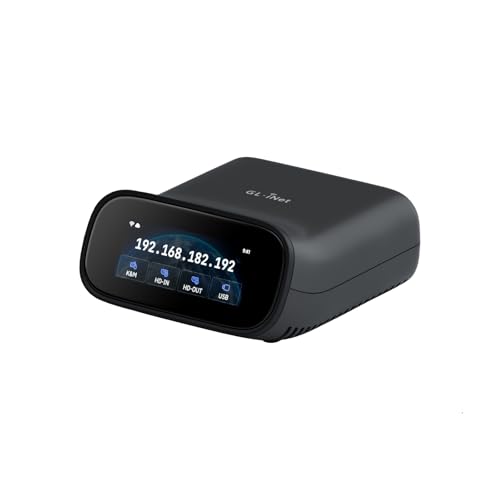
- 4K@30 FPS passthrough and two-way audio
- Dual-band Wi-Fi 6 plus wired connectivity
- Built-in Tailscale and self-hosted cloud support
Best For: Wireless-friendly home offices and home labs
Best Open-Source Expansion

- 1080p@60 FPS streaming with 30–60 ms latency
- Browser, cloud, and Wake on LAN access
- Linux/Golang platform with expansion support
Best For: Home labs and technically inclined users
Best PoE Installation

- PoE and USB-C power options
- 4K@30 Hz streaming with two-way audio
- 32GB eMMC for storing system images
Best For: Wired home offices and PoE-equipped labs
Best Simple 1080p Setup

- Plug-and-use browser access over Ethernet
- 1080p@60 FPS with 30–60 ms latency
- Open-source firmware and optional expansions
Best For: Personal workstations and straightforward home labs
Best Single-PC Remote KVM

- BIOS-level remote control
- 4K video at 30Hz
- No host software required
Best For: Remote access to one PC or server
Best Long-Distance KVM Extender

- 4K extension over Cat5e
- Up to 390-foot range
- Three USB ports at the receiver
Best For: Remote workstations and separated desk setups
Best Multi-Computer Home Lab KVM

- Controls up to four hosts
- PoE with USB-C backup
- 64GB onboard eMMC storage
Best For: Home labs and rack-based multi-system management
Compact BIOS Control

- BIOS-level remote control
- Software-free device access
- Compact design with watchdog recovery
Best For: Remote PC recovery and space-constrained home offices
Pocket Wireless Support

- One-cable USB-C control
- Wi-Fi 6 remote sessions
- 2K QHD streaming at 60 FPS
Best For: Family IT support and portable home-office access
Redundant 4K Management

- 4K DCI DisplayPort support
- Dual LAN and dual power
- Relay/DI monitoring and reboot control
Best For: Advanced home labs and resilient workstation or server access
Best Wireless Flexibility – GL-RM10 Comet Pro
The GL.iNet GL-RM10 Comet Pro is a flexible choice among kvm over ip switches for home offices, combining wired and dual-band Wi-Fi 6 connectivity with 4K video passthrough. It provides browser-based access across Windows, macOS, and Linux, plus app support for mobile devices.
Best For: Home offices and home labs that want wireless flexibility, high-resolution passthrough, and secure remote access options.
Pros:
- Supports 4K at 30 FPS passthrough with two-way audio.
- Offers both 2.4 GHz and 5 GHz Wi-Fi alongside wired connectivity.
- Includes built-in Tailscale and optional self-hosted cloud deployment.
- Can support remote BIOS recovery and power control with optional extensions.
Cons:
- Power-control accessories such as the ATX Board or Fingerbot are sold separately.
- Its 4K streaming specification is limited to 30 FPS.
- Remote operation depends on network connectivity and setup.
The touchscreen and broad client compatibility make the Comet Pro approachable for home users, while Tailscale and self-hosting provide useful options for more advanced setups.
Best Open-Source Expansion – JetKVM IP KVM
The JetKVM is a compact Ethernet-based option for kvm over ip switches for home offices, with browser access, optional cloud connectivity, and Wake on LAN. Its 1080p video stream is designed for responsive keyboard and mouse control, while the open-source Linux platform supports customization.
Best For: Tinkerers, home-lab users, and small offices that value open-source software and expansion options.
Pros:
- Provides 1080p at 60 FPS with stated 30–60 ms latency.
- Supports local browser access, cloud access, and Wake on LAN.
- Open-source Linux and Golang foundation allows customization.
- Expansion support includes ATX, DC, and RS-232 options.
Cons:
- Power-control and other expansion hardware is sold separately.
- Requires Ethernet for network connectivity.
- Its listed video resolution is 1080p rather than 4K.
With multiple access methods and a customizable software foundation, this JetKVM is well suited to users who want more control than a closed, plug-and-play remote-access device typically provides.
Best PoE Installation – GL-RM1PE Comet PoE
The GL.iNet Comet PoE is a practical pick among kvm over ip switches for home offices when a compatible PoE network is available. It combines Ethernet-based 4K streaming with PoE or USB-C power, built-in Tailscale, and onboard storage for system images.
Best For: Home offices, server closets, and labs that want fewer power cables and a dependable wired installation.
Pros:
- PoE can power the device through a compatible switch.
- Also supports USB-C power, including simultaneous use for added stability.
- Provides 4K at 30 Hz with low-latency H.264 streaming and two-way audio.
- Built-in 32GB eMMC can store system images for reinstallation workflows.
Cons:
- PoE requires a compatible PoE switch or network setup.
- ATX Board and Fingerbot accessories are sold separately.
- 4K operation is specified at 30 Hz.
The dual-power design and integrated storage give the Comet PoE a strong infrastructure-oriented profile, especially for users already running a PoE switch and needing remote recovery capabilities.
Best Simple 1080p Setup – JetKVM Network KVM
This JetKVM offers a straightforward Ethernet setup for kvm over ip switches for home offices: connect HDMI, USB-C, and Ethernet, then open the displayed IP address in a browser. It supports 1080p at 60 FPS, local LAN access, optional WebRTC cloud access, and Wake on LAN.
Best For: Personal workstations and home labs that need simple browser-based remote keyboard, mouse, and display control.
Pros:
- Requires no drivers or extra software for browser access.
- Supports 1080p at 60 FPS with stated 30–60 ms latency.
- Offers LAN access, optional cloud access, and Wake on LAN.
- Open-source firmware supports SSH customization and optional expansions.
Cons:
- The HDMI connection does not transfer audio.
- The non-PoE model is powered through host USB-C and cannot control fully powered-off targets without optional modules.
- Power-control and serial-console accessories are sold separately.
Its onboard LCD and uncomplicated browser workflow make this version approachable, while the open-source platform leaves room for customization as a home-lab setup grows.
Best Single-PC Remote KVM – GL.iNet Comet GL-RM1
The GL.iNet Comet GL-RM1 is a compact choice among kvm over ip switches for home offices when you need remote access to one computer. It supports BIOS-level control, remote power-on, file transfers, and 4K video at 30Hz without requiring software on the host computer.
Best For: Remote workers, IT professionals, and smart-home users managing one PC, laptop, or server.
Pros:
- Provides remote reboot, power-on, operating-system installation, and BIOS access.
- Supports 3840×2160 video at 30Hz with low-latency remote audio.
- Works with compatible computers without installing host-side software.
- Compact hardware design with Ethernet, HDMI, USB 2.0, and USB-C interfaces.
Cons:
- Designed for one host system rather than multi-computer switching.
- PD adapters cannot be used.
- 4K video is limited to 30Hz.
Choose the GL-RM1 if straightforward, BIOS-level control of a single home-office computer matters more than local multi-system switching. Its small footprint and Tailscale support make it practical for access from home or on the go.
Best Long-Distance KVM Extender – AV Access 4KIP100-KVM
The AV Access 4KIP100-KVM is a strong option among kvm over ip switches for home offices that need to place a computer away from the desk. It sends 4K video, audio, USB, keyboard, and mouse signals over existing Cat5e or better Ethernet cabling, reaching up to 390 feet with Cat5e.
Best For: Home offices, gaming setups, and workstations where the computer and display need to be separated over a long cable run.
Pros:
- Extends 4K video, audio, and USB up to 120 meters over Cat5e.
- Can use an existing IP network instead of dedicated KVM cabling.
- Receiver provides three USB 2.0 ports for peripherals.
- Supports up to 16 extender sets through DIP-switch pairing.
Cons:
- Requires both transmitter and receiver units plus suitable Ethernet cabling.
- 4K operation is limited to 30Hz.
- Its long-distance design may be more hardware than a typical single-desk setup needs.
This extender is best when reliable physical separation is the priority. It offers plug-and-play operation across Windows, macOS, and Linux, but it is more of an Ethernet-based extension system than a compact one-box remote-access KVM.
Best Multi-Computer Home Lab KVM – GL.iNet Comet X GL-RM4PE
The GL.iNet Comet X is a versatile pick among kvm over ip switches for home offices with several computers, servers, or lab systems. It connects four HDMI hosts, supports switching from the touchscreen, front button, or browser, and can receive power over Ethernet.
Best For: Home labs, IT professionals, and rack-mounted setups managing up to four host systems.
Pros:
- Provides four HDMI inputs and four dedicated USB-C device connections.
- Offers local and browser-based remote switching over HTTPS.
- PoE reduces cabling, with 5V USB-C backup power available.
- Includes 64GB eMMC storage for images, backups, and deployment files.
Cons:
- Its four-port rack-ready design may be excessive for a single-computer home office.
- 4K HDMI loop-out is limited to 30 frames per second.
- Requires more installation space and configuration than a compact single-host KVM.
For a growing home lab, the Comet X combines remote access, local control, onboard storage, and rack flexibility in one unit. It is the most capable choice here for managing multiple systems, especially where PoE and browser access simplify deployment.
Compact BIOS Control – Q1 Remote KVM Over IP
The Q1 is a strong option for home offices that need kvm over ip switches for home offices with access available before the operating system loads. Its compact, software-free design supports remote troubleshooting, recovery, and control across several device types.
Best For: Remote PC recovery, BIOS access, and space-constrained home-office setups.
Pros:
- Provides BIOS-level control, including power-on, reboot, and recovery access.
- Requires no software installation on the controlled device and supports Windows, macOS, iOS, and Android systems.
- Very compact at approximately 75 × 45.05 × 17 mm and 63 g.
- Includes watchdog protection for automatic recovery during system failures.
Cons:
- Its stated maximum operating temperature is 40 °C.
- Requires Ethernet networking and USB-C power, so it is not a fully wireless setup.
- The supplied specifications identify HDMI connectivity but do not state a maximum video resolution.
Choose the Q1 when pre-boot access and dependable recovery matter more than a built-in display or a larger enterprise feature set. Its small footprint also makes it practical for a desk, rack, or travel toolkit.
Pocket Wireless Support – GL.iNet Comet Q Pocket KVM
The GL.iNet Comet Q is a convenient pick among kvm over ip switches for home offices when wireless access and family tech support are priorities. Its foldable USB-C connection carries video, audio, keyboard, and mouse data, while Wi-Fi 6 supports browser- or app-based sessions.
Best For: Supporting family members, laptops, phones, and compatible home devices remotely.
Pros:
- Uses one USB-C connection for video, audio, keyboard, and mouse data on compatible DP Alt Mode devices.
- Supports remote wake-up for supported devices and can resume sessions through a browser.
- Offers Tailscale and ZeroTier access, two-factor authentication, and no target-device software installation.
- Streams up to 2560 × 1440 at 60 FPS, with Wi-Fi 6 connectivity.
Cons:
- USB-C DP Alt Mode compatibility is required for the all-in-one connection.
- Actual image quality and responsiveness vary with network bandwidth.
- Remote wake-up is specified only for supported devices.
Comet Q stands out for a flexible, portable home-support workflow rather than traditional rack installation. The touchscreen, app support, and wireless networking make it especially approachable for helping others from another room or location.
Redundant 4K Management – ATEN CN9950 DisplayPort KVM
ATEN 1-Local/Remote Share Access Single Port 4K DisplayPort KVM Over IP Switch
Check Price On AmazonThe ATEN CN9950 is a more substantial choice for home offices that need kvm over ip switches for home offices with a DisplayPort workstation or server and stronger infrastructure features. It supports local and remote 4K DCI output, plus dual power and dual LAN for backup.
Best For: Advanced home labs, workstation management, and setups that benefit from network and power redundancy.
Pros:
- Supports DisplayPort up to 4096 × 2160 at 30 Hz at both local and remote consoles.
- FPGA graphics processing is designed to improve image quality and frame-rate throughput.
- Includes dual power supply and dual LAN for backup.
- Provides a 5-pin relay/DI terminal for environment monitoring and reboot control.
Cons:
- At 3.4 pounds and approximately 12.75 × 8.25 × 3.9 inches, it is less compact than pocket-oriented models.
- Its 4K support is specified at 30 Hz rather than 60 Hz.
- The supplied notes describe compatibility with PCs and servers, not a broad range of consumer devices.
The CN9950 makes the most sense when resilience and DisplayPort support justify a larger installation. For a typical single-PC desk, it may be more equipment than necessary, but it is better suited to a serious home lab or remote server arrangement.
How We Picked the Best Kvm Over Ip Switches for Home Offices
We evaluated these Kvm Over Ip Switches for Home Offices based on the features that matter during everyday remote management. Key considerations included supported video resolution and refresh rate, reliable keyboard-and-mouse control, BIOS or pre-boot access, network connectivity, remote-access options, and installation complexity.
We also considered the range of designs represented here. Compact units suit a single desktop or laptop, while PoE, multi-port, and rack-oriented models can better serve home labs, workstations, and several nearby systems. Product specifications can vary by firmware, cable type, and network setup, so verify compatibility before buying.
Quick Comparison
| Best For | Look For |
|---|---|
| One home-office PC | Compact IP KVM with HDMI, USB, and simple network setup |
| Remote troubleshooting | BIOS-level control and dependable keyboard or mouse emulation |
| High-resolution workflows | 4K support, suitable refresh rate, and adequate bandwidth |
| Home labs | Multiple ports, PoE, Tailscale, or flexible remote-access options |
| Long cable runs | TCP/IP extension over Cat5e or better cabling |
Key Buying Factors for Kvm Over Ip Switches for Home Offices
Video Resolution and Refresh Rate
Check whether the device supports your monitor’s resolution and refresh rate. Some models provide 4K at 30Hz, while others target 4K at 60Hz. For server administration, 30Hz may be sufficient; for regular desktop work, 60Hz is generally more comfortable.
BIOS and Pre-Boot Control
True remote management should work before the operating system loads. BIOS access is important for changing boot settings, recovering a failed system, installing an operating system, or troubleshooting a machine that cannot be reached through software.
Network and Remote-Access Security
Wired Ethernet is typically more consistent than Wi-Fi for a permanently installed device. For access outside your home, review encryption, authentication, VPN support, Tailscale compatibility, and whether port forwarding is required. Avoid exposing an IP KVM directly to the public internet unless it is properly secured.
Ports, Power, and Compatibility
Confirm the required HDMI or DisplayPort connection, USB support, included adapters, and power method. PoE can simplify installation when your network equipment supports it. A multi-port model is worthwhile only if you expect to manage several computers.
Who Should Buy Which Kvm Over Ip Switches for Home Offices?
Choose a compact single-port model if you need occasional remote access to one desktop, laptop, or mini PC. Look for a 4K-capable option with BIOS control if the device doubles as your primary work machine. A model with VPN-friendly networking is a strong choice for secure access while traveling.
Home-lab users and technically inclined buyers should consider multi-port, PoE, or open-source-oriented designs that can scale with additional systems. If your priority is extending a local workstation across a building, a TCP/IP KVM extender may be more suitable than a cloud-oriented remote-management device. For professional environments or DisplayPort installations, prioritize established management features, compatibility documentation, and dependable support over the smallest price.