
A keyed laptop locking cable is a simple, affordable way to secure a computer or other valuable device in an office, classroom, library, hotel, or shared workspace. The right model should match your device’s security slot, offer a durable cable and locking mechanism, and include enough length for a dependable anchor point.
We selected 10 options covering standard T-bar locks, universal designs, HP and Kensington-compatible models, and newer solutions for devices with less common security slots. Use the guide below to compare compatibility, construction, convenience, and everyday security needs before buying.
Best 10 Keyed Laptop Locking Cables Picks for 2026
Best Overall
Kensington T-Bar Keyed Laptop Lock
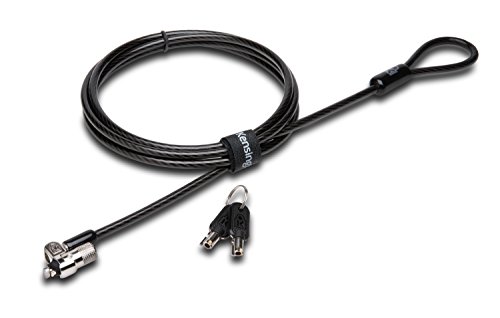
- 6-foot carbon-steel cable
- Compact 10 mm pivoting lock head
- Tubular anti-pick lock design
Best For: Standard Kensington-slot laptops and shared workspaces
Most Versatile
Universal Laptop Cable Lock with Anchor Plate

- 6.5-foot steel cable
- Includes adhesive security anchor plate
- Fits standard laptop slots and more
Best For: Mixed laptops, tablets, phones, and Surface devices
Best for IT Fleets

- 6-foot vinyl-coated cable
- Galvanized-steel construction
- Works with multiple office devices
Best For: Workplace and school equipment with compatible lock slots
Best Compact Option
Manhattan 4.6-Foot K-Slot Lock

- 4.6-foot steel cable
- Includes two keys
- PVC jacket helps reduce scratches
Best For: Short-range security in home offices, classrooms, and travel
Flexible No-Key Security

- Works with built-in slots or an adhesive plate
- Four-digit code eliminates lost keys
- 6.23-foot, 5mm braided cable
Best For: Mixed devices and users who prefer combination access
Simple Keyed Protection
HP T1A62UT Security Cable Lock

- Six-foot vinyl-coated steel cable
- Includes two keys
- 360-degree swiveling cable head
Best For: Notebook users seeking conventional keyed security
Universal Slot Compatibility

- Fits Noble Wedge, K-Slot, and Nano slots
- 6.5-foot carbon steel cable
- Includes two keys and cable organizer
Best For: Multi-brand offices and mixed laptop fleets
MacBook Pro Specialist
AboveTEK Rotatable Keyed Cable

- Made for 2021–2024 14/16-inch MacBook Pro models
- 6.56-foot cut-resistant steel cable
- Includes two keys and silicone contact point
Best For: MacBook Pro users in shared or temporary workspaces
Broad Slot Compatibility
Sendt Universal Push-to-Lock Cable

- Works with Kensington, Nano, Mini Saver, and more
- Push-to-lock design for quick setup
- Six-foot cable with two keys included
Best For: Portable electronics using common security slots
Standard T-Bar Option
Multplx Keyed Laptop Lock Cable

- Fits standard 7mm x 3mm security slots
- 1.7-meter cut-resistant steel cable
- Pivoting ball-joint lock head
Best For: Standard-slot laptops secured to desks or tables
Best Overall – Kensington T-Bar Keyed Laptop Lock
For dependable keyed laptop locking cables, the Kensington K65035AM combines a 6-foot carbon-steel cable with a compact T-Bar lock head. It is designed for devices with a standard Kensington security slot and can anchor to a desk, table, or other fixed structure.
Best For: Offices, classrooms, and shared workspaces using laptops or other equipment with a standard Kensington security slot.
Pros:
- 6-foot carbon-steel cable with a protective plastic sheath.
- Pivoting 10 mm lock head helps with access on thinner devices.
- Hidden-pin tubular lock and anti-pick design add security features.
- Works with laptops, monitors, projectors, docking stations, and other compatible devices.
Cons:
- Not compatible with 2016-and-newer Dell devices using the wedge lock slot.
- Some HP devices require a NanoSaver-compatible lock instead.
- Requires a compatible Kensington security slot.
This is a strong all-purpose choice when your device has the standard T-Bar slot. Check the laptop manufacturer’s slot type before buying, especially for newer Dell and some HP models.
Most Versatile – Universal Laptop Cable Lock with Anchor Plate
Among keyed laptop locking cables, this 6.5-foot option stands out for its included adhesive anchor plate. It can connect directly to most standard laptop slots or provide a mounting point for tablets, phones, and other devices without a built-in security slot.
Best For: Mixed-device households, offices, and classrooms securing laptops, tablets, phones, or Surface-style devices.
Pros:
- Includes an adhesive anchor plate for devices without standard lock slots.
- 6.5-foot cut-resistant twisted-steel cable offers flexible reach.
- 360-degree rotating stainless-steel lock head helps with positioning.
- Compatible with most laptops using standard security slots.
Cons:
- Devices without a lock slot require attaching the adhesive anchor plate.
- Compatibility depends on the device’s surface and the anchor plate installation.
- The supplied notes do not identify a specific warranty.
This is the most adaptable pick in the group, particularly if your equipment includes tablets or phones. Consider whether an adhesive plate is acceptable before choosing it for a device without a built-in slot.
Best for IT Fleets – HP 10 mm Keyed Cable Lock
The HP T1A62AA is a straightforward choice for buyers who need keyed laptop locking cables across a range of workplace equipment. Its 6-foot vinyl-coated galvanized-steel cable is intended for notebooks, docking stations, projectors, desktop computers, and printers.
Best For: Business, school, and IT environments securing HP-compatible notebooks and shared office equipment.
Pros:
- 6-foot cable provides useful reach to a fixed anchor.
- Galvanized-steel construction is covered with vinyl.
- 10 mm keyed lock design is suitable for compatible notebooks and peripherals.
- Supports several device categories beyond laptops, including printers and projectors.
Cons:
- Compatibility should be confirmed for the specific device’s lock slot.
- The supplied information does not specify extra keys beyond the keyed system.
- It may be less suitable for devices using nonstandard slots.
This HP lock makes sense for standardized equipment deployments where a 6-foot tether and keyed access are the main requirements. Verify the security-slot format before ordering for non-HP or newer devices.
Best Compact Option – Manhattan 4.6-Foot K-Slot Lock
For buyers seeking compact keyed laptop locking cables, the Manhattan 440271 offers a 4.6-foot steel tether with a PVC jacket and two keys. It attaches to compatible built-in K-slots and loops around a desk, table leg, or other stationary object.
Best For: Home offices, classrooms, travel, and workstations where a shorter cable is sufficient.
Pros:
- Includes two keys for convenient access.
- Steel cable with PVC coating helps protect surfaces from scratches.
- All-metal lock body uses diecast zinc alloy construction.
- Fits compatible K-slot computers, displays, projectors, cameras, and mobile devices.
Cons:
- At 4.6 feet, the cable is shorter than the other options here.
- Requires a built-in compatible K-slot.
- Keyed-alike configuration may be less suitable where unique keys are preferred.
This is a practical choice for close-quarters setups where a long tether is unnecessary. Its shorter length and two-key design keep the package simple, but confirm that your device has a compatible K-slot.
Flexible No-Key Security – Laptop Combination Cable Lock
This versatile option stands out among keyed laptop locking cables because it uses a customizable four-digit combination instead of a key. It works with laptops that have built-in security slots and can also attach to devices without one using the included adhesive lock plate.
Best For: Users securing a mix of laptops, tablets, and other devices, especially when avoiding lost keys is important.
Pros:
- Supports both built-in security slots and devices without slots.
- Four-digit combination offers more than 10,000 possible codes.
- 6.23-foot cable provides room to move the device.
- 5mm braided cable and stainless-steel double-lever lock head are designed for added strength.
Cons:
- Combination locks may be less convenient for users who prefer physical keys.
- The adhesive plate requires installation on compatible devices without security holes.
This is a practical, adaptable choice for shared workspaces or mixed equipment. Its adhesive plate and combination system broaden compatibility, while the longer cable supports flexible positioning.
Simple Keyed Protection – HP T1A62UT Security Cable Lock
The HP T1A62UT is a straightforward keyed option among keyed laptop locking cables. Its six-foot vinyl-coated galvanized steel cable wraps around a secure object, while the swiveling cable head helps with positioning before locking.
Best For: Notebook users who want a conventional keyed lock with a simple installation process.
Pros:
- Includes two keys for convenient access and a spare.
- Six-foot cable provides useful reach around a fixed object.
- 360-degree swiveling cable head helps position the lock.
- Backed by a one-year limited warranty.
Cons:
- Uses a keyed lock, so the keys must be kept available.
- The supplied notes identify it specifically as a notebook security lock, rather than a universal multi-slot design.
This HP lock favors uncomplicated, familiar operation over extra compatibility features. It is a sensible fit for a notebook setup where the existing security slot matches the lock and a six-foot cable is sufficient.
Universal Slot Compatibility – StarTech Keyed Laptop Lock
For shoppers comparing keyed laptop locking cables across different notebook brands, the StarTech Universal Laptop Lock offers broad slot compatibility. Its adjustable tip supports Noble Wedge, K-Slot, and Nano slots, while the 6.5-foot carbon steel cable is designed for flexible workplace use.
Best For: Offices, labs, and users who need one keyed lock that can accommodate multiple industry-standard laptop slot types.
Pros:
- Three-in-one compatibility covers Noble Wedge, K-Slot, and Nano slots.
- Includes two zinc alloy keys and a push-to-lock button.
- 360-degree ball-joint rotation and a 90-degree elbow pivot help reduce strain and coiling.
- Protective spacers and an organizing hook-and-loop strap are included.
Cons:
- The cable is shorter than the 6.6-foot listing description suggests, with the specifications stating 6.5 feet.
- Additional anchor locks for equipment without a security slot are sold separately.
This is the strongest choice here for varied laptop fleets because its adjustable lock tip is designed for three common slot formats. The included positioning features also make it well suited to repeated office or lab use.
MacBook Pro Specialist – AboveTEK Rotatable Keyed Cable
Among keyed laptop locking cables, this AboveTEK model is purpose-built for 14- and 16-inch MacBook Pro models from 2021–2024. It attaches through the bottom-side vent slot and combines a rotatable lock head with a flexible 6.56-foot cable for use in shared workspaces.
Best For: MacBook Pro owners who need a portable keyed lock for offices, cafés, classrooms, hot desks, or travel.
Pros:
- Designed specifically for 2021–2024 14-inch and 16-inch MacBook Pro models.
- Long 6.56-foot cut-resistant steel cable and rotatable head support flexible positioning.
- Includes two keys and a silicone contact point to help protect the aluminum finish.
Cons:
- Its stated compatibility is limited to specific MacBook Pro models and their vent slots.
- A keyed lock requires carrying the included key when access is needed.
The rotatable design and tool-free setup make this a practical choice for temporary workstations. Verify that your MacBook Pro model and vent slot match the stated design before buying.
Broad Slot Compatibility – Sendt Universal Push-to-Lock Cable
This Sendt universal keyed laptop locking cable is designed for notebooks with Kensington, Nano, Mini Saver, Noble Wedge, Samsung, and other common security slots. Its push-to-lock mechanism and six-foot cut-resistant cable offer a straightforward way to deter grab-and-go theft in public or shared spaces.
Best For: Users who want broad slot compatibility and quick push-button locking for portable electronics.
Pros:
- Supports several common security-slot formats, including Kensington and Noble Wedge.
- Push-to-lock operation simplifies installation.
- Includes a six-foot cable, two keys, and a hook-and-loop cable tie.
Cons:
- Compatibility should still be checked against the specific slot on your device.
- The six-foot cable is shorter than some extended-length alternatives.
For buyers comparing keyed laptop locking cables across different notebooks, the Sendt’s stated multi-slot compatibility is its main advantage. The included tie also helps with cable management when the lock is not in use.
Standard T-Bar Option – Multplx Keyed Laptop Lock Cable
This Multplx keyed laptop locking cable uses a standard-size T-shaped bar for laptops with a 7mm x 3mm security slot. Its 1.7-meter cut-resistant steel cable loops around a fixed point, while the pivoting lock head helps reduce stress on the laptop body.
Best For: Laptops with a standard 7mm x 3mm lock slot and users who prefer a pivoting T-bar mechanism.
Pros:
- Designed for laptops with a standard 7mm x 3mm security slot.
- 1.7-meter cut-resistant steel cable provides reach for desks and tables.
- Pivoting ball-joint lock head helps minimize stress on the laptop body.
Cons:
- It is not presented as a universal lock, so slot dimensions must be confirmed.
- The cable is shorter than the 6.56-foot AboveTEK option.
The Multplx is a sensible standard-slot choice when its T-shaped bar matches your laptop. Confirm the 7mm x 3mm dimensions before ordering, then use the cable to tether the device to a fixed structure.
How We Picked These Keyed Laptop Locking Cables
We focused on practical security features rather than appearance alone. The selection includes cables with standard T-bar compatibility, universal locking designs, keyed push-to-lock mechanisms, and options intended for Kensington Wedge or Nano-style slots. We also considered cable length, cut resistance, included keys, brand support, and compatibility with laptops, monitors, docking stations, tablets, projectors, and other equipment.
Because a cable lock is only effective when it fits both the device and a secure anchor, slot compatibility received the most weight. We also favored products that clearly identify their locking format and intended use, helping buyers avoid purchasing a cable that cannot engage their computer’s security slot.
Quick Comparison
- Best-known standard: Kensington and HP T-bar models are sensible choices for devices with a conventional 3.0mm x 7.0mm-style security slot.
- Best for broad compatibility: Universal locks may fit multiple slot formats, but buyers should verify the manufacturer’s compatibility list.
- Best for newer laptops: Models designed for Kensington Nano, Wedge, or specific MacBook generations can provide a better fit than a standard T-bar cable.
- Best for portability: Cables around 4.6 to 6 feet balance reach and packability for desks, classrooms, and travel.
- Best for fixed workstations: Longer, heavier steel cables can make it easier to reach substantial furniture or permanent anchor points.
Key Buying Factors for Keyed Laptop Locking Cables
Security Slot Compatibility
Check the slot on your laptop before ordering. Standard T-bar, Nano, Wedge, and proprietary openings are not interchangeable. A universal cable can help when the slot type is uncertain, but confirmation remains important.
Cable Construction and Length
Look for galvanized or carbon steel cables with a protective vinyl coating. Steel helps resist casual cutting, while vinyl protects the desk and device from scratches. Choose enough length to wrap around a sturdy, immovable anchor without leaving excessive slack.
Key Design and Convenience
Most keyed cables include two keys, which is useful for keeping a spare at home or with an IT administrator. Push-to-lock designs can save time, while traditional keyed mechanisms may offer a familiar, straightforward setup.
Anchor Point and Daily Use
Even the strongest lock cannot secure a device to a weak or movable object. Use a fixed desk loop, security plate, or other permanent anchor, and position the cable where it will not interfere with ports, ventilation, or normal laptop use.
Who Should Buy Which Keyed Laptop Locking Cables?
Choose a Kensington or HP standard keyed model for a business laptop or office computer with a conventional T-bar slot. Pick a StarTech, Manhattan, or other universal option when you need a reputable general-purpose cable for multiple devices. For a MacBook or a laptop with a Nano or Wedge slot, select a model explicitly designed for that opening. If you secure monitors, projectors, docking stations, or desktop accessories, prioritize a versatile lock with adequate reach and a cable length suited to your installation.