
USB-C KVM over IP switches make it easier to control computers remotely while sharing displays, keyboards, mice, storage, and other peripherals. They can serve everyone from home-lab users to IT teams managing systems outside the local workspace.
This roundup includes dedicated remote KVM appliances, multi-port network solutions, and USB-C desktop KVMs. Compare remote-access features, video support, power delivery, connectivity, and setup requirements before choosing.
Best 10 USB C Kvm Over Ip Switches Picks for 2026
Best Open-Source Value

- 1080p/60 video with 30–60 ms latency
- Browser, cloud, and Wake-on-LAN access
- Open-source Linux/Golang platform
Best For: Home labs and remote PC troubleshooting
Best PoE Single-Host KVM

- PoE and USB-C dual power support
- 4K/30 streaming with H.264 encoding
- 32GB eMMC and built-in Tailscale
Best For: PoE-enabled home labs and offices
Best Compact 1080p Remote KVM

- 1080p/60 streaming at 30–60 ms latency
- USB-C handles input signals and power
- Remote BIOS and crash recovery support
Best For: Single-PC home labs and personal workstations
Best Multi-Host Rack KVM

- Four-host HDMI and USB-C switching
- PoE with 5V Type-C backup
- 4K/30 loop-out, touchscreen, and 64GB eMMC
Best For: Rack-mounted IT environments and multi-host labs
Best Long-Distance Dual-Display KVM

- Dual 4K@60Hz extension up to 100m/330ft
- DisplayLink support for Windows, macOS, and Linux
- USB 3.2 hub with up to 5Gbps performance
Best For: Remote dual-monitor workstations and professional installations
Best for BIOS-Level Remote Access

- Controls systems from BIOS through the desktop
- No software installation on the controlled device
- Compact 63g design with watchdog protection
Best For: Remote IT administration and system recovery
Best USB-C Dock-Sharing Switch

- Shares one display or dock across three computers
- Up to 20Gbps data and 140W PD charging
- RF remote enables software-free switching
Best For: Multi-laptop desks using a USB-C monitor or dock
Remote Infrastructure Pick
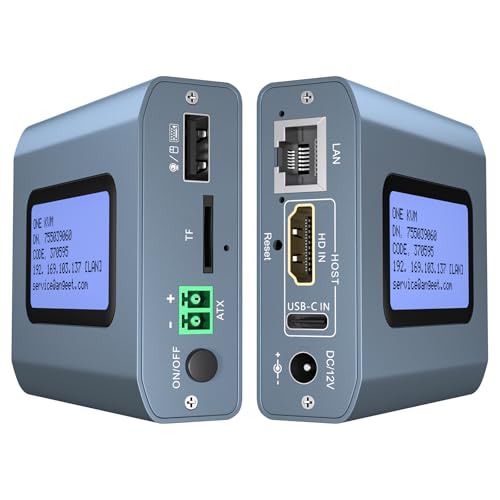
- 4K 60Hz remote control
- ZeroTier for cross-network access
- Remote desktop power control
Best For: Remote IT management and server access
Desk Setup Pick

- Connects three computers
- Up to 8K 60Hz output
- 60W charging on USB-C inputs
Best For: Single-monitor mixed laptop and desktop setups
Portable Remote Access Pick

- Single-cable USB-C control
- Wi-Fi 6 remote sessions
- 2K QHD streaming at 60 FPS
Best For: Portable troubleshooting and family IT support
Best Open-Source Value – JetKVM IP KVM
This compact JetKVM is a practical entry point for usb c kvm over ip setups. It connects to a target computer through USB-C and HDMI, then provides browser-based LAN access, optional cloud access, and Wake-on-LAN support.
Best For: Home labs, remote troubleshooting, and users who want open-source customization.
Pros:
- 1080p at 60 fps with stated 30–60 ms latency.
- Supports browser, optional WebRTC cloud, and Wake-on-LAN access.
- Offers flexible USB-C, 5V, DC extension, or ATX-board power options.
- Linux- and Golang-based open-source design with expansion potential.
Cons:
- Remote access is limited to 1080p resolution.
- The base unit does not provide full power control without additional hardware.
- Cloud access is optional and requires account-based configuration.
Choose this model when low latency, open-source flexibility, and straightforward single-computer remote control matter more than 4K video or multi-host switching.
Best PoE Single-Host KVM – GL.iNet Comet PoE
The GL.iNet Comet PoE is a single-host choice for usb c kvm over ip installations where simplified power and secure networking are priorities. PoE can carry power through the Ethernet connection, while Type-C provides a second power option.
Best For: Offices, home labs, and IT setups with PoE networking and remote recovery needs.
Pros:
- PoE reduces the need for a separate power adapter.
- Built-in Tailscale uses WireGuard-encrypted connections.
- Streams 4K at 30 Hz with H.264 encoding and low latency.
- 32GB eMMC can store multiple system images for reinstallation.
Cons:
- Controls a maximum of one host.
- ATX and Fingerbot functions require separately sold extensions.
- 4K streaming is limited to 30 Hz.
This is a strong fit for a PoE-equipped rack or lab that needs secure remote KVM access, image storage, and optional hardware-assisted recovery for one computer or server.
Best Compact 1080p Remote KVM – JetKVM Network KVM
This JetKVM provides a compact usb c kvm over ip solution for one HDMI-equipped computer. USB-C carries keyboard and mouse signals while powering the device, and Ethernet enables browser-based LAN access, optional WebRTC cloud access, and Wake-on-LAN.
Best For: Personal workstations, Raspberry Pi projects, home labs, and BIOS-level troubleshooting.
Pros:
- Simple setup with HDMI, USB-C, and Ethernet connections.
- 1080p at 60 fps with stated 30–60 ms latency.
- Provides remote BIOS, crash-screen, reboot, and safe-mode access.
- Open-source firmware supports SSH customization and hardware expansion.
Cons:
- HDMI does not transfer audio.
- The non-PoE unit cannot control a fully powered-off host without optional modules.
- Video output is limited to 1080p.
Its small footprint and clear recovery features make it a sensible choice for remote administration when one 1080p host is enough and you do not need native multi-port switching.
Best Multi-Host Rack KVM – GL.iNet Comet X
The GL.iNet Comet X is the most capable option here for usb c kvm over ip systems that need to manage several computers. It supports four HDMI hosts with four dedicated USB-C device connections, plus local controls, PoE, browser access, and rack mounting.
Best For: IT professionals, server rooms, and home labs managing up to four host systems.
Pros:
- Controls up to four hosts through four HDMI and four USB-C ports.
- PoE power with 5V Type-C backup supports flexible installation.
- 4K/30 HDMI loop-out enables local display alongside remote access.
- Includes touchscreen controls, 64GB eMMC, and 10- or 19-inch rack brackets.
Cons:
- 4K loop-out is limited to 30 Hz.
- The larger feature set and rack chassis may be excessive for a single host.
- Operating temperature specifications list a 25–40 °C range.
For multi-system environments, Comet X stands out through its four-host capacity, local touchscreen, rack-ready hardware, and onboard storage for images and deployment files.
Best Long-Distance Dual-Display KVM – Dual 4K DisplayLink Extension
If you need usb c kvm over ip switches for a clean workstation or remote computer setup, this AV Access system is built for extending two independent 4K displays and USB peripherals over a single Cat6A/7 cable. It supports USB-C and USB-A hosts across Windows, macOS, and Linux, with DisplayLink handling dual extended screens without requiring MST.
Best For: Offices, studios, control rooms, and server-room workstations that need dual 4K display and USB extension over distances up to 100m/330ft.
Pros:
- Extends two 4K@60Hz displays up to 100m/330ft over one Cat6A/7 cable.
- Supports Windows, macOS, including Apple Silicon, and Linux with USB-C or USB-A systems.
- Provides a USB 3.2 Gen 1 hub with up to 5Gbps performance for storage, webcams, printers, and input devices.
- One-way PoC power can power both units from an adapter connected on the receiver side.
Cons:
- Its 8.5-inch enclosure and dual-display design may be more hardware than a simple single-monitor setup requires.
- DisplayLink is part of the video solution, so it is best suited to systems and workflows compatible with that technology.
This is a strong choice when distance, dual-screen productivity, and reliable USB integration matter more than a compact desktop switch. The dedicated USB control chip and continuous-use positioning also make it suitable for managed professional environments.
Best for BIOS-Level Remote Access – Q1 Remote IP KVM
Among usb c kvm over ip switches, the Q1 is aimed at remote administration rather than conventional desk-side source switching. It provides BIOS-level control over Ethernet, allowing you to troubleshoot, reboot, or recover a computer from power-on through the operating system without installing software on the controlled device.
Best For: IT technicians, data centers, industrial sites, and remote systems that need compact, software-free access even when the operating system is unavailable.
Pros:
- Provides BIOS-level control for recovery, rebooting, and troubleshooting before or beyond the operating system.
- Supports remote control of Windows, macOS, iOS, and Android systems without software installation on the controlled device.
- Its 75 × 45.05 × 17mm, 63g design fits racks, workstations, edge devices, and travel toolkits.
- A built-in watchdog is designed to support automatic recovery during system failures.
Cons:
- This is primarily a remote-management device, not a traditional multi-computer desktop KVM for local source switching.
- The supplied details do not specify a dual-monitor or multi-output configuration.
The Q1 stands out when remote recovery and pre-boot access are the priority. Its small size, Ethernet connectivity, HDMI output, and USB-C power input make it practical for distributed IT environments where physical access is inconvenient.
Best USB-C Dock-Sharing Switch – 3-Computer 20Gbps KVM
This Cable Matters model is a USB-C KVM for sharing one compatible USB-C or Thunderbolt 4 monitor or docking station among three computers. It combines up to 20Gbps USB4 data transfer, video support up to 8K@30Hz in specified Windows setups, and up to 140W Power Delivery for the active computer.
Best For: Users with three laptops or computers who want to share a compatible USB-C display or detachable-cable dock while keeping charging, display, and peripheral connections centralized.
Pros:
- Connects three computers to one USB-C or Thunderbolt 4 monitor or compatible dock.
- Supports up to 20Gbps data transfer and video modes including 8K@30Hz, 5K@60Hz, and 4K@144Hz in specified Windows configurations.
- Delivers up to 140W Power Delivery to the selected active computer.
- Includes an RF remote for convenient source switching without additional software or drivers.
Cons:
- It requires the included USB4 20Gbps cables; Thunderbolt 3/4/5 cables are specifically not recommended.
- macOS supports one external display, and bandwidth limitations may affect some dock display resolutions or refresh rates.
- Only the selected active computer receives charging at a time.
This is a practical option for a multi-laptop desk built around one USB-C monitor or detachable-host dock. Check cable, dock, and display compatibility carefully, especially if you need maximum refresh rates or use macOS.
Remote Infrastructure Pick – 4K Internet IP KVM
This internet-based IP KVM is a practical choice when researching usb c kvm over ip switches for remote access to desktops, servers, cameras, or streaming devices. It supports browser and app control, 4K at 60Hz, and software-free access across Windows, macOS, Linux, and Android.
Best For: Remote IT management, server access, and controlling a desktop from another location.
Pros:
- Supports 3840×2160 at 60Hz with latency below 60 milliseconds.
- Built-in ZeroTier enables cross-network access without port forwarding or VPN configuration.
- Can remotely power compatible desktop computers on or off through the motherboard connection.
- Supports browser and app access without installing software on the target computer.
Cons:
- Remote power control does not support laptops.
- ZeroTier requires an online upgrade.
- Remote operation depends on an Ethernet connection and network access.
Choose this model if remote BIOS-level control, installation, and power management matter more than a simple desk-based peripheral switch. Its included cables and broad operating-system support make it suitable for distributed equipment management.
Desk Setup Pick – 3-Computer USB-C KVM
For a workstation-focused option among usb c kvm over ip switches, the SABRENT USB-C DisplayPort KVM connects two USB-C laptops and one DisplayPort computer to a single monitor, keyboard, and mouse. It also provides 8K output and USB-C charging for compatible laptops.
Best For: Mixed laptop-and-desktop desks using one external monitor and shared peripherals.
Pros:
- Controls three computers from one monitor, keyboard, and mouse.
- Supports up to 8K at 60Hz or 4K at 144Hz on one DisplayPort monitor.
- Passes up to 60W Power Delivery through each USB-C input.
- Includes remote switching, shared USB 2.0 ports, and audio connections.
Cons:
- Supports one external display only, not dual- or multi-monitor setups.
- USB-C laptops must support DisplayPort Alternate Mode for video output.
- Shared USB ports operate at USB 2.0 speeds and are not intended for fast storage.
This is the strongest fit for a modern single-monitor desk that combines USB-C laptops with a DisplayPort system. Verify USB-C video support on each laptop before buying, since charge-only or data-only ports will not provide a picture.
Portable Remote Access Pick – Comet Q Pocket KVM
The GL.iNet Comet Q is a compact alternative for shoppers comparing usb c kvm over ip switches for remote laptop and mobile-device support. Its foldable USB-C connection carries video, audio, keyboard, and mouse data, while Wi-Fi 6, browser access, and app control support remote sessions without software on the target device.
Best For: Family IT support, portable troubleshooting, and remote control of compatible USB-C devices.
Pros:
- One USB-C connection carries video, audio, keyboard, and mouse data on compatible DP Alt Mode devices.
- Supports remote wake-up for supported devices and browser-based session access.
- Works with Tailscale and ZeroTier, with two-factor authentication for protected access.
- Compact design includes a 1.8-inch touchscreen and supports up to 2560×1440 at 60 FPS.
Cons:
- USB-C target devices must support DisplayPort Alt Mode.
- Remote image quality and responsiveness vary with network bandwidth.
- Its wireless design depends on Wi-Fi connectivity rather than a wired Ethernet connection.
Comet Q stands out when portability and family or mobile-device support are priorities. It offers a streamlined single-cable setup and privacy-oriented access controls, but compatibility should be confirmed for each target device before purchase.
How We Picked the Best USB C Kvm Over Ip Switches
We focused on products that solve one or both sides of the modern KVM problem: remote access over a network and convenient USB-C switching at the desk. The selection includes compact remote KVM devices, PoE-capable models, quad-port systems, and traditional USB-C KVM switches with high-resolution video and power delivery.
We compared the advertised video capabilities, number of controllable computers, USB and display connections, remote-management features, network options, power requirements, and compatibility with laptops, desktops, servers, and home-lab equipment. Because “KVM over IP” and “USB-C KVM” are not always the same thing, check the feature details carefully rather than relying on the product name alone.
Quick Comparison
| What to compare | Best suited for |
|---|---|
| Single-PC remote KVM | Remote troubleshooting, BIOS access, and headless computers |
| Multi-port remote KVM | Home labs, IT professionals, and several networked systems |
| PoE remote KVM | Installations where one Ethernet cable can provide network and power |
| USB-C desktop KVM | Switching multiple computers at a desk with shared peripherals |
| High-resolution KVM | Workstations needing 4K or 8K display support |
Key Buying Factors for USB-C KVM Over IP Switches
Remote Access and Network Security
Look for browser-based access, BIOS-level control, virtual media, remote power functions, and support for secure networking tools such as Tailscale or ZeroTier. A device intended for internet access should offer authentication and a sensible way to avoid exposing management interfaces directly to the public web.
Video Resolution and Refresh Rate
Confirm the actual input and output standards, not just a headline resolution. 4K at 60Hz is useful for most office and lab systems, while 8K support may matter for specialized workstations. Remote streaming quality can also depend on network bandwidth, compression, and latency.
USB-C, Power Delivery, and Compatibility
For desk-based switching, check whether USB-C carries video through DisplayPort Alt Mode, how much power delivery is supported, and whether the host laptop accepts charging through the switch. Some products labeled USB-C KVM use USB-C primarily for data or charging and still require separate video connections.
Ports, Cabling, and Installation
Count the computers, monitors, USB peripherals, and network connections you need today and soon. Cat6-based extenders, Ethernet KVMs, PoE models, and compact pocket devices each have different cabling and power requirements. Verify operating-system, monitor, webcam, and peripheral compatibility before installation.
Who Should Buy Which USB C Kvm Over Ip Switches?
Choose a compact remote KVM if you need occasional access to one desktop, server, or home-lab machine. A PoE model is attractive when simplified cabling and dependable remote placement matter. Multi-port systems make more sense for IT professionals or advanced users managing several computers from one interface.
For a local workstation, choose a USB-C desktop KVM with the video resolution, charging wattage, and peripheral support your laptops require. High-resolution models suit demanding displays, while pocket-sized remote KVMs are better for travel, temporary setups, or emergency troubleshooting. Before ordering, confirm whether you need true network-based control, local USB-C switching, or both.