
Managing a Windows PC or server remotely is easier when you can see the screen, control the keyboard and mouse, and access BIOS-level functions—not just connect through a desktop app.
These 10 KVM over IP switches for Windows cover home labs, remote support, office servers, and professional infrastructure. The right choice depends on video resolution, network design, security, and how much hands-on control you need.
Best 10 Kvm Over Ip Switches for Windows Picks for 2026
Best Flexible Wi-Fi 6 Pick
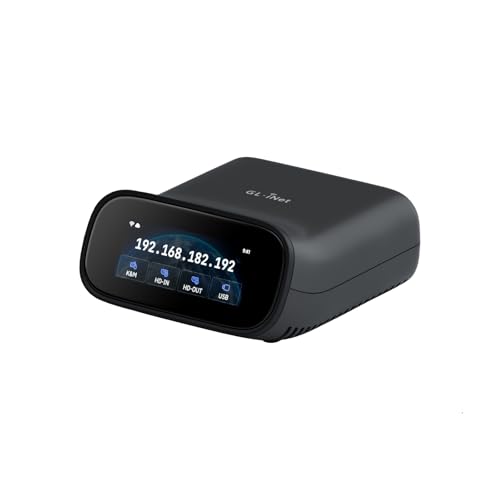
- Dual-band Wi-Fi 6 and wired connectivity
- 4K@30 passthrough with two-way audio
- Browser access supports Windows without software
Best For: Wireless-friendly Windows remote management and recovery
Best Open-Source 1080p Option

- 1080p@60 streaming with 30–60 ms latency
- Browser, WebRTC cloud, and Wake-on-LAN access
- Open-source Linux and Golang platform
Best For: Windows troubleshooting, BIOS access, and home-lab management
Best PoE Remote Recovery Pick

- PoE and USB-C dual-power support
- 4K@30 streaming with two-way audio
- 32GB eMMC for stored system images
Best For: PoE-equipped offices, server rooms, and recovery-focused deployments
Best Expandable Value Pick

- 1080p@60 video with adjustable bitrate
- Local, cloud, and Wake-on-LAN access
- Expandable with power, serial, and sensor modules
Best For: Windows users wanting customizable remote management
Best Rack-Ready Pick
GL.iNet Comet X Quad-Port Remote KVM

- Four HDMI inputs for multi-system control
- PoE power with USB-C backup
- 4K 30Hz loop-out and rack brackets
Best For: Home labs and small server rooms
Best Long-Distance Extender
AV Access 4K HDMI USB KVM Extender

- Up to 120m over Cat5e
- Up to 150m over Cat6 or better
- Windows plug-and-play operation
Best For: Distributed workstations and control rooms
Best Single-Computer Remote Access
GL.iNet Comet GL-RM1 Remote KVM

- BIOS-level remote management
- 4K 30Hz viewing with hardware encoding
- No software required on the host
Best For: Single PCs, servers, and remote IT support
Best 4K DisplayPort Pick
ATEN CN9950 KVM Over IP Switch

- 4K DCI DisplayPort video at 30Hz
- FPGA-enhanced image processing
- Dual LAN and dual power redundancy
Best For: Windows PC and server setups needing resilient DisplayPort remote access
Best Feature-Rich Remote Option
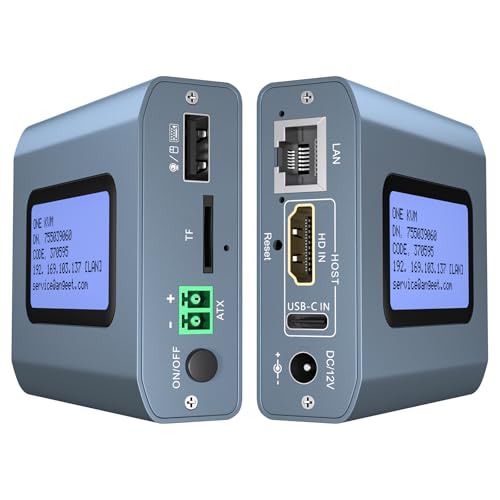
- 4K video at 60Hz
- Browser, app, and ZeroTier access
- Remote desktop power control
Best For: Cross-network Windows PC and server management
Best Legacy VGA Choice

- 1920 x 1200 video at 60Hz
- Virtual media support
- VGA, PS/2, USB, and serial compatibility
Best For: Legacy Windows servers and mixed-platform environments
Best Flexible Wi-Fi 6 Pick – Comet Pro Remote KVM
For buyers comparing kvm over ip switches for windows, the GL.iNet Comet Pro stands out when flexible connectivity matters. It supports wired and dual-band Wi-Fi 6 access, browser-based control for Windows without installing software, and remote BIOS or OS recovery.
Best For: Windows users who want wireless flexibility, 4K passthrough, and secure remote access for home labs or office systems.
Pros:
- Supports Windows, macOS, and Linux through browser-based cloud control.
- Dual-band Wi-Fi 6 plus wired connectivity helps reduce cabling and connectivity dependence.
- Provides 4K video passthrough, two-way audio, and BIOS-level remote recovery.
- Built-in Tailscale and optional self-hosted deployment support privacy-focused setups.
Cons:
- Remote power cycling and hard reset require separately sold ATX Board or Fingerbot accessories.
- 4K streaming is specified at 30 FPS rather than 60 FPS.
- The device is limited to one connected system.
The Comet Pro is a versatile choice if you want Windows-friendly browser access without giving up wireless placement options. Its touchscreen and Tailscale support add convenience, while the optional hardware extensions broaden recovery capabilities.
Best Open-Source 1080p Option – JetKVM IP KVM
The JetKVM is a compact option for shoppers seeking kvm over ip switches for windows with simple browser setup. Connect HDMI, USB-C, and Ethernet, then open the displayed IP address to control the host without drivers or extra software.
Best For: Windows PCs, home labs, and servers needing responsive 1080p remote keyboard, mouse, and BIOS access.
Pros:
- Runs at up to 1080p and 60 FPS with stated 30–60 ms latency.
- Offers local browser access, optional WebRTC cloud access, and Wake-on-LAN.
- Open-source Linux and Golang foundation allows SSH customization.
- Supports remote BIOS access, rebooting, safe-mode entry, and OS reinstall workflows.
Cons:
- HDMI carries video only; the notes specify no audio transfer.
- The non-PoE model cannot control a fully powered-off target without additional modules.
- Remote power control and expanded functions require separately sold accessories.
JetKVM focuses on practical remote troubleshooting rather than high-resolution passthrough. Its LCD IP display, open-source platform, and multiple access methods make it especially appealing for technically minded Windows administrators.
Best PoE Remote Recovery Pick – Comet PoE Remote KVM
For kvm over ip switches for windows in equipment rooms or network closets, the GL.iNet Comet PoE simplifies installation with Power over Ethernet. It combines 4K streaming, Tailscale security, and remote recovery features in a compact Ethernet-connected design.
Best For: Windows computers and servers near a PoE switch where centralized power and remote reinstallation are priorities.
Pros:
- PoE reduces the need for a separate power adapter and helps limit cable clutter.
- Supports 4K video at 30 FPS with low-latency H.264 hardware encoding.
- Built-in 32GB eMMC can store multiple system images for reinstallation.
- Dual PoE and USB-C power options can improve power flexibility and stability.
Cons:
- Requires access to compatible PoE infrastructure to use its main installation advantage.
- 4K output is limited to 30 FPS according to the supplied specifications.
- ATX Board or Fingerbot accessories are sold separately for remote power and hard-reset control.
The Comet PoE is a strong fit for managed environments where Ethernet infrastructure is already available. Its onboard storage is particularly useful for recovery planning, while Tailscale supports secure direct connections.
Best Expandable Value Pick – JetKVM Ethernet IP KVM
This JetKVM is a practical choice for kvm over ip switches for windows when you want straightforward Ethernet access and expandable hardware options. HDMI and USB-C connections provide remote display and input control, while browser and optional cloud access support management from inside or outside the network.
Best For: Windows users, businesses, and educators who need low-latency remote control with flexible power and expansion options.
Pros:
- Provides 1080p at 60 FPS with stated 30–60 ms latency and adjustable bitrate.
- Supports local browser access, optional cloud access, and Wake-on-LAN.
- Offers multiple power methods, including host USB-C, separate 5V power, and extension options.
- Can be expanded with ATX, DC power, RS-232, sensors, and other custom hardware.
Cons:
- The listed video connection is HDMI, while the product details also reference USB-C DisplayPort Alternate Mode.
- Advanced power control and serial features require additional extension hardware.
- Cloud access is optional and depends on the JetKVM Cloud service and network conditions.
With responsive 1080p streaming and an open-source Linux foundation, this JetKVM balances ease of setup with room for customization. It is best suited to buyers who may eventually add power control, serial management, or monitoring accessories.
Best Rack-Ready Pick – GL.iNet Comet X Quad-Port Remote KVM
The GL.iNet Comet X is a strong choice among kvm over ip switches for windows when you need to manage several host systems from a rack or home lab. It provides four HDMI inputs, dedicated USB Type-C connections, browser-based HTTPS access, and local switching through its touchscreen or front-panel controls.
Best For: Home labs, IT professionals, and small server rooms managing up to four systems.
Pros:
- Four-port remote KVM control with web-based access over HTTPS.
- PoE power reduces cabling, with 5V USB Type-C backup power available.
- 4K at 30Hz HDMI loop-out supports simultaneous local display and remote access.
- Includes brackets for 10-inch and 19-inch rack installation.
Cons:
- Video loop-out is limited to 4K at 30Hz.
- Its listed operating temperature range is 25°C to 40°C.
- The platform is listed as Linux, so buyers should verify their preferred Windows management workflow.
With four inputs, onboard storage, touchscreen controls, and self-hosted browser access, the Comet X is well suited to centralized equipment management. Its rack accessories and PoE support make it particularly practical where clean installation matters.
Best Long-Distance Extender – AV Access 4K HDMI USB KVM Extender
The AV Access 4K HDMI USB KVM Extender is a practical option for kvm over ip switches for windows when the computer and workstation need to be separated by a long cable run. It sends HDMI, audio, and USB control over Cat5e or better cabling and works with Windows without host-side drivers.
Best For: Offices, control rooms, classrooms, server racks, and distributed Windows workstations.
Pros:
- Extends 4K video and USB control up to 120m over Cat5e, or up to 150m over Cat6/6A/7.
- Works over an existing IP network and supports up to 16 paired sets.
- Plug-and-play compatibility with Windows, macOS, and Linux.
- Receiver provides three USB 2.0 ports for peripherals.
Cons:
- This is an extender system rather than a multi-host KVM switch.
- 4K operation is limited to 30Hz.
- Requires separate transmitter and receiver placement and 12V DC power.
This model stands out when distance and installation flexibility matter more than switching among several local computers. Its network-based design can simplify centralized equipment deployments, while DIP-switch pairing helps organize multiple extender sets.
Best Single-Computer Remote Access – GL.iNet Comet GL-RM1 Remote KVM
The GL.iNet Comet GL-RM1 is a compact alternative for kvm over ip switches for windows when you need remote access to one computer or server. It supports BIOS-level control, remote rebooting, operating-system installation, and 4K at 30Hz viewing without requiring software on the controlled host.
Best For: Remote IT support, server maintenance, home users, and single-PC management.
Pros:
- Provides BIOS-level access for rebooting and operating-system installation.
- Supports remote power-on and control without host-side software.
- Hardware H.264 encoding delivers a low-latency remote experience up to 3840×2160 at 30Hz.
- Includes remote audio and file-transfer capabilities.
Cons:
- It has one KVM connection rather than multiple host ports.
- Windows 10 is listed as the minimum required operating system version.
- PD adapters cannot be used.
The GL-RM1 is best viewed as a lightweight, single-host remote-management device rather than a conventional multi-port switch. Its small enclosure and BIOS access make it useful for unattended computers, servers, and troubleshooting from outside the equipment room.
Best 4K DisplayPort Pick – ATEN CN9950 KVM Over IP Switch
ATEN 1-Local/Remote Share Access Single Port 4K DisplayPort KVM Over IP Switch
Check Price On AmazonFor demanding kvm over ip switches for windows setups, the ATEN CN9950 combines 4K DisplayPort video with remote and local console access. Its FPGA graphics processor, dual LAN, and dual power supply make it a strong choice for users who prioritize image quality and redundancy.
Best For: Windows PC and server users who need high-resolution DisplayPort access with backup connectivity and power.
Pros:
- Supports up to 4K DCI (4096 x 2160) at 30Hz locally and remotely.
- FPGA processing helps provide crisp video and improved frame throughput.
- Dual LAN and dual power supply support backup operation.
- Includes relay/DI terminals for monitoring and reboot control.
Cons:
- 4K operation is limited to 30Hz.
- DisplayPort connectivity may not suit systems using other video outputs.
- Its 3.4-pound size is less compact than simpler remote KVM devices.
The CN9950 is the more infrastructure-focused option here, especially for environments where resilience and DisplayPort image quality matter more than minimal size or cost.
Best Feature-Rich Remote Option – 4K Internet KVM with ZeroTier
This compact IP KVM is a flexible choice among kvm over ip switches for windows, offering browser and app access without additional software or drivers on the controlled computer. It supports 4K video, remote power control for desktop PCs, and ZeroTier connectivity for cross-network access.
Best For: Windows users managing PCs or servers remotely across networks who want browser, app, and remote power features.
Pros:
- Supports 3840×2160 at 60Hz with latency below 60 milliseconds.
- Works with Windows, macOS, Linux, and Android environments.
- Built-in ZeroTier can simplify cross-network access without port forwarding.
- Supports remote desktop power control and BIOS-level OS installation workflows.
Cons:
- Remote power control applies to desktop computers, not laptops.
- ZeroTier requires an online upgrade.
- Remote access depends on the web platform, app, or network configuration.
With 4K60 support, an LCD screen, webcam compatibility, and multiple access methods, this model offers an unusually broad feature set for remote Windows management in a small enclosure.
Best Legacy VGA Choice – ATEN CN8000A VGA KVM Over IP
Aten 1-Local/Remote Share Access Single Port VGA KVM Over IP Switch (1920 x 1200)
Check Price On AmazonThe ATEN CN8000A is a practical option for older Windows systems and mixed server environments that still use VGA, PS/2, serial, or USB connections. For kvm over ip switches for windows, it adds remote access, virtual media, and TLS 1.2 encryption while supporting resolutions up to 1920 x 1200 at 60Hz.
Best For: Legacy Windows servers and mixed-platform environments that require VGA, PS/2, USB, or serial connectivity.
Pros:
- Supports up to 1920 x 1200 at 60Hz with 24-bit color.
- Offers virtual media support for remote administration.
- TLS 1.2 encryption helps protect login credentials.
- Supports Windows, Mac, Sun, Linux, and VT100-based serial devices.
Cons:
- VGA resolution is lower than the 4K options in this roundup.
- Its legacy PS/2, Sun, and serial support may be unnecessary for newer PCs.
- It is designed around older VGA-based systems rather than modern DisplayPort workflows.
The CN8000A remains compelling when compatibility with older hardware is the priority. Its broad connection support and virtual media features make it better suited to established server rooms than new high-resolution workstations.
How We Picked the Best Kvm Over Ip Switches for Windows
We selected these Kvm Over Ip Switches for Windows based on the capabilities that matter in real remote-management situations: operating-system compatibility, BIOS-level access, video support, USB control, network connectivity, remote reach, and installation flexibility. The list includes dedicated IP KVM devices, compact remote KVM appliances, PoE models, multi-port hardware, and HDMI or DisplayPort solutions.
We also considered practical differences between products designed for a home lab and those intended for business or server-room use. Features such as Tailscale or ZeroTier support, browser-based control, local-console sharing, webcam access, virtual media, Wake-on-LAN, and remote power functions can significantly affect day-to-day usability.
Quick Comparison
| Best For | Look For |
|---|---|
| Home labs and personal PCs | Compact design, simple setup, secure remote access |
| Remote IT support | BIOS control, virtual media, browser access, reliable video |
| Server rooms | Rack-friendly installation, local/remote sharing, enterprise management |
| Multiple computers | Multi-port switching and clearly supported resolutions |
| Long cable runs | TCP/IP extension or Cat5e-and-newer cabling support |
Key Buying Factors for Kvm Over Ip Switches for Windows
Video Input and Resolution
Match the KVM’s input connector to the computer or server: HDMI, DisplayPort, or VGA. Check both maximum resolution and refresh rate, especially if the system uses 4K output. Some devices provide 4K passthrough while streaming at a lower remote resolution, so read the specifications carefully.
BIOS, USB, and Virtual Media Support
Windows compatibility is only part of the decision. For troubleshooting, choose a model that supports keyboard and mouse control before Windows loads. Virtual media can let you mount an ISO remotely to install or repair Windows, while webcam and USB support may help with specialized workflows.
Network and Security
Determine whether the unit connects through Ethernet, Wi-Fi, or PoE. For access outside your home or office, prioritize encrypted connections, user authentication, secure tunneling, and integrations such as Tailscale or ZeroTier. Avoid exposing an IP KVM directly to the public internet without appropriate firewall and access controls.
Ports, Power, and Installation
A single-port model is usually sufficient for one PC, while a multi-port unit can simplify a home lab or server rack. Consider power requirements, remote reboot support, Wake-on-LAN, cable length, and whether local and remote users can share access simultaneously.
Who Should Buy Which Kvm Over Ip Switches for Windows?
Home-lab users should favor compact, affordable units with straightforward networking and secure remote access. Remote support technicians will benefit from BIOS control, virtual media, and broad USB support. Small businesses should look for dependable Ethernet connectivity, user controls, and local/remote sharing. IT departments and server-room operators may prefer rack-oriented hardware, multi-port switching, stronger administration features, and support for the organization’s preferred video standard.
Before ordering, verify the computer’s connector type, required resolution, network topology, and operating distance. A well-matched KVM over IP switch can provide useful Windows access even when the operating system is frozen, unavailable, or still being installed.