
Remote access is most useful when you can control a laptop or host computer before the operating system loads. A KVM over IP switch can provide that deeper level of access, including BIOS navigation, installation, troubleshooting, and power-related workflows from another location.
This roundup compares 10 options across compact remote KVM devices, multi-port systems, HDMI and VGA solutions, and models aimed at home labs or professional infrastructure. The right choice depends on video resolution, port count, remote-management features, network design, and how much hands-on control you need.
Best 10 Kvm Over Ip Switches for Laptops Picks for 2026
Best Open-Source Pick

- 1080p at 60 FPS with 30–60 ms latency
- Local, cloud, and Wake-on-LAN access
- Open-source Linux/Golang platform
Best For: Home labs and remote troubleshooting
Best Multi-Host Choice

- Supports four HDMI-connected host systems
- PoE with 5V USB-C backup power
- 4K 30 Hz local HDMI loop-out
Best For: Multi-system labs and rack installations
Best Compact Value

- 1080p 60 FPS streaming with low latency
- Local, cloud, and Wake-on-LAN access
- Compact open-source Linux/Golang design
Best For: Personal home labs and BIOS troubleshooting
Best 4K Remote-Control Option
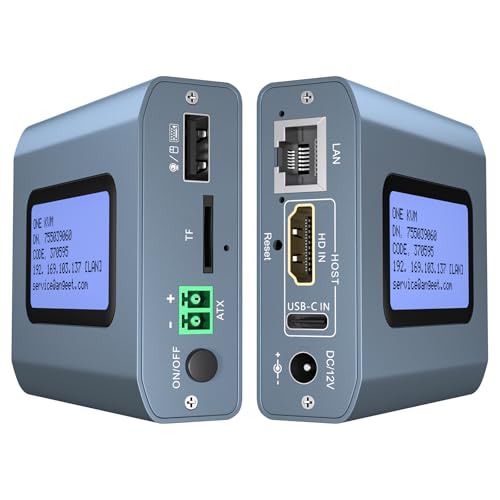
- 4K at 60 Hz with under 60 ms latency
- Built-in ZeroTier for cross-network access
- Web and app control without host drivers
Best For: 4K remote work and IT management
Best Long-Range Extender

- 4K video and USB extension over Ethernet
- Up to 390 feet on Cat5e
- Supports up to 16 extender sets
Best For: Long-distance remote workstations and AV installations
Best Compact Remote Access

- Remote BIOS and pre-boot control
- No software required on the controlled device
- Compact 75 × 45.05 × 17mm design
Best For: Portable IT support and unattended recovery
Best Rackmount Server Management

- Eight-port Cat5 KVM over IP
- One local and one remote user simultaneously
- Cascades to control up to 128 servers
Best For: Rack-based multi-server administration
Best PoE Pick

- PoE and USB-C dual-power support
- 4K at 30Hz video streaming
- Tailscale and 32GB eMMC storage
Best For: Home labs and offices needing secure single-device remote management
Best Compact DIY Option

- 23x37mm ultra-compact design
- Remote USB keyboard, mouse, and storage simulation
- Open-source RISC-V platform with 100Mbps Ethernet
Best For: Developers and labs needing customizable headless computer access
Best Legacy-Connectivity Pick

- 1920x1200 at 60Hz remote and local video
- Virtual media support
- VGA, PS/2, USB, Sun Legacy, and RS-232 compatibility
Best For: Server environments with legacy video and peripheral connections
Best Open-Source Pick – JetKVM IP KVM
For shoppers comparing kvm over ip switches for laptops, the JetKVM is a compact option focused on straightforward browser-based control. It connects over HDMI, USB-C, and Ethernet, streams up to 1080p at 60 FPS, and supports optional cloud access and Wake-on-LAN.
Best For: Home labs, remote troubleshooting, and users who value open-source customization.
Pros:
- Browser access through local IP, optional cloud dashboard, and Wake-on-LAN.
- 1080p at 60 FPS with quoted 30–60 ms latency and adjustable bitrate.
- Linux- and Golang-based open-source platform with expansion options.
- Multiple USB-C power methods are supported.
Cons:
- Video output is limited to 1080p according to the supplied specifications.
- The listed model requires the controlled device to provide USB-C power unless an alternative supply is used.
JetKVM is a sensible fit when compact size, browser control, and software flexibility matter more than multi-device switching or 4K output.
Best Multi-Host Choice – GL.iNet Comet X Quad-Port KVM
Among kvm over ip switches for laptops, the GL.iNet Comet X stands out for handling up to four host systems. It combines four HDMI inputs, dedicated USB-C device ports, browser-based HTTPS control, local switching, and rack-ready mounting.
Best For: IT professionals and home-lab users managing several laptops, desktops, or servers from one unit.
Pros:
- Controls up to four systems through four HDMI and four USB-C connections.
- PoE provides network and power through one Ethernet cable, with 5V USB-C backup.
- 4K at 30 Hz HDMI loop-out enables local display alongside remote access.
- Includes touchscreen control, 64 GB eMMC storage, and 10- or 19-inch rack brackets.
Cons:
- The HDMI loop-out is specified at 4K 30 Hz rather than 4K 60 Hz.
- Its larger feature set and rack-oriented design may be excessive for a single-laptop setup.
Choose Comet X when port count and installation flexibility are priorities. It is the most capable option here for consolidating multiple systems in a rack or lab.
Best Compact Value – JetKVM Open-Source IP KVM
This JetKVM is a compact choice for buyers seeking kvm over ip switches for laptops without installing client software. HDMI carries video, USB-C handles keyboard and mouse signals and power, and Ethernet enables browser access on a local network or through optional WebRTC cloud connectivity.
Best For: Personal home labs and remote BIOS-level troubleshooting of compatible PCs and servers.
Pros:
- 1080p at 60 FPS streaming with quoted 30–60 ms latency.
- Supports local browser access, WebRTC cloud access, and Wake-on-LAN.
- Open-source Linux/Golang firmware supports SSH customization and expansion.
- Works with Windows, Mac, Linux, and Raspberry Pi systems.
Cons:
- The non-PoE unit does not work with fully powered-off targets without additional ATX or DC modules.
- HDMI carries video only; audio transfer is not supported.
- Remote power control modules are sold separately.
Its small footprint and open platform make this JetKVM appealing for hands-on home-lab users, provided the target computer’s power requirements are understood.
Best 4K Remote-Control Option – 4K IP KVM with ZeroTier
For buyers comparing kvm over ip switches for laptops, this model emphasizes higher-resolution remote viewing and flexible network access. It supports 4K at 60 Hz, browser and app control, ZeroTier peer-to-peer connectivity, and remote BIOS installation workflows without requiring client software on the controlled system.
Best For: Remote work, IT management, and users who need 4K viewing across networks.
Pros:
- Supports 3840×2160 at 60 Hz with latency below 60 ms.
- Provides web, app, custom-cloud, and built-in ZeroTier access options.
- Compatible with Windows, macOS, Linux, Android, PCs, servers, and laptops.
- Includes remote power control wiring for desktop motherboards.
Cons:
- Remote power on/off is not supported for laptops.
- ZeroTier requires an online upgrade according to the supplied notes.
- The included ATX connection is intended for desktop computers, not laptops.
This is the strongest fit when 4K output and cross-network access are more important than laptop-specific power control. Laptop users should treat it primarily as a remote display and input solution.
Best Long-Range Extender – 4K HDMI USB KVM Over IP
For buyers comparing kvm over ip switches for laptops, this AV Access extender is a practical choice when the computer and display need to be separated by a long distance. It carries HDMI, audio, USB, and keyboard/mouse control over standard Ethernet, with support for existing IP networks and no driver installation.
Best For: Remote workstations, server rooms, control centers, classrooms, and distributed AV setups requiring long-distance 4K video and USB control.
Pros:
- Extends 4K video, audio, and USB up to 390 feet over Cat5e or up to 492 feet over Cat6/6A/7.
- Supports remote keyboard, mouse, controller, flash drive, gamepad, or printer connections through the receiver.
- Can use an existing Ethernet network and supports up to 16 paired extender sets.
- Works with Windows, macOS, and Linux without additional drivers.
Cons:
- 4K video is limited to 30Hz.
- It is an extender pair rather than a multi-port server-management switch.
- Long-distance network operation requires suitable Gigabit network infrastructure.
This model stands out when distance and flexible USB access matter more than centralized control of many computers. Its rack-friendly construction, locking power connectors, and ESD protection also suit more demanding installations.
Best Compact Remote Access – Q1 BIOS-Level IP KVM
This compact Q1 device is a strong fit for kvm over ip switches for laptops when remote troubleshooting must begin before the operating system loads. It provides BIOS-level control without software on the controlled device and connects through Ethernet, HDMI, and USB-C power.
Best For: IT technicians, edge devices, remote laptops, servers, NVRs, and systems that may need recovery while the screen is off or the operating system is unresponsive.
Pros:
- Provides BIOS-level access for rebooting, recovery, and troubleshooting before the OS starts.
- Works without installing software on the controlled device and supports Windows, macOS, iOS, and Android systems.
- Credit-card-sized design is portable and space-saving for racks, workstations, and travel kits.
- Built-in watchdog protection can automatically recover the device during system failures.
Cons:
- It is designed for remote access to a single system rather than switching multiple computers.
- The supplied details identify HDMI output but do not specify a 4K refresh rate.
- Its IP00 rating provides no stated ingress protection.
The Q1 is best viewed as a portable, out-of-band remote-management tool rather than a traditional rack KVM switch. Its BIOS access and watchdog feature make it particularly useful where unattended recovery is important.
Best Rackmount Server Management – 8-Port NetCommander IP KVM
For a rack-based laptop or server-management setup, the Tripp Lite NetCommander offers eight-port KVM access with one local and one remote user operating simultaneously. Its Cat5 design reduces cable clutter, while IPv4 and IPv6 support enables secure browser-based administration over an IP connection.
Best For: Server racks, small data centers, and organizations that need centralized remote management of multiple compatible computers.
Pros:
- Controls up to eight connected systems and can cascade to manage as many as 128 servers.
- Supports simultaneous access for one local and one remote user.
- Offers browser-based remote control, IPv4 and IPv6 support, and RADIUS/LDAP/S authentication.
- 1U rackmount construction and Cat5 connectivity help conserve rack space and reduce cable clutter.
Cons:
- The supplied compatibility details list PCs but do not specifically confirm laptop operating-system support.
- Remote browser control uses a Java-based application, which may require legacy environment compatibility.
- It is a rackmount appliance rather than a compact portable option.
This is the most suitable choice here for structured server management and multi-system access. Its cascade capability, dual-user operation, and authentication options give it a clear advantage over single-device remote KVM tools.
Best PoE Pick – GL.iNet Comet Remote KVM
For shoppers comparing kvm over ip switches for laptops, the GL.iNet Comet PoE is a compact option for remotely managing one computer or server. It combines 4K video streaming, Tailscale support, flexible power, and storage for system images in a small enclosure.
Best For: Home labs, offices, and users who want PoE-powered remote access with BIOS-level management features.
Pros:
- PoE and USB-C power options can simplify installation and improve power flexibility.
- Streams video at up to 4K resolution and 30Hz with low-latency H.264 encoding.
- Built-in Tailscale and 32GB eMMC storage support secure access and system-image storage.
Cons:
- Supports a maximum of one device.
- ATX Board and Fingerbot functions require separately sold extensions.
The Comet PoE stands out when cable reduction, secure remote connectivity, and recovery-oriented features matter more than multi-device switching. Its 4K streaming and optional remote power-control accessories make it especially capable for hands-on troubleshooting.
Best Compact DIY Option – Sipeed NanoKVM Lite
The Sipeed NanoKVM Lite is a highly compact choice among kvm over ip switches for laptops and other computers. Its web-based control, HDMI capture, USB HID simulation, and 100Mbps Ethernet connection enable remote BIOS, boot, and operating-system access without relying on a host OS.
Best For: Developers, home-server users, lab automation, and bulk deployments that favor an open-source, space-saving design.
Pros:
- Very small 23x37mm form factor fits tight spaces.
- Supports remote keyboard, mouse, and USB-storage simulation for BIOS configuration and OS installation.
- Open-source hardware and firmware allow customization, with compatibility for Tailscale, SSH tools, and Wake-on-LAN.
Cons:
- Uses 100Mbps networking rather than a faster Ethernet standard.
- The minimal board design may be less convenient for users seeking a conventional enclosed appliance.
Choose the NanoKVM Lite when physical size, low power use, and customization are priorities. It offers the core functions needed for headless management, though its DIY-friendly format may appeal more to technical users than to those wanting a polished enterprise appliance.
Best Legacy-Connectivity Pick – ATEN CN8000A VGA KVM
Aten 1-Local/Remote Share Access Single Port VGA KVM Over IP Switch (1920 x 1200)
Check Price On AmazonThe ATEN CN8000A is a more traditional single-port choice for kvm over ip switches for laptops, servers, and mixed-platform environments. It provides local and remote access at up to 1920×1200, along with virtual media and support for several legacy connection types.
Best For: Server rooms and organizations managing older VGA, PS/2, USB, Sun Legacy, or RS-232 equipment.
Pros:
- Supports up to 1920×1200 at 60Hz with 24-bit color for local and remote sessions.
- Virtual media support can assist with remote system administration.
- Supports Windows, Mac, Sun, Linux, and VT100-based serial devices.
- TLS 1.2 encryption helps protect login passwords.
Cons:
- Limited to VGA video and a single connected device.
- Its legacy interfaces may be less suitable for newer laptop setups without adapters.
The CN8000A is best suited to infrastructure where compatibility with older hardware matters. It is less modern than the other options here, but its broad interface support, virtual media, and local/remote sharing make it practical for established server environments.
How We Picked the Best Kvm Over Ip Switches for Laptops
We evaluated these models by looking at the features that matter most for remote laptop and computer management: video compatibility, USB control, BIOS-level access, network connectivity, remote responsiveness, installation requirements, and ease of use. We also considered different use cases rather than treating every KVM as interchangeable.
The selection includes single-computer IP KVMs for home labs, compact devices for travel or dedicated troubleshooting, multi-port systems for IT racks, and KVM extenders that send keyboard, video, and mouse signals over structured cabling. Models with features such as virtual media, power control, Tailscale or ZeroTier support, PoE, and open-source software can be especially useful in more advanced deployments.
Quick Comparison
| Best For | Look For | Typical Advantage |
|---|---|---|
| One laptop or PC | Single-port IP KVM | Lower cost and simpler setup |
| Home labs | Compact HDMI device with virtual media | Easy remote testing and OS installation |
| Multiple systems | Multi-port rackmount KVM | Centralized control from one console |
| Long cable runs | TCP/IP KVM extender | Flexible placement over Cat5e or better cabling |
| Modern remote access | Tailscale, ZeroTier, or secure web access | Convenient off-site connectivity |
Key Buying Factors for Kvm Over Ip Switches for Laptops
Video Input and Resolution
Match the KVM to the laptop’s output. HDMI models are generally the easiest fit for newer systems, while VGA units suit older servers and legacy equipment. Check the supported resolution and refresh rate if you need a sharp desktop image or 4K output.
BIOS, Boot, and Virtual-Media Support
Remote desktop software often cannot help when a computer is stuck at startup. Hardware KVMs that provide BIOS access, keyboard emulation, and virtual USB storage let you enter firmware settings, reinstall an operating system, and troubleshoot boot failures remotely.
Network and Security
Consider whether the unit works only on a local network or can be reached securely from outside it. VPN, Tailscale, ZeroTier, HTTPS, user accounts, and strong authentication are preferable to exposing a management interface directly to the public internet.
Port Count and Installation
A single-port model is usually best for one laptop or test machine. Choose a multi-port rackmount switch when several computers must share remote access. For a separate-room setup, verify cable distance, Cat5e/Cat6 requirements, and whether the extender needs local and remote transmitter units.
Power Management and Reliability
Remote power control, wake support, and an independent management path can reduce on-site visits. Also check whether the device needs a dedicated power adapter, supports PoE, offers local console access, and can remain available after a host reboot.
Who Should Buy Which Kvm Over Ip Switches for Laptops?
For Home Labs and Makers
Choose a compact HDMI IP KVM with virtual media and straightforward web access. Open-source or small-form-factor options can be attractive when you want flexibility, low power use, or a device attached permanently to a single test machine.
For Remote Workers and Laptop Troubleshooting
A single-port model with good browser access, BIOS control, and secure remote networking is usually enough. Prioritize simple installation and compatibility with the laptop’s video output over a high port count.
For IT Professionals and Server Rooms
Look for a rackmount multi-port KVM with simultaneous local and remote access, IPv4/IPv6 support, user management, and dependable firmware. A higher-end system costs more but can consolidate control of multiple hosts and reduce physical maintenance.
For Long-Distance Installations
Use a TCP/IP KVM extender when the computer and operator need to be separated by a building or equipment room. Confirm the required cabling, maximum distance, resolution, and whether the design provides true network access or only point-to-point extension.