
The best studio monitors make it easier to hear balance, detail, and tonal problems before they reach the final mix. This roundup compares compact near-field speakers from JBL, Yamaha, PreSonus, Edifier, M-Audio, and Mackie.
Whether you are building a home studio, upgrading a desktop setup, or need reliable speakers for casual production, the right pair depends on room size, listening distance, connectivity, and your preferred sound profile.
Best 10 Studio Monitors Picks for 2026
Wide-Sweet-Spot Precision

- Image Control Waveguide for precise imaging
- Boundary EQ and HF Trim room adjustments
- 5-inch woofers with dual 41-watt amplification
Best For: Music production, podcasting, and cinematic sound design
Uncolored Reference Sound

- Emphasizes sonic purity with minimal coloration
- Bi-amplified 70-watt system
- Balanced and unbalanced XLR/TRS inputs
Best For: Music production and critical studio monitoring
Flexible Nearfield Monitoring
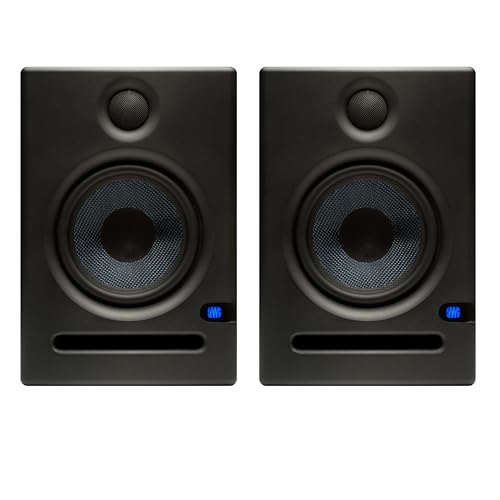
- 5.25-inch woven-composite woofer
- XLR, TRS, and RCA inputs
- Acoustic tuning and 80-watt Class AB amplification
Best For: Home studios and versatile nearfield mixing
Connected Everyday Monitoring
Edifier MR3 Powered Studio Monitor

- Bluetooth multipoint plus balanced TRS input
- Music, Monitor, and Custom sound modes
- 18 watts per channel with 3.5-inch drivers
Best For: Home studios, video editing, and everyday listening
Compact Desktop Pick
M-AUDIO BX3 3.5-inch Studio Monitors

- 3.5-inch Kevlar woofers with silk dome tweeters
- Multiple wired inputs and front headphone output
- Rear EQ controls and included cables
Best For: Compact desktop production, podcasting, streaming, and gaming
Balanced Monitoring Pick
Edifier MR4 4-inch Studio Monitors

- Near-flat monitor mode for music creation
- 4-inch woofers and silk dome tweeters
- TRS, RCA, AUX, and headphone connections
Best For: Home studios that also need casual listening
Easy Desk-Tuning Pick

- Compact pair with 3.5-inch woofers
- Tone knob for quick voicing changes
- Location switch and included isolation pads
Best For: Small studios and desktop multimedia setups
Best Balanced Desk Setup

- 50W Class AB stereo amplification
- TRS, RCA, and auxiliary inputs
- Room-tuning controls and headphone output
Best For: Flexible desktop production and everyday listening
Best Compact Reference Monitor

- 4.5-inch woofer and 1-inch dome tweeter
- Room control and high-trim adjustments
- XLR/TRS, RCA, and stereo mini inputs
Best For: Compact music-production and video-editing workstations
Best Budget Multimedia Pair

- 50W powered stereo pair
- 3.5-inch woofers with silk-dome tweeters
- TRS, RCA, auxiliary, and headphone connections
Best For: Small desks, gaming, streaming, and entry-level production
Wide-Sweet-Spot Precision – JBL 305P MkII Pair
This JBL pair is a strong choice if you want studio monitors with precise imaging and room-adjustment controls. The 5-inch woofers, Image Control Waveguide, and dual 41-watt Class-D amplification suit music production, podcasting, and cinematic sound design.
Best For: Producers, podcasters, and vloggers who need accurate stereo monitoring in a small or mid-sized room.
Pros:
- Image Control Waveguide provides a wide sweet spot and precise imaging.
- Boundary EQ and HF Trim help tailor the response to the room.
- Balanced XLR and 1/4-inch TRS inputs support common studio connections.
- Sold as a pair with 5-inch woofers and 112 watts maximum output.
Cons:
- No wireless connectivity is listed.
- The speakers are not water resistant.
Choose these studio monitors when stereo imaging and flexible placement adjustments matter more than convenience features. They offer a focused nearfield setup with a practical combination of power and connectivity.
Uncolored Reference Sound – Yamaha HS5 Pair
The Yamaha HS5 pair is designed for listeners who want studio monitors that emphasize sonic purity rather than added coloration. Its bi-amplified 5-inch woofer and 1-inch dome tweeter provide a focused nearfield monitoring setup with balanced and unbalanced input support.
Best For: Music producers who prioritize hearing the original character of a mix.
Pros:
- Designed to emphasize the original sound without coloring or altering it.
- Bi-amplified system delivers 45 watts to the low frequencies and 25 watts to the highs.
- XLR and TRS inputs accept balanced or unbalanced signals.
- Specified frequency response spans 54 Hz to 30 kHz.
Cons:
- No RCA input is listed in the supplied specifications.
- The speakers are not water resistant.
These studio monitors make sense for a straightforward reference setup where neutral presentation is the priority. Their conventional wired inputs and bi-amplified design keep the focus on monitoring rather than extra features.
Flexible Nearfield Monitoring – PreSonus Eris E5 Pair
The PreSonus Eris E5 pair offers versatile studio monitors for a home or professional setup. Its 5.25-inch woven-composite woofers, silk-dome tweeters, 80-watt Class AB bi-amplification, and acoustic tuning controls are built for clear, adjustable nearfield monitoring.
Best For: Home-studio users and producers who need multiple input options and room-tuning controls.
Pros:
- 5.25-inch woofers provide solid low-end sound with minimal bass distortion.
- Balanced XLR and 1/4-inch inputs plus unbalanced RCA cover common connections.
- Acoustic tuning controls help contour the sound for the mixing environment.
- Front-firing ports and 102 dB maximum continuous SPL support nearfield use.
Cons:
- No wireless communication technology is included.
- The supplied warranty is listed as two years.
If you want studio monitors that balance output, connectivity, and adjustability, the Eris E5 pair is a practical option. The protection features and included isolation feet also make it suitable for a carefully configured desktop or home-studio workspace.
Connected Everyday Monitoring – Edifier MR3 Powered Studio Monitor
The Edifier MR3 combines studio monitors with convenient wireless and app-based controls. With Bluetooth, balanced TRS, RCA, and AUX connectivity, plus selectable Music, Monitor, and Custom modes, it fits audio production, video editing, guitar playing, and everyday listening.
Best For: Home-studio users who want monitoring features alongside Bluetooth and general-purpose listening.
Pros:
- Hi-Res Audio certification and a stated 52 Hz to 40 kHz flat response.
- Bluetooth supports multipoint connection, while TRS, RCA, and AUX add wired options.
- EDIFIER ConneX app provides EQ control and customizable sound modes.
- MDF cabinet and front-facing controls suit desktop and nearfield use.
Cons:
- Its 18-watt-per-channel RMS output is lower than the other listed pairs.
- The supplied details list a 3.5-inch mid-low driver rather than a larger woofer.
These studio monitors are a good fit when convenience and flexibility matter as much as strict production monitoring. The MR3 is especially appealing for a compact home setup that also serves as a Bluetooth speaker.
Compact Desktop Pick – M-AUDIO BX3 3.5-inch Studio Monitors
If you need compact studio monitors for a desk, the M-AUDIO BX3 pair combines 3.5-inch Kevlar woofers, silk dome tweeters, and a wired connection for latency-free monitoring. Multiple inputs and rear EQ controls make them practical for music production, podcasting, gaming, and general desktop audio.
Best For: Desktop music production, podcasting, streaming, and gaming where compact speakers and flexible wired connections matter.
Pros:
- 3.5-inch Kevlar woofers and silk dome tweeters provide detailed stereo sound.
- Includes 1/4-inch, 1/8-inch, and RCA inputs for flexible hookups.
- Front headphone access and rear high/low EQ controls support convenient desktop use.
- Includes foam feet, connection cables, and MPC Beats software.
Cons:
- The 3.5-inch woofers may offer less low-end reach than larger monitors.
- They are wired and not water resistant.
The BX3 is a versatile choice when desk space is limited but you still want monitor-style features, easy connectivity, and adjustable sound in a compact pair.
Balanced Monitoring Pick – Edifier MR4 4-inch Studio Monitors
The Edifier MR4 is a practical pair of studio monitors for creators who want a near-flat monitoring mode alongside a more relaxed music mode. Its 4-inch composite woofers, silk dome tweeters, MDF construction, and flexible inputs suit home studios and everyday listening.
Best For: Home producers and listeners who want switchable monitor and music modes with straightforward desktop connectivity.
Pros:
- Near-flat monitor mode is designed for music creation and critical listening.
- 4-inch composite woofers and 1-inch silk dome tweeters deliver clear, smooth sound.
- Includes balanced TRS, RCA, AUX, and front headphone connections.
- Separate high- and low-frequency controls allow basic sound adjustment.
Cons:
- The supplied specifications list 42 watts of maximum output, which may limit headroom for larger spaces.
- These corded speakers are intended for indoor use rather than portable setups.
With its two listening modes and range of inputs, the MR4 stands out for users who want one speaker pair to cover both production work and casual music playback.
Easy Desk-Tuning Pick – Mackie CR3.5 Studio Monitors
The Mackie CR3.5 pair offers compact studio monitors for home studios, multimedia setups, and desktop listening. Its tone knob lets you adjust the voicing from the desk, while the location switch helps compensate for placement against a wall or in a more open position.
Best For: Small studios and desktop setups that need simple front-panel voicing and placement adjustments.
Pros:
- Compact 3.5-inch monitors are sized for desks and small studios.
- Tone knob provides quick voicing adjustments without menus.
- Location switch helps correct bass for different placement conditions.
- Includes isolation pads and the cables needed to get started.
Cons:
- The 3.5-inch woofers may not deliver the low-end extension of larger monitors.
- The one-year limited warranty is shorter than some competing options listed here.
The CR3.5 is a straightforward option for listeners who value compact dimensions and hands-on controls for adjusting sound to their desk and room placement.
Best Balanced Desk Setup – PreSonus Eris E4.5
If you want versatile studio monitors for music production, hi-fi listening, or multimedia, the PreSonus Eris E4.5 pair offers a practical balance of size, connectivity, and output. Its 4.5-inch woven-composite woofers, silk-dome tweeters, and 50 watts of Class AB amplification deliver clear sound with a substantial low end.
Best For: Desktop listeners and creators who need flexible connections, room-tuning controls, and enough power for room-filling stereo sound.
Pros:
- 50 watts of Class AB amplification provides 25 watts per side.
- Balanced TRS, RCA, and front-panel auxiliary inputs accommodate professional and consumer sources.
- High- and low-frequency controls help tailor the sound to your room and speaker placement.
- Front headphone output and built-in amplifier make private listening convenient.
Cons:
- These are wired monitors, so setup requires a power connection and source cables.
- The compact 4.5-inch design may not replace a dedicated subwoofer for listeners seeking maximum bass.
The Eris E4.5 is a strong all-purpose option when you want studio monitors that can serve as production references, entertainment speakers, and a flexible desktop listening system. The optional Eris Sub 8BT can add more low end later.
Best Compact Reference Monitor – Yamaha HS4
The Yamaha HS4 pair is a compact choice for music production and video editing setups where tabletop space matters. Each 2-way monitor combines a 4.5-inch woofer and 1-inch dome tweeter with room-control and high-trim adjustments for practical placement flexibility.
Best For: DAW workstations, video-editing desks, and creators who want compact Yamaha studio monitors with multiple wired input options.
Pros:
- Compact 2-way design uses a 4.5-inch woofer and 1-inch dome tweeter.
- Room control and high-trim response controls help adjust the speakers to the listening environment.
- XLR/TRS combo, RCA, and stereo mini inputs support computers, interfaces, and consumer devices.
- Includes speaker cable, stereo mini-to-RCA cable, and anti-slip pads.
Cons:
- Output is listed at 26 watts, making them less suited to very large listening spaces.
- Connectivity is wired rather than wireless.
The HS4 makes sense for a compact workstation that still needs flexible connections and basic acoustic adjustment. Its tabletop-focused design and included accessories help streamline a straightforward stereo setup.
Best Budget Multimedia Pair – PreSonus Eris 3.5
The PreSonus Eris 3.5 pair brings studio-style sound to smaller desktops without requiring extra equipment. These studio monitors use 3.5-inch woven-composite woofers, 1-inch silk-dome tweeters, and 50 watts of built-in amplification for music production, gaming, movies, streaming, and everyday listening.
Best For: Small desks, gaming and multimedia setups, and entry-level creators who need convenient connections and adjustable sound.
Pros:
- Sold as a complete stereo pair with 50 watts of built-in amplification.
- 3.5-inch woofers and 1-inch tweeters provide balanced sound across the listed 80 Hz–20 kHz range.
- Balanced TRS, RCA, and front-panel auxiliary inputs connect to computers, interfaces, consoles, phones, and turntables.
- Front headphone output plus high- and low-frequency controls add useful desktop convenience.
Cons:
- The smaller 3.5-inch woofers offer less low-frequency reach than larger monitors.
- They are wired speakers, so they need a corded setup.
For a compact desk, the Eris 3.5 is an approachable way to get powered studio monitors with broad source compatibility. It is especially practical when music production and general entertainment share the same workspace.
How We Picked These Studio Monitors
We selected these Studio Monitors based on practical factors that matter in home recording and desktop environments: driver size, powered operation, near-field suitability, connectivity, placement flexibility, and overall value. The list includes compact 3.5-inch and 4-inch models for small desks, versatile 4.5-inch and 5-inch speakers for general production, and more mix-focused options such as the JBL 305P MkII and Yamaha HS5.
Because no single speaker suits every room, we considered how each model fits common use cases rather than ranking them by size alone. Room acoustics, speaker placement, and listening distance can affect results as much as specifications.
Quick Comparison
| Best For | Recommended Models | Why Consider Them |
|---|---|---|
| Accurate home mixing | JBL 305P MkII, Yamaha HS5 | Focused near-field designs and detailed presentation |
| Balanced value | PreSonus Eris E5, Edifier MR4 | Useful size, straightforward powered operation, and flexible placement |
| Small desks | PreSonus Eris 3.5, M-Audio BX3 | Compact cabinets for close listening distances |
| Desktop versatility | Edifier MR3, Mackie CR3.5 | Convenient controls and broad everyday usability |
| Compact Yamaha option | Yamaha HS4 | Small-format monitoring from a familiar studio brand |
Key Buying Factors for Studio Monitors
Room Size and Listening Distance
Choose a speaker size that matches your workspace. Smaller monitors are often easier to manage on a crowded desk and can work well when you sit close to the speakers. Five-inch models generally offer more low-end authority, but they may expose room problems more readily in untreated spaces.
Accuracy Versus Everyday Features
For mixing, prioritize a controlled, revealing response and useful placement controls. For a hybrid desk setup, features such as Bluetooth, front-panel volume controls, headphone outputs, or multiple inputs may be more valuable than maximum neutrality.
Powered Design and Connectivity
All of the options here are active or powered designs, so they do not require a separate amplifier. Check the available inputs before buying, especially if you need to connect an audio interface, computer, turntable, or mobile device. Balanced inputs can also help reduce noise in a recording setup.
Placement and Acoustics
Position the tweeters near ear level, form an equilateral triangle with your listening position, and angle the speakers toward you. Use stands or isolation pads where possible, and avoid placing rear-ported monitors directly against a wall. Basic acoustic treatment can improve consistency more than upgrading speakers prematurely.
Who Should Buy Which Studio Monitors?
Choose the JBL 305P MkII or Yamaha HS5 if mixing accuracy and a more serious near-field setup are your priorities. Choose the PreSonus Eris E5 or Edifier MR4 for a capable balance of size, sound, and value. Choose the PreSonus Eris 3.5, M-Audio BX3, or Mackie CR3.5 when desk space and budget matter most. Choose the Edifier MR3 if Bluetooth and general desktop flexibility are important. Choose the Yamaha HS4 when you want a compact pair from Yamaha for a smaller workspace.
Whichever pair you select, give placement and room setup careful attention. Proper positioning will help these Studio Monitors deliver a clearer, more dependable listening reference.