
The best video switchers make it easier to combine multiple cameras, manage live cuts, and send a polished program feed to a streaming platform or display. The models in this roundup range from compact HDMI units for creators to more advanced systems with SDI, PTZ control, audio mixing, and 4K support.
Use the comparison and buying advice below to match your cameras, workflow, resolution needs, and budget with the right switcher.
Best 10 Video Switchers Picks for 2026
Best Compact Streaming Hub

- Four HDMI inputs with multiview
- Built-in streaming and recording
- Integrated audio mixer and keying
Best For: Four-camera livestreams and presentations
Best All-in-One Production Console

- Six HDMI and USB video inputs
- Two studio-grade XLR combo inputs
- Scenes, overlays, streaming, and ISO recording
Best For: Audio-focused studio livestreams
Best for Solo Streamers

- Four HDMI inputs with 2K support
- USB webcam output for streaming software
- Built-in transitions and picture-in-picture layouts
Best For: Solo creators and software-based streaming
Best for Advanced HDMI Productions

- Eight HDMI inputs for larger setups
- Five-layer effects and advanced keying
- Built-in multiview and 18-channel audio mixer
Best For: Complex HDMI events and live productions
Best All-in-One Control
KC800 4K PTZ Streaming Switcher
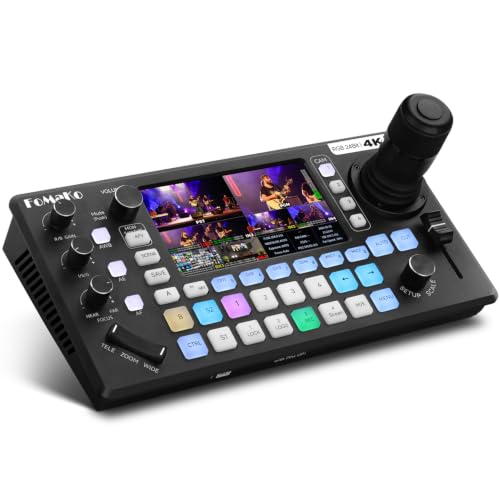
- Four 4K HDMI inputs with 1080p60 output
- Integrated PTZ joystick and AI tracking
- Audio mixing, recording, and multi-platform streaming
Best For: Churches and solo operators managing PTZ productions
Best Simple Starter
FEELWORLD LIVEPRO L1 V1 HDMI Mixer

- Four-input 1080p HDMI switching
- USB 3.0 webcam-style streaming output
- Compact design with multiview monitoring
Best For: Beginners and portable single-operator setups
Best 4K60 Workflow

- 4K60 input and 4K loop-through
- Four-camera PTZ control with nine presets
- Advanced audio mixing and three-platform streaming
Best For: Live productions needing 4K source compatibility
Best Portable Pick
Mixer Plus Compact Video Switcher

- Four HDMI inputs with zero-latency switching
- Built-in 4-inch multiview display
- PTZ, keying, PIP, DSK, and AUX routing
Best For: Portable HDMI multi-camera productions
Best Compact 4K Option
RGBlink Mini V3 Video Switcher
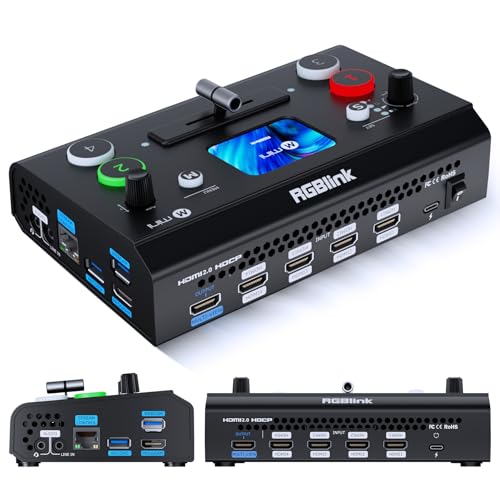
- Four HDMI inputs and dual HDMI outputs
- 2.1-inch touch screen with T-bar control
- UVC mode, recording, and optional creative tools
Best For: Entry-level HDMI streaming and webcam workflows
Best for Professional Productions

- Combines four HDMI and four SDI inputs
- Supports network streaming and dual recording
- Integrated PTZ and NDI|HX3 capabilities
Best For: Complex live productions with mixed video sources
Best Compact Streaming Hub – ATEM Mini Pro
The Blackmagic Design ATEM Mini Pro is one of the more capable compact video switchers for four-camera HDMI productions. It combines live switching, multiview monitoring, streaming, recording, keying, transitions, and audio mixing in a small desktop unit.
Best For: Multicamera livestreams, education, business presentations, and esports events.
Pros:
- Four HDMI inputs with 10-bit 4:2:2 video support.
- Built-in streaming, recording, multiview, and webcam output capabilities.
- Includes a six-input, two-channel audio mixer and multiple transition and keying options.
Cons:
- Limited to four HDMI video inputs.
- Audio connections are 3.5mm analog inputs rather than XLR inputs.
Choose this model if you want a compact, feature-rich switcher for a conventional four-camera HDMI setup. Its integrated streaming and recording functions reduce the need for additional production hardware.
Best All-in-One Production Console – RØDECaster Video
The RØDECaster Video is a professional video switcher and audio interface designed for productions that need flexible source handling and serious audio connectivity. It switches up to six HDMI or USB video sources while adding scenes, overlays, chroma keying, streaming, and recording controls.
Best For: Studio-style livestreams, creators using XLR microphones, and productions needing integrated audio and video control.
Pros:
- Supports six video sources through four HDMI and two USB inputs.
- Two Neutrik combo inputs use high-gain Revolution Preamps for XLR and instrument sources.
- Offers customizable scenes, overlays, automatic chroma keying, direct streaming, and ISO recording.
Cons:
- Its broad feature set may be more than simple switching setups require.
- Operation requires corded power.
This is a strong choice when video switching and high-quality audio need to live in one workflow. Wi-Fi, Ethernet, USB streaming, external recording, and intelligent auto-switching add flexibility for more advanced productions.
Best for Solo Streamers – RGBlink Mini
The RGBlink Mini is a straightforward option among video switchers for creators who want four HDMI inputs and computer-based streaming. Its USB 3.0 output appears as a webcam, while built-in transitions, picture-in-picture layouts, and remote control support simplify solo operation.
Best For: Solo streamers using OBS, vMix, or social media streaming platforms.
Pros:
- Four HDMI inputs support multi-camera setups with up to 2K input and output.
- USB 3.0 webcam output works with streaming software and social platforms.
- Includes 14 transition effects, nine picture-in-picture layouts, and LAN-based remote control.
Cons:
- The supplied notes specify that onboard recording requires the Mini-Pro or higher models.
- It does not list built-in XLR audio inputs.
For a compact streaming desk, the RGBlink Mini focuses on accessible switching and webcam-style computer connectivity. It is particularly practical when your computer handles the streaming software and recording workflow.
Best for Advanced HDMI Productions – Roland V-8HD
The Roland V-8HD is a larger-format HDMI video switcher for productions that need up to eight sources, advanced effects, monitoring, and flexible routing. It adds an integrated multiview preview monitor, AUX output, still storage, automated switching, and an 18-channel digital audio mixer.
Best For: Complex HDMI live productions, event workflows, and operators who need extensive routing and effects.
Pros:
- Mixes up to eight HDMI sources in a compact unit.
- Provides five-layer effects and keying, an integrated multiview monitor, and AUX output.
- Includes automated switching, preset memories, still storage, and an 18-channel audio mixer.
Cons:
- It is more substantial and heavier than compact four-input switchers.
- The supplied details list a one-year manufacturer warranty.
The V-8HD makes sense when four inputs are not enough and your production benefits from dedicated monitoring, routing, keying, and repeatable presets. Its wide range of supported frame rates also suits varied live-production requirements.
Best All-in-One Control – KC800 4K PTZ Streaming Switcher
The FoMaKo KC800 is one of the more comprehensive video switchers for solo operators who need camera control, audio mixing, recording, and streaming in one unit. It accepts four 4K HDMI inputs, includes a built-in 4D PTZ joystick, and outputs at up to 1080p60.
Best For: Churches, event producers, and solo streamers running up to four PTZ cameras.
Pros:
- Controls up to four PTZ cameras with VISCA/VISCA-over-IP, presets, and AI tracking.
- Offers four 4K HDMI inputs, multiple HDMI outputs, UVC connectivity, and extensive audio I/O.
- Supports USB or SD recording without a computer and streaming to up to three platforms plus UVC.
- Includes a six-channel audio mixer with XLR inputs, phantom power, and headphone monitoring.
Cons:
- Its broad feature set may take time to learn compared with simpler switchers.
- Although it accepts 4K input, its listed program output is up to 1080p60.
The KC800 is a strong choice when reducing the amount of equipment matters. Its integrated PTZ control, recording, streaming, and audio tools make it especially practical for recurring live productions with a small crew.
Best Simple Starter – FEELWORLD LIVEPRO L1 V1 HDMI Mixer
The FEELWORLD LIVEPRO L1 V1 is a compact option for buyers who want straightforward video switchers for four-camera 1080p production. Its USB 3.0 output appears as a webcam to a computer, making it easy to use with common streaming software.
Best For: Beginners, lightweight mobile setups, and single-person 1080p live streams.
Pros:
- Switches between four HDMI inputs in real time at up to 1080p.
- USB 3.0 output works like a built-in webcam with streaming software.
- Provides multiview monitoring for the program, preview, and four inputs.
- Compact design can be mounted on a tripod and operated remotely through XPOSE over LAN.
Cons:
- It does not provide 4K support according to the supplied specifications.
- The listed configuration has one HDMI output and a relatively simple control set.
The LIVEPRO L1 V1 keeps the workflow accessible by focusing on core switching and USB streaming. It is a sensible fit for users who value portability and ease of operation over advanced audio, PTZ, or 4K features.
Best 4K60 Workflow – FoMaKo KC602 HDMI Video Mixer
The FoMaKo KC602 is designed for buyers who need 4K input handling, PTZ control, and more advanced audio features in a hardware-focused workflow. It accepts four HDMI sources, provides 4K60 loop-through, and delivers 1080p60 program output for streaming and recording.
Best For: Professional live events, churches, studios, and productions needing 4K source compatibility.
Pros:
- Supports 4K60 HDMI input and 4K loop-through while outputting at 1080p60.
- Controls up to four PTZ cameras with a T-bar, keypad, and nine presets.
- Streams through UVC, RTMP, or RTMPS and supports up to three simultaneous platforms.
- Offers robust audio tools, including XLR input, 48V phantom power, five-band EQ, AUX mixing, and monitoring.
Cons:
- The listed program output is 1080p60 rather than 4K.
- Its 31-button, three-knob control panel may be more than casual users need.
The KC602 is a capable middle ground for productions that want 4K source flexibility without giving up a dedicated 1080p streaming workflow. Its PTZ controls and audio processing make it particularly useful when one device must handle several production tasks.
Best Portable Pick – Mixer Plus Compact Video Switcher
If you need video switchers for mobile productions, the Mixer Plus combines four HDMI inputs with a built-in 4-inch multiview display. Its compact design and practical broadcast tools make it well suited to multi-camera streaming, online classes, events, and YouTube setups.
Best For: Portable multi-camera productions that need on-device monitoring and flexible HDMI routing.
Pros:
- Built-in 4-inch multiview screen shows inputs, program, preview, resolution indicators, and audio meters.
- Supports four HDMI sources with zero-latency switching, 30 transition effects, and four scene presets.
- Includes PTZ control, chroma key, luma key, PIP, DSK, and logo-overlay functions.
- Customizable AUX HDMI output can route sources, program, preview, clean feeds, patterns, or multiview.
Cons:
- Uses HDMI inputs only, which may not suit productions built around SDI sources.
- The 4-inch screen is convenient for monitoring but smaller than a dedicated production monitor.
The Mixer Plus is a strong choice when portability and straightforward HDMI production matter most. Its integrated screen reduces the need for extra monitoring equipment, while the AUX output and scene controls give more experienced operators room to customize a live workflow.
Best Compact 4K Option – RGBlink Mini V3 Video Switcher
The RGBlink Mini V3 is one of the more compact video switchers for creators who want four HDMI inputs, a touch screen, and flexible computer connectivity. It can serve as a live-production switcher, UVC webcam device, or USB recorder, though some advanced functions require optional TAO Cloud activation.
Best For: Entry-level multi-camera streaming and creators who want HDMI, UVC, recording, and touch-control options in a small unit.
Pros:
- Provides four HDMI inputs, dual 1080p HDMI outputs, a 2.1-inch touch screen, and a professional T-bar.
- UVC webcam mode supports direct computer recognition for platforms such as YouTube and Facebook.
- Offers PIP layouts, chroma key, logo overlays, 15 transition effects, and USB recording up to 2TB.
- TAO Cloud lets users select certain premium features through monthly or lifetime plans.
Cons:
- Recording, PTZ control, chroma key, and some other advanced features require licensing.
- Stable UVC streaming on Mac or PC requires the included USB 3.0 cable.
- A 35W-or-higher USB-C power adapter is recommended for stable operation.
The Mini V3 is appealing for smaller studios and beginner creators who value a touch interface and computer-friendly workflow. Before buying, account for the optional licensing model and confirm that your cameras and power setup match the manufacturer’s guidance.
Best for Professional Productions – Tenveo PC500 Video Switcher
The Tenveo PC500 is designed for demanding video switchers workflows that combine HDMI, SDI, USB, PTZ, recording, and network streaming. Its 5.5-inch screen and broad connectivity suit churches, conferences, studios, events, classrooms, and other productions that need more than a basic HDMI switcher.
Best For: Professional multi-camera productions requiring mixed inputs, PTZ control, recording, and network streaming.
Pros:
- Supports four HDMI inputs, including two with 4K60FPS, four SDI inputs, USB input, and NDI|HX3.
- Streams through UVC, SRT, RTMP, RTSP, or NDI|HX3 and can target up to two platforms simultaneously.
- Provides 1080p60 output, SDI and HDMI program outputs, customizable AUX routing, and USB recording.
- Controls up to four PTZ cameras with presets, camera adjustments, AI tracking triggers, and cruise tracks.
Cons:
- Outputs are limited to 1080p60 even though selected inputs support 4K60FPS.
- The extensive SDI, network, PTZ, and recording features may be more than simple streaming setups require.
- Its professional feature set likely involves a steeper setup and operating learning curve than compact switchers.
The PC500 is the most production-oriented option in this group. It makes sense when your workflow benefits from mixed HDMI and SDI sources, network delivery, dual recording, and integrated PTZ control; for basic four-camera HDMI streaming, its larger feature set may be unnecessary.
How We Picked These Video Switchers
We selected these Video Switchers based on input and output options, supported resolutions and frame rates, live-streaming connectivity, monitoring features, audio capabilities, portability, and ease of use. We also considered the needs of different buyers, including solo creators, educators, churches, event teams, and professional multi-camera productions.
Specifications can vary by input, output, and operating mode. Before buying, confirm that your cameras and display or streaming destination use compatible resolutions, frame rates, connectors, and signal formats.
Quick Comparison
| Best For | Features to Prioritize |
|---|---|
| Solo streaming | Simple controls, USB output, built-in audio, and compact size |
| Multi-camera HDMI setups | Four or more HDMI inputs, multiview monitoring, and reliable switching |
| Professional production | SDI connectivity, flexible routing, audio control, and robust construction |
| PTZ camera workflows | Joystick control, camera presets, tracking, and compatible control protocols |
| 4K production | 4K input support, suitable frame rates, and outputs that match the intended workflow |
Key Buying Factors for Video Switchers
Inputs, Outputs, and Signal Formats
Count the cameras and other sources you expect to connect now, then leave room for expansion. HDMI is common for mirrorless cameras, camcorders, and consumer devices, while SDI is better suited to longer cable runs and professional installations. Check whether the advertised 4K support applies to every input and output or only selected modes.
Streaming and Recording Workflow
A USB webcam-style output can simplify streaming from a computer, while HDMI or SDI program outputs are useful for external recorders, projectors, and broadcast equipment. A built-in multiview helps you monitor previews, the live program, audio meters, and signal status from one screen.
Audio Control
If you need microphones, music, or remote audio sources, look for dedicated audio inputs, level controls, mixing, delay, and embedding options. A switcher with integrated audio features can reduce the amount of extra equipment required, but a separate mixer may offer more control for complex productions.
Controls and Portability
Physical buttons are useful during fast live cuts, while touchscreens, software control, cloud tools, and PTZ joysticks can improve flexibility. For mobile work, consider power requirements, screen visibility, mounting options, and whether the unit is easy to pack and operate without assistance.
Who Should Buy Which Video Switchers?
Choose a compact HDMI switcher if you stream classes, interviews, gaming, presentations, or small events with a few cameras. These models are generally the easiest starting point and often provide the simplest computer connection.
Choose a switcher with audio mixing if one device needs to manage cameras, microphones, music, and the final stream. This is especially useful for solo operators and small production teams.
Choose an SDI-capable model for venues, stages, houses of worship, and installations requiring dependable long cable runs. Choose a PTZ-focused system if remote camera positioning and tracking are central to your workflow.
Choose a 4K-capable unit when you need high-resolution sources or want to preserve detail for projection and recording. Verify the complete signal path before purchase, since the cameras, cables, switcher, capture device, and display must all support the desired format.