
The best wireless smart displays do more than show information: they can organize a household, extend a laptop screen, stream media, or deliver digital signage without a complicated installation.
This roundup compares 10 options across smart-home hubs, portable monitors, family calendars, E Ink dashboards, and commercial displays so you can match the hardware to your space and workflow.
Best 10 Wireless Smart Displays Picks for 2026
Best Compact Alexa Display
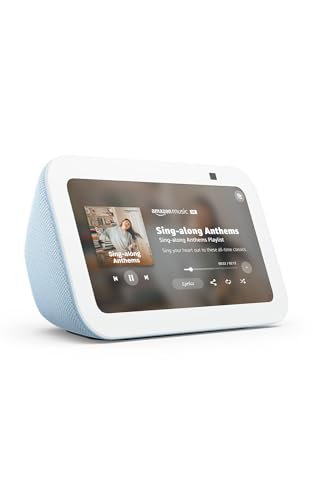
- 5.5-inch screen for quick-glance information
- Video calling and compatible camera viewing
- Compact Alexa smart-home control
Best For: Small spaces and everyday Alexa tasks
Best Portable Screen

- 15.6-inch Full HD anti-glare display
- 8000mAh battery for 4–5 hours of use
- AirPlay, Miracast, USB-C, and Mini HDMI
Best For: Travel and portable second-screen setups
Best Family Organization Hub

- 15.6-inch Full HD family dashboard
- Built-in Fire TV and included remote
- Widgets, smart-home controls, and video calls
Best For: Shared kitchens and household organization
Best Dedicated Family Calendar

- 8-inch 1280x800 touchscreen
- Calendar syncing, casting, and video calls
- Wall mount and desktop stand included
Best For: Family schedules and shared home communication
Best Low-Power Pick
reTerminal E1002 Color E Ink Dashboard

- 7.3-inch color E Ink screen
- Up to 3-month deep-sleep battery life
- Home Assistant and ESPHome compatible
Best For: Low-power home dashboards and maker projects
Best Interactive Display
15.6-Inch Android Touchscreen Signage Monitor

- 10-point 1080p capacitive touchscreen
- Android 13 with wireless screen sharing
- Includes desktop and adjustable floor stands
Best For: Interactive signage, presentations, and home whiteboards
Best Screen-Mirroring Accessory

- AirPlay, DLNA, and Miracast support
- Plug-and-play HDMI mirroring
- Compact design with dual-band antennas
Best For: Presentations and mirroring to an existing HDMI screen
Portable Business Pick

- Android 11 with 4GB RAM and 32GB storage
- 23,200mAh removable battery
- USB, cloud/CMS, and custom-app support
Best For: Portable tabletop menus, promotions, and retail messaging
Wall-Mounted Visual Hub
RoyceBee 21.5-Inch Wi-Fi Signage

- 1080P IPS screen with 178-degree viewing angle
- Portrait or landscape wall mounting
- Wi-Fi, Ethernet, USB, and SD playback
Best For: Fixed menus, directories, and promotional signage
Low-Power Message Board
Fabater 7.5-Inch Epaper Display

- Bluetooth updates through a dedicated app
- Up to one year of battery life
- Three-color screen with QR and barcode support
Best For: Compact reusable signs, labels, and meeting notices
Best Compact Alexa Display – Echo Show 5
The Echo Show 5 is a compact option for shoppers comparing wireless smart displays for everyday home control and quick information. Its 5.5-inch screen shows news, weather, song titles, photos, compatible camera feeds, and video calls, while Alexa handles compatible smart-home devices.
Best For: Bedrooms, desks, kitchens, and smaller spaces that need Alexa features in a compact display.
Pros:
- Compact 5.5-inch display for quick-glance information and entertainment.
- Supports video calls, camera viewing, announcements, and compatible smart-home controls.
- Includes a camera shutter, microphone/camera-off button, and recyclable or recycled materials.
- Offers deeper bass and clearer vocals than the prior model according to the supplied product details.
Cons:
- The small screen is less suitable for extended viewing or detailed family organization.
- Some features depend on compatible devices, services, or Alexa app users.
The Echo Show 5 makes the most sense when footprint and basic Alexa functionality matter more than screen size. It is a practical entry point for wireless smart displays, especially for quick controls, calls, and camera checks.
Best Portable Screen – 15.6-Inch Wireless Monitor
This battery-powered monitor is a different kind of wireless smart display, designed for screen mirroring and portable productivity rather than voice assistance. AirPlay and Miracast support let compatible phones, tablets, Macs, Windows laptops, and PCs connect wirelessly, while wired USB-C and Mini HDMI inputs provide backup options.
Best For: Remote work, travel, presentations, and users who need a larger portable display without relying on an outlet.
Pros:
- 15.6-inch Full HD IPS screen with 400-nit brightness, 60Hz refresh rate, and matte anti-glare finish.
- Built-in 8000mAh battery provides approximately 4 to 5 hours of cord-free use.
- Supports AirPlay and Miracast, plus USB-C and Mini HDMI wired connections.
- Kickstand adjusts up to 180 degrees, with portrait rotation for phones and tablets.
Cons:
- Wireless casting does not support Netflix, Hulu, Prime Video, and other listed streaming apps because of HDCP restrictions.
- No Google Cast, Bluetooth, or touchscreen support.
- Several devices, including Google Pixel phones, Chromebooks, and gaming devices, require a wired connection.
Choose this model if portability and a large mirrored workspace are the priority. Its compatibility limitations make it less like a traditional smart-home display, but the battery and input flexibility are useful for travel and mobile work.
Best Family Organization Hub – Echo Show 15
The Echo Show 15 is a wall-oriented wireless smart display built for shared household information and entertainment. Its 15.6-inch Full HD screen can show calendars, to-do lists, weather, smart-home controls, photos, video calls, and Fire TV content in one prominent location.
Best For: Kitchens and family spaces where a large shared dashboard, streaming screen, and smart-home controller are useful.
Pros:
- Large 15.6-inch 1080p display with customizable widgets for household organization.
- Built-in Fire TV supports apps including Prime Video, Netflix, YouTube, and Apple TV, with remote included.
- Centered camera offers auto-framing, wide field of view, 3.3x zoom, and noise reduction.
- Smart-home dashboard provides voice and touch controls for compatible devices and camera feeds.
Cons:
- Its larger size is less suitable for compact spaces than smaller wireless smart displays.
- Some entertainment services may require subscriptions.
- Smart-home and camera features depend on compatible devices.
The Echo Show 15 is the strongest fit for households that want one visible place for schedules, entertainment, and smart-home controls. Its bigger screen and camera features add versatility, but they also make it a more space-conscious purchase.
Best Dedicated Family Calendar – 8-Inch Digital Calendar
This 8-inch digital calendar targets shoppers seeking wireless smart displays for family scheduling and communication. It combines a 1280×800 touchscreen with calendar synchronization, media casting, video calls, Bluetooth 5.0, dual speakers, and connections for additional devices.
Best For: Families that want a dedicated schedule display with video calling, casting, and flexible placement.
Pros:
- 8-inch 1280×800 touchscreen is sized for calendars and household information.
- Supports calendar data synchronization, media casting, and video calls.
- Includes a 5MP camera, dual speakers, and Bluetooth 5.0.
- Offers HDMI, RS232, two USB ports, and a 3.5mm port, with both wall mount and desktop stand included.
Cons:
- The supplied details do not identify the supported calendar platforms or app ecosystem.
- Software update support is listed as unknown.
- Its feature set may require more setup than a platform-centered smart display.
This display is appealing when family scheduling is the main goal and mounting flexibility matters. Before buying, verify calendar-app compatibility and the software ecosystem you need, since those details are not specified in the supplied information.
Best Low-Power Pick – reTerminal E1002 Color E Ink Dashboard
The reTerminal E1002 is a practical choice for wireless smart displays that prioritize glanceable information, low energy use, and customization. Its 7.3-inch color E Ink screen remains readable in bright light, while the battery can last up to three months in deep-sleep mode with six-hour refresh intervals.
Best For: Home automation dashboards, smart office displays, reminders, and maker projects.
Pros:
- Color E Ink display uses very little power while holding an image.
- Up to three months of battery life in the specified deep-sleep configuration.
- Supports SenseCraft HMI, Home Assistant, ESPHome, Arduino, PlatformIO, and ESP-IDF.
- GPIO, I²C, SPI, and Grove expansion support suits custom builds.
Cons:
- E Ink refresh behavior is better suited to dashboards than fast-moving video.
- Its 7.3-inch screen is smaller than a conventional tablet or signage panel.
- Some advanced projects may require maker-oriented setup and development.
Choose this model when low maintenance and always-visible information matter more than touch interaction or multimedia playback. The no-code dashboard tools make it approachable, while the expansion options leave room for more advanced smart-home projects.
Best Interactive Display – 15.6-Inch Android Touchscreen Signage Monitor
This 15.6-inch Android panel is a strong option for wireless smart displays when touch control, app support, and screen sharing are priorities. It combines a 1080p capacitive touchscreen with Android 13, wireless mirroring, a built-in battery, and a mobile floor stand for flexible indoor use.
Best For: Retail signage, presentations, home whiteboards, and interactive business displays.
Pros:
- 10-point capacitive touchscreen with 1080p resolution.
- Android 13 supports downloadable apps and autoplay content.
- Wireless screen sharing works with iOS, Android, Windows, and macOS through Eshare.
- Includes a desktop stand, adjustable floor stand, and 75x75mm VESA mounting holes.
Cons:
- Battery runtime is listed at approximately four to six hours per charge.
- Its glossy LCD may be less suitable for bright environments than E Ink.
- The listed 5.95-pound weight makes it less portable than a small tablet.
This display makes sense when you need an interactive wireless smart display rather than a passive information board. Its ports, speakers, Android app ecosystem, and mounting options also make it adaptable for commercial or home use.
Best Screen-Mirroring Accessory – Wireless HDMI Display Dongle
The BRAIDOL wireless HDMI dongle is a compact way to add wireless smart display functionality to an existing HDTV, projector, or monitor. It supports AirPlay, DLNA, and Miracast for screen mirroring from compatible Apple, Android, and Windows devices, with up to 1080p output and claimed 4K support.
Best For: Wireless presentations, casual screen mirroring, and upgrading an existing HDMI display.
Pros:
- Compact plug-and-play design for HDMI-equipped displays.
- Supports AirPlay, DLNA, and Miracast across several platforms.
- Uses 2.4GHz and 5GHz antennas for wireless transmission.
- Offers one-click mirroring, disconnecting, and landscape or portrait switching.
Cons:
- HDCP-protected services such as Netflix and Amazon Prime Video may not work.
- Transmission distance is listed at up to 16 feet or 5 meters.
- It is an adapter rather than a standalone smart display with its own screen.
Consider this dongle if you already own a screen and mainly want convenient device mirroring. It is inexpensive in concept and easy to carry, but copyright restrictions and the limited stated range make it less suitable for dependable streaming-service playback.
Portable Business Pick – WeADS Tabletop Smart Display
The WeADS tabletop unit is a practical choice among wireless smart displays when portability and flexible content management matter. Its Android 11 platform, touch control, Wi-Fi connectivity, and built-in battery support menus, promotions, and other business content without requiring constant access to an outlet.
Best For: Restaurants, bars, retail counters, and businesses that need a portable tabletop display.
Pros:
- Android 11 with 4GB RAM and 32GB of storage
- Large 23,200mAh rechargeable battery for extended operation
- Supports USB uploads, cloud/CMS management, and custom apps
- Detachable battery and one-year warranty
Cons:
- Its 3.6-pound weight may be less convenient for frequent transport
- The notes do not specify a display resolution or runtime in hours
The removable battery and multiple content options make this a flexible wireless smart display for changing business locations or campaigns. Consider it if you value customization and battery operation more than a specified screen-resolution rating.
Wall-Mounted Visual Hub – RoyceBee 21.5-Inch Wi-Fi Signage
This RoyceBee model is a wall-mounted option for wireless smart displays, combining a 1080P IPS screen with Wi-Fi, Ethernet, and built-in media playback. Its portrait or landscape installation and scheduling tools make it suitable for business messaging that needs to run continuously.
Best For: Restaurants, shops, offices, museums, and other venues needing a fixed digital sign or menu.
Pros:
- 1080P IPS display with a 178-degree viewing angle
- Supports horizontal or vertical wall mounting
- Wi-Fi, Ethernet, USB, and SD-card playback options
- Offers split-screen playback, looping, and automated timers
Cons:
- This listing describes a wall-mounted installation rather than a portable display
- The supplied notes do not identify the included signage software or its subscription terms
With broad viewing angles, dual orientation, and scheduled playback, this is a strong fit for high-traffic indoor spaces. Verify the content-management workflow if remote administration is an essential requirement.
Low-Power Message Board – Fabater 7.5-Inch Epaper Display
The Fabater Epaper Display offers a compact alternative among wireless smart displays, using Bluetooth updates and reflective electronic ink instead of a conventional LCD. Its three-color screen, customizable templates, and exceptionally long stated battery life suit reusable signs that do not need frequent power or video playback.
Best For: Name cards, meeting signs, door signs, price labels, conference agendas, and small business notices.
Pros:
- Bluetooth content updates through a dedicated app
- 4000mAh battery rated for up to one year on a charge
- Three-color reflective display readable from any 180-degree angle
- Supports text, images, QR codes, barcodes, and editable templates
Cons:
- The 7.5-inch screen is intended for compact messages rather than large signage
- Bluetooth updates may be less convenient than Wi-Fi for remote management
- Its electronic-ink design is not presented as a video display
This is best viewed as a reusable electronic sign rather than a full multimedia kiosk. Choose it when low maintenance, paper replacement, and long battery life are more important than large size or cloud-based control.
How We Picked These Wireless Smart Displays
We selected products across the main categories buyers encounter: voice-enabled home displays, portable wireless monitors, family dashboards, programmable panels, and digital-signage hardware. We considered screen size, wireless connectivity, portability, power options, touch capability, camera and speaker features, viewing flexibility, and the intended environment.
Because these products serve different purposes, the “best” choice depends on whether you need entertainment, household coordination, presentations, automation, or business messaging. We also looked for practical distinctions such as battery operation, platform compatibility, update methods, mounting options, and whether a display is designed for continuous use.
Quick Comparison
| Best for | Look for | Most suitable display type |
|---|---|---|
| Voice control and entertainment | Smart assistant support, speakers, streaming | Connected smart display |
| Portable presentations | Battery power, AirPlay or Miracast, USB-C or HDMI | Wireless portable monitor |
| Family scheduling | Touchscreen, camera, calendar and messaging features | Family dashboard |
| Home automation | Wi-Fi, APIs, no-code tools, Home Assistant support | Programmable smart panel |
| Retail or restaurant messaging | Brightness, mounting, remote updates, battery life | Digital-signage display |
Key Buying Factors for Wireless Smart Displays
Connectivity and Compatibility
Check whether the display supports the devices and services you already use. AirPlay and Miracast are useful for wireless screen mirroring, while Android-based signage panels may offer broader app flexibility. Smart-home buyers should verify assistant, calendar, and automation compatibility before purchasing.
Power and Placement
A compact plug-in display works well on a nightstand or kitchen counter, but a battery-powered model is easier to move or deploy where outlets are limited. For commercial use, confirm mounting hardware, cable routing, orientation support, and expected operating hours.
Screen Technology and Visibility
LCD screens typically provide color, touch interaction, and video playback. E Ink panels use very little power and remain comfortable for static information, but they are less suited to fast animation or full-motion media. Consider viewing distance, ambient light, resolution, and portrait-versus-landscape use.
Audio, Camera, and Privacy
Speakers matter for calls, alerts, and entertainment, while a camera can support video calls or household interaction. If privacy is important, look for physical camera controls, microphone settings, or a model without those components.
Who Should Buy Which Wireless Smart Displays?
Choose a compact smart display for bedside reminders, voice commands, recipes, and casual entertainment. Select a larger smart-home hub when you want shared calendars, household organization, and a central media screen. A portable monitor is the better fit for remote work, travel, or presentations from phones and laptops.
Families managing schedules should prioritize a touchscreen calendar with a camera and speakers. Home-automation enthusiasts may prefer a programmable or Home Assistant-compatible panel. For stores, restaurants, and events, focus on signage models with dependable wireless updates, suitable brightness, flexible mounting, and enough battery capacity or reliable continuous power.