
The best 4K video switchers make multi-camera production faster, cleaner, and easier to manage. Whether you stream events, produce presentations, or build a professional studio, the right switcher can combine camera inputs, audio, recording, and streaming in one workflow.
This roundup compares 10 notable options across HDMI and SDI connectivity, input capacity, switching controls, display features, recording support, and streaming flexibility.
Best 10 4K Video Switchers Picks for 2026
Best All-Around Starter

- Four HDMI inputs with multiview
- Built-in streaming, recording, and audio mixing
- Multiple transitions and keying effects
Best For: Education, presentations, esports, and small multicamera broadcasts
Best for 4K60 Production

- Accepts 4K60 input and provides 4K loop-through
- Controls up to four PTZ cameras
- Includes streaming, recording, and advanced audio tools
Best For: Churches, studios, events, and professional multicamera livestreams
Best for Mixed SDI and HDMI Sources

- Combines four SDI and four HDMI inputs
- Supports NDI HX, USB-C, and media playback
- Streams to up to three platforms
Best For: Live events with mixed SDI and HDMI cameras
Best Compact 4K Option
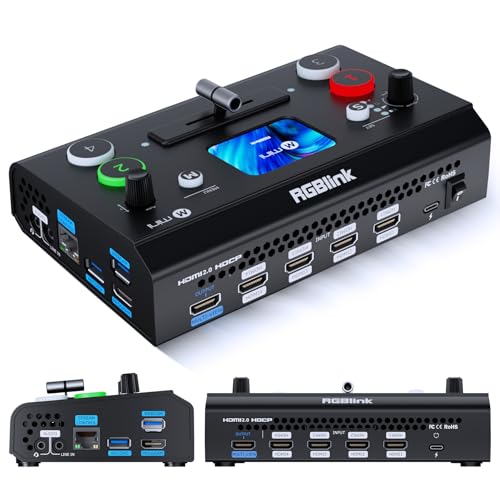
- Four HDMI inputs and dual HDMI outputs
- 2.1-inch touchscreen with T-bar control
- UVC webcam mode and optional creative tools
Best For: Compact entry-level multicamera streaming setups
Hybrid Production Powerhouse

- Four HDMI and four SDI inputs
- Records 8 ISO feeds plus PGM
- XLR audio and triple RTMP streaming
Best For: Mixed HDMI/SDI event and broadcast productions
PTZ Control Center

- Four HDMI and four SDI inputs
- Integrated control for up to 4 PTZ cameras
- NDI|HX3, IP streaming, and dual recording
Best For: PTZ-based events, worship, and conference production
Compact Streamer’s Deck
Osee GoStream Deck HDMI Switcher

- Four HDMI inputs with dual HDMI outputs
- Streams to 3 platforms and records locally
- T-bar, macros, overlays, and audio controls
Best For: Compact HDMI livestreams, podcasts, and events
Best Feature-Rich Pick
FoMaKo M6 4K HDMI/SDI Switcher

- 4K 60fps HDMI input support
- 10.1-inch multiview touchscreen
- PTZ, streaming, recording, and overlays
Best For: Complex multi-camera live productions
Best Portable Kit

- 14-inch integrated monitor
- Four HDMI/SDI inputs
- AC, DC, and USB power options
Best For: Mobile multi-camera streaming
Best Audio-Focused Option

- Four 4K HDMI and four 3G-SDI inputs
- Eight-channel audio mixing
- PTZ, UVC, RTMP/RTMPS, and NDI|HX2
Best For: Multi-camera productions with live audio mixing
Best All-Around Starter – Blackmagic ATEM Mini Pro
The Blackmagic Design ATEM Mini Pro is a practical choice for creators seeking a compact entry point into 4k video switchers. Its four HDMI inputs, multiview, built-in streaming, recording, and audio mixing support make it well suited to multicamera productions without requiring a large control surface.
Best For: Education, business presentations, livestreamed esports, and small multicamera broadcasts.
Pros:
- Four HDMI camera inputs with 10-bit 4:2:2 video support.
- Built-in multiview, streaming, recording, and a six-input, two-channel audio mixer.
- Includes multiple transition types, chroma key, upstream keys, and a downstream keyer.
Cons:
- Does not provide 4K switching; its listed HDMI workflow is designed around the ATEM Mini Pro platform.
- Audio connectivity is limited to two 3.5mm stereo analog inputs.
The ATEM Mini Pro offers a strong balance of switching, streaming, and audio features in a lightweight enclosure. Choose it when reliable HD production and straightforward HDMI connectivity matter more than 4K output.
Best for 4K60 Production – FoMaKo KC602 4K Video Mixer
The FoMaKo KC602 stands out among 4k video switchers for accepting 4K at 60 fps while providing 1080p60 output. Its built-in 5.5-inch display, PTZ control, streaming options, USB recording, and extensive audio features make it a versatile console for live production.
Best For: Churches, studios, professional livestreams, and events using multiple HDMI or PTZ cameras.
Pros:
- Supports 4K60 input and 4K loop-through, with 1080p60 program output.
- Controls up to four PTZ cameras and stores nine camera presets.
- Supports RTMP, RTMPS, UVC streaming, USB recording, and simultaneous streaming to up to three platforms.
- Provides XLR input, 48V phantom power, five-band EQ, and independent monitoring.
Cons:
- The primary listed program output is 1080p60 rather than 4K.
- Its broad control set may require more setup and learning than a basic HDMI switcher.
With its combination of 4K input handling, PTZ management, streaming, recording, and professional audio, the KC602 is aimed at users who want a more complete production hub. It is especially compelling when one operator needs access to video, cameras, and sound from the same panel.
Best for Mixed SDI and HDMI Sources – Osee GoStream Duet
Osee GoStream Duet Multiple Camera SDI and HDMI Live Stream Video Mixer Switcher
Check Price On AmazonThe Osee GoStream Duet is a flexible option for productions that combine SDI, HDMI, USB-C, NDI HX, and playback sources. Rather than focusing only on traditional 4k video switchers, it emphasizes broad input selection, portrait or landscape workflows, multiple control methods, and direct streaming to several platforms.
Best For: Live events and creators who need to mix SDI and HDMI cameras while keeping several streaming workflows available.
Pros:
- Supports four SDI inputs, four HDMI inputs, USB-C, NDI HX, and SD/SSD playback sources.
- Offers luma, chroma, and pattern keying, plus PIP, DSK, MIX, DIP, WIPE, and T-bar transitions.
- Can stream to up to three platforms through Ethernet or a smartphone hotspot and works with OBS and vMix.
- Supports landscape and portrait inputs and outputs.
Cons:
- The supplied notes do not specify 4K input or output support.
- NDI HX requires the latest firmware to unlock the included license.
- Its one-year manufacturer warranty is shorter than some extended-support offerings.
The GoStream Duet is best understood as a connectivity-focused live production mixer. Its SDI and HDMI flexibility makes it a practical choice for mixed-camera environments, particularly when streaming compatibility and varied source types are more important than a specifically stated 4K workflow.
Best Compact 4K Option – RGBlink Mini V3
The RGBlink Mini V3 is a compact 4k video switcher for entry-level multicamera streaming and production. It combines four HDMI inputs, a 2.1-inch touchscreen, professional T-bar control, dual HDMI outputs, UVC webcam mode, and optional creative features activated through TAO Cloud.
Best For: Compact desk-based productions, entry-level creators, and users who want HDMI switching with webcam connectivity.
Pros:
- Provides four HDMI inputs, dual 1080p HDMI outputs, and a touchscreen control interface.
- Supports UVC webcam mode for direct recognition by platforms such as YouTube and Facebook.
- Offers PIP layouts, chroma key overlays, 15 transitions, USB recording, and PTZ control options.
Cons:
- Recording and selected advanced features require optional TAO Cloud activation.
- Stable operation calls for a 35W or higher USB-C power adapter.
- The listed HDMI outputs are 1080p rather than 4K.
The Mini V3 is appealing when portability and simple HDMI-based operation are priorities. Before buying, account for the optional licensing model and power requirement, especially if you need recording, chroma key, logo overlays, or PTZ control.
Hybrid Production Powerhouse – Osee GoStream Duet 8 ISO
For demanding 4k video switchers workflows, the Osee GoStream Duet 8 ISO combines four HDMI 2.0 inputs with four 3G-SDI inputs. It accepts HDMI sources up to 4K60 while outputting at 1080p, making it a practical choice for mixed-camera productions that need flexible connectivity and extensive recording.
Best For: Churches, event crews, podcasts, and productions using both HDMI and SDI cameras.
Pros:
- Combines four HDMI and four SDI inputs in one switcher.
- Records eight ISO feeds plus the program output for post-production or recovery.
- Includes professional XLR audio inputs, phantom power, and built-in audio processing.
- Supports NDI|HX, SRT, RTMP, UVC, and streaming to up to three RTMP destinations.
Cons:
- Program output is limited to 1080p despite HDMI input support up to 4K60.
- The broad feature set may require more setup than a basic camera switcher.
The GoStream Duet 8 ISO stands out when production safety and source flexibility matter more than a simple plug-and-switch workflow. Its ISO recording, XLR audio, network video support, and layered graphics tools make it well suited to complex live productions.
PTZ Control Center – Tenveo PC500 4K60 Video Mixer
The Tenveo PC500 is a professional option among 4k video switchers for teams that need integrated switching, streaming, recording, and PTZ camera control. It accepts four HDMI sources, four SDI sources, USB video, and NDI|HX3, while providing 4K60 input and 1080p60 output.
Best For: Multi-camera productions using PTZ cameras for worship, conferences, education, sports, and live events.
Pros:
- Supports four HDMI inputs, four SDI inputs, USB input, and NDI|HX3.
- Provides integrated PTZ control with presets, cruise tracks, and camera parameter adjustments.
- Supports UVC and IP streaming through SRT, RTMP, RTSP, and NDI|HX3.
- Offers a built-in 5.5-inch screen plus USB and SD-card recording options.
Cons:
- Outputs are limited to 1080p60 even though some inputs support 4K60.
- Its professional controls and networking features may be more than casual users need.
Choose the PC500 if centralized PTZ operation is a priority. Its monitoring screen, web control, flexible outputs, and dual recording support create a capable production hub for installations where repeatable camera moves and remote operation are important.
Compact Streamer’s Deck – Osee GoStream Deck HDMI Switcher
The Osee GoStream Deck is a compact choice for creators comparing 4k video switchers for straightforward multi-camera streaming. Its four HDMI inputs, dual HDMI outputs, USB-C connectivity, Ethernet streaming, recording, playback, and hands-on control panel support a range of live production setups.
Best For: Podcasts, education, conferences, worship, weddings, and other small-to-medium live productions.
Pros:
- Connects four HDMI sources and two displays for multiview and monitoring.
- Streams to up to three platforms through Ethernet and supports USB output for OBS or vMix.
- Records program video to an SD card or USB SSD while playing MP4 media.
- Includes a physical T-bar, PVW/PGM buses, macros, audio controls, and keying tools.
Cons:
- Uses HDMI inputs rather than the HDMI/SDI combination found on larger production switchers.
- Its supplied notes do not specify 4K input or output support.
The GoStream Deck is a practical fit when ease of operation and streaming convenience outweigh the need for SDI or advanced ISO recording. The built-in controls, portrait and landscape modes, overlays, and direct recording make it useful for compact, repeatable productions.
Best Feature-Rich Pick – FoMaKo M6 4K HDMI/SDI Switcher
For buyers comparing 4k video switchers for church services, studios, education, or broadcast work, the FoMaKo M6 combines 4K inputs, SDI connectivity, touchscreen multiview monitoring, and integrated production controls in one portable system.
Best For: Multi-camera productions that need PTZ control, layered graphics, network streaming, and recording.
Pros:
- Accepts two 4K 60fps HDMI inputs, two 1080p 60fps HDMI inputs, and four 3G-SDI inputs.
- Includes a 10.1-inch multiview touchscreen, PTZ control, PIP, DSK, chroma keying, and more than 30 transitions.
- Supports dual RTMP/SRT streaming, network stream input, simultaneous recording, and HDMI/SDI program outputs.
Cons:
- Output is limited to 1080p 60fps despite supporting 4K inputs.
- NDI functionality requires an optional upgrade.
The M6 is a strong fit when an operator needs a broad toolset without relying entirely on computer software. Its combination of PTZ operation, media playback, recording, and layered output makes it especially capable for complex live productions.
Best Portable Kit – Osee GoStream Duet Kit
Among 4k video switchers designed for mobile production, the Osee GoStream Duet Kit stands out as a self-contained package with a 14-inch monitor, camera connectivity, mounting plates, and flexible power options for on-location streaming.
Best For: Portable multi-camera streaming setups using HDMI/SDI cameras, USB devices, OBS, vMix, or Zoom.
Pros:
- Includes the switcher, 14-inch 1080×1920 display, silent fan, and three expandable cheese plates.
- Provides four HDMI/SDI inputs, two HDMI outputs, and two USB ports for cameras or streaming software.
- Supports AC, DC, or USB power-bank operation and can provide USB DC 5V power to another device.
Cons:
- The kit weighs about 5 kg, or approximately 12 pounds, so it is portable but not especially lightweight.
- The supplied notes do not specify 4K output resolution.
This kit is appealing when convenience and portability matter more than building a system from separate components. Its integrated screen, mounting hardware, and multiple power choices make it practical for field productions and compact streaming stations.
Best Audio-Focused Option – RGBlink mini-Edge SDI
For creators seeking 4k video switchers with stronger audio and streaming integration, the RGBlink mini-Edge SDI combines 4K HDMI inputs, 3G-SDI inputs, PTZ control, USB streaming, network production, and an eight-channel audio mixer.
Best For: Podcasts, worship services, corporate events, and content studios that need integrated audio mixing with multi-camera switching.
Pros:
- Offers four 4K HDMI inputs and four 3G-SDI inputs for cameras ranging from DSLRs to broadcast equipment.
- Includes Line In, Mic In, UAC, and Bluetooth audio inputs with real-time mixing.
- Supports UVC streaming, RTMP/RTMPS, NDI|HX2, dual 2K HDMI outputs, PTZ control, and web-based remote operation.
Cons:
- The built-in display is a relatively compact 5.5 inches.
- The supplied notes recommend upgrading to the newest firmware before use.
The mini-Edge SDI is a versatile choice for productions where synchronized audio is as important as video switching. Its connectivity and remote-control features suit both fixed studios and on-site events, while the compact screen keeps the unit portable.
How We Picked the Best 4K Video Switchers
We selected these 4K Video Switchers based on the features that matter most in real-world production: input types, supported resolutions and frame rates, switching responsiveness, audio connectivity, recording and streaming options, monitoring, portability, and overall workflow flexibility. The list includes compact HDMI units for creators as well as larger HDMI/SDI systems for studios, events, and professional crews.
Because product specifications and firmware capabilities can vary, confirm the manufacturer’s current compatibility details before buying—especially when mixing cameras, computers, PTZ systems, and external audio equipment.
Quick Comparison
| Best For | Look For |
|---|---|
| Portable streaming | Compact design, USB output, built-in display, and simple controls |
| Multi-camera HDMI setups | Four or more HDMI inputs, multiview, and dependable 1080p output |
| Professional production | SDI connectivity, XLR audio, ISO recording, and robust monitoring |
| PTZ and networked workflows | PTZ control, NDI, cloud management, or UVC compatibility |
| High-resolution sources | 4K input support, suitable frame-rate handling, and reliable scaling |
Key Buying Factors for 4K Video Switchers
Inputs and Signal Compatibility
Start with the cameras and sources you already own. HDMI is common for mirrorless cameras, camcorders, and computers, while SDI is better suited to longer cable runs and professional environments. Check whether the switcher accepts the exact resolution and frame rate from each source; 4K input support does not always mean 4K program output.
Output Resolution and Scaling
Many switchers accept 4K signals but produce a 1080p stream or recording. That can be ideal for live platforms, which commonly prioritize 1080p compatibility and bandwidth efficiency. If you need a 4K master, verify that the device supports 4K output or recording rather than only 4K pass-through.
Audio and Recording
Built-in audio mixing is useful for microphones, cameras, and playback sources. XLR inputs are preferable for professional microphones, while 3.5mm inputs may suit smaller setups. ISO recording can preserve individual camera feeds for post-production, but it typically requires more storage and a more involved workflow.
Control and Monitoring
A multiview screen helps you monitor every source, preview, and program feed at once. Touchscreens, physical transition controls, macros, cloud management, and PTZ control can reduce operator workload. Consider whether you prefer hands-on hardware controls or software-based operation.
Who Should Buy Which 4K Video Switchers?
Solo creators and mobile streamers should prioritize compact HDMI switchers with USB output, built-in monitoring, and straightforward controls. Small production teams may benefit from four-input HDMI models with audio mixing and recording. Event producers, houses of worship, and studios should look for SDI support, XLR audio, multiview, and dependable long-cable performance.
Choose an ISO-capable system if you expect to edit camera angles after recording. PTZ operators and networked studios should focus on NDI, remote control, or cloud features. Finally, do not pay for 4K capability alone: match the switcher’s inputs, outputs, recording format, and control system to the cameras and production workflow you will actually use.