
Choosing among camera external recorders with SDI input depends on more than resolution. Your ideal setup may need a portable monitor, broadcast deck, computer capture interface, or standalone streaming encoder.
We selected 10 options covering on-camera recording, 3G and 12G-SDI capture, studio playback, live production, and professional streaming. Use the guide below to match connectivity, recording format, and workflow to your production needs.
Best 10 Camera External Recorders with Sdi Input Picks for 2026
Premium Camera-to-Cloud Pick

- Locking 12G-SDI and HDMI 2.0 I/O
- 8K30 ProRes RAW recording support
- 1500-nit touchscreen with Wi-Fi 6
Best For: Connected professional camera productions
Best Standalone SDI Streaming Encoder
Magewell Ultra Encode SDI Plus

- 4K SDI encoding up to 4096×2160p30
- Multi-protocol and multi-destination streaming
- Simultaneous internal, USB, or network recording
Best For: Professional live streaming and IP workflows
Best Monitoring and Scopes Package

- 5-inch Full HD LCD touchscreen monitor
- Professional scopes and focus assist
- 3D LUT and HDR support
Best For: Portable image monitoring and exposure evaluation
Best Budget SDI Field Recorder

- 3G-SDI input and output with HDMI conversion
- USB MP4 recording up to 1080p30
- 6-inch 1080p touchscreen with monitoring scopes
Best For: Affordable field monitoring and basic recording
Professional 12G-SDI Deck

- 12G-SDI and HDMI 2.0 inputs
- Records to SSD, SD, and UHS-II media
- Supports ProRes, DNxHD, and 10-bit codecs
Best For: Professional 4K production and broadcast-style recording
Compact SDI-to-USB Capture
AVMATRIX UC2018 Video Capture Card

- SDI and HDMI inputs up to 1080p60
- USB 3.0 Type-C computer output
- Works with OBS, Zoom, Teams, and more
Best For: Computer-based streaming, conferencing, and recording
Compact HD Recording Deck
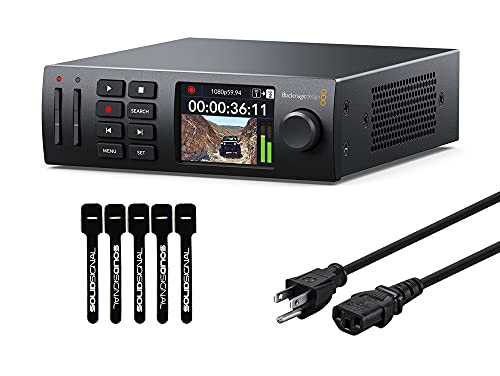
- 3G-SDI input and output for HD workflows
- Records H.264, ProRes, and DNxHD
- Compact 1/3-rack design with USB webcam mode
Best For: Compact HD production and streaming setups
Compact 3G-SDI Capture
UltraStudio Express Recorder 3G

- HDMI and 3G-SDI inputs
- 10-bit video support
- Compact 100 g design
Best For: Portable computer-based capture and streaming
Internal HD Capture Card

- SDI capture for personal computers
- Up to 16 embedded SDI audio channels
- Includes low-profile slot bracket
Best For: Desktop SDI capture installations
UHD 4K60 SDI Capture

- 12G-SDI and HDMI inputs
- Supports UHD 4K60
- Thunderbolt 4 computer output
Best For: High-bandwidth 4K production workflows
Premium Camera-to-Cloud Pick – Atomos Ninja TX
For camera external recorders with SDI input, the Atomos Ninja TX combines a locking 12G-SDI connection with a bright touchscreen monitor and versatile recording options. It is a strong fit when you need professional monitoring, recording, and connected production features in one compact unit.
Best For: Camera operators needing 12G-SDI recording, on-camera monitoring, and cloud-connected workflows.
Pros:
- Locking 12G-SDI and HDMI 2.0 input/output support.
- Records ProRes RAW, ProRes, Avid DNx, and H.265/H.264 formats.
- Bright 1500-cd/m² 5.2-inch touchscreen with Wi-Fi 6 and timecode sync.
- Supports recording up to 8K30 ProRes RAW and includes cross conversion.
Cons:
- CFexpress Type B media is required for recording.
- Its feature-rich design may be more than basic monitoring setups need.
- The L-Series battery is not included in the supplied specifications.
The Ninja TX is the most advanced monitor-recorder here for productions that value high-resolution recording, robust SDI connectivity, and integrated uploading. Its professional feature set makes it especially compelling for demanding camera-to-cloud workflows.
Best Standalone SDI Streaming Encoder – Magewell Ultra Encode SDI Plus
Among camera external recorders with SDI input, the Magewell Ultra Encode SDI Plus stands out as a standalone 4K encoder built for streaming and contribution. It can encode SDI video while recording internally, to USB storage, or to network locations.
Best For: Live production teams, broadcasters, and AV operators that need SDI streaming, recording, and IP workflow support.
Pros:
- Encodes SDI video up to 4096×2160p30 using H.264 or H.265.
- Supports RTMP, RTMPS, SRT, NDI|HX, HLS, and TS over UDP/RTP.
- Records simultaneously to 128GB internal storage, USB, or network locations.
- Includes Gigabit Ethernet with PoE, Wi-Fi, overlays, and scheduled recording.
Cons:
- It is an encoder rather than a portable touchscreen field monitor.
- 4G/5G modem support requires a modem purchased separately.
- Its professional networking features may be unnecessary for simple local recording.
The Ultra Encode SDI Plus is a specialized choice for moving SDI sources into streaming and IP environments. Choose it when protocol flexibility, simultaneous recording, and standalone operation matter more than an on-camera display.
Best Monitoring and Scopes Package – Blackmagic Video Assist 5” 3G
Blackmagic Design Video Assist 5'' 3G Portable Monitor, Recorder, Scope, and Viewfinder
Check Price On AmazonFor shoppers comparing camera external recorders with SDI input, the Blackmagic Design Video Assist 5” 3G is a compact monitor-recorder focused on field viewing and image evaluation. Its 1080p LCD includes professional scopes, focus assist, 3D LUTs, and HDR support.
Best For: Camera crews that prioritize accurate monitoring, exposure tools, and portable 1080p viewing.
Pros:
- Portable 5-inch 1920×1080 LCD display.
- Includes professional scopes and focus-assist tools.
- Supports 3D LUTs and HDR picture enhancement.
- Offers HDMI connectivity with two HDMI ports listed.
Cons:
- The supplied notes do not specify an SDI input for this particular model.
- Its display resolution is limited to Full HD 1080p.
- The listed brightness and connectivity details may not suit every outdoor setup.
The Video Assist 5” 3G is best approached as a monitoring-first tool with recording capability. Verify the exact input configuration before buying if SDI connectivity is a firm requirement, since the supplied specifications identify HDMI hardware but do not clearly list SDI input.
Best Budget SDI Field Recorder – FEELWORLD CUT6S
The FEELWORLD CUT6S is a practical option among camera external recorders with SDI input, pairing a 6-inch 1080p touchscreen with 3G-SDI input/output and USB recording. It also supports SDI-to-HDMI conversion for multi-person monitoring.
Best For: DSLR and field-camera users who want affordable SDI monitoring, basic MP4 recording, and signal conversion.
Pros:
- Includes 3G-SDI input and output plus HDMI input.
- Records compatible video up to 1080p30 in MP4 format to FAT32 USB storage.
- 6-inch 1920×1080 touchscreen with waveform, histogram, vectorscope, and other monitoring tools.
- Supports SDI-to-HDMI conversion and simultaneous HDMI and SDI output.
Cons:
- USB recording is limited to compatible 1080p30 video.
- USB flash storage and NP-F battery are not included.
- The display is rated at 450 nits, which may be modest in bright outdoor conditions.
The CUT6S offers a useful balance of SDI connectivity, monitoring tools, and simple USB recording. It is a sensible pick for budget-conscious crews, provided its 1080p30 recording limit and separate battery requirement fit the workflow.
Professional 12G-SDI Deck – HyperDeck Studio 4K Pro
For demanding camera external recorders with SDI input, the Blackmagic Design HyperDeck Studio 4K Pro is a full-size 1 RU deck built for Ultra HD workflows. It accepts 12G-SDI and HDMI 2.0, records to SD cards, UHS-II cards, or its two SSD slots, and supports a broad selection of professional codecs.
Best For: Production teams needing a feature-rich 4K recorder with multiple media options, embedded audio support, timecode, reference, and professional device control.
Pros:
- 12G-SDI and HDMI 2.0 inputs support Ultra HD recording workflows.
- Records ProRes, DNxHD, uncompressed, and 10-bit 4:2:2 H.264/H.265 formats.
- Offers two SSD slots, two SD card slots, USB Type-C output, timecode, reference, and RS-422.
- Includes a jog wheel, front-panel controls, speaker, and 2.2-inch LCD.
Cons:
- Its 1 RU design and 8.1-pound weight are less portable than compact capture devices.
- Power cord is not included.
- The extensive professional I/O may be more than a basic recording setup requires.
This is the strongest choice here for advanced 4K and broadcast-style recording, especially when flexible storage and extensive connectivity matter more than compact size.
Compact SDI-to-USB Capture – AVMATRIX UC2018 Video Capture Card
If you need camera external recorders with SDI input for streaming or computer-based recording, the AVMATRIX UC2018 is a compact capture card rather than a standalone deck. It accepts SDI or HDMI, adds a 3.5mm audio input, and sends uncompressed YUY2 video to a computer over USB 3.0 at up to 1080p60.
Best For: Streamers, educators, churches, telemedicine users, and conference setups that need an SDI or HDMI camera feed in OBS, Zoom, Teams, or similar software.
Pros:
- Supports SDI and HDMI input with automatic signal detection up to 1080p60.
- Provides USB 3.0 Type-C output with uncompressed YUY2 video and audio capture.
- Driver-free compatibility includes Windows, macOS, and Linux.
- Small 92 x 58 x 19 mm design weighs about 205 g.
Cons:
- It relies on a connected computer and recording software rather than internal media storage.
- Resolution is limited to 1080p60.
- USB 3.0 output and YUY2 workflow may not suit users seeking a standalone broadcast recorder.
The UC2018 is a practical, portable bridge between an SDI camera and a computer. Choose it for live production and software recording, not for an independent field deck.
Compact HD Recording Deck – HyperDeck Studio HD Mini
For HD-focused camera external recorders with SDI input, the Blackmagic Design HyperDeck Studio HD Mini offers a compact 1/3-rack design with 3G-SDI input and output. It records H.264, ProRes, or DNxHD to SD or UHS-II cards and can also use external USB disks for supported workflows.
Best For: Small production environments, presenters, and videographers who want a dedicated HD deck with front-panel controls, timecode, reference, and USB webcam functionality.
Pros:
- Compact 1/3-rack form factor is easier to integrate into smaller setups.
- Records SD and HD formats up to 1080p60 using H.264, ProRes, or DNxHD.
- Includes 3G-SDI input and output, HDMI output, timecode, and reference connections.
- USB webcam mode works with software such as Zoom, Microsoft Teams, Skype, OBS, and XSplit.
Cons:
- It is an HD recorder and does not provide the 4K capabilities of the HyperDeck Studio 4K Pro.
- Storage media options are limited compared with a deck offering multiple SSD slots.
- The bundle’s included cable ties add convenience but do not expand recording functionality.
This mini deck is a sensible middle ground for HD production: more self-contained than a USB capture card, but smaller and less capable than a professional 4K rack deck.
Compact 3G-SDI Capture – UltraStudio Express Recorder 3G
The Blackmagic Design UltraStudio Express Recorder 3G is a practical choice when you need camera external recorders with SDI input in a compact, pocket-friendly format. It accepts 3G-SDI and HDMI video, supports 10-bit video, and works with computers, live-streaming software, and DaVinci Resolve.
Best For: Compact SDI/HDMI capture setups, computer-based recording, and live streaming.
Pros:
- Provides both HDMI and 3G-SDI video inputs.
- Supports 10-bit video and SDI speeds from 270Mbit through 3G.
- Compatible with DaVinci Resolve and live-streaming software.
- Compact 4.53-by-2.76-by-1.38-inch design weighing 100 g.
Cons:
- Its SDI capability is limited to 3G rather than higher-speed SDI formats.
- Requires a compatible computer-based workflow for recording or streaming.
Choose this model if portability and flexible HDMI/3G-SDI connectivity matter more than UHD capture. Its compact enclosure and software compatibility make it a straightforward option for mobile or desktop production.
Internal HD Capture Card – DeckLink Mini Recorder HD
The Blackmagic Design DeckLink Mini Recorder HD is an internal capture option for buyers comparing camera external recorders with SDI input for a personal computer. It features SDI audio input with up to 16 embedded channels and is supplied with a low-profile slot bracket for flexible installation.
Best For: Desktop computer systems that need an internal SDI capture card with embedded audio support.
Pros:
- Designed for personal-computer capture workflows.
- Supports SDI audio with up to 16 embedded channels.
- Includes a low-profile slot bracket.
- Compact 5.25-by-5.25-by-1-inch package weighing 60 g.
Cons:
- Its supplied connectivity details emphasize SDI rather than a broad range of external interfaces.
- Installation requires a compatible computer and available slot.
This is a sensible fit for a fixed desktop setup rather than a portable recorder. Consider it when embedded SDI audio and low-profile computer installation are priorities.
UHD 4K60 SDI Capture – UltraStudio Mini Recorder 12G
The Blackmagic Design UltraStudio Mini Recorder 12G is aimed at demanding camera external recorders with SDI input workflows. Its 12G-SDI and HDMI inputs support common video codecs up to UHD 4K60, while Thunderbolt 4 output connects the recorder to a computer for use with DaVinci Resolve, Wirecast, vMix, OBS, and other popular software.
Best For: UHD 4K60 capture and higher-bandwidth computer-based production workflows.
Pros:
- Offers 12G-SDI and HDMI inputs.
- Supports common video codecs up to UHD 4K60.
- Provides Thunderbolt 4 output to a computer.
- Supports uncompressed and compressed 10-bit 4:2:2 YUV and 4:4:4 RGB quality.
Cons:
- Its listed package weight is 2 pounds, making it less appealing for lightweight mobile kits.
- Requires a Thunderbolt 4 computer connection for the stated output workflow.
For 4K production, this model is the strongest match in the group because its 12G-SDI input and UHD 4K60 support provide substantially more bandwidth than a 3G-SDI device. It is best suited to a capable computer-based studio or production setup.
How We Picked the Best Camera External Recorders with Sdi Input
We focused on products that accept SDI signals and serve a clear production role, from compact field monitors to rack-style broadcast recorders and computer-based capture devices. Our selection considers SDI generation, supported video formats, recording or capture method, monitoring features, portability, power options, and workflow compatibility.
Because these products are not interchangeable, we included both standalone units and interfaces that rely on a computer or other recording system. Before buying, confirm that the recorder’s SDI standard matches your camera, switcher, or playback source.
Quick Comparison
| Workflow | Best fit | What to prioritize |
|---|---|---|
| Run-and-gun filmmaking | On-camera monitor/recorder | Portability, display quality, battery support, and recording codecs |
| Studio or broadcast recording | Deck-style recorder | Rack or desktop connectivity, reliable media, timecode, and format support |
| Computer capture | USB or Thunderbolt interface | Host compatibility, driver support, latency, and input format |
| Live streaming | Standalone SDI encoder | Network protocols, encoding controls, recording, and remote management |
Key Buying Factors for Camera External Recorders with Sdi Input
SDI Standard and Resolution
Check whether you need 3G-SDI for HD production, 6G or 12G-SDI for higher-bandwidth 4K workflows, or a device that can handle multiple formats. A 4K-capable recorder may still require compatible cables, frame rates, and source output settings.
Recording Versus Capture
Standalone recorders save video to internal or removable media without a computer. Capture interfaces generally send the SDI signal to software such as a production switcher, editing application, or video-conferencing platform. Choose based on where you want the recording to live.
Codec, Media, and Storage
For editing, prioritize recording formats that preserve image quality and integrate with your software. Confirm supported cards, SSDs, storage capacities, sustained write speeds, and maximum clip duration. High-bitrate 4K files require considerably more storage than compressed HD recordings.
Monitoring and Production Features
Field monitors may add scopes, focus aids, LUT support, touch controls, and camera-to-cloud tools. Studio units may emphasize playback, timecode, reference monitoring, and dependable signal handling. Streaming encoders should be evaluated for protocol support, audio inputs, and network reliability.
Power, Audio, and System Compatibility
For location work, verify battery type, charging options, heat management, and screen brightness. For computer capture, check operating-system support, USB or Thunderbolt requirements, driver availability, and whether embedded or line-level audio is supported.
Who Should Buy Which Camera External Recorders with Sdi Input?
Choose a compact monitor/recorder if you need camera-mounted monitoring and quick field recording. Select a HyperDeck-style device for studio, broadcast, or playback workflows where stable media handling and dedicated connections matter. A USB or Thunderbolt capture interface is better for editing, streaming, conferencing, or switching through a computer. Choose a standalone SDI encoder when you need network streaming or recording without dedicating a computer to the signal path.
Finally, match the recorder to your entire chain—not just the camera. Confirm SDI level, resolution, frame rate, audio routing, storage, and required software before ordering.