
The best camera external recorders with touchscreens combine a larger viewing surface with dependable video capture, giving filmmakers more control than a camera’s built-in display. They can also add monitoring tools, better codecs, and streamlined recording workflows.
This roundup covers compact HDMI recorders, SDI-capable field monitors, analog capture devices, and professional Atomos and Blackmagic options. Match the recorder’s inputs, recording format, storage, and power needs to your camera and production style.
Best 10 Camera External Recorders with Touchscreens Picks for 2026
Best ProRes Workflow

- 1500-nit 5.2-inch HDR touchscreen
- Records ProRes and ProRes RAW
- Camera control and professional scopes
Best For: Mobile ProRes RAW production with compatible HDMI cameras
Best Analog Capture Value

- 2.4-inch built-in LCD
- Records analog video to microSD
- Supports PAL and NTSC capture
Best For: Tape digitization and compact AV or FPV recording
Best Large-Screen Monitor

- 7-inch 1280×800 touchscreen
- Focus, zebra, histogram, and false color tools
- 300g body with HDMI and flexible power
Best For: Accessible framing and exposure monitoring on camera rigs
Best Bright 5-Inch Production Monitor
Blackmagic Video Assist 5'' 3G

- 2500-nit 5-inch Full HD LCD
- Integrated monitor, recorder, scope, and viewfinder
- HDR, 3D LUTs, and focus assist
Best For: Bright, feature-rich production monitoring in a portable form
Best Budget SDI Monitor-Recorder
FEELWORLD CUT6S 6" Touchscreen

- 6-inch 1920×1080 touchscreen
- USB recording up to 1080p30
- 3G-SDI and HDMI monitoring connections
Best For: Affordable DSLR and video-camera monitoring with basic USB recording
Best All-in-One Vlogging Camera

- 8K video and 48MP still photos
- Wi-Fi sharing and webcam mode
- Night vision, fill light, and touchscreen
Best For: Beginner vloggers seeking a compact, feature-rich camera
Best Professional HDMI Recorder

- 1500-nit touchscreen display
- Up to 6K RAW recording
- ProRes, DNx, H.265, and H.264 support
Best For: Advanced creators needing professional HDMI recording and monitoring
Compact Monitoring Value
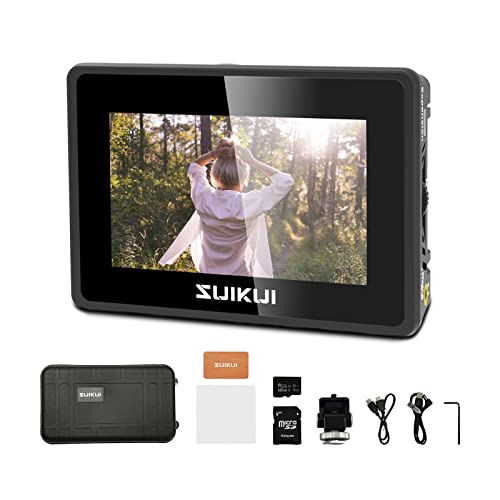
- 1080p30 H.264 recording without a stated limit
- 3.5-inch, 600-nit preview LCD
- Waveform, peaking, zebra, and focus tools
Best For: Lightweight HDMI monitoring and basic camera recording
Connected Pro Workflow
Atomos Ninja TX 5.2-inch Recorder

- 1500-nit 1920 x 1080 IPS touchscreen
- 4K60 HDMI and 12G-SDI input/output
- ProRes, DNx, H.265/H.264, and 8K30 RAW support
Best For: Professional recording and camera-to-cloud workflows
Outdoor RAW Production Kit
Atomos Ninja RAW HDMI Recorder

- 1500-nit Full HD HDR touchscreen
- 6K30 ProRes RAW recording
- Bundle includes batteries, cables, bag, and tripod
Best For: Portable filmmaking and high-quality RAW capture
Best ProRes Workflow – Atomos Ninja RAW
For camera external recorders with touchscreens, the Atomos Ninja RAW is a strong choice when you need a bright monitoring display plus professional recording and camera-control features. Its 5.2-inch HDR touchscreen reaches 1500 nits and records formats including ProRes and ProRes RAW to CFexpress Type B media or compatible USB-C storage.
Best For: Mirrorless and HDMI-camera users building a mobile ProRes RAW production setup.
Pros:
- Bright 1500-nit HDR touchscreen with 1920×1080 resolution
- Records ProRes, ProRes RAW, ProRes RAW HQ, ProRes LT, 422, and 422 HQ
- Camera control supports start/stop, ISO, shutter, aperture, and white balance
- Includes waveform, focus peaking, EL Zone false color, and Onion Skin tools
Cons:
- CFexpress media and some external storage or networking accessories are sold separately
- ProRes RAW functionality depends on camera compatibility
The Ninja RAW is more than a viewing monitor: it combines a high-visibility touchscreen, extensive scopes, camera control, and flexible power options. It is particularly well suited to creators who need an advanced recorder for real-world production work.
Best Analog Capture Value – PowerPlay DVR Video Recorder
Among camera external recorders with touchscreens, the PowerPlay DVR is aimed at compact AV capture and tape digitization rather than high-end cinema recording. It records analog video to microSD cards and includes a built-in 2.4-inch LCD for checking footage during portable transfers or FPV use.
Best For: Digitizing VHS, 8mm, Hi8, MiniDV, and Digital8 footage or recording compatible AV sources on the go.
Pros:
- Built-in 2.4-inch 640×480 RGB LCD screen
- Records PAL at 720×576 and NTSC at 720×480, with up to 50fps or 60fps respectively
- Supports microSD cards up to 512GB Class 10
- Compact design includes a clip mount and rechargeable-battery support
Cons:
- Captures SD-resolution video rather than Full HD
- Battery cells are not included
- Uses AV connectivity, limiting compatibility with modern HDMI camera setups
The PowerPlay DVR is a practical specialist recorder for analog sources and lightweight field capture. Its small screen and clip mount add convenience, but it is not the right fit for users seeking HDMI monitoring or cinema-grade recording formats.
Best Large-Screen Monitor – FEELWORLD FW759 PRO
The FEELWORLD FW759 PRO is a useful option for shoppers comparing camera external recorders with touchscreens who primarily need a larger on-camera viewing display. Its 7-inch 1280×800 IPS touchscreen helps with framing and focus, while HDMI connectivity and flexible power options support DSLR, mirrorless, and camcorder rigs.
Best For: Beginners, vloggers, interviews, livestreams, and handheld or gimbal setups that need a larger monitor.
Pros:
- Large 7-inch 1280×800 touchscreen for easier framing
- Includes histogram, zebra pattern, focus assist, and false color tools
- Lightweight 300g design with included sunshade
- Supports NP-F battery, DC, or Type-C power
Cons:
- Supplied notes describe monitoring features but do not specify onboard recording
- 400-nit brightness may be less suited to very bright outdoor conditions than higher-output displays
The FW759 PRO makes a compelling case when screen size and basic exposure assistance matter more than integrated recording. It can improve focus and composition on compatible HDMI camera rigs without adding a particularly heavy monitor.
Best Bright 5-Inch Production Monitor – Blackmagic Video Assist 5'' 3G
Blackmagic Design Video Assist 5'' 3G Portable Monitor, Recorder, Scope, and Viewfinder
Check Price On AmazonThe Blackmagic Design Video Assist 5” 3G combines a portable touchscreen monitor, recorder, scope, and viewfinder in one unit. For camera external recorders with touchscreens, its 5-inch Full HD display, 2500-nit brightness, HDR support, 3D LUTs, and professional scopes make it suited to demanding monitoring workflows.
Best For: Production users who want a highly bright monitor with recording, viewfinder, scope, and focus-assist functions.
Pros:
- Very bright 2500-nit 5-inch LCD touchscreen display
- Combines monitor, recorder, scope, and viewfinder functions
- Supports HDR and 3D LUTs for advanced image monitoring
- Includes professional scopes and focus-assist features
Cons:
- At 771g, it is heavier than many compact field monitors
- Supplied details do not specify recording formats or included media
The Video Assist 5” 3G is a strong all-in-one choice when visibility and monitoring tools are priorities. Its high brightness should help in challenging conditions, while the integrated recorder and scopes reduce the need for separate accessories.
Best Budget SDI Monitor-Recorder – FEELWORLD CUT6S 6" Touchscreen
For filmmakers who need camera external recorders with touchscreens without moving to a high-end codec system, the FEELWORLD CUT6S combines a 6-inch Full HD display with basic USB recording. It can record compatible video up to 1080p30 in MP4 to a FAT32 USB flash drive, while its SDI and HDMI connections support flexible monitoring setups.
Best For: DSLR and video-camera users who want an affordable touchscreen monitor with USB recording, SDI connectivity, and exposure-assist tools.
Pros:
- 6-inch 1920×1080 touchscreen provides a clear monitoring image.
- Records up to 1080p30 in MP4 to a FAT32 USB flash drive.
- Includes 3G-SDI input/output, HDMI input, and SDI-to-HDMI routing.
- Offers waveform, RGB parade, vectorscope, and histogram tools.
Cons:
- USB recording is limited to compatible 1080p30 video and FAT32 drives.
- NP-F battery is not included in this package.
- HDMI output supports up to 1080p60, despite HDMI input supporting 4K 60Hz.
The CUT6S is a practical choice when monitoring and straightforward USB recording matter more than advanced RAW workflows. Verify your camera’s signal compatibility and plan for a separate NP-F battery before shooting.
Best All-in-One Vlogging Camera – WIKICO 8K 48MP Touchscreen
The WIKICO A06-2 is a handheld camera rather than a standalone recorder, but its built-in touchscreen and MP4 recording make it relevant for shoppers comparing camera external recorders with touchscreens. It targets beginners with 8K video capture, 48MP photos, Wi-Fi sharing, webcam functionality, and a compact feature set.
Best For: Beginner vloggers who want one compact camera for handheld recording, webcam use, and quick wireless sharing.
Pros:
- Supports up to 8K video at 15FPS and 48MP still photos.
- Built-in touchscreen, 18x digital zoom, infrared night vision, and fill light.
- Wi-Fi supports mobile transfers, while webcam mode expands its use.
- Can record while charging and includes digital image stabilization.
Cons:
- Its 60-minute average battery life may require frequent recharging.
- Uses manual focus and digital rather than optical stabilization.
- The 3-inch display is listed at FHD resolution, smaller than dedicated field monitors.
This camera suits entry-level creators who prioritize convenience and built-in features over a professional external recording workflow. Its touchscreen, Wi-Fi, and webcam mode make it versatile, while the compact design keeps setup simple.
Best Professional HDMI Recorder – Atomos Ninja TX GO 5-inch
Atomos Ninja TX GO 5-inch Camera Monitor-Recorder, HDMI CFexpress Wi-Fi HDR Touchscreen ProRes RAW
Check Price On AmazonThe Atomos Ninja TX GO is a purpose-built option for shoppers seeking camera external recorders with touchscreens and professional post-production support. Its bright 5-inch touchscreen pairs with HDMI input/output, Wi-Fi 6E, and recording to CFexpress Type B or USB-C storage in ProRes, ProRes RAW, Avid DNx, H.265, or H.264.
Best For: Professional and advanced creators who need touchscreen monitoring, RAW-capable recording, broad codec support, and modern network or cloud workflows.
Pros:
- Super-bright 1500-nit 5-inch touchscreen supports outdoor monitoring.
- Records up to 6K RAW to CFexpress Type B or USB-C storage.
- Supports ProRes, ProRes RAW, Avid DNx, H.265, and H.264.
- Includes HDMI I/O, Wi-Fi 6E, NDI streaming support, and camera-control features.
Cons:
- Compatible storage, network adapters, calibration probes, and some cloud services may be additional purchases.
- It is more specialized and potentially more complex than a basic USB monitor-recorder.
- Power options require USB-C, an NP-F battery, or an AC adapter.
The Ninja TX GO is the strongest fit here for production teams that need high-quality recording formats and a bright, capable monitoring interface. Its storage and accessory requirements should be included in the overall system budget.
Compact Monitoring Value – RH35 HDMI Recorder
For buyers comparing camera external recorders with touchscreens, the RH35 is a compact HDMI monitor/recorder focused on straightforward 1080p capture. It records H.264 video at 1080p30 without a stated recording limit and supports microSD cards or USB flash drives.
Best For: Camera operators who want a lightweight 3.5-inch preview monitor with basic recording and exposure-assist tools.
Pros:
- Accepts 1080p60 HDMI input/output and records 1080p30 H.264 video.
- Includes peaking, zebra, waveform, focus assist, exposure assist, and false color.
- Lightweight 3.5-inch design with 600-nit brightness and 178-degree viewing angle.
Cons:
- The 800 x 480 display is less detailed than the Full HD panels on the Atomos models.
- Its notes do not identify a touchscreen interface.
The RH35 prioritizes portability and essential monitoring features over a high-resolution display or advanced production workflow. It is a practical entry-level option when simple HDMI recording is the main goal.
Connected Pro Workflow – Atomos Ninja TX 5.2-inch Recorder
The Atomos Ninja TX is a professional choice among camera external recorders with touchscreens, combining a 5.2-inch 1920 x 1080 IPS touchscreen with 4K60 HDMI and 12G-SDI connectivity. It records to CFexpress Type B media and adds Wi-Fi, timecode synchronization, and uploading features.
Best For: Filmmakers and production teams needing a bright touchscreen recorder with multiple codecs and connected workflow features.
Pros:
- 1500-nit Full HD touchscreen designed for visibility in bright conditions.
- Supports 4K60 input/output, 12G-SDI, HDMI 2.0, and NDI functionality.
- Records Apple ProRes, Avid DNx, H.265/H.264, and 8K30 ProRes RAW.
- Includes Wi-Fi 6, timecode synchronization, uploading, and cross conversion.
Cons:
- Its professional features and CFexpress Type B recording require a more involved setup.
- The supplied notes do not specify included recording media.
With broad connectivity, a bright touchscreen, and several recording formats, the Ninja TX is aimed at demanding production environments rather than casual monitoring. Its connected features can also help streamline camera-to-cloud workflows.
Outdoor RAW Production Kit – Atomos Ninja RAW HDMI Recorder
The Atomos Ninja RAW pairs a bright 5.2-inch Full HD touchscreen with HDMI monitoring and recording for filmmakers who need a portable on-set display. It supports 6K30 ProRes RAW recording, CFexpress Type B media, HDR, and locking HDMI 2.0 connections.
Best For: Filmmakers, videographers, and content creators who want high-quality RAW recording with a ready-to-use accessory bundle.
Pros:
- 1500-nit touchscreen with HDR support helps with outdoor viewing and monitoring.
- Records 6K30 ProRes RAW for flexible post-production workflows.
- Includes two replacement batteries, cables, a camera bag, flexible tripod, and cleaning kit.
- Uses locking HDMI 2.0 and CFexpress Type B recording for a professional setup.
Cons:
- The supplied details identify HDMI connectivity but do not list SDI inputs or outputs.
- Its 4-pound listed item weight may be less convenient for lightweight rigs.
The Ninja RAW stands out for combining a daylight-friendly touchscreen and RAW capture with a generous bundle of accessories. It is a strong fit for creators who value image flexibility and want several setup essentials included.
How We Picked These Camera External Recorders with Touchscreens
We selected models across several real-world use cases, including mirrorless filmmaking, DSLR monitoring, FPV and camcorder capture, live production, and camera-to-cloud workflows. The comparison considers recording capability, input compatibility, screen usability, monitoring features, portability, and the practicality of each device’s storage and power setup.
Not every product serves the same buyer. Some are dedicated monitor-recorders for professional codecs, while others are simpler capture devices or cameras with built-in recording features. Check the specifications carefully before assuming that every touchscreen model records the same formats or accepts the same signal types.
Quick Comparison
| What to Compare | Best For |
|---|---|
| HDMI monitor-recorder | Mirrorless and DSLR filmmaking |
| SDI and HDMI support | Professional cameras and longer cable runs |
| ProRes or ProRes RAW | Editing flexibility and higher-end post-production |
| Analog AV/RCA capture | VHS, Hi8, MiniDV, and older video sources |
| Camera-to-cloud connectivity | Fast remote delivery and collaborative workflows |
| Basic HDMI recording | Simple capture, streaming, or reference recording |
Key Buying Factors for Camera External Recorders with Touchscreens
Input and Output Compatibility
Start with your camera’s output. HDMI, micro-HDMI, mini-HDMI, and SDI are not interchangeable without the right equipment. Confirm the supported resolution and frame rates, and check whether the recorder can pass the signal through to another monitor or switcher.
Recording Format and Storage
Professional models may record ProRes, ProRes RAW, or other edit-friendly formats, while simpler devices may save compressed files to removable media. Verify supported cards, SSDs, or CFexpress media, along with maximum capacities and sustained write-speed requirements.
Screen Quality and Touch Controls
A touchscreen is most useful when it remains visible outdoors and provides responsive access to exposure, focus, playback, and recording controls. Resolution, brightness, viewing angle, screen size, and anti-glare performance matter more than touch capability alone.
Power, Size, and Durability
External recorders add weight and battery demands to a camera rig. Look for compatible battery plates, USB power options, DC input, and realistic runtime. A rugged build and secure mounting points are valuable for field work.
Monitoring Tools and Workflow Features
Focus peaking, false color, waveform, vectorscope, zebras, LUT support, HDR monitoring, timecode, and camera control can significantly improve production efficiency. Choose only the tools your workflow requires so you do not pay for unnecessary complexity.
Who Should Buy Which Camera External Recorders with Touchscreens?
Mirrorless filmmakers: Choose a compact HDMI monitor-recorder with strong focus and exposure tools, especially if you need a larger display or an edit-friendly recording format.
Professional video crews: Prioritize SDI support, reliable timecode, robust power options, and professional codecs. These features are more important than the smallest possible form factor.
Archival and analog-video users: Select a recorder with the correct AV or RCA inputs and verify the supported source formats before connecting legacy players.
Streamers and fast-turnaround creators: Look for dependable HDMI capture, simple controls, wireless connectivity, and a storage workflow that minimizes file transfers.
Budget-conscious buyers: Focus on signal compatibility and basic recording reliability first. A less expensive monitor can be the better choice if you do not need RAW, SDI, or advanced scopes.