
Remote desktop software is not always enough when you need BIOS access, a reboot, or control before an operating system loads. The best KVM over IP switches for desktops provide out-of-band keyboard, video, and mouse control across a network.
This roundup compares compact plug-and-play devices, 4K-capable units, PoE models, and multi-port rack solutions so you can match remote access features to your desktop, workstation, or home lab.
Best 10 Kvm Over Ip Switches for Desktops Picks for 2026
Best Wireless Desktop Pick
- Dual-band Wi-Fi 6 and wired connectivity
- 4K@30 passthrough with two-way audio
- Tailscale and browser-based remote access
Best For: Wireless home labs, offices, and remote recovery
Best Open-Source Option

- 1080p@60 video with 30–60 ms latency
- Browser, cloud, and Wake-on-LAN access
- Linux-based open-source platform
Best For: Developers and IT users wanting customization
Best PoE Model

- PoE and USB-C dual-power options
- 4K@30 streaming with two-way audio
- 32GB eMMC for stored system images
Best For: PoE-equipped offices, labs, and server setups
Best Long-Distance Extension

- 4K extension up to 120m over Cat5e
- USB 2.0 keyboard, mouse, and peripheral control
- Supports up to 16 paired extender sets
Best For: Control rooms, racks, classrooms, and long cable runs
Best Remote BIOS Access

- BIOS-level remote control without host software
- 4K at 30Hz with hardware encoding
- Remote reboot, power-on, audio, and file transfer
Best For: Single desktops, servers, and unattended maintenance
Best Rackmount Multi-Server Option
Tripp Lite NetCommander 8-Port

- Eight-port Cat5 KVM over IP design
- One local and one remote user simultaneously
- Cascadable to manage up to 128 servers
Best For: Small server rooms and rack-based IT management
Best Pocket KVM for Laptops

- Single USB-C cable carries video and input data
- 2K QHD streaming at up to 60 FPS
- Wi-Fi 6 with secure remote-access options
Best For: Mobile support and compatible USB-C devices
Enterprise DisplayPort Choice

- 4K DCI DisplayPort at 30Hz
- FPGA video processing
- Dual LAN and power redundancy
Best For: DisplayPort PC/server management with redundancy needs
Compact Recovery Tool

- BIOS-level remote control
- Software-free device access
- 63g portable design with watchdog
Best For: Portable remote recovery of desktops and servers
Multi-System Lab Hub

- Four HDMI host inputs
- PoE with USB-C power backup
- HTTPS control and 4K loop-out
Best For: Home labs and racks managing up to four systems
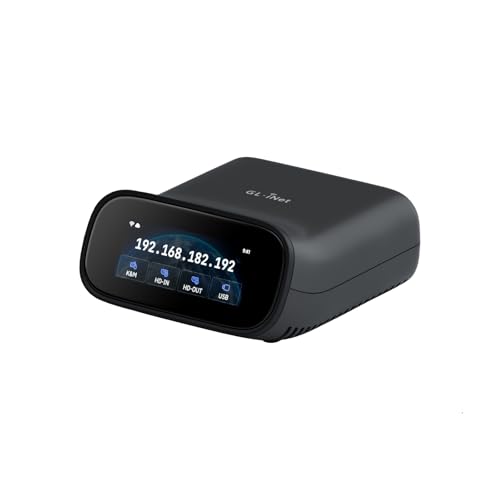
Best Wireless Desktop Pick – Comet Pro Remote KVM
For shoppers comparing kvm over ip switches for desktops, the GL.iNet Comet Pro stands out as a flexible remote-access device with dual-band Wi-Fi 6, wired connectivity, and 4K video passthrough. It supports browser-based control across Windows, macOS, and Linux without requiring client software.
Best For: Home labs, offices, and users who want wireless remote BIOS access with two-way audio.
Pros:
- Supports 2.4GHz and 5GHz Wi-Fi 6 plus wired connectivity.
- Provides 4K at 30 fps passthrough with H.264 encoding and two-way audio.
- Includes built-in Tailscale and optional self-hosted cloud deployment.
- Supports remote recovery tasks, including BIOS access and OS reinstallation.
Cons:
- ATX Board and Fingerbot accessories are sold separately.
- Remote cloud and app features may be more capability than simple desktop users need.
The Comet Pro is a strong choice when flexible networking, secure remote access, and recovery features matter more than a basic wired-only setup.
Best Open-Source Option – JetKVM IP KVM
The JetKVM is a compact option for shoppers evaluating kvm over ip switches for desktops. It connects through USB-C and HDMI, uses Ethernet for network access, and offers browser, cloud, and Wake-on-LAN control for remote computer management.
Best For: Developers, IT users, and remote administrators who value open-source customization and low-latency 1080p control.
Pros:
- Offers 1080p at 60 fps with stated 30–60 ms latency.
- Provides local browser access, optional cloud access, and Wake-on-LAN.
- Open-source Linux-based design supports customization through SSH.
- Expansion support includes ATX power, DC power, and RS-232 possibilities.
Cons:
- Video support is specified at 1080p rather than 4K.
- Requires HDMI, USB-C, and Ethernet connections for installation.
- Advanced customization may be unnecessary for users seeking a simple plug-and-play appliance.
With responsive 1080p streaming and an open platform, JetKVM is particularly appealing for technically inclined users who may want to extend or modify their remote-management setup.
Best PoE Model – Comet PoE Remote KVM
The GL.iNet Comet PoE simplifies installations for buyers seeking kvm over ip switches for desktops by combining Ethernet-based remote access with Power over Ethernet. It also supports 4K streaming, two-way audio, and remote recovery functions for computers and servers.
Best For: Networked offices, home labs, and server setups with an existing PoE switch.
Pros:
- Can receive power through PoE or a USB-C adapter.
- Supports 4K at 30 Hz with H.264 hardware encoding and low-latency streaming.
- Includes built-in Tailscale for encrypted remote connections.
- Built-in 32GB eMMC storage can hold multiple system images.
Cons:
- PoE benefits depend on having a compatible PoE network switch.
- ATX Board and Fingerbot accessories are sold separately.
- Its single-device support is intended for one computer or server at a time.
The Comet PoE is a practical fit when clean cabling, backup power flexibility, and remote system reinstallation are priorities.
Best Long-Distance Extension – AV Access 4K KVM Extender
For desktop installations where the computer and workspace are far apart, this AV Access unit is a useful alternative among kvm over ip switches for desktops. It extends HDMI, audio, USB, keyboard, and mouse signals over standard Cat5e or better Ethernet cabling.
Best For: Control rooms, server racks, classrooms, and distributed workstations needing long-range physical KVM extension.
Pros:
- Extends 4K video up to 120m over Cat5e and up to 150m over Cat6/6A/7 cable.
- Supports USB keyboard, mouse, controllers, and additional peripherals.
- Can use an existing IP network and supports up to 16 paired extender sets.
- Works with Windows, macOS, and Linux without drivers.
Cons:
- This is primarily a signal-extension system rather than a cloud-managed remote-access appliance.
- Requires separate transmitter and receiver hardware plus cabling.
- Remote control depends on the physical network path and installed extender equipment.
This model makes the most sense for structured installations that need reliable, high-bandwidth KVM extension over long cable runs rather than app-based access from anywhere.
Best Remote BIOS Access – GL.iNet Comet GL-RM1
For buyers comparing kvm over ip switches for desktops, the GL.iNet Comet GL-RM1 is a compact hardware-based option for controlling one computer or server remotely. It supports BIOS-level access, remote rebooting, operating-system installation, and power-on control without requiring software on the host computer.
Best For: IT professionals, remote workers, smart-home users, and server maintenance where one-device remote access is the priority.
Pros:
- Provides remote BIOS-level control without host-side software.
- Supports up to 3840×2160 resolution at 30Hz with low-latency H.264 hardware encoding.
- Includes remote audio and file-transfer capabilities.
- Works with desktops, laptops, servers, and other compatible computers through a one-click app connection.
Cons:
- Offers a single-device connection rather than multi-port switching.
- Power Delivery adapters cannot be used.
- Requires Windows 10 or later as the listed minimum operating-system version.
The Comet GL-RM1 is best viewed as a focused remote KVM appliance rather than a rack-scale switch. Its BIOS access and no-agent design make it particularly useful for unattended troubleshooting and maintenance, while the single-port format suits individual desktops or servers.
Best Rackmount Multi-Server Option – Tripp Lite NetCommander 8-Port
Among kvm over ip switches for desktops, the Tripp Lite NetCommander is designed for structured environments that need access to several PCs or servers. Its eight-port Cat5 layout, 1U rackmount design, and support for one local and one remote user make it a practical fit for small server rooms and equipment racks.
Best For: IT departments and rack installations managing multiple PCs or servers with local and remote access.
Pros:
- Controls up to eight connected devices and can cascade to support up to 128 servers.
- Supports simultaneous use by one local and one remote user.
- Provides secure browser-based access over IPv4 or IPv6, with RADIUS and LDAP/S authentication support.
- Uses Cat5 cabling and a 1U rackmount form factor to reduce rack cable clutter.
Cons:
- Its rackmount design and 6.3-pound weight are less suitable for casual desktop use.
- Remote access uses a Java-based application.
- The listed warranty is two years, despite the title referencing a three-year warranty.
The NetCommander is the strongest choice here for centralized multi-device management. It offers substantially more switching capacity than single-device remote KVM products, but its rack-oriented hardware and Java-based remote interface may require more planning and maintenance.
Best Pocket KVM for Laptops – GL.iNet Comet Q Pocket KVM
The GL.iNet Comet Q is a portable alternative for shoppers seeking kvm over ip switches for desktops, laptops, and compatible mobile devices. Its single USB-C connection carries video, audio, keyboard, and mouse data, while Wi-Fi 6, Tailscale, and ZeroTier support enable remote sessions without installing software on the target device.
Best For: Family IT support, mobile troubleshooting, and remote control of compatible USB-C laptops, desktops, Macs, iPhones, and iPads.
Pros:
- Uses a foldable USB-C cable for video, audio, keyboard, and mouse control through one connection.
- Streams up to 2560×1440 at 60 FPS through USB-C DP Alt Mode.
- Supports remote wake-up for supported devices and browser- or app-based control.
- Includes Wi-Fi 6, two-factor authentication, Tailscale, and ZeroTier support without port forwarding.
Cons:
- Requires a compatible USB-C DP Alt Mode connection for the all-in-one setup.
- Its compact design is intended for one target device, not multi-port rack switching.
- Remote image quality and responsiveness vary with network bandwidth.
The Comet Q stands out for portability and simple family or small-office support. It is more flexible than a conventional desktop KVM for mobile use, but buyers should verify USB-C DP Alt Mode compatibility before choosing it.
Enterprise DisplayPort Choice – ATEN CN9950 4K KVM over IP
ATEN 1-Local/Remote Share Access Single Port 4K DisplayPort KVM Over IP Switch
Check Price On AmazonFor organizations comparing kvm over ip switches for desktops, the ATEN CN9950 is a strong fit when DisplayPort video quality, redundancy, and remote recovery controls matter. It supports up to 4K DCI at 30Hz at both local and remote consoles and uses an FPGA graphics processor for responsive image handling.
Best For: IT teams managing a DisplayPort desktop or PC/server remotely with backup networking and power requirements.
Pros:
- Supports DisplayPort up to 4096 × 2160 at 30Hz for local and remote access.
- FPGA graphics processing helps deliver crisp video and improved frame throughput.
- Dual LAN and dual power supplies add connection and power redundancy.
- Relay/DI terminals support environment monitoring and reboot control.
Cons:
- Limited to a single connected port.
- 4K operation is specified at 30Hz rather than 60Hz.
- Its enterprise-focused feature set may be more than a basic desktop setup needs.
The CN9950 is best viewed as a robust, specialized option for controlled DisplayPort environments. Its redundant design and hardware-assisted video processing make it particularly appealing for infrastructure where availability and remote intervention are priorities.
Compact Recovery Tool – AweSun Q1 Remote KVM
The Q1 is a compact option for shoppers seeking kvm over ip switches for desktops with BIOS-level access and no software installation on the controlled device. It is designed to provide remote control from power-on through the operating system, including recovery scenarios when a desktop is unresponsive.
Best For: Technicians and remote IT operators who need portable, out-of-band access to desktops, laptops, servers, and other compatible systems.
Pros:
- Provides BIOS-level control for rebooting, recovery, and troubleshooting before the OS loads.
- Supports remote access without installing software on the controlled device.
- Ultra-compact 75 × 45.05 × 17mm design weighs about 63g.
- Built-in watchdog protection can help recover systems after failures.
Cons:
- Designed for a single controlled PC rather than multi-port switching.
- Its IP00 rating does not indicate protection from dust or water.
- Operating temperature is listed up to 40°C.
The Q1 prioritizes portability and recovery access over rack-scale expansion. Its HDMI, Ethernet, and USB-C connections make it adaptable, while BIOS control and watchdog functionality address problems that ordinary remote-desktop software cannot.
Multi-System Lab Hub – GL.iNet Comet X Quad-Port KVM
For home labs and IT environments comparing kvm over ip switches for desktops, the GL.iNet Comet X stands out with four HDMI inputs, dedicated USB-C device connections, and browser-based remote control. PoE simplifies installation, while local controls, a touchscreen, and rack brackets support hands-on management.
Best For: Home labs, server rooms, and IT teams that need remote access to up to four HDMI-equipped systems.
Pros:
- Connects up to four host systems through four HDMI inputs and four USB-C device ports.
- Supports browser-based remote control over HTTPS without client software.
- PoE provides network and power through one Ethernet cable, with 5V Type-C backup.
- Includes 4K 30Hz HDMI loop-out, touchscreen control, rack brackets, and 64GB eMMC storage.
Cons:
- HDMI loop-out is limited to 4K at 30Hz.
- The four-port feature set may be unnecessary for single-desktop users.
- PoE installation requires suitable network equipment or an alternative USB-C power source.
The Comet X is the most expandable choice in this group, combining four-port switching with local controls and self-hosted browser access. It is especially practical when several desktops or servers need to share one rack-ready KVM platform.
How We Picked the Best Kvm Over Ip Switches for Desktops
We focused on practical remote-control capability rather than treating every networked video extender as the same product. The selection covers single-computer KVM devices, multi-port switches, compact travel models, PoE hardware, and systems designed for rack or lab environments.
Key considerations included video resolution and refresh rate, BIOS-level access, network connectivity, remote-user support, security features such as Tailscale or IPv4/IPv6 compatibility, installation requirements, and whether the unit suits a desktop, laptop, workstation, or server cabinet.
Quick Comparison
| Best For | What to Look For |
|---|---|
| One desktop or home server | Compact single-port KVM, straightforward setup, and reliable remote power or reboot access |
| 4K desktop workflows | 4K support at the refresh rate your monitor and applications require |
| Home labs and multiple systems | Multi-port switching, flexible cabling, and simultaneous local or remote access |
| Rack-mounted infrastructure | Rack hardware, longer Cat cable runs, IPv4/IPv6 support, and centralized administration |
| Portable or temporary use | Small footprint, USB-powered operation, and compatibility with phones or laptops |
Key Buying Factors for Kvm Over Ip Switches for Desktops
Resolution, Refresh Rate, and Video Type
Check the complete video path, including HDMI or DisplayPort input, passthrough output, compression, and maximum refresh rate. A device advertised as 4K may be limited to 30Hz, while gaming, design, and motion-heavy desktop work may benefit from 4K at 60Hz.
BIOS and Pre-Boot Control
Remote operating-system access is different from KVM access. If you need to enter BIOS, troubleshoot startup failures, reinstall an OS, or control a machine after a crash, confirm that the switch supports keyboard and mouse input before the operating system loads.
Network and Security
Ethernet is generally more predictable than Wi-Fi for permanent installations, although Wi-Fi 6 models can be useful when cabling is difficult. Consider VPN or mesh-network support, authentication, encryption, firmware updates, and whether the product can be isolated on a trusted VLAN.
Ports, Cabling, and Installation
Single-port models are usually simplest for one desktop. Multi-port switches make more sense when several computers share one remote console. For long runs, verify Cat5e, Cat6, or higher cable requirements, distance limits, and whether the installation needs PoE, a rackmount chassis, or local console access.
Who Should Buy Which Kvm Over Ip Switches for Desktops?
Choose a compact single-port model if you want occasional remote access to one desktop, laptop, NAS, or home server. A PoE version is a strong fit for clean installations where one network cable should provide both connectivity and power. Look for a pocket-sized unit when portability or quick laptop troubleshooting matters most.
For home labs, developers, and IT professionals managing several machines, a multi-port or quad-port KVM can reduce cable swapping and centralize access. Rack-mounted users should prioritize port count, structured cabling, local-user support, and IPv4/IPv6 compatibility over the smallest footprint.
Finally, select a higher-refresh 4K model when image quality and responsiveness matter, but do not pay for premium video specifications if your main requirement is dependable BIOS-level administration. The best choice is the one that matches your computer count, network design, required pre-boot control, and expected maintenance routine.