
Sharing one keyboard, mouse, printer, or scanner between two computers does not require unplugging cables every time you change devices. The right USB switch box lets you move connected peripherals between PCs with a button, remote, or simple selector.
We compared 10 options across USB speeds, port layouts, compatibility, switching methods, and desk-friendly design to help you choose a practical setup for your home office.
Best 10 USB Switch Boxes for Home Offices Picks for 2026
Best Multi-Device USB 2.0 Switch
UGREEN 2-Computer 4-Port USB Switch

- Shares four USB 2.0 devices between two computers
- One-button switching with LED status indicator
- Optional power input for multiple or higher-power devices
Best For: Home offices sharing several peripherals between two computers
Best Compact USB 3.0 Switch
Aluminum Bi-Directional USB Switch

- Supports two computers sharing one device or two devices on one computer
- Offers USB 3.0 speeds up to 5Gbps
- Compact aluminum housing with LED status light
Best For: Fast, flexible switching for one peripheral
Best High-Speed Multi-Port Switch
UGREEN 2-Computer 4-Port USB 3.0 Switch
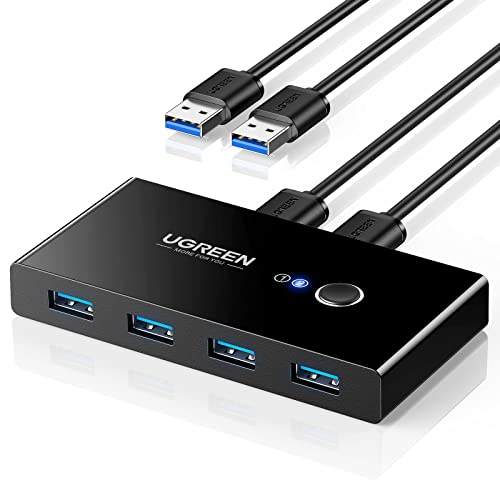
- Shares four USB devices between two computers
- Supports USB 3.0 transfer speeds up to 5Gbps
- Includes two USB 3.0 cables and optional USB-C power input
Best For: Two-computer workstations with several USB 3.0 peripherals
Best Basic Office Peripheral Switch

- Designed for sharing USB peripherals across multiple computers
- Offers four USB 2.0 ports
- Supports printers, scanners, cameras, and keyboards
Best For: Simple home and office peripheral-sharing setups
Best High-Speed Pick
UGREEN 2-in 7-Out USB 3.2 Switch

- Shares seven USB devices between two computers
- Up to 10Gbps through USB 3.2 Gen 2 ports
- Includes USB-C-to-A cable and power adapter
Best For: Mixed-port home offices with many peripherals
Best Budget-Friendly Option
BENFEI USB 3.0 2-in 4-Out Switch

- Shares four USB devices between two computers
- 5Gbps USB 3.0 transfer support
- Push-button switching with LED status indicator
Best For: Basic USB-A peripheral sharing on a dual-computer desk
Best Flexible Everyday Pick
UGREEN USB 3.0 USB-C and A Switch

- Shares four peripherals between two computers
- Combines one USB-C and three USB-A ports
- Switches by button or included controller
Best For: Mixed USB-C and USB-A home-office setups
Best Multi-Device Pick
BENFEI 4-Port USB Switch with Remote

- Shares three USB 3.0 and one USB-C device between two computers
- Offers 5Gbps transfers with remote or button switching
- Optional USB-C power supports higher-consumption peripherals
Best For: Multi-peripheral home office workstations
Best Two-Way Value
DUOPURUI Bi-Directional USB 3.0 Switch

- Reverses between two-computer sharing and one-computer device switching
- Supports 5Gbps USB 3.0 transfers and older USB standards
- Includes two USB 3.0 cables and simple LED button control
Best For: Basic printer sharing and small desk setups
Best Durable Design
Aluminum Bi-Directional USB 3.0 Switch

- Uses a durable aluminum housing for everyday desk use
- Supports reversible 2-in-1-out and 1-in-2-out switching
- Includes cables, blue status LEDs, and 5Gbps USB 3.0 performance
Best For: Durable single-channel USB sharing
Best Multi-Device USB 2.0 Switch – UGREEN 2-Computer 4-Port USB Switch
For home offices that need to share several peripherals, this UGREEN model is a practical choice among usb switch boxes for home offices. It lets two computers share up to four USB 2.0 devices, with one-button switching and an LED showing the active computer.
Best For: Home-office users sharing a keyboard, mouse, printer, scanner, or other USB peripherals between two computers.
Pros:
- Supports four shared USB 2.0 peripherals.
- Includes two USB A-to-A cables.
- Driver-free operation across Windows, macOS, Linux, and Chrome OS.
- Optional micro-USB power input can improve stability with multiple devices.
Cons:
- Does not support monitors or video transmission.
- Power adapter and charging cable are not included.
- USB 2.0 is slower than USB 3.0 for large file transfers.
This is a straightforward peripheral-sharing switch rather than a full KVM. Choose it when capacity for four USB devices matters more than video switching or high-speed transfers.
Best Compact USB 3.0 Switch – Aluminum Bi-Directional USB Switch
This compact aluminum switch offers flexible USB sharing for home offices. It can connect two computers to one USB 3.0 peripheral, or let one computer switch between two USB devices, while supporting data speeds up to 5Gbps.
Best For: Users who want fast USB 3.0 sharing for a single printer, scanner, keyboard, mouse, or storage device.
Pros:
- Bi-directional design supports two connection modes.
- USB 3.0 transfer speeds up to 5Gbps.
- Aluminum construction and blue LED activity indicator.
- Plug-and-play compatibility with Windows, macOS, Linux, and Chrome OS.
Cons:
- USB 3.0 cable is not included.
- Shares one peripheral between two computers, or two devices with one computer—not multiple peripherals simultaneously.
- No extra power supply is required or included, which may limit some power-demanding setups.
Its reversible configuration makes it more versatile than a standard two-computer switch, while the USB 3.0 interface suits faster data transfers. Confirm that the included setup requirements fit your desk before ordering.
Best High-Speed Multi-Port Switch – UGREEN 2-Computer 4-Port USB 3.0 Switch
For a home office with multiple USB accessories and a need for faster transfers, this UGREEN switch is a strong option among usb switch boxes for home offices. Two computers can share four USB 3.0 ports, and a single button changes the active computer.
Best For: Workstations that alternate between two computers while using several USB 3.0 peripherals, including storage, cameras, printers, or input devices.
Pros:
- Four shared USB 3.0 ports support speeds up to 5Gbps.
- Includes two USB 3.0 data cables.
- Works without drivers on Windows, macOS, Chrome OS, and Linux.
- USB-C power input can help stabilize higher-power devices.
Cons:
- Does not support monitor or video transmission.
- Power adapter is not included.
- Multiple or high-power devices may require supplemental power.
This model is well suited to a two-computer desk where four peripherals need to move together. It delivers more bandwidth than a USB 2.0 switch, but it remains a peripheral switch rather than a video-capable KVM.
Best Basic Office Peripheral Switch – 4-Port USB 2.0 Manual Switch
This manual four-port USB 2.0 switch is designed for straightforward peripheral sharing in office and home settings. It supports devices such as printers, scanners, cameras, keyboards, and other USB accessories across multiple computers.
Best For: Basic home-office setups that need to share common USB peripherals without adding video-switching features.
Pros:
- Provides four USB 2.0 peripheral ports.
- Suitable for printers, scanners, cameras, and keyboards.
- Designed for office and home use.
Cons:
- USB 2.0 is slower than USB 3.0 for data-heavy tasks.
- The supplied notes do not specify operating-system compatibility.
- The supplied notes do not specify included cables, power requirements, or switching indicators.
This is worth considering when your priority is basic USB peripheral sharing rather than maximum speed. Because the available specifications are limited, verify cable, compatibility, and power details before purchase.
Best High-Speed Pick – UGREEN 2-in 7-Out USB 3.2 Switch
For home offices with several peripherals and two computers, the UGREEN 2-in 7-out is one of the most capable USB switch boxes for home offices. It lets two USB-A or USB-C computers share seven devices, including four USB-A and three USB-C connections, while offering USB 3.2 Gen 2 speeds up to 10Gbps.
Best For: Mixed USB-A and USB-C setups that need many shared peripherals and faster file transfers.
Pros:
- Supports two computers sharing up to seven USB devices.
- Includes four USB 3.2 Gen 2 ports with speeds up to 10Gbps.
- Includes a USB-C-to-USB-A cable, power adapter, and external controller.
- Powered design can provide more stable performance for hard drives and printers.
Cons:
- It is not a KVM switch and does not support video output.
- USB ports are intended primarily for data transmission; audio device connections are not recommended.
This is the strongest choice when port count, USB-C flexibility, and transfer speed matter more than display switching. Its powered design also suits busier desks with higher-demand peripherals.
Best Budget-Friendly Option – BENFEI USB 3.0 2-in 4-Out Switch
The BENFEI USB 3.0 Switch is a straightforward option for home offices where two computers need to share a keyboard, mouse, printer, scanner, or other USB accessories. Its four USB 3.0 outputs support transfers up to 5Gbps, and a push button with LED indicator makes switching simple.
Best For: Two-computer workstations seeking a compact, driver-free USB switch for everyday peripherals.
Pros:
- Allows two computers to share four USB devices.
- Supports USB 3.0 transfer speeds up to 5Gbps and USB 2.0 backward compatibility.
- Works with Windows, macOS, Linux, and Chrome OS.
- Includes an 18-month unconditional warranty.
Cons:
- Requires USB-A-to-USB-A cables for computer connections.
- The included power cable does not include a power adapter.
- Extra power may be needed for high-consumption devices such as hard drives or cameras.
Choose this BENFEI model if your setup uses standard USB-A connections and you want a simple, affordable switch. The missing power adapter is worth factoring into the total cost if you plan to connect demanding devices.
Best Flexible Everyday Pick – UGREEN USB 3.0 USB-C and A Switch
The UGREEN USB 3.0 Switch combines four shared device ports—one USB-C and three USB-A—with two switching methods. It is a practical middle ground among USB switch boxes for home offices, especially when you want to share peripherals between a work computer and a personal computer without adding a monitor or video function.
Best For: Home offices that need both USB-C and USB-A peripheral support with button or remote switching.
Pros:
- Lets two computers share four USB devices.
- Provides one USB-C and three USB-A device ports.
- Supports up to 5Gbps data transfer and plug-and-play use with major desktop operating systems.
- Offers both button and controller switching, helping keep the switch out of sight.
Cons:
- It is not a KVM switch and does not support monitor or video transmission.
- A USB-C-to-USB adapter may be needed when connecting a computer with USB-C input.
- Optional power is recommended when using multiple devices or higher-power peripherals.
This model is a good fit for mixed-device desks that value convenient control and a tidy layout. It offers useful flexibility, but shoppers should plan for separate power or an adapter depending on their computer and peripheral mix.
Best Multi-Device Pick – BENFEI 4-Port USB Switch with Remote
For home offices that need to share several peripherals, the BENFEI is one of the more flexible usb switch boxes for home offices. It lets two computers share three USB-A devices and one USB-C device, with switching available from either the unit or its remote.
Best For: Workstations switching keyboards, mice, printers, scanners, or other USB devices between two computers.
Pros:
- Provides three USB 3.0 ports plus one USB-C port for shared peripherals.
- Supports data transfers up to 5Gbps and works with USB 2.0 devices.
- Includes remote and button switching with LED status indicators.
- Compatible with Windows, macOS, Linux, and Chrome OS without added drivers.
Cons:
- Requires USB-A-to-USB-A cables for connection.
- Optional USB-C power is recommended for higher-consumption devices such as hard drives, cameras, and headphones.
This is the strongest choice here when you need more than one or two shared USB connections. Its remote control and optional power input add convenience, though the cable requirement is worth checking before purchase.
Best Two-Way Value – DUOPURUI Bi-Directional USB 3.0 Switch
The DUOPURUI is a compact option among usb switch boxes for home offices, with a reversible design that supports either two computers sharing one USB peripheral or one computer switching between two USB devices. Two USB 3.0 cables are included.
Best For: Simple printer sharing or switching between two USB devices with a single computer.
Pros:
- Supports both 2-in-1-out and 1-in-2-out configurations.
- Delivers USB 3.0 transfer speeds up to 5Gbps and is backward compatible with USB 2.0 and 1.1.
- Uses a physical button and LED indicator for straightforward switching.
- Works with Windows, macOS, and Linux without additional drivers.
Cons:
- It is a USB data switch, not a KVM, so it does not switch monitors or video signals.
- The output is intended for data transmission only.
Choose this model when your setup has modest USB-sharing needs and you want the flexibility to reverse the connection direction. It is less suitable if you need monitor control or multiple shared output ports.
Best Durable Design – Aluminum Bi-Directional USB 3.0 Switch
With its aluminum housing and reversible connection modes, this model is a practical pick among usb switch boxes for home offices. It supports two computers sharing one USB peripheral or one computer switching between two devices, while blue LEDs show the active channel.
Best For: Daily home-office use where a compact, durable switch is preferred for printers, input devices, storage, or webcams.
Pros:
- Supports 2-in-1-out and 1-in-2-out USB switching.
- Provides up to 5Gbps transfers and works with USB 3.0, 2.0, and 1.1 devices.
- Aluminum construction is scratch-resistant, anti-fingerprint, and designed to aid heat dissipation.
- Includes two USB-A-to-A cables and offers plug-and-play compatibility with Windows, macOS, Linux, and Chrome OS.
Cons:
- Only one channel can be active at a time; it does not provide simultaneous A+B output.
- Does not support HDMI or other video output.
This switch stands out for its metal build and clear status lighting. It is a good fit for straightforward USB sharing, provided your workflow does not require video switching or simultaneous connections.
How We Picked the Best USB Switch Boxes for Home Offices
We focused on the features that matter in a shared-peripheral setup: the number and type of USB ports, USB 2.0 versus USB 3.0 or USB 3.2 performance, compatibility with USB-A and USB-C devices, switching convenience, and overall flexibility. We also considered whether each model is suited to simple keyboard-and-mouse sharing or heavier use with printers, scanners, storage devices, and cameras.
A USB switch is not automatically a full KVM switch. Most products here share USB peripherals only, so you will still need separate video connections if you want to use two computers with one monitor.
Quick Comparison
| What to Compare | Best Fit |
|---|---|
| USB 2.0 | Keyboards, mice, printers, and basic office accessories |
| USB 3.0 | Faster storage, cameras, scanners, and general-purpose sharing |
| USB 3.2 or 10 Gbps | High-throughput devices and USB-C or mixed-port setups |
| Four shared ports | Desks with several permanent peripherals |
| Remote control | Computers or switch boxes positioned out of reach |
| Bi-directional design | Switching one device between computers or multiple devices between computers, depending on the configuration |
Key Buying Factors for USB Switch Boxes for Home Offices
Port Type and Speed
Check both the connector type and the supported standard. USB 2.0 is usually sufficient for input devices and many printers, while USB 3.0 is a better choice for cameras, scanners, external drives, and larger file transfers. If your setup includes USB-C devices, choose a model with native USB-C ports or budget for reliable adapters.
Number of Devices
Count the peripherals you plan to leave connected. Four-port models are convenient for a keyboard, mouse, printer, and scanner, while smaller bi-directional switches can be better for a single shared device or a compact desk.
Power and Compatibility
Some bus-powered accessories work immediately, but power-hungry devices may need an externally powered hub or their own power adapter. Verify that the switch supports your operating systems and device types, especially with webcams, storage drives, and multifunction printers.
Switching Method and Layout
A front button is simple and dependable. A wired remote is useful when the switch is mounted behind a monitor or under a desk. Look for clear status indicators and enough cable length to position the selector without creating cable clutter.
Who Should Buy Which USB Switch Boxes for Home Offices?
Choose a USB 2.0 four-port switch if your home office mainly shares a keyboard, mouse, printer, and scanner. It is typically the most economical option for routine office work.
Choose a USB 3.0 model if you regularly connect faster peripherals or want more responsive transfers. A mixed USB-A and USB-C switch is the better match for newer laptops and desktops with different connector types.
Choose a USB 3.2 model when speed is a priority and your computers and cables support 10 Gbps operation. Finally, consider a remote-controlled or compact bi-directional model when accessibility and a tidy desk matter more than maximum port capacity.