
The best Bluetooth adapters for Mac make it easier to connect wireless headphones, keyboards, mice, controllers, and other accessories when built-in Bluetooth is limited or unavailable.
We selected 10 compact USB options spanning different connection types, Bluetooth versions, operating-system support, range claims, and use cases. Before buying, confirm Mac compatibility and the USB port type on your computer.
Best 10 Bluetooth Adapters for Mac Picks for 2026
Long-Range Pick

- Supports macOS 10.15 Catalina and several other platforms
- Low-energy Bluetooth with up to 65 feet of stated range
- Compact design, but check device and system exclusions
Best For: Mac users wanting a compact, low-energy adapter with extended stated range
Headset Specialist

- USB-C connection for Mac or PC headsets
- Bluetooth 5.1 Low Energy technology
- Designed for Poly Voyager headsets
Best For: Mac users seeking a compact USB-C adapter for compatible Poly headsets
Audio Quality Pick

- Bluetooth 5.2 with aptX audio codecs
- Low latency for synchronized audio and video
- Includes USB-A dongle and attachable USB-C adapter
Best For: Mac users prioritizing headphone sound quality, calls, and low latency
Windows-Only Option

- Bluetooth 5.4 with up to five simultaneous devices
- Plug-and-play support for Windows 11, 10, and 8.1
- Explicitly not compatible with macOS or Linux
Best For: Windows PCs needing newer Bluetooth connectivity—not Macs
Long-Range Classic
StarTech.com Bluetooth 4.0 USB Adapter

- Native Windows and Mac support
- Up to 50 m (165 ft) rated range
- Compact Class 1 design with two-year warranty
Best For: Mac and Windows users prioritizing range and portability
Newest Standard
ASUS USB-BT600 Bluetooth 6.0 Adapter

- Bluetooth 6.0 with energy-saving BLE
- Connects up to seven devices
- Ultra-compact USB 2.0 Type-A design
Best For: Windows and Linux users needing multiple Bluetooth connections
Windows-Focused Value
UGREEN Bluetooth 5.3 USB Adapter

- Bluetooth 5.3 with BR+EDR
- Connects up to five devices
- Plug-and-play on Windows 8.1/10/11
Best For: Windows users seeking a compact multi-device receiver
Best Console-Friendly Pick
NBCP Wireless Bluetooth Adapter

- USB and Type-C connectivity
- Supports Mac, PC, PS4, and Switch
- Plug-and-play design for peripherals
Best For: Mac users who also want gaming-console connectivity
Best for Windows PCs
Amazon Basics Bluetooth 5.4 Adapter
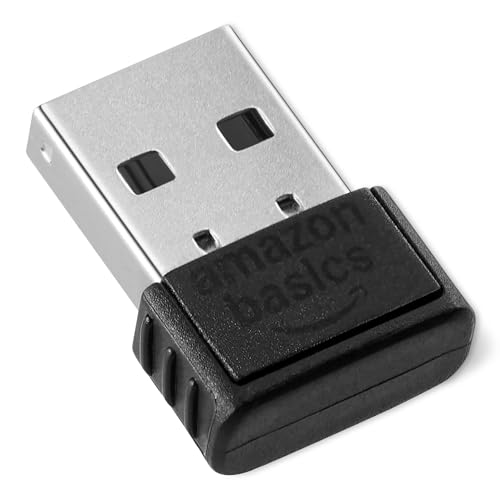
- Bluetooth 5.4 with broad backward compatibility
- Connects up to six devices
- Not compatible with macOS
Best For: Windows 8.1, 10, and 11 users
Best High-Spec Windows Option
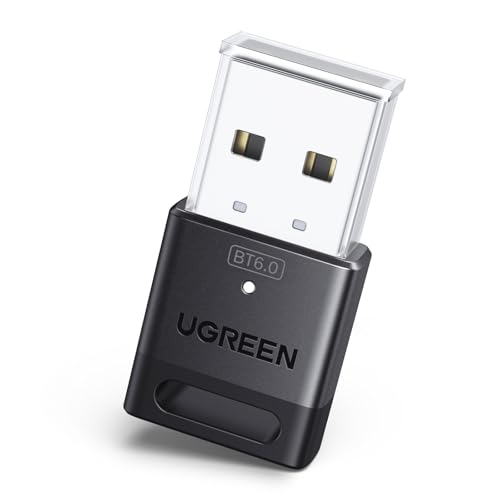
- Bluetooth 6.0 with EDR and BLE
- Connects up to five devices
- macOS and console support excluded
Best For: Windows users wanting newer Bluetooth connectivity
Long-Range Pick – Hideez Bluetooth 4.0 Adapter
If you need one of the more versatile bluetooth adapters for mac, the Hideez USB Bluetooth Adapter supports macOS 10.15 Catalina and works with Linux, Windows, ChromeOS, and Raspberry Pi. Its Bluetooth 4.0 Low Energy design is suited to peripherals such as mice, keyboards, headphones, speakers, and printers.
Best For: Mac users seeking a compact adapter with low power consumption and up to 65 feet of stated wireless range.
Pros:
- Supports macOS 10.15 Catalina plus Linux, Windows, ChromeOS, and Raspberry Pi.
- Bluetooth Low Energy helps reduce power consumption.
- Stated wireless range reaches up to 65 feet or 20 meters.
- Small 4-gram USB adapter with a 12-month limited warranty.
Cons:
- It will not work if the computer’s built-in Bluetooth module is defective.
- Not compatible with PS5, PS4, Xbox, Logitech MX devices, iMac Retina, or Hackintosh systems.
- May not function with KVM switches.
Install the Hideez Desktop App before buying to check the Mac’s existing Bluetooth functionality. This is a practical choice when broad computer compatibility and low-energy operation matter more than the newest Bluetooth version.
Headset Specialist – Poly BT700 USB-C Adapter
The Poly BT700 is a focused choice among bluetooth adapters for mac, connecting a Mac or PC to a Bluetooth headset through USB-C. Bluetooth 5.1 Low Energy technology is designed to provide greater wireless range and faster connections, particularly with Poly Voyager headsets.
Best For: Mac users with USB-C ports who primarily use compatible Poly Voyager headsets for calls.
Pros:
- Connects a PC or Mac to a Bluetooth headset through USB-C.
- Bluetooth 5.1 Low Energy supports stated range and connection improvements.
- Compact form factor can remain plugged into a laptop or PC.
- Includes a two-year manufacturer warranty.
Cons:
- Its listed compatible operating system family is Windows, so Mac compatibility should be confirmed for your setup.
- Best suited to Poly Voyager headsets rather than a broad range of Bluetooth accessories.
- Uses USB-C, which may require an adapter on computers with only USB-A ports.
The BT700 makes the most sense as a dedicated headset dongle rather than a general-purpose Bluetooth upgrade. Verify your Mac port and headset model before purchase, especially if you do not use a Poly Voyager headset.
Audio Quality Pick – Sennheiser BTD 600 Dongle
For listening and calls, the Sennheiser BTD 600 is one of the more audio-focused bluetooth adapters for mac. It uses Bluetooth 5.2 and current aptX audio codecs for high-definition music, clear calls, and low-latency audio-video playback, with both USB-A and USB-C connection options.
Best For: Mac users who prioritize headphone audio quality, synchronized video, and convenient switching between USB port types.
Pros:
- Bluetooth 5.2 and aptX codecs support high-quality audio and clear calls.
- Low latency helps keep sound and video in sync.
- USB-C adapter attaches to the USB-A dongle for flexible port compatibility.
- Stays paired when moved to another device, according to the supplied details.
Cons:
- It is primarily suited to headphones and audio use rather than general peripherals.
- Warranty coverage is listed as one year.
- Only one port is provided.
The BTD 600 is a strong fit for entertainment and calls when codec support and low latency are priorities. Its included USB-C adapter also makes it easier to use across newer USB-C Macs and computers with USB-A ports.
Windows-Only Option – UGREEN Bluetooth 5.4 Adapter
Although it may appear alongside bluetooth adapters for mac, the UGREEN Bluetooth 5.4 Adapter is explicitly not compatible with macOS. It is designed for Windows 11, 10, and 8.1, with plug-and-play operation on supported versions and connections for keyboards, mice, headphones, and speakers.
Best For: Windows users who need Bluetooth 5.4 connectivity and support for up to five connected devices.
Pros:
- Bluetooth 5.4 is specified for faster, more stable connections and reduced transmission delay.
- Supports up to five connected devices simultaneously.
- Plug-and-play support is listed for Windows 11, 10, and 8.1.
- Can connect keyboards, mice, headphones, and speakers.
Cons:
- Not compatible with Mac OS, Linux, iPhone, car stereos, TVs, or Xbox systems.
- Windows 7 requires a driver.
- Computers with built-in Bluetooth may require existing Bluetooth devices to be disabled first.
This adapter should not be selected for a Mac. For a Windows desktop that lacks Bluetooth, however, its newer Bluetooth 5.4 standard and five-device capacity make it a potentially useful option.
Long-Range Classic – StarTech.com Bluetooth 4.0 USB Adapter
If you need bluetooth adapters for mac with straightforward setup, the StarTech.com USBBT1EDR4 is a practical option. It adds Bluetooth 4.0 through USB and is natively supported on Windows and Mac without additional software, according to the supplied product information.
Best For: Mac and Windows users who want a portable adapter with extended wireless range.
Pros:
- Native Windows and Mac support without additional software.
- Class 1 wireless range rated up to 50 m (165 ft).
- Bluetooth Smart Ready with LE and EDR support.
- Compact design and a two-year warranty.
Cons:
- Uses the older Bluetooth 4.0 standard compared with newer adapters.
- The supplied details list desktop compatibility, so verify fit and port requirements for your setup.
Choose this model when range and Mac support matter more than having the newest Bluetooth generation. Its small form factor also makes it convenient for travel.
Newest Standard – ASUS USB-BT600 Bluetooth 6.0 Adapter
The ASUS USB-BT600 is a compact choice for bluetooth adapters for mac shoppers who are also considering Windows or Linux systems. Its key strengths are Bluetooth 6.0, Bluetooth Low Energy, and support for connecting up to seven devices, though the supplied compatibility list does not include macOS.
Best For: Windows 10/11 and Linux desktop or laptop users who need multiple-device connectivity in a tiny adapter.
Pros:
- Uses the newer Bluetooth 6.0 standard with BLE.
- Supports up to seven connected devices.
- Ultra-compact design for portability.
- Includes a three-year warranty.
Cons:
- The supplied operating-system support lists Windows 10/11 and Linux, not macOS.
- Uses a USB 2.0 Type-A interface, so compatible ports or an adapter may be needed on some computers.
This is the most forward-looking option of the three, but Mac buyers should confirm operating-system compatibility before purchasing. For supported Windows and Linux systems, its seven-device capacity is a useful advantage.
Windows-Focused Value – UGREEN Bluetooth 5.3 USB Adapter
The UGREEN Bluetooth 5.3 dongle is compact and supports up to five connected devices, making it appealing for Windows users shopping among bluetooth adapters for mac alternatives. However, the supplied notes explicitly state that macOS, Linux, and Windows 7 are not supported, so it is not a suitable choice for a Mac.
Best For: Windows 8.1, 10, and 11 desktops or laptops using mice, keyboards, headphones, speakers, or printers.
Pros:
- Bluetooth 5.3 BR+EDR technology for improved connection stability and lower power consumption.
- Supports up to five connected devices.
- Plug-and-play operation on Windows 8.1/10/11 without driver installation.
- Small design that leaves nearby USB ports accessible.
Cons:
- Does not support macOS, Linux, or Windows 7.
- Requires an existing Bluetooth module to be disabled if it conflicts with the adapter.
- It is a receiver, not a transmitter, and does not work directly with listed game consoles or TVs.
For a Mac-focused roundup, this is primarily a compatibility warning rather than a recommendation. It remains a straightforward, space-saving option for supported Windows computers.
Best Console-Friendly Pick – NBCP Wireless Bluetooth Adapter
For shoppers comparing bluetooth adapters for mac, the NBCP is a versatile option when you also need support for gaming setups. It connects through USB or Type-C and is designed for Macs, PCs, PS4, Nintendo Switch, and other compatible devices.
Best For: Mac users who want one compact adapter for wireless peripherals and selected gaming consoles.
Pros:
- Supports USB and Type-C connections.
- Compatible with Mac, PC, PS4, and Nintendo Switch.
- Works with controllers, headphones, keyboards, and mice.
- Plug-and-play USB installation requires no drivers.
Cons:
- The supplied operating-system details list Windows 10 as the minimum required version, so Mac support should be confirmed for your setup.
- Its stated data transfer rate is 3 Mbps.
The NBCP stands out for its broad hardware compatibility and included Type-C flexibility. However, because the detailed system requirements emphasize Windows, verify Mac compatibility before buying.
Best for Windows PCs – Amazon Basics Bluetooth 5.4 Adapter
Although it may appear in searches for bluetooth adapters for mac, this Amazon Basics dongle is explicitly limited to Windows 8.1, 10, and 11. It provides Bluetooth 5.4 connectivity through a standard USB port and is aimed at PC accessories such as mice and keyboards.
Best For: Windows PC users who need a small USB Bluetooth receiver for multiple peripherals.
Pros:
- Supports Bluetooth 5.4 and backward compatibility through Bluetooth 1.1.
- Can connect up to six devices simultaneously.
- Uses EDR and BLE technology for efficient performance.
- Lightweight 2-gram design fits a standard USB port.
Cons:
- Not compatible with Mac, Linux, Chrome, Unix, PlayStation, or Windows 7 and earlier.
- Requires disabling the computer’s built-in Bluetooth before use.
This is a straightforward choice for supported Windows systems, especially when several Bluetooth peripherals must be connected. It is not a suitable Mac adapter despite the broader roundup keyword.
Best High-Spec Windows Option – UGREEN Bluetooth 6.0 Dongle
For buyers researching bluetooth adapters for mac, the UGREEN dongle is important to rule in or out carefully: its supplied specifications state that macOS is not supported. On compatible Windows systems, it offers Bluetooth 6.0, EDR, BLE, and simultaneous connections for several peripherals.
Best For: Windows 8.1, 10, or 11 users seeking newer Bluetooth technology for keyboards, mice, headphones, speakers, or printers.
Pros:
- Uses Bluetooth 6.0 EDR technology and is backward compatible with Bluetooth 5.4 and 5.3.
- Supports up to five connected devices at once.
- Plug-and-play operation requires no driver installation on supported Windows versions.
- Includes EDR and BLE for data performance and energy efficiency.
Cons:
- Does not support macOS, Linux, or Windows 7.
- Cannot be used directly with PS3, PS4, PS5, Switch, or Xbox consoles.
- Only one audio device of the same type can play music at a time.
UGREEN offers the most advanced Bluetooth specification in this group, but it is strictly a Windows-focused adapter. Mac shoppers should choose another model or confirm compatibility with a different product.
How We Picked the Best Bluetooth Adapters for Mac
We compared these Bluetooth Adapters for Mac using the specifications most likely to affect everyday use: operating-system support, Bluetooth generation, connection type, advertised range, low-energy support, device compatibility, and portability. We also considered whether each adapter is designed primarily for computers, audio, gaming, or broad peripheral connectivity.
Compatibility deserves special attention. Several models in this roundup are marketed mainly for Windows or Linux, while others specifically mention macOS, Mac, or USB-C systems. A product’s listed Bluetooth version does not guarantee that every feature works on every operating system, so check the manufacturer’s current driver and feature information before purchasing.
Quick Comparison
| Best For | What to Prioritize | Shortlist |
|---|---|---|
| Mac peripherals | macOS support, low-energy connectivity | Hideez, StarTech.com |
| USB-C Macs | Native USB-C plug or included adapter | Poly BT700, Sennheiser BTD 600 |
| Bluetooth audio | Audio codec support and stable connection | Poly BT700, Sennheiser BTD 600 |
| Long-range use | Advertised distance and clear placement | Hideez, StarTech.com |
| Budget upgrades | Basic plug-and-play connectivity | Amazon Basics, UGREEN models |
Key Buying Factors for Bluetooth Adapters for Mac
MacOS and Hardware Compatibility
Confirm that the adapter supports your macOS version and Mac model. Newer Macs commonly use USB-C, while older systems may offer USB-A. Some adapters are built for Windows and may have limited functionality on macOS, even if the connector physically fits.
Bluetooth Version and Supported Profiles
Bluetooth 5.3, 5.4, and 6.0 can offer improvements in efficiency, range, and connection management, but the connected device also matters. For keyboards and mice, profile support and reliability are usually more important than the newest version number. For headphones, check codec and audio-feature support rather than assuming a newer adapter automatically improves sound quality.
USB Connector and Setup
Choose USB-A, USB-C, or a model with both options based on your available ports. Compact adapters are convenient for laptops, but a short extension cable can help improve signal placement when a desktop’s metal chassis or nearby USB devices cause interference.
Range, Interference, and Device Count
Advertised range is measured under favorable conditions. Walls, metal, Wi-Fi congestion, and connected devices can reduce real-world distance. If you plan to connect several accessories, review the stated device limit and remember that audio streaming and input devices share available bandwidth.
Who Should Buy Which Bluetooth Adapters for Mac?
Choose Hideez or StarTech.com if you need a general-purpose adapter with an emphasis on peripheral support or longer advertised range.
Choose Poly BT700 or Sennheiser BTD 600 if your priority is wireless audio and you want an adapter designed around headphone or headset connectivity.
Choose ASUS, UGREEN, or Amazon Basics for a compact everyday dongle, especially when your main goal is connecting a mouse, keyboard, controller, or other basic accessory.
Choose NBCP if gaming-console compatibility and a USB-C-friendly setup are more important than broad computer-focused support. Whichever model you select, verify macOS compatibility, connector type, and return terms before ordering.