
A Bluetooth adapter with an external antenna can give a desktop PC more range and placement flexibility than a compact plug-in dongle. That can help when your computer sits under a desk, far from a controller, or in another room from connected audio and accessories.
We compared 10 long-range USB models across Bluetooth versions, antenna designs, claimed distance, Windows compatibility, and everyday setup considerations. Use the guide below to narrow the list by your PC, workspace, and connectivity needs.
Best 10 Bluetooth Adapters with External Antennas Picks for 2026
Top Dual-Antenna Pick

- Bluetooth 5.4 with dual antennas
- Up to 3 Mbps transfer rate
- Plug-and-play on Windows 11/10/8.1
Best For: Windows users seeking stable connections for peripherals and audio
Maximum Distance Specialist
Sena UD100-G03 Bluetooth Adapter

- 300-meter open-field working distance
- Exchangeable antenna with 600-meter potential
- Supports up to 7 simultaneous connections
Best For: Desktop setups that need extended-range Bluetooth links
Best Detachable-Antenna Value

- Detachable 5 dBi antenna
- Up to 150 meters in open areas
- Connects up to 7 devices
Best For: Windows PCs needing modern, longer-range Bluetooth
Legacy Windows Range Pick

- Up to 100 meters in open space
- Supports older Windows versions
- Up to 3 Mbps with multiple-device support
Best For: Older Windows PCs needing basic extended-range Bluetooth
Best for Maximum Stated Range
Techkey Bluetooth 6.0 Long-Range Dongle

- Stated range up to 600 feet in open areas
- 5dBi extended antenna and Class 1 radio
- Connects up to seven devices simultaneously
Best For: Windows users needing long-range, multi-device Bluetooth connectivity
Best Dual-Antenna Design
ZEXMTE Bluetooth 6.0 USB Adapter

- Dual adjustable 2dBi antennas
- Stated range up to 656 feet
- Supports up to seven connected devices
Best For: Windows users wanting flexible antenna positioning and long-range coverage
Best Plug-and-Play Pick
Bluetooth 6.0 USB Adapter with 5dBi Antenna

- Bluetooth 6.0 with lower-latency positioning
- Detachable adjustable 5dBi antenna
- Plug-and-play on Windows 10/11
Best For: Windows users needing flexible long-range peripheral connectivity
Best for Large Rooms
ZEXMTE Bluetooth 6.0 Adapter with High-Gain Antenna

- Up to 492 feet or 150 meters in open spaces
- Connects up to seven devices simultaneously
- Auto-reconnect and Windows 10/11 plug-and-play
Best For: Large-room Windows workstations and multi-device setups
Best Warranty Coverage
Bluetooth 5.4 USB Adapter with Dual Antennas
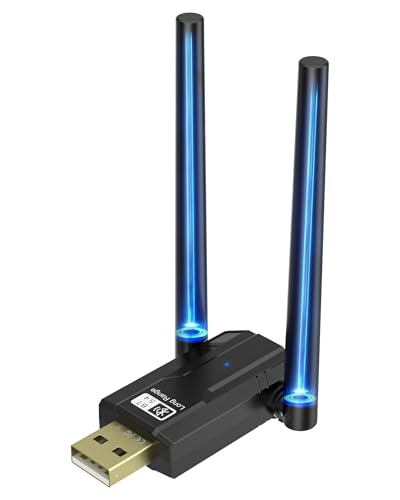
- Dual 180-degree rotating high-gain antennas
- Supports up to seven Bluetooth devices
- Includes a two-year warranty
Best For: Windows PCs needing flexible antennas and long-term coverage
Top Dual-Antenna Pick – GAROGYI Bluetooth 5.4 Adapter
For shoppers comparing Bluetooth adapters with external antennas, the GAROGYI BT606 stands out with Bluetooth 5.4, dual antennas, and broad Windows compatibility. It supports up to 3 Mbps transfers and connects with common peripherals, audio devices, phones, printers, and controllers.
Best For: Windows users who want a modern, dual-antenna adapter for dependable everyday connections.
Pros:
- Bluetooth 5.4 with backward compatibility through Bluetooth 2.0 and later standards.
- Dual antennas are designed to improve signal stability and range.
- Plug-and-play setup on Windows 11, 10, and 8.1; Windows 7 driver available.
- Supports headphones, speakers, keyboards, mice, controllers, phones, and printers.
Cons:
- Windows 7 may require a driver download.
- Compatibility is listed for Windows systems rather than macOS or other platforms.
The GAROGYI is a practical choice when you want current Bluetooth features and antenna-assisted stability without a complicated setup on newer Windows PCs.
Maximum Distance Specialist – Sena UD100-G03 Bluetooth Adapter
Among Bluetooth adapters with external antennas, the Sena UD100-G03 is built around extended coverage. Its exchangeable antenna supports a stated 300-meter working distance in an open field, with up to 600 meters using the specified 5 dBi dipole antenna.
Best For: Desktop users who prioritize long-range Bluetooth connectivity and broad profile support.
Pros:
- Rated for a normal open-field working distance of 300 meters.
- Exchangeable antenna design can support up to 600 meters with a 5 dBi dipole antenna.
- Supports up to seven simultaneous connections.
- Works with numerous Bluetooth profiles, including HID, A2DP, HFP, PAN, and SPP.
Cons:
- Bluetooth 4.0 is older than the Bluetooth 5.4 options in this roundup.
- Requires the Bluesoleil driver and a Windows configuration tool.
- The listed compatibility is for desktop use.
The Sena is the specialist option for unusually long open-area links, though its older Bluetooth version and driver requirement make it less streamlined for typical home use.
Best Detachable-Antenna Value – BT548 Bluetooth 5.4 Adapter
The BT548 is one of the more flexible Bluetooth adapters with external antennas, combining Bluetooth 5.4, a detachable 5 dBi antenna, and a claimed open-area range of up to 150 meters. It is designed for Windows PCs and supports audio, input devices, printers, and file transfers.
Best For: Windows 8.1–11 users who want a detachable antenna and modern Bluetooth connectivity for several device types.
Pros:
- Bluetooth 5.4 dual-mode support with backward compatibility.
- Detachable 5 dBi antenna and claimed open-area range up to 150 meters.
- Plug-and-play on Windows 8.1, 10, and 11; Windows 7 driver available.
- Supports up to seven connected devices and transfers up to 3 Mbps.
Cons:
- Not compatible with Mac, TVs, car stereos, or Windows 8, XP, and Vista.
- Walls, obstructions, and wireless interference can reduce operating range.
- Only one Bluetooth audio device of the same type can play music at a time.
With current Bluetooth technology and a detachable antenna, the BT548 offers a strong feature set for compatible Windows desktops, provided its platform limitations fit your setup.
Legacy Windows Range Pick – FEASYCOM FSC-BP119 Adapter
The FEASYCOM FSC-BP119 is a straightforward choice among Bluetooth adapters with external antennas, offering Bluetooth 4.0, a stated open-space range of up to 100 meters, and compatibility with several older Windows versions. It supports common audio and input accessories at up to 3 Mbps.
Best For: Windows users with older PCs who need basic long-range Bluetooth for peripherals and audio.
Pros:
- Up to 100 meters of transmission range in open space.
- Supports data and music transfers at up to 3 Mbps.
- Compatible with Windows 10, 8, 7, XP, and Vista in 32-bit and 64-bit versions.
- Supports multiple connected devices, including speakers, headphones, keyboards, and mice.
Cons:
- Bluetooth 4.0 lacks the newer features of Bluetooth 5.4 adapters.
- Requires the CSR Harmony Wireless Software Stack driver.
- Not intended for car stereos, TVs, or Mac computers.
The FEASYCOM makes sense for legacy Windows systems where broad older-version support matters more than the newest Bluetooth specification or top-end range.
Best Adjustable-Antenna Pick – TP-Link UB500 Plus Bluetooth 5.3 Adapter
The TP-Link UB500 Plus is a practical choice if you need Bluetooth adapters with external antennas for a Windows desktop or laptop. Its adjustable multi-direction antenna can be repositioned for better reception, while Bluetooth 5.3, EDR, and backward compatibility support a broad range of devices.
Best For: Windows users who want an adjustable antenna, newer Bluetooth support, and a straightforward USB upgrade for keyboards, mice, speakers, and other peripherals.
Pros:
- Bluetooth 5.3 with backward compatibility from Bluetooth 4.2 through 1.1.
- Adjustable antenna helps optimize reception in different environments.
- Plug-and-play support for Windows 8.1, 10, and 11; Windows 7 requires a driver.
- Supports EDR and Bluetooth Low Energy for improved speed and power efficiency.
Cons:
- Compatible operating systems are limited to Windows.
- Windows 7 requires a separate driver download.
Choose this model when antenna positioning matters more than maximum advertised range. Its Windows-focused setup and adjustable design make it a balanced option for everyday desktop connectivity.
Best for Maximum Stated Range – Techkey Bluetooth 6.0 Long-Range Dongle
The Techkey Bluetooth 6.0 dongle stands out among Bluetooth adapters with external antennas for its stated 600-foot open-area range and 5dBi antenna. It uses Class 1 radio technology, supports Bluetooth 6.0 with EDR and BLE, and can connect up to seven devices at once.
Best For: Windows 10 and 11 desktop users who need extended range for several Bluetooth peripherals, including headphones, speakers, keyboards, mice, and printers.
Pros:
- Stated transmission range of up to 600 feet or 200 meters in open areas.
- Bluetooth 6.0 compatibility with support for earlier versions listed in the specifications.
- Supports simultaneous connections with up to seven Bluetooth devices.
- Plug-and-play setup with claimed data rates up to 3Mbps.
Cons:
- Actual range can be reduced by walls, obstructions, and wireless interference.
- Does not support Mac OS, Linux, TVs, gaming consoles, or car stereo systems.
- Minimum listed operating system support is Windows 10 and Windows 11.
This is the strongest fit when open-area range and multi-device connectivity are your priorities. Verify your operating system before buying, since compatibility is limited to newer Windows versions.
Best Dual-Antenna Design – ZEXMTE Bluetooth 6.0 USB Adapter
The ZEXMTE adapter is a useful option for shoppers comparing Bluetooth adapters with external antennas and wanting flexible antenna positioning. Its Realtek RTL616 chip, dual 2dBi antennas, Class 1 technology, and Bluetooth 6.0 support are designed for long-range Windows connectivity.
Best For: Windows 10 and 11 users who want dual adjustable antennas, support for up to seven connected devices, and a driver-free USB installation.
Pros:
- Dual 2dBi antennas adjust 90 degrees vertically and 180 degrees horizontally.
- Stated range reaches up to 200 meters or 656 feet.
- Supports BR/EDR and BLE dual mode with Bluetooth 6.0 technology.
- Can connect up to seven devices simultaneously and requires no driver installation on supported Windows versions.
Cons:
- Not compatible with Mac OS, Linux, TVs, or gaming consoles.
- Built-in Bluetooth should be disabled before use.
- Warranty coverage is listed as six months.
The ZEXMTE makes the most sense when antenna flexibility and broad room coverage are more important than cross-platform support. Its Windows-only design should be checked carefully before purchase.
Best Plug-and-Play Pick – Bluetooth 6.0 USB Adapter with 5dBi Antenna
If you want Bluetooth adapters with external antennas for a Windows desktop or laptop, this WANJEED model combines Bluetooth 6.0, a detachable 5dBi antenna, and a compact USB design. It is designed for stable everyday connections to audio devices and common peripherals.
Best For: Windows 10 and 11 users who want an adjustable external antenna for headphones, speakers, keyboards, mice, printers, or controllers.
Pros:
- Bluetooth 6.0 is positioned for faster transmission, lower latency, and improved anti-interference performance.
- Detachable 5dBi high-gain antenna supports longer-range coverage and can be adjusted for reception.
- Plug-and-play setup is supported on Windows 10 and 11, with Windows 7 driver support included.
- Supports multiple types of Bluetooth peripherals in a compact USB form.
Cons:
- Windows 7 requires driver installation.
- The listed warranty is only two months.
- Linux is listed as compatible, but the notes do not specify setup details.
Choose this adapter when easy Windows setup and a detachable 5dBi antenna matter more than extensive warranty coverage. Its adjustable design is useful when you need to fine-tune reception around a desktop setup.
Best for Large Rooms – ZEXMTE Bluetooth 6.0 Adapter with High-Gain Antenna
Among Bluetooth adapters with external antennas, the ZEXMTE model stands out for its stated 492-foot, or 150-meter, open-space range. Its Class 1 radio and high-gain antenna are aimed at users who need stable connections across larger homes, offices, or workstations.
Best For: Windows users connecting several peripherals across a spacious room or open area, including headphones, mice, keyboards, and printers.
Pros:
- Claims up to 492 feet or 150 meters of range in open spaces.
- Supports connection of up to seven Bluetooth devices at once.
- Bluetooth 6.0 dual-mode support is designed for stable, low-latency audio and peripheral use.
- Offers driver-free setup on Windows 10 and 11, with smart auto-reconnect for paired devices.
Cons:
- The stated maximum range applies to open spaces and may vary indoors.
- Windows 7 requires a driver installation.
- The supplied notes list Windows compatibility but do not provide Linux support.
This is a practical choice if range is your main concern and you expect to use several Bluetooth devices simultaneously. The 150-meter figure is a best-case open-space claim, so walls and interference will affect real-world performance.
Best Warranty Coverage – Bluetooth 5.4 USB Adapter with Dual Antennas
This RENGOGA model is one of the more flexible Bluetooth adapters with external antennas, pairing Bluetooth 5.4 with two 180-degree rotating high-gain antennas. It supports transmitter and receiver use on compatible Windows PCs and is rated for up to 150 meters in open spaces.
Best For: Windows 8.1, 10, and 11 users who want multi-device support, adjustable antenna positioning, and a two-year warranty.
Pros:
- Bluetooth 5.4 supports data rates up to 3 Mbit/s according to the supplied notes.
- Two rotating high-gain antennas can be positioned to optimize reception and transmission.
- Supports up to seven connected Bluetooth devices, including headphones, mice, keyboards, and phones.
- Includes a two-year warranty and plug-and-play operation for Windows 8.1, 10, and 11.
Cons:
- Windows 7 requires downloading and installing a driver.
- The 150-meter range is specified for open spaces, not typical indoor conditions.
- The supplied compatible-device details are limited and specifically list a mouse.
Consider this adapter if adjustable dual antennas and warranty length are important buying factors. Its seven-device capacity also suits a PC that needs to handle several peripherals, while indoor range will depend on the environment.
How We Picked the Best Bluetooth Adapters with External Antennas
We focused on USB Bluetooth adapters that include a removable or fixed external antenna rather than tiny low-profile dongles. We compared advertised Bluetooth versions, range claims, antenna configuration, operating-system support, transmitter and receiver functions, and setup requirements. Because real-world range depends on walls, interference, USB placement, and the connected device, advertised distances are treated as useful benchmarks—not guarantees.
We also considered practical details such as Windows 11 and Windows 10 compatibility, included drivers, antenna adjustability, and whether a model appears better suited to basic peripherals, audio, gaming accessories, or extended-distance connections.
Quick Comparison
| What to Compare | Why It Matters |
|---|---|
| Bluetooth version | Newer versions may improve efficiency and compatibility, but connected devices still determine the final experience. |
| Antenna design | External, high-gain, or dual antennas can improve placement and signal consistency. |
| Claimed range | Useful for comparing models, though walls and interference can substantially reduce actual distance. |
| Operating-system support | Check Windows version and driver requirements before buying. |
| Feature support | Confirm whether you need audio transmission, receiving, BLE, EDR, or simple peripheral pairing. |
Key Buying Factors for Bluetooth Adapters with External Antennas
Range and Antenna Placement
Choose an adapter with an antenna you can position away from the back of a metal desktop case or other obstructions. A longer range claim is most useful when your PC and Bluetooth device are separated by distance. Dual-antenna and high-gain designs may help maintain a steadier connection, but they do not eliminate interference or physical barriers.
Bluetooth Generation and Compatibility
Bluetooth 5.3, 5.4, and 6.0 models may offer newer standards and improved efficiency, but backward compatibility is generally more important than the version number alone. Make sure the adapter supports your Windows installation and that required drivers are available. Some products are designed primarily for Windows and may not support macOS or Linux.
Use Case and Connection Type
For keyboards, mice, gamepads, and basic speakers, a reliable USB adapter with a repositionable antenna may be sufficient. For demanding audio setups, check codec and profile support rather than assuming every adapter delivers the same sound quality. If you need to connect one device as a transmitter and another as a receiver, verify that both modes are explicitly supported.
Setup and USB Location
Plug-and-play claims can still depend on Windows drivers. If the adapter includes a driver disc or download, save the driver before removing an existing Bluetooth device. A short USB extension cable can help move the adapter and antenna into a clearer position, especially on desktop PCs tucked beneath a desk.
Who Should Buy Which Bluetooth Adapters with External Antennas?
Choose a compact long-range model if you want a straightforward upgrade for a desktop PC and do not need advanced transmission features. Pick a dual-antenna adapter if the computer is enclosed, positioned low, or located far from your accessories. A high-gain 5 dBi model makes more sense for users prioritizing extended range and flexible antenna positioning. If you want the newest advertised standard, consider a Bluetooth 6.0 option—but confirm Windows support and compatibility with your existing devices first. For professional or unusually long-distance use, models with exchangeable antennas and clearly stated range specifications offer the most room to optimize placement.