
If you need to copy drives without a computer, usb duplicators with offline operation are built for the job. They let you clone, wipe, and verify media directly from the dock or duplicator itself.
Below, we’ve selected 10 options for flash drives, NVMe, SATA, and even larger storage workflows so you can match the right tool to your cloning needs.
Best 10 USB Duplicators with Offline Operation Picks for 2026
Offline SATA Duplicator Dock
SABRENT Dual Bay HDD/SSD Clone Station

- Offline cloning up to 60Mbps
- Supports 2.5-inch and 3.5-inch SATA HDDs/SSDs
- USB 3.0 dock with plug-and-play setup
Best For: SATA drive cloning and docking without a computer
Portable NVMe Offline Cloner

- Standalone offline cloning for NVMe SSDs
- Supports 2230 to 22110 M-Key drives
- Up to 1250MB/s over USB 3.2 Gen 2
Best For: Fast offline cloning of M.2 NVMe drives
Standalone USB Thumb Drive Cloner
StarTech 1-to-2 USB Duplicator/Eraser

- Standalone cloning and erasing with no computer
- LCD shows drive status, speed, and errors
- Supports quick erase plus 3-pass overwrite
Best For: Flash-drive duplication and sanitizing in IT workflows
High-Speed NVMe Clone Dock
UGREEN 20Gbps Dual Bay NVMe Enclosure

- One-click offline cloning with no computer
- Supports M-Key and B+M-Key NVMe SSDs
- 20Gbps transfer support with aluminum cooling
Best For: Fast offline NVMe cloning with premium cooling
Standalone SATA/USB Sanitizer
1:1 Duplicator & Eraser for HDD/SSD and Flash

- Offline 1:1 copying and erasing without a PC
- Works with 2.5/3.5-inch SATA HDDs/SSDs and USB thumb drives
- Includes multiple copy modes, erase modes, and Copy & Compare
Best For: IT teams and technicians who need a standalone copier/eraser for SATA drives and USB flash media.
Dual-Bay M.2 Clone Dock
Offline Copy Tool for M.2 SATA SSDs

- One-click offline cloning with no PC required
- Dual-bay design supports simultaneous read and write
- Tool-free support for B+M key M.2 SATA SSD sizes
Best For: Users who need a tool-free offline duplicator for M.2 SATA SSD migration and backup.
High-Volume USB Cyclone Duplicator

- Standalone 1-to-15 USB duplication with no computer needed
- Supports copy, compare, erase, and format functions
- Includes DoD 3-pass and 7-pass erase modes
Best For: Businesses and technicians who need a standalone 1-to-15 USB duplicator for batch media handling.
Standalone SATA Cloner Dock
Offline Clone Dock for 2.5/3.5 Drives

- One-key offline clone without a computer
- Supports 2.5" and 3.5" SATA drives
- Up to 40TB total capacity
Best For: Quick SATA drive duplication and backups
WAVLINK Offline Clone Dock

- Offline clone works without drivers
- Supports 2.5" and 3.5" SATA drives
- UASP and USB 3.0 support
Best For: Simple stand-alone cloning with daily dock use
SAS Offline Cloner Station
SAS Dual-Bay Offline Duplicator
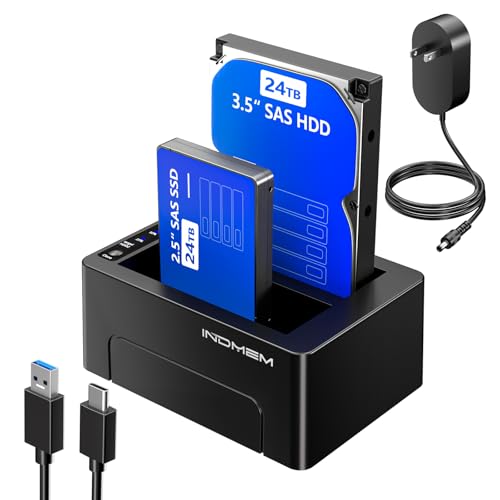
- Clones SAS and SATA drives offline
- Supports up to 48TB total capacity
- Can write to two target drives at once
Best For: Professional SAS/SATA duplication and batch backup
Offline SATA Duplicator Dock – SABRENT Dual Bay HDD/SSD Clone Station
If you want usb duplicators with offline operation for standard SATA drives, this SABRENT dock is a straightforward pick. It works as a dual-bay USB 3.0 docking station and standalone cloner for 2.5-inch and 3.5-inch HDDs or SSDs, so you can duplicate drives without a computer while still using it as a normal dock when needed.
Best For: Users who need an offline cloner for 2.5-inch and 3.5-inch SATA hard drives or SSDs.
Pros:
- Supports offline cloning up to 60Mbps
- Handles standard 2.5-inch and 3.5-inch SATA HDDs and SSDs
- Plug-and-play design with no drivers needed
- USB 3.0 transfer speeds up to 5Gbps when used as a dock
Cons:
- Limited to SATA drives, not M.2 NVMe SSDs
- Clone speed is modest compared with newer NVMe duplicators
This is a practical choice if your workflow centers on SATA storage and you value simple standalone duplication. It is less specialized than NVMe units, but the broad drive support and dual-bay dock design make it useful for everyday drive handling.
Portable NVMe Offline Cloner – MAIWO Dual Bay M.2 SSD Dock
For usb duplicators with offline operation built around modern NVMe storage, this MAIWO cloner is aimed at fast, standalone copying. It supports M-Key NVMe SSDs in multiple sizes, clones without a computer, and uses USB 3.2 Gen 2 for up to 1250MB/s transfer performance when connected for data access.
Best For: NVMe users who want a standalone duplicator for multi-size M.2 drives.
Pros:
- Works as a completely standalone offline cloner
- Supports M-Key NVMe SSDs in 2230, 2242, 2260, 2280, and 22110 lengths
- Each bay supports up to 8TB, for 16TB total capacity
- USB 3.2 Gen 2 speeds up to 1250MB/s for fast transfers
Cons:
- Only supports M-Key NVMe SSDs, not SATA drives
- Target drive must be equal to or larger than the source drive
This is a strong fit if you need a compact offline NVMe cloning tool with broad M.2 length compatibility. The open vertical design and tool-free setup make it especially convenient for frequent drive swaps and backup work.
Standalone USB Thumb Drive Cloner – StarTech 1-to-2 USB Duplicator/Eraser
If your priority is usb duplicators with offline operation for flash drives, this StarTech model is built for standalone USB duplication and erasing. It can clone, sanitize, and verify USB flash media without a computer, making it useful for IT teams that need to prepare or wipe multiple thumb drives efficiently.
Best For: IT pros who need a standalone USB flash drive duplicator and eraser.
Pros:
- Standalone 1-to-2 USB drive duplicator and eraser
- Supports duplication, quick erase, and single-pass or 3-pass overwrite
- LCD menu display with drive info, performance, and error scanning
- Asynchronous copy mode helps you process drives without waiting between swaps
Cons:
- Designed for USB flash drives, not SATA or NVMe SSDs
- Asynchronous mode is limited by the 64MB internal memory and source size
This unit is best when you need a dedicated flash-drive duplicator rather than a general storage dock. Its standalone erase and verify features make it especially practical for managed deployments and data sanitization tasks.
High-Speed NVMe Clone Dock – UGREEN 20Gbps Dual Bay NVMe Enclosure
Among usb duplicators with offline operation, this UGREEN dual-bay enclosure is built for fast NVMe cloning and everyday drive handling. It supports one-click offline cloning with no computer required, works with M-Key and B+M-Key NVMe SSDs, and uses a 20Gbps interface for high-speed transfers when you are moving data through USB.
Best For: Users who want a fast offline NVMe duplicator with tool-free installation.
Pros:
- One-click offline cloning with no computer required
- Supports two NVMe SSDs up to 8TB each, for 16TB total
- 20Gbps USB 3.2 Gen 2×2 transfer support
- Aluminum body, 360° cooling, and S.M.A.R.T. monitoring
Cons:
- Only supports NVMe drives; SATA interfaces are not supported
- 20Gbps speeds require compatible hardware and cable support
This is a feature-rich option if you want fast standalone cloning plus strong heat management in a premium enclosure. Its combination of tool-free setup and drive health monitoring makes it a sensible pick for frequent SSD work.
Standalone SATA/USB Sanitizer – 1:1 Duplicator & Eraser for HDD/SSD and Flash
If you need usb duplicators with offline operation for both flash drives and SATA storage, this StarTech.com unit is built for practical field use. It works as a standalone 1:1 duplicator and eraser for 2.5/3.5-inch SATA HDDs/SSDs and USB thumb drives, with push-button controls and an LCD menu for selecting copy or erase modes without a PC.
Best For: IT teams and technicians who need a standalone copier/eraser for SATA drives and USB flash media.
Pros:
- Standalone offline operation with LCD menu and push-button mode selection.
- Supports both SATA HDD/SSD and USB flash drives, including cross-interface copying.
- Offers multiple copy modes and five erase modes, including DoD 5220.22-M 3-pass overwrite.
- Copy & Compare option helps verify the cloned drive after duplication.
Cons:
- Adapter support for eSATA, mSATA, IDE, and M.2 SATA requires separate accessories.
- Designed as a 1:1 duplicator, so it is not meant for high-volume multi-drive USB workflows.
Overall, this is a strong choice when you want a simple offline cloning and wiping tool that covers both USB flash media and SATA drives. The feature set leans toward secure sanitizing and dependable drive-to-drive copying rather than advanced workstation integration.
Dual-Bay M.2 Clone Dock – Offline Copy Tool for M.2 SATA SSDs
For buyers comparing usb duplicators with offline operation for M.2 SATA drives, this MAIWO dock is a focused two-bay solution. It supports one-click cloning without a computer, so you can insert the source and target SSDs and start a standalone backup or migration workflow right away.
Best For: Users who need a tool-free offline duplicator for M.2 SATA SSD migration and backup.
Pros:
- One-click offline clone works without connecting to a PC.
- Dual-bay design supports simultaneous read and write for two SSDs.
- USB-C and USB-A cables are included for flexible host connectivity when used as a dock.
- Tool-free installation supports B+M key M.2 SATA SSDs in 2242/2260/2280/22110 sizes.
Cons:
- Limited to M.2 SATA SSDs, not NVMe or standard USB flash drives.
- Best suited to SSD cloning tasks rather than broad multi-format duplication.
This is a practical pick if your offline duplication needs center on M.2 SATA storage and you want an easy, tool-free setup. It combines dock functionality with standalone cloning, making it useful for routine drive migration and expansion work.
High-Volume USB Cyclone Duplicator – 1-to-15 Offline Copy Hub
If you need usb duplicators with offline operation for larger batches, the EZ Dupe USB Cyclone is built for one-to-many workflows. It runs as a standalone system with no computer or software required, and it can copy, compare, erase, or format USB flash drives and supported USB external hard drives with one-touch control.
Best For: Businesses and technicians who need a standalone 1-to-15 USB duplicator for batch media handling.
Pros:
- Supports 1-to-15 duplication for USB flash media and USB external hard drives.
- Standalone operation requires no computer or software.
- Includes four copy modes and four erase modes, including DoD 3-pass and 7-pass options.
- Independent bandwidth design helps prevent one slow drive from reducing overall copy speed.
Cons:
- USB-focused design does not cover SATA or M.2 drives.
- Bulk-capacity workflows may be slower on drives that do not sustain the full USB speed rating.
Overall, this model makes sense when your priority is fast, offline USB duplication across many drives at once. Its batch-oriented layout and stand-alone controls are well matched to business imaging, distribution, and sanitation tasks.
Standalone SATA Cloner Dock – Offline Clone Dock for 2.5/3.5 Drives
If you want usb duplicators with offline operation for fast drive swaps and simple backups, this dual-bay SATA dock is built around one-key cloning with no computer required. It supports 2.5-inch and 3.5-inch SATA drives, offers up to 5Gbps USB 3.2 Gen1 connectivity, and adds practical status monitoring through a 25%-50%-75%-100% LED progress bar.
Best For: Home offices, IT techs, and console or media users who need a straightforward offline clone dock for SATA drives.
Pros:
- One-key offline clone works without a PC or laptop.
- Supports 2.5-inch and 3.5-inch SATA drives with up to 40TB total capacity.
- USB 3.2 Gen1 5Gbps connection helps keep file access and backups moving.
- Tool-free vertical design makes drive swapping quick and easy.
Cons:
- Built for SATA drives only, not other drive types.
- Cloning progress is simple, so it may not suit users wanting advanced software controls.
Overall, this is a practical offline duplicator for users who value convenience, broad SATA compatibility, and a clean, tool-free setup. The extra monitoring features and cooling-focused design make it a solid pick for regular backup and migration tasks.
WAVLINK Offline Clone Dock – USB-C Dual-Bay SATA Cloner
For buyers comparing usb duplicators with offline operation, this WAVLINK dual-bay dock focuses on simple stand-alone cloning and everyday drive access. It supports 2.5-inch and 3.5-inch SATA HDDs and SSDs, adds UASP-backed transfer performance, and keeps setup easy with tool-free installation and hot-swapping.
Best For: Users who want a straightforward dual-bay SATA dock with offline cloning and broad desktop compatibility.
Pros:
- Supports offline cloning from source to target without drivers.
- Works with 2.5-inch and 3.5-inch SATA HDDs and SSDs.
- UASP support improves transfer efficiency over standard USB 3.0.
- Built-in power switch and sleep mode add convenient day-to-day use.
Cons:
- Offline clone is limited to a source-to-target workflow and does not support online cloning.
- Maximum clone rate is listed at 60Mbps, so it is not a speed-focused duplicator.
This dock is a sensible choice if you need dependable cloning plus normal docking use in one unit. It leans on ease of setup and broad OS support rather than premium extras, which makes it a practical value pick.
SAS Offline Cloner Station – SAS Dual-Bay Offline Duplicator
If your search for usb duplicators with offline operation includes SAS support, this dual-bay station is aimed at heavier-duty cloning and backup workflows. It clones without a PC, supports both SAS and SATA 2.5-inch/3.5-inch drives, and uses a 12V 4A power adapter to handle the higher power demands of professional setups.
Best For: IT teams and professionals who need offline cloning for SAS and SATA drives in a higher-capacity dock.
Pros:
- One-touch offline cloning works independently without a PC.
- Supports both SAS and SATA 2.5-inch/3.5-inch drives.
- Up to 48TB total capacity suits larger storage needs.
- Can create two identical copies at once for efficient duplication.
Cons:
- Designed for desktop use and includes a more specialized SAS-focused setup.
- Requires the included 12V 4A power adapter, so it is not a low-power portable option.
Compared with typical SATA-only cloners, this model stands out for SAS compatibility and dual-target copying. It is best viewed as a practical workstation tool for batch backups, migration, and recovery tasks where capacity and flexibility matter more than compact size.
How We Picked These USB Duplicators with Offline Operation
We focused on standalone cloning tools that can work without software, drivers, or an attached host PC. Priority went to reliable one-touch operation, clear status feedback, support for common drive types, and practical speeds for real-world duplication jobs.
We also considered whether each unit is better suited to flash media, NVMe SSDs, SATA HDDs/SSDs, or mixed-use environments, since the best offline duplicator depends heavily on what you clone most often.
Quick Comparison
The fastest way to narrow the list is by media type. USB flash drive duplicators are ideal for mass distribution and erasing workflows. NVMe and SATA duplicators are better for cloning system drives, service replacements, and storage migration. If you need to handle multiple formats, look for a dock-style unit with offline clone support and broad bay compatibility.
Key Buying Factors for USB Duplicators with Offline Operation
Media Type and Slot Compatibility
Check whether the unit supports USB flash drives, M.2 NVMe, M.2 SATA, 2.5-inch SSDs, 3.5-inch HDDs, or SAS drives. A mismatch here is the most common buying mistake.
Clone Speed and Capacity
Fast duplication matters, but only if the device can sustain it across full-capacity drives. If you clone large SSDs or high-volume flash batches, look for higher throughput and robust thermal design.
Offline Operation and Ease of Use
The appeal of USB Duplicators with Offline Operation is simplicity. One-button cloning, visible progress indicators, and dependable verify/erase modes make it easier to use in labs, IT closets, and production environments.
Workflow Features
For business use, features like compare/verify, secure erase, mixed-media support, and automatic source detection can save a lot of time and reduce errors.
Who Should Buy Which USB Duplicators with Offline Operation?
Choose a USB flash duplicator if you distribute the same files to many drives or need secure wipe capability. Pick an NVMe or SATA offline duplicator if you service laptops, desktops, or storage upgrades and want to clone drives directly.
If you manage mixed environments, a dual-bay docking station with offline cloning offers the most flexibility. For higher-volume operations, a dedicated multi-target duplicator is usually the better long-term choice than a general-purpose dock.