
If you need to clone or sanitize flash drives without tying up a PC, standalone USB duplicators can save time and simplify the workflow. They’re built for quick, repeatable copying in offices, labs, schools, and production environments.
This roundup focuses on practical options for different batch sizes, speeds, and media-handling needs so you can choose a duplicator that fits your workload.
Best 10 Standalone USB Duplicators Picks for 2026
Compact IT Duplicator
Standalone 1:2 USB Flash Drive Duplicator

- Copies and erases without a computer
- LCD menu with compare and scan tools
- Quick Erase plus 3-pass overwrite
Best For: Technicians and IT teams handling small-batch USB cloning and wiping
High-Output Duplicator
1-to-7 Standalone USB Duplicator

- Duplicates up to seven USB drives at once
- Up to 2GB per minute copy speed
- Bit-by-bit copy with sync and async modes
Best For: Businesses and IT teams running higher-volume USB duplication jobs
Portable Cloning Tool
Portable 1:2 USB Flash Drive Copier

- No-computer 1-to-2 USB copying
- Quick Copy and whole-media clone modes
- Built-in test and erase functions
Best For: Mobile users who need a lightweight standalone copier and sanitizer
Mass-Production Cloner
1-to-31 Standalone USB Duplicator
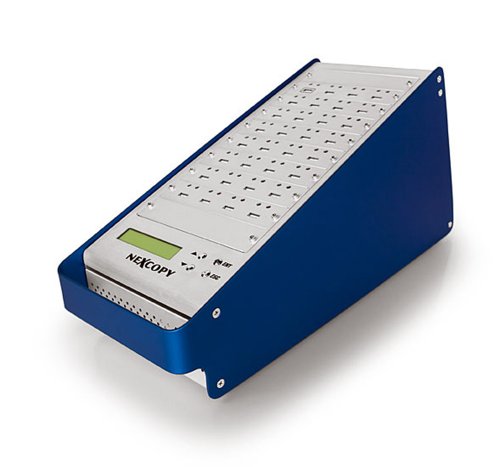
- Copies one source to 31 targets
- No computer or software required
- LCD shows real-time status and performance
Best For: Production teams needing very high-volume USB duplication
Computer-Connected Multi-Copy Pick
DupliM Mini 1-to-10 USB Duplicator

- Duplicates up to 10 USB drives at once
- Works with Windows and Mac software
- Copies from image files, drives, or folders
Best For: Computer-based duplication jobs that need high drive count
Standalone Erase-and-Verify Pick
StarTech 1:5 USB Duplicator Eraser

- Standalone 1-to-5 duplication with no PC needed
- Supports quick erase and 3-pass overwrite
- LCD menu with Copy & Compare verification
Best For: Technicians who need cloning plus secure drive wiping
Portable Speed-Focused Pick
EZ Dupe Mini USB Plus MK II 1-to-4

- Standalone plug-and-use operation
- Copies up to 4 drives at once
- Updated unit rated at 2.5GB/min
Best For: Portable jobs that need quick multi-drive USB copying
High-Speed 7-Target Rack
Vinpower USBShark Standalone Duplicator

- Copies up to 7 drives at once
- Smart copy, prescan, and secure erase
- Works with USB 3.0, 2.0, and 1.0
Best For: Higher-volume teams needing standalone cloning and erase tools
Touchscreen Office Cloner

- Touchscreen control for copy, compare, format, and erase
- Up to 35MB/s USB flash duplication
- Lightweight 3-pound build
Best For: Small offices wanting simple, touch-driven duplication
Compact 7-Bay Updater

- Copies up to 7 drives at once
- Asynchronous copy workflow
- Supports USB 1.0/2.0/3.0 and powered external storage
Best For: Compact duplication with flexible, asynchronous cloning
Compact IT Duplicator – Standalone 1:2 USB Flash Drive Duplicator
If you need standalone usb duplicators for basic cloning and secure wiping, this StarTech unit is built for technicians and IT teams that work with USB flash drives and external USB storage. It copies without a computer, supports multiple erase modes, and includes an LCD menu for checking status and drive health.
Best For: IT pros, technicians, and teams that need a compact 1-to-2 USB cloner with erase functions.
Pros:
- Standalone 1-to-2 duplication and erasing with no computer required
- Supports Quick Erase plus single-pass and 3-pass overwrite options
- LCD menu with copy-and-compare verification and bad-sector scanning
- Upgradeable firmware and asynchronous copy mode for smaller source content
Cons:
- Asynchronous copy mode is limited to source content under 64 MB
- Best fit is USB flash media; external USB devices may need their own power source
- Only duplicates to two targets at a time
This is a practical pick when you want a small standalone duplicator that combines cloning, verification, and sanitizing in one box. Its strongest appeal is the mix of copy modes and erase tools for routine USB management.
High-Output Duplicator – 1-to-7 Standalone USB Duplicator
For buyers comparing standalone usb duplicators for higher-volume jobs, this Systor model stands out with a 1-to-7 layout and no-computer operation. It is designed for bit-by-bit USB copying, supports synchronous and asynchronous modes, and keeps transfer speed up to 2GB per minute even as more targets are added.
Best For: Businesses, IT departments, and service teams that need to duplicate up to seven USB drives at once.
Pros:
- Standalone operation with no computer or software required
- Copies up to 7 targets and maintains up to 2GB per minute speed
- Bit-by-bit duplication with synchronous and asynchronous copy modes
- Includes lifetime technical support and a 3-year labor warranty
Cons:
- Larger desktop unit at 10 pounds, so it is less portable
- Primary compatibility is USB flash drives; 2.5-inch external drives are optional
- Interface details are basic, with USB 1.1 listed in the specs
If you need more output than a 1-to-2 unit can provide, this is the more scalable option in the standalone usb duplicators category. It is a better fit for repeated production runs where speed consistency and multi-target duplication matter.
Portable Cloning Tool – Portable 1:2 USB Flash Drive Copier
If you want standalone usb duplicators in a small, portable format, the BestDuplicator UB300 is aimed at fast 1-to-2 flash drive copying without a PC. It supports quick copy and whole-media copy, and adds built-in test and erase functions for checking drives before deployment.
Best For: Mobile technicians, schools, businesses, and government users who need a lightweight 1-to-2 USB copier.
Pros:
- Standalone 1-to-2 duplication with no Windows or Mac software required
- Quick Copy and Whole Media Copy modes for data-only or bit-for-bit cloning
- Built-in capacity check, device info, speed test, and erase tools
- Compact 6.72-ounce portable design with LCD and per-port LEDs
Cons:
- Best performance is with source and target media of similar capacity
- USB flash drives are the main use case; card support depends on a separate USB card reader
- Only duplicates to two targets simultaneously
This model makes sense when portability and simple field use matter more than high-target capacity. It covers the essentials well for small duplication tasks and basic media testing.
Mass-Production Cloner – 1-to-31 Standalone USB Duplicator
For very large jobs, this standalone usb duplicators option is built around a 1 master to 31 target setup with no PC or software required. It emphasizes high-speed copying, asynchronous duplication for smaller masters, and real-time feedback on the LCD.
Best For: Production environments that need to clone one USB source to many targets at once.
Pros:
- 1 master to 31 target configuration for large batch duplication
- Standalone use with no PC or software required
- Over 1800MBs per minute copy speed to each port
- LCD provides real-time performance feedback and status
Cons:
- Asynchronous duplication is limited to masters up to 256MBs
- At 18 pounds, it is not a portable unit
- Details are limited, so setup expectations should be based on the listed core specs
This is the strongest pick here when sheer output matters more than portability or extra features. The 1-to-31 design makes it a specialized production tool for high-volume USB cloning.
Computer-Connected Multi-Copy Pick – DupliM Mini 1-to-10 USB Duplicator
If you want a compact option for standalone usb duplicators, the DupliM Mini is built for users who do not need a self-contained unit. It connects to a Mac or PC and can duplicate up to 10 USB 3.0 or 2.0 drives at once, with support for copying from image files, flash drives, or selected files and folders on your hard drive.
Best For: Users who want a computer-connected USB duplicator with multi-drive output and software-based control.
Pros:
- Duplicates up to 10 USB drives simultaneously.
- Supports USB 3.0 and 2.0 media with SuperSpeed USB 3.0 technology.
- Can duplicate from image files, flash drives, or selected files and folders.
- Includes DupliM software suite, power adapter, USB 3.0 cable, and U.S.-based tech support.
Cons:
- Requires a connected Windows or Mac computer to operate.
- Not a true standalone duplicator.
Overall, this model makes sense when your workflow is tied to a host computer and you want a compact duplicator that can push out multiple copies efficiently. It is especially practical for users who want software-guided duplication rather than an all-in-one standalone box.
Standalone Erase-and-Verify Pick – StarTech 1:5 USB Duplicator Eraser
Among standalone usb duplicators, the StarTech USBDUP15 stands out for technicians who need both duplication and sanitizing in one device. It works without a computer, supports USB 3.0, 2.0, and 1.1 flash drives and some external USB storage, and offers multiple copy and erase modes for practical shop or IT use.
Best For: IT pros and technicians who need a standalone duplicator with erase and verification tools.
Pros:
- Standalone 1-to-5 USB duplicator, no computer required.
- Includes duplicate, erase, quick erase, and 3-pass overwrite modes.
- Supports system/file copy, sector-by-sector copy, and Copy & Compare verification.
- LCD menu, push-button controls, and asynchronous copy mode for workflow flexibility.
Cons:
- Copies up to 5 drives at a time, fewer than larger multi-bay units.
- External USB devices may need their own power source.
This is a strong pick if your priority is control, erasure, and validation rather than just raw capacity. The LCD interface and multiple erase standards make it a practical choice for environments that handle boot media, shared drives, or drive sanitization tasks.
Portable Speed-Focused Pick – EZ Dupe Mini USB Plus MK II 1-to-4
If you need standalone usb duplicators in a compact format, the EZ Dupe Mini USB Plus MK II is a portable 1-to-4 unit with plug-and-use operation. It supports USB 1.0, 2.0, and 3.0 flash drives, can copy to up to four drives at once, and is rated at 2.5GB/min or about 45 MB/s in the updated version.
Best For: Buyers who want a compact standalone duplicator with faster copy speed and broad flash-drive compatibility.
Pros:
- Standalone operation with no computer required.
- Copies up to 4 USB flash drives simultaneously.
- Updated version claims 25% faster copy speed at 2.5GB/min.
- Supports USB 1.0, 2.0, 3.0 flash drives and external storage with its own power source.
Cons:
- Only duplicates up to 4 drives at a time.
- External USB devices must have their own power source.
For buyers who value portability, this model offers a good balance of speed and simplicity. It is a sensible choice when you want a small standalone duplicator that can handle common flash media without needing a connected computer.
High-Speed 7-Target Rack – Vinpower USBShark Standalone Duplicator
Vinpower Digital USBShark Standalone USB Flash Drive Duplicator - 7 Targets (High Speed)
Check Price On AmazonIf you need standalone usb duplicators for fast, no-computer flash drive cloning, the Vinpower Digital USBShark is built for higher-volume jobs. It supports bit-by-bit duplication, smart copy for accessible content, and secure erase, while also including a USB prescan feature to check for physical reading errors before duplication starts.
Best For: Teams that need a standalone 7-target duplicator with smart copy, prescan, and secure erase tools.
Pros:
- Copies up to 7 USB flash drives at once in standalone mode.
- Smart copy supports all accessible content with bit-by-bit duplication.
- Secure erase fully wipes drives, and prescan checks for source errors.
- Compatible with USB 3.0, 2.0, and 1.0 devices.
Cons:
- Heavier unit at 10 pounds, so it is less portable than compact models.
- Best suited to dedicated duplication workflows rather than casual use.
This model makes sense when accuracy and standalone operation matter more than a tiny footprint. The feature set is practical for repeated cloning, erase, and verification tasks in a busy setting.
Touchscreen Office Cloner – EZ Dupe SOHO Touch 1 to 10
Among standalone usb duplicators, the EZ Dupe SOHO Touch is aimed at simple everyday copying with a touchscreen menu and straightforward controls. It handles copy, compare, format, and erase tasks, and its lightweight build makes it easier to place in a small office or shared workspace.
Best For: Users who want a touchscreen standalone duplicator for routine copy, compare, format, and erase tasks.
Pros:
- Touchscreen interface simplifies control of copy, compare, format, and erase.
- Supports USB flash media duplication at up to 35MB per second.
- Compatible with USB devices on Windows, Linux, or macOS.
- Lightweight 3-pound design is easier to move and set up.
Cons:
- Speed is lower than faster high-end duplicators.
- Designed for USB flash media, so it is less specialized for larger-scale production work.
This is a practical pick if you want an easy-to-use standalone unit without a steep learning curve. The touchscreen and common maintenance functions make it well suited to regular office duplication tasks.
Compact 7-Bay Updater – EZ Dupe Mini USB Plus MK III
If compact standalone usb duplicators are what you need, the EZ Dupe Mini USB Plus MK III focuses on speed, convenience, and a small footprint. It duplicates up to 7 USB flash drives at the same time, supports asynchronous copying, and claims a faster copy speed than the original version while keeping plug-and-use operation.
Best For: Users who want a compact standalone duplicator for up to 7 flash drives with asynchronous copying.
Pros:
- Duplicates up to 7 USB flash drives simultaneously.
- Asynchronous copy lets you start new jobs without waiting for a full set to finish.
- Supports USB 1.0, 2.0, 3.0 flash drives and external USB storage with its own power source.
- Standalone plug-and-use operation keeps setup simple.
Cons:
- External USB devices must have their own power source.
- Actual speed depends on the read/write performance of the drives being copied.
This unit is a smart fit when you want more flexibility than a basic cloner without moving up to a larger rack system. Its asynchronous workflow is especially helpful when you are running repeat duplication jobs throughout the day.
How We Picked the Best Standalone USB Duplicators
We focused on real-world factors buyers care about most: target count, copy speed, erase/sanitize functions, ease of use, and whether the unit is truly standalone. We also considered tray design, portability, and whether the interface makes multi-drive jobs simpler to manage.
Quick Comparison: What Matters Most
For smaller teams, 1:2 and 1:4 models are often the easiest way to keep costs down while still getting dependable duplication. Mid-range units around 1:5 to 1:10 offer a stronger balance of throughput and flexibility. High-capacity options such as 1:31 are better suited to bulk deployment, but they also demand more attention to media quality and power management.
Key Buying Factors for Standalone USB Duplicators
Target Count and Batch Size
Choose the number of targets based on how many drives you need to prepare per run. If you regularly duplicate a few drives at a time, a compact unit is usually enough. If you handle training kits, retail packaging, or large internal rollouts, a higher-target machine can cut cycle time significantly.
Speed and Media Compatibility
Copy speed matters, but only when it’s supported by your flash drives. Faster models help with large data sets, yet the actual performance depends on the slowest drive in the batch. Look for support for the USB standards and drive capacities you use most often, and make sure the duplicator can handle mixed media consistently.
Erase and Sanitization Features
Many Standalone USB Duplicators include erase or sanitizer modes, which is useful when you need to reuse drives or prepare media for secure handoff. If you work with sensitive files, confirm that the erase process matches your internal data-handling requirements.
Controls, Reporting, and Ease of Use
LCD menus, touchscreens, and clear job-status indicators reduce mistakes and speed up repetitive work. For shared environments, simple controls are especially helpful because they minimize training time and make job setup more consistent.
Who Should Buy Which Standalone USB Duplicators?
Pick a compact 1:2 or 1:4 unit if you need portability, occasional duplication, or a lower-cost entry point. Choose a mid-size 1:5 to 1:10 model if you want the best all-around mix of speed and capacity for everyday deployment. If your workflow involves large-scale provisioning, a high-capacity standalone unit is the better fit, especially when batch output matters more than footprint.
In short, the best Standalone USB Duplicators are the ones that match your batch size, speed expectations, and erasing needs without adding unnecessary complexity.