
For teams that need to copy, distribute, or securely erase flash drives at scale, the right duplicator can save hours and reduce errors.
This roundup of the best USB duplicators for small businesses focuses on speed, port count, ease of use, and practical features that matter in everyday operations.
Best 10 USB Duplicators for Small Businesses Picks for 2026
Standalone 1:2 USB Cloner
StarTech USB Flash Drive Duplicator/Eraser

- Copies or wipes USB drives without a computer
- Supports verify, sector copy, and overwrite erase modes
- Compact LCD unit for small batch workflows
Best For: Small teams needing simple, computer-free USB cloning and sanitizing
High-Capacity 1:7 Duplicator
Systor USB Duplicator & Sanitizer

- Duplicates one drive to up to seven targets
- Standalone design with synchronous and asynchronous modes
- Fast 2GB/min copy speed for batch jobs
Best For: Businesses that need to clone the same USB content to several drives at once
4-Port USB Data Hub
ANYPLUS Mini Multiport Expander

- Adds four USB ports to one connection
- Plug-and-play, no driver installation needed
- Good for flash drives and general peripherals
Best For: Workstations that need extra USB connections, not drive duplication
Standalone 1:5 USB Cloner
StarTech USB Flash Drive Duplicator/Eraser

- Duplicates and wipes up to five USB drives
- Standalone with LCD, compare, and error scanning
- Supports file copy, sector copy, and overwrite erase
Best For: Small businesses that need dependable mid-size USB cloning and sanitizing
USB Hub Expansion
7-Port Slim Hub with Individual Switches
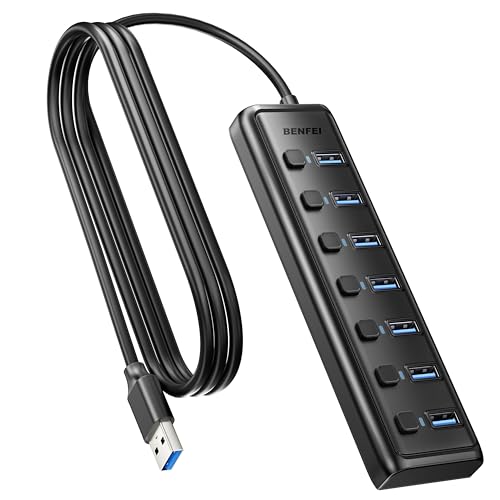
- Adds 7 USB 3.0 ports for office peripherals.
- 5Gbps data transfer supports fast file moves.
- Per-port switches and LEDs simplify device control.
Best For: Small offices needing USB expansion, not drive cloning
Standalone USB Copier

- Clones one USB drive to two targets at once.
- Standalone operation needs no computer or software.
- Includes erase, capacity check, and speed test tools.
Best For: IT teams and small businesses needing simple 1-to-2 cloning
High-Capacity USB Duplicator

- Duplicates one source to up to 31 targets.
- Supports USB flash drives plus 2.5-inch HDDs/SSDs.
- Simple 3-step standalone workflow.
Best For: High-volume batch cloning in small business or IT settings
Standalone 4-Bay Speed Pick
EZ Dupe Mini USB Plus MK II 1 to 4

- Standalone, no-computer copying
- Copies up to 4 drives at once
- Updated version with faster copy speed
Best For: Small teams that need portable, plug-and-play USB flash drive duplication
Software-Driven 10-Bay Hub
DupliM Mini USB Duplicator 1 to 10

- Copies up to 10 drives at once
- Works with Windows and Mac
- Can duplicate from files, folders, or image files
Best For: Offices needing a higher-capacity computer-connected copier with flexible workflows
Mid-Size Standalone Cloner
EZ Dupe Mini USB Plus MK III 1 to 7

- Copies up to 7 drives simultaneously
- Standalone operation with no computer needed
- Updated version with faster copy speed
Best For: Small operations that need more capacity than a 4-bay standalone duplicator
Standalone 1:2 USB Cloner – StarTech USB Flash Drive Duplicator/Eraser
If you need usb duplicators for small businesses that can copy, erase, and verify drives without tying up a computer, this StarTech standalone unit is a practical fit. It handles 1-to-2 duplication, supports multiple erase modes, and gives you an LCD menu for monitoring performance and checking for bad sectors.
Best For: Small teams that need a compact, computer-free way to clone or sanitize USB flash drives.
Pros:
- Standalone 1-to-2 cloning and erasing, so no PC is required
- Supports system/file copy and whole-drive sector-by-sector copy
- Includes quick erase plus single-pass and 3-pass overwrite options
- Copy & Compare verification helps confirm cloned drives
Cons:
- Only duplicates to two drives at once
- Asynchronous mode depends on source content being under 64 MB
- External USB storage may need its own power source
This is a strong entry-level duplicator for businesses that want simple workflow control and built-in sanitizing tools. Its 1.5 GB/min speed and compact design make it useful for recurring USB distribution tasks.
High-Capacity 1:7 Duplicator – Systor USB Duplicator & Sanitizer
For usb duplicators for small businesses that need to feed multiple people at once, this Systor 1-to-7 unit is built for larger batches. It runs completely standalone, copies at up to 2GB per minute, and supports both synchronous and asynchronous modes for flexible turnaround.
Best For: Small businesses that regularly need to duplicate the same USB drive across several recipients.
Pros:
- Copies one source to as many as seven USB drives
- Standalone operation requires no computer or software
- Up to 2GB per minute transfer rate for fast batch work
- Includes sanitizer functionality and bit-by-bit copy mode
Cons:
- Bulkier desktop unit at 10 pounds
- Uses a USB 1.1 interface specification in the listed details
- Best suited to flash drives rather than mixed device workflows
Its main advantage is scale: if your team often distributes the same files to several drives, this model reduces repeat labor. The included lifetime technical support and long labor warranty add peace of mind for business use.
4-Port USB Data Hub – ANYPLUS Mini Multiport Expander
This is not a true duplicator, but it can still be useful in a small-business setup where usb duplicators for small businesses are part of a broader data-transfer station. The ANYPLUS hub expands one USB port into four and supports devices working at the same time, making it handy for connecting flash drives and peripherals during file-moving tasks.
Best For: Desks that need a simple 4-port USB expansion for flash drives and accessories.
Pros:
- Expands one USB port into four working ports
- Plug-and-play design with no driver required
- Supports up to 5Gbps transfer speeds on USB 3.0
- Compatible with many common devices, including flash drives and printers
Cons:
- Does not duplicate or sanitize USB drives
- Maximum output current is only 900mA
- Not recommended for charging devices
If your goal is actual drive cloning, this hub is the wrong category. But for office workstations that need more USB connections for data transfer and peripherals, it is a straightforward low-cost utility.
Standalone 1:5 USB Cloner – StarTech USB Flash Drive Duplicator/Eraser
If you want usb duplicators for small businesses with a little more output capacity, this StarTech 1-to-5 model is a strong middle ground. It duplicates and erases USB flash drives without a computer, supports verification, and includes an LCD interface for tracking status and drive health.
Best For: Small teams that need to clone or sanitize up to five USB drives in one run.
Pros:
- Copies one source to as many as five target drives
- Standalone operation with no computer required
- Supports system/file copy and sector-by-sector copy
- Includes quick erase and single-pass or 3-pass overwrite options
Cons:
- Asynchronous mode requires source content under 64 MB
- External USB storage may need its own power supply
- More expensive and larger than a simple hub-based setup
For businesses that need to hand out several identical drives but do not need the 1-to-7 scale, this model offers a solid balance of capacity and control. Its copy-and-compare feature is especially useful when accuracy matters.
USB Hub Expansion – 7-Port Slim Hub with Individual Switches
If you’re shopping for usb duplicators for small businesses, this BENFEI 7-port hub is the simplest way to expand a workstation for everyday peripheral handling. It doesn’t clone drives, but it does give a small office more USB connections for flash drives, printers, mice, keyboards, card readers, and other accessories with 5Gbps data transfer and per-port power switches.
Best For: Small businesses that need reliable USB expansion for multiple peripherals and file transfers.
Pros:
- Adds 7 USB 3.0 ports in one compact, ultra-slim hub.
- Supports 5Gbps transfers for fast file movement and backups.
- Individual on/off switches and LED indicators help manage connected devices.
- Works with a wide range of operating systems and peripherals.
Cons:
- Cannot charge devices.
- Not a true USB duplicator for cloning flash drives.
- Requires the host computer for operation.
For a small business that mainly needs more ports for daily workflow, this hub is a practical, low-friction upgrade. It is best viewed as an expansion tool rather than a duplication appliance, so it fits teams that want connectivity more than standalone copying.
Standalone USB Copier – 1:2 Flash Drive Duplicator
For usb duplicators for small businesses, the BestDuplicator UB300 is a straightforward standalone copier built for moving one USB flash drive to two targets at once. It works without a computer, supports Quick Copy and Whole Media Copy, and includes verification and erase tools that can help with deployment, testing, or sanitizing drives.
Best For: Small businesses, IT teams, and schools that need a portable 1-to-2 standalone USB cloning tool.
Pros:
- Duplicates one source drive to two target drives simultaneously.
- Runs independently without Windows or Mac software.
- Includes copy modes plus capacity check, speed test, and erase functions.
- LCD display and LED indicators make status easy to monitor.
Cons:
- Designed for USB 1.1 and USB 2.0 media, not modern high-speed USB 3.x duplication.
- Only copies to two targets at once.
- Best performance depends on source and target drives with similar capacity.
This is a solid pick if your business needs a compact, no-computer cloning station for occasional USB rollout or cleanup tasks. Its strengths are simplicity, standalone operation, and built-in verification tools rather than high-volume throughput.
High-Capacity USB Duplicator – 1:31 Stand-Alone Cloner
DupliM 1:31 USB Flash Drive Duplicator Stand-Alone and External 2.5. USB HDD Cloner Burner Copier
Check Price On AmazonIf your search for usb duplicators for small businesses is really about higher-volume copying, the DupliM 1:31 stand-alone duplicator is built for large batch jobs. It supports USB flash drives as well as external 2.5-inch HDDs or SSDs, uses a simple 3-step workflow, and can copy up to 31 targets from one source without requiring a host computer.
Best For: Businesses that need to duplicate many USB drives or external 2.5-inch drives in one workflow.
Pros:
- Copies one source to as many as 31 target drives.
- Supports USB 2.0/3.0 flash drives and external 2.5-inch HDDs or SSDs.
- Standalone design and 3-step process keep operation simple.
- 256MB buffer and up to 1.5GB/min read/write speeds support efficient duplication.
Cons:
- Max HDD capacity is under 2TB.
- Requires AC power and a dedicated physical setup.
- May be more capacity than a very small office needs.
For businesses that regularly clone drives in batches, this model offers far more output than a basic copier. It makes the most sense when you want a standalone duplicator that can scale beyond a few targets at a time.
Standalone 4-Bay Speed Pick – EZ Dupe Mini USB Plus MK II 1 to 4
If you want usb duplicators for small businesses that keep setup simple, this EZ Dupe standalone model is a practical fit. It copies up to four USB flash drives at once, runs without a computer, and the updated version is rated for faster duplication with broader flash memory compatibility.
Best For: Small teams that need a portable, plug-and-play duplicator for routine USB flash drive jobs.
Pros:
- Standalone operation means no computer is needed.
- Duplicates up to 4 USB flash drives simultaneously.
- Updated version claims 25% faster copy speed at up to 2.5GB/min.
- Supports USB 1.0, 2.0, 3.0 flash drives and external USB storage with its own power source.
Cons:
- External USB devices must have their own power source.
- Best suited to flash media duplication rather than general file management.
- Top speed still depends on the read/write speed of the drives being copied.
For small-business workflows that value portability and no-fuss operation, this model keeps things lean while still handling multiple copies at once. The 4-bay limit is modest, but the standalone design and updated compatibility make it a solid everyday copier.
Software-Driven 10-Bay Hub – DupliM Mini USB Duplicator 1 to 10
Among usb duplicators for small businesses, this DupliM unit stands out for higher capacity and software-based control. It duplicates up to 10 USB drives at once, works with Windows and Mac, and can copy from image files, flash drives, or selected files and folders on a hard drive.
Best For: Offices that want a computer-connected duplicator with more flexibility and higher batch capacity.
Pros:
- Duplicates up to 10 USB 3.0 or 2.0 drives simultaneously.
- Computer-connected design supports Windows and Mac OS.
- Can duplicate from image files, flash drives, or selected files and folders.
- Includes a USB 3.0 cable, power adapter, software suite, and U.S.-based tech support.
Cons:
- Requires a connected computer to operate.
- Has higher system requirements than standalone units.
- Less portable than self-contained duplicators.
This is a strong choice if your workflow already revolves around a PC or Mac and you need more than a small-batch copier. The 10-drive capacity and flexible source options make it especially useful for repeat production tasks.
Mid-Size Standalone Cloner – EZ Dupe Mini USB Plus MK III 1 to 7
If your small business needs more throughput without moving to a full workstation setup, this EZ Dupe standalone model is worth a look. It duplicates up to seven USB flash drives at once, runs without a computer, and the updated version is built for faster copying and improved flash memory compatibility.
Best For: Small operations that want a standalone duplicator with more capacity than a 4-bay unit.
Pros:
- Copies up to 7 USB flash drives simultaneously.
- Standalone plug-and-use operation does not require a computer.
- Updated model claims 25% faster copy speed at up to 2.5GB/min.
- Supports USB 1.0, 2.0, 3.0 flash drives and external USB storage with its own power source.
Cons:
- External USB devices must have their own power source.
- Copy speed depends on the speed of the drives being duplicated.
- More specialized than a general-purpose USB hub or file transfer tool.
This model sits in a useful middle ground for buyers who have outgrown a 4-bay duplicator but do not need software-managed duplication. Its standalone design and seven-drive capacity make it a strong fit for repetitive small-batch production.
How We Picked the Best USB Duplicators for Small Businesses
We focused on USB Duplicators for Small Businesses that balance throughput, reliability, and ease of operation. Priority went to standalone units for simple offline use, models with clear LCD or status indicators, and options that support both duplication and sanitizing when data security matters.
We also considered port count, duplication speed, compatibility with common flash media, and whether the device is better suited for occasional office tasks or higher-volume production runs.
Quick Comparison
If you need basic one-to-one copying, compact standalone units are usually the simplest and most affordable choice. For recurring jobs or larger batches, multi-target duplicators can dramatically improve efficiency. Hub-style accessories are useful for connectivity, but they are not substitutes for true duplication hardware.
Key Buying Factors for USB Duplicators for Small Businesses
Capacity and Port Count
Choose a port count that matches your typical workload. A 1:2 or 1:4 unit works well for small teams and occasional duplication, while 1:7, 1:10, or larger systems make more sense for marketing handouts, onboarding kits, training materials, or retail distribution.
Speed and Workflow
Look at rated copy speed, but also how the machine handles repeat jobs. A duplicator that is easy to start, verify, and rerun can be more valuable than a slightly faster model with a clunky interface.
Standalone Vs. Computer-Connected
Standalone units are ideal when you want a simple appliance that works without software. Computer-connected models can be more flexible for certain environments, but they may add setup steps and dependency on a host system.
Erase and Sanitize Features
If you reuse drives, prioritize erase or sanitize functions. These are especially important for businesses that handle customer data, internal documents, or compliance-sensitive content.
Media Compatibility
Make sure the duplicator supports the drive sizes and file types you use most often. Some models are optimized for standard flash drives, while others can handle broader media or even certain external storage workflows.
Who Should Buy Which USB Duplicators for Small Businesses?
Choose a smaller 1:2 or 1:4 model if you mainly duplicate a few drives at a time and want a compact, budget-conscious setup. Pick a mid-range 1:5 to 1:7 unit if you regularly prepare batches for staff, events, or customers. Go with a high-capacity system if production speed matters more than desk space, or if you need to process large volumes on a schedule.
For most small businesses, the best choice is the simplest unit that reliably matches your daily output. That keeps training easy, cuts mistakes, and makes the investment easier to justify over time.