
If you need to copy, clone, or erase multiple flash drives efficiently, the right duplicator can save hours. The best models balance speed, target count, and ease of use without pushing past your budget.
This roundup of usb duplicators under 500 focuses on practical options for small businesses, labs, IT teams, and event workflows.
Best 10 USB Duplicators Under 500 Picks for 2026
Standalone Cloning + Erasing
StarTech 1:2 USB Flash Drive Duplicator Eraser

- No-computer 1-to-2 cloning and erasing
- Quick Copy, sector copy, and multi-pass wipe options
- LCD controls with Copy & Compare verification
Best For: Technicians and IT pros needing compact standalone duplication and sanitizing
PC-Based 16-Target Cloning
Nexcopy SSUSB160PC USB 3.0 16-Target Duplicator

- Copies to 16 target drives
- PC-based with Drive Manager software
- Uses USB 3.0 for higher-speed workflows
Best For: Computer-connected users who need higher port count and faster workflows
Portable Standalone Copier
BestDuplicator UB300 1:2 USB Flash Drive Copier

- No-computer 1-to-2 flash drive copying
- Quick Copy plus whole-media cloning
- Capacity check, speed tests, and erase tools
Best For: Portable standalone copying with built-in testing and erase functions
Standalone 15-Target Batch Copy
Systor SYS-USBD-15 1-to-15 USB Duplicator

- Copies one source to up to 15 targets
- Standalone duplicator and sanitizer
- Synchronous and asynchronous copy modes
Best For: Users who need the highest target count in a standalone setup
Compact standalone copier
EZ Dupe Mini USB Plus MK III 1-to-7

- Copies up to 7 USB flash drives at once
- No computer or software needed
- Updated speed up to 45 MB/second
Best For: Small batches of flash-drive duplication with minimal setup
High-volume standalone duplicator
USB131SA 1-to-31 Standalone USB Duplicator
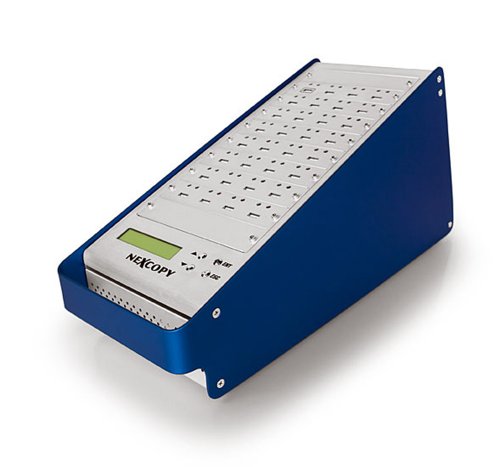
- 1 master to 31 target drives
- No PC or software required
- LCD shows real-time status
Best For: Large production runs that need maximum target capacity
Flexible computer-connected cloner
DupliM Mini USB Duplicator 1-to-10

- Duplicates up to 10 drives simultaneously
- Works with Windows and Mac
- Copies from images, drives, or folders
Best For: Mac/PC users who want software-based duplication flexibility
Professional 1-to-3 Standalone USB Duplicator
Vinpower 1-to-3 USB Duplicator with Secure Erase

- Standalone copying with no PC required
- Smart Copy or Raw Copy options
- DoD 5220.22-M USB erase support
Best For: Small teams needing secure, simple flash drive duplication
High-Capacity 1-to-23 USB Cloner
DupliM 1-to-23 Stand-Alone USB Flash Duplicator

- Copies up to 23 drives at once
- Stand-alone 3-step operation
- Supports bootable drives and multiple file systems
Best For: High-volume duplication jobs with many target drives
Touchscreen 1-to-10 USB Duplicator
EZ Dupe SOHO Touch 1-to-10 USB Cloner

- Touchscreen controls for Copy, Compare, Format, and Erase
- Supports USB 2.0/3.0/3.1 flash media
- Up to 35MB per second duplication speed
Best For: Daily users wanting simple touchscreen control and 10-drive copying
Standalone Cloning + Erasing – StarTech 1:2 USB Flash Drive Duplicator Eraser
If you’re comparing usb duplicators under 500 for small-scale drive cloning and secure wiping, this StarTech unit is built for straightforward stand-alone use. It handles duplication, erase modes, and verification without needing a computer, which makes it practical for IT desks and field work.
Best For: Technicians and IT pros who need a compact 1-to-2 duplicator with erase functions.
Pros:
- Standalone 1-to-2 duplication and erasing with no computer required
- Supports Quick Copy, whole-drive sector copy, and multiple erase modes
- LCD menu plus Copy & Compare verification for cloned drives
- Upgradeable firmware and asynchronous copy mode for quick turnaround
Cons:
- Asynchronous mode requires source content under 64 MB
- Designed for up to 2 target drives, so it is not for larger batch jobs
Overall, this is a focused, portable duplicator that prioritizes ease of use and drive sanitizing over high-volume throughput. If you want a simple standalone tool for USB 3.0/2.0 flash media, it fits the job well.
PC-Based 16-Target Cloning – Nexcopy SSUSB160PC USB 3.0 16-Target Duplicator
For buyers comparing usb duplicators under 500, this Nexcopy model stands out for PC-based high-capacity workflows rather than a small standalone box. It is designed to copy to 16 targets and take advantage of USB 3.0 speeds through included Drive Manager software.
Best For: Users who need a PC-connected duplicator for larger flash-drive jobs.
Pros:
- Supports up to 16 target USB drives
- PC-based workflow with Nexcopy Drive Manager software included
- Built for USB 3.0 technology and maximum flash-drive transfer speeds
Cons:
- Requires a computer-based setup rather than standalone use
- Bulkier at 12 pounds, so it is less portable than compact duplicators
This is a better fit when throughput and port count matter more than portability. If your process lives on a computer and you want to scale cloning jobs, it offers a strong capacity advantage.
Portable Standalone Copier – BestDuplicator UB300 1:2 USB Flash Drive Copier
If you’re shopping for usb duplicators under 500 and want a no-software solution, the BestDuplicator UB300 keeps things simple. It copies one flash drive to two targets at once, adds erase and testing tools, and stays compact enough for portable work.
Best For: IT teams, schools, and field technicians who want a lightweight 1-to-2 copier with built-in tests.
Pros:
- Standalone 1-to-2 duplication with no computer required
- Quick Copy and whole-media bit-for-bit copy modes
- Built-in capacity check, read/write speed test, and erase tools
- Compact, lightweight design with LCD and per-port LEDs
Cons:
- Best performance depends on using source and target media of similar capacity
- Card duplication needs a compatible USB card reader sold separately
As a practical everyday copier, this model balances portability and useful maintenance features. It is a sensible pick if you want fast one-source-to-two-target duplication without extra software overhead.
Standalone 15-Target Batch Copy – Systor SYS-USBD-15 1-to-15 USB Duplicator
Among usb duplicators under 500, this Systor unit is aimed at users who need more targets per run while keeping the workflow fully standalone. It offers synchronous and asynchronous copy modes, bit-by-bit duplication, and built-in sanitizing without requiring a computer or software.
Best For: Business and personal users who need a standalone 1-to-15 duplicator with sanitizer features.
Pros:
- Copies one source drive to as many as 15 targets
- Standalone operation with no computer or software required
- Supports synchronous and asynchronous copy modes
- Bit-by-bit duplication with 2 GB/min transfer speed
Cons:
- Bulkier workflow than a simple 1-to-2 portable duplicator
- Speed is listed at up to 2 GB per minute, which may still be limiting for very large jobs
This model is the strongest fit when target count matters more than size. If you want a standalone duplicator and sanitizer that can handle a larger batch of drives, it is the most scalable option in this group.
Compact standalone copier – EZ Dupe Mini USB Plus MK III 1-to-7
If you want usb duplicators under 500 that keep setup simple, this EZ Dupe Mini USB Plus MK III is built for straightforward standalone copying. It can duplicate one master drive to as many as seven USB flash drives at the same time, with no computer required, and the updated version advertises faster copy speed plus better flash compatibility.
Best For: Small teams or offices that need a compact, no-PC USB duplicator for up to 7 target drives.
Pros:
- Standalone operation requires no computer or software
- Copies up to 7 USB flash drives simultaneously
- Updated speed rating of up to 2.5GB/min or 45 MB/second
- Supports USB 1.0, 2.0, 3.0 flash drives and external USB storage with its own power source
Cons:
- External USB devices must have their own power source
- Max speed depends on the read/write speed of the flash drives
- Best suited to flash media rather than a broad mixed workflow
This model is a practical pick when you value a compact footprint and hands-off duplication more than advanced software tools. Its asynchronous copy design helps you keep work moving instead of waiting for one full batch to finish.
High-volume standalone duplicator – USB131SA 1-to-31 Standalone USB Duplicator
Among usb duplicators under 500, this USB131SA stands out for sheer port count and a fully standalone workflow. It is designed for 1 master to 31 targets, with no PC or software required, and it adds asynchronous duplication plus LCD status feedback for monitoring the job in real time.
Best For: Very large USB duplication runs that need 31 target ports and on-device status monitoring.
Pros:
- Standalone design needs no computer or software
- Copies one master to 31 target drives
- Asynchronous duplication supports masters up to 256MBs
- LCD provides real-time performance feedback and status
Cons:
- Large 18-pound unit is less portable than compact duplicators
- Copy speed details are given per port, but practical results depend on the source media
- Best for duplication-only tasks rather than computer-connected workflows
This is the strongest fit when volume matters more than portability. If your job is to push out many identical USB drives quickly and keep the process visible from the unit itself, the USB131SA is purpose-built for that use case.
Flexible computer-connected cloner – DupliM Mini USB Duplicator 1-to-10
If you need usb duplicators under 500 that work with both Windows and Mac, this DupliM mini cloner is built around a computer-connected workflow. It can duplicate up to 10 USB 3.0 or 2.0 drives simultaneously and supports copying from image files, flash drives, or selected files and folders from your hard drive.
Best For: Users who want flexible, software-based USB duplication on Mac or PC.
Pros:
- Duplicates up to 10 USB drives at the same time
- Works with Windows and Mac OS
- Can duplicate from image files, flash drives, or selected folders/files
- Includes software suite, power adapter, USB 3.0 cable, and U.S.-based tech support
Cons:
- Requires a computer-connected setup
- Needs minimum system requirements, including 2GB RAM and a dual-core processor
- Not a standalone duplicator
This model is a strong choice when you want more control over the source material and platform compatibility. It trades stand-alone convenience for flexible duplication options and a software-driven workflow.
Professional 1-to-3 Standalone USB Duplicator – Vinpower 1-to-3 USB Duplicator with Secure Erase
If you want usb duplicators under 500 for secure, no-computer copying, this Vinpower unit is built for straightforward standalone use. It supports Smart Copy for accessible files or Raw Copy for full bit-by-bit duplication, and it can also erase drives with DoD 5220.22-M standards.
Best For: IT teams, offices, and organizations that need compact standalone USB copying plus secure erasing.
Pros:
- Standalone operation requires no PC connection, which helps avoid malware exposure.
- Smart Copy and Raw Copy give you flexibility for file-based or full-drive duplication.
- Includes secure USB erasing with DoD 5220.22-M wipe support.
- Read Error Skip can help recover readable data from aging or partially damaged drives.
Cons:
- Only duplicates up to 3 drives at once, so it is not ideal for larger batch jobs.
- Focused on flash drives and thumb drives rather than broader media workflows.
This is a practical pick if you need a compact, business-oriented duplicator that also handles secure wipe tasks. Its strength is reliable standalone operation, not high-volume throughput.
High-Capacity 1-to-23 USB Cloner – DupliM 1-to-23 Stand-Alone USB Flash Duplicator
DupliM 1:23 USB Flash Drive Duplicator Stand-Alone Burner Cloner Copier (1 to 23)
Check Price On AmazonFor buyers comparing usb duplicators under 500, this DupliM model stands out for its large 1-to-23 copying capacity and stand-alone workflow. The unit uses a simple three-step process, supports USB 2.0/3.0 flash drives, and can also handle bootable flash drives and compatible external 2.5-inch USB hard drives or SSDs.
Best For: Users who need to duplicate many drives at once and want a straightforward stand-alone copier.
Pros:
- Copies up to 23 target drives in one run.
- Stand-alone operation keeps the process simple and computer-free.
- Supports bootable flash drives and several file systems, including FAT, NTFS, HFS, and Ext formats.
- Can work with compatible external 2.5-inch USB hard drives and SSD drives.
Cons:
- Larger footprint and 7-pound weight make it less portable than smaller units.
- Its focus is duplication volume, so it may be more machine than casual users need.
This is the strongest option here when batch size matters most. If your priority is moving one source drive to many targets quickly, the DupliM offers the biggest duplication capacity in this group.
Touchscreen 1-to-10 USB Duplicator – EZ Dupe SOHO Touch 1-to-10 USB Cloner
If you want usb duplicators under 500 with a simpler interface, the EZ Dupe SOHO Touch leans hard into easy operation. Its touchscreen menu handles Copy, Compare, Format, and Erase, while the unit supports USB 2.0/3.0/3.1 flash media and claims duplication speeds up to 35MB per second.
Best For: Users who want a user-friendly 1-to-10 duplicator with touchscreen controls and erase functions.
Pros:
- Touchscreen interface makes Copy, Compare, Format, and Erase easy to access.
- Supports USB 2.0, 3.0, and 3.1 thumb drives and flash media.
- High-speed duplication is listed at up to 35MB per second.
- Lightweight yet heavy-duty construction is built for daily operation.
Cons:
- Only copies up to 10 drives at once, which is less than larger high-capacity units.
- Its feature set is practical, but not as specialized for secure wipe or recovery as some alternatives.
This model is a good middle ground if you want easier controls without jumping to the largest batch sizes. It balances daily usability with solid duplication and erase tools.
How We Picked USB Duplicators Under 500
We prioritized models that offer strong value in the sub-$500 range, with attention to duplication speed, target count, standalone versus PC-based operation, and included erasing or sanitizing functions. We also looked for clear controls, dependable compatibility with common USB flash drives, and formats suited to both occasional and repetitive jobs.
Quick Comparison
For simple small-batch cloning, a 1:2 or 1:3 standalone unit is often the easiest choice. If you need to process larger volumes, higher-target machines can improve throughput, while PC-connected duplicators may offer more flexibility for computer-based workflows. Touchscreen models can simplify navigation, but basic LCD units are often enough for straightforward duplication tasks.
Key Buying Factors for USB Duplicators Under 500
Target Count
The target count determines how many drives can be copied at once. Lower counts are usually better for portability and smaller jobs, while higher counts help when you need to duplicate many drives in a single cycle.
Stand-Alone or PC-Based
Stand-alone duplicators are ideal for fast, repeatable work without tying up a computer. PC-based models can be useful when you want more control or already have a computer-centered workflow.
Speed and Drive Support
Look at rated copy speed, but also consider real-world performance with the specific flash drives you use. USB 2.0, 3.0, and mixed-support systems can differ significantly depending on media quality and file size.
Erase and Sanitization Features
If you handle reused media, built-in erase or sanitize modes are valuable. These features help prepare drives for redeployment and can simplify compliance-oriented workflows.
Ease of Use
Clear menus, status indicators, and a compact footprint matter more than they may first appear. A simple interface reduces mistakes, especially when multiple operators will use the device.
Who Should Buy Which USB Duplicators Under 500?
If you only duplicate a few drives at a time, choose a compact standalone model with a lower target count. If you need consistent batch production for schools, offices, or field kits, step up to a mid- or high-capacity unit. PC-based options make sense when your process involves desktop oversight, file preparation, or mixed device management. For buyers focused on USB Duplicators Under 500, the best choice is usually the one that matches your batch size, workflow, and erasing needs rather than the one with the most ports.