
Standalone DMX controllers give you hands-on control over stage, DJ, and architectural lighting without relying on a computer during every show. The right model can simplify programming, speed up live adjustments, and match your fixture count and workflow.
We compared 10 popular options across channel capacity, programming features, scene and cue control, portability, and ease of use to help you find the best fit for your lighting setup.
Best 10 Standalone Dmx Controllers Picks for 2026
Flexible Universe Control

- Four-universe support
- 37 backlit buttons
- Four rotary encoders
Best For: Multi-universe lighting rigs
Full-Size Programming Console

- 512-channel control
- Up to 32 fixtures
- Stores 48 scenes
Best For: Complex stage and event lighting
DJ Software Integration

- Two DMX universes
- Dual USB connections
- Tactile DJ-focused controls
Best For: Software-driven DJ light shows
Compact Chase Programming

- Controls eight lights
- 96 DMX channels
- Six 999-step chases
Best For: Small DJ lighting rigs
High-Capacity Pick

- 384 DMX channels for detailed control
- 30 banks and 8 scenes per bank
- Supports up to 24 fixtures
Best For: DJs and venues needing extensive scene programming
Simple Cue Playback

- Five tactile buttons for cue recall
- Up to 10 programmable actions
- Records DMX512, Art-Net, and sACN
Best For: Fixed venues and staff-operated repeatable shows
Balanced Manual Control
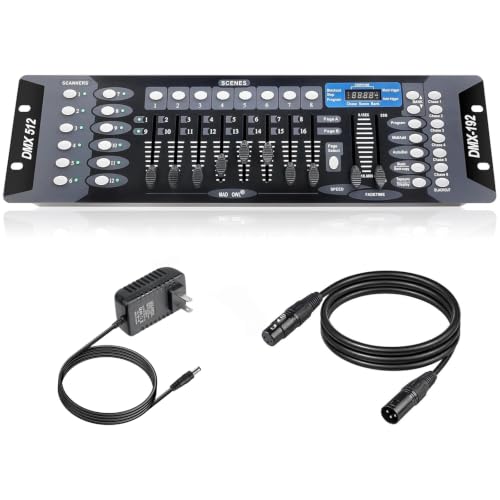
- Controls up to 12 fixtures
- 23 banks with 8 scenes each
- Supports six 240-step chases
Best For: DJs and venues wanting hands-on fader control
Compact Manual Control

- 12 channel faders and a master fader
- Portable battery or DC-powered design
- 3-pin and 5-pin DMX outputs
Best For: Basic demos and compact lighting setups
Programmable Fixture Control

- Up to 192 DMX channels
- Controls up to 12 intelligent lights
- MIDI controllable with blackout feature
Best For: Multi-fixture intelligent lighting setups
Scene Programming Console

- Controls 12 fixtures and 240 scenes
- Up to 40 steps per scene
- Voice control and 3-pin DMX512 output
Best For: Programmed stage and event lighting shows
Flexible Universe Control – ADJ WMX1 Mk2
The ADJ WMX1 Mk2 is a compact choice among standalone DMX controllers for users who want tactile programming controls and support for larger lighting setups. Its 37 backlit buttons, four rotary encoders, and four output sockets provide a hands-on control layout.
Best For: DJs, small production teams, and lighting operators managing multi-universe setups.
Pros:
- Supports up to four DMX universes.
- Includes 37 backlit silicone buttons for tactile operation.
- Four rotary encoders provide additional hands-on adjustment.
- Compact 10 x 9.25 x 3.5-inch design weighs 2.36 pounds.
Cons:
- The supplied notes do not specify fixture capacity or onboard scene storage.
- Its four-universe capability may be more than needed for very small rigs.
The WMX1 Mk2 stands out when output capacity and direct physical control matter more than a minimal interface. Confirm compatibility with your fixtures and workflow before buying.
Full-Size Programming Console – DMX512 Controller
This DMX512 console is one of the more traditional standalone DMX controllers, with 512 channels, an LCD display, faders, a joystick, and dedicated programming controls. It is designed for stage and event setups using multiple DMX fixtures.
Best For: DJs, venues, and stage operators programming moving heads, PAR lights, fog machines, and other DMX equipment.
Pros:
- Controls 512 DMX channels and up to 32 fixtures at 16 channels per fixture.
- Stores and runs up to 48 scenes.
- Includes an LCD screen, joystick, faders, and dedicated chase controls.
- Includes a gooseneck LED console lamp, power cable, manual, and 3-pin DMX cable.
Cons:
- Its 17.73-pound weight and large package make it less portable.
- The larger control surface may be excessive for simple lighting systems.
With substantial channel capacity and scene storage, this controller is suited to more involved programming. Its metal casing and included accessories also make it a practical option for fixed or event-based operation.
DJ Software Integration – SoundSwitch Control One
The SoundSwitch Control One takes a software-connected approach to standalone DMX controllers, offering tactile control for SoundSwitch lighting software. It connects directly with compatible Engine DJ hardware and also supports selected AlphaTheta workflows with the required software setup.
Best For: DJs who want hands-on light-show control alongside compatible DJ hardware or software.
Pros:
- Provides two DMX universes with inputs, outputs, and a thru option.
- Dual USB connections support DJ transition workflows.
- Includes a touch strip, encoders, and customizable RGB performance pads.
- Supports BPM-based synchronization from DJ software, DAWs, live audio, USB, or microphone input.
Cons:
- Its full functionality depends on SoundSwitch software and compatible hardware or software setups.
- Users seeking a completely computer-free controller may find the workflow limiting.
Control One is a strong fit for performance-focused DJs who want to trigger and modify lighting effects in real time. Check the compatibility requirements for your specific DJ platform before purchasing.
Compact Chase Programming – CHAUVET DJ Obey 10
The CHAUVET DJ Obey 10 is a compact option among standalone DMX controllers for controlling a limited number of intelligent lights. It offers 96 DMX channels, sequential chase linking, and substantial step capacity for programmed lighting sequences.
Best For: Small DJ rigs and compact lighting systems using up to eight intelligent fixtures.
Pros:
- Controls up to eight intelligent lights.
- Provides up to 12 channels per fixture and 96 DMX channels overall.
- Supports six chases with up to 999 steps each.
- Compact design weighs 4 pounds.
Cons:
- Its eight-fixture and 96-channel limits are less suitable for larger installations.
- The supplied notes do not mention an LCD display or included accessories.
The Obey 10 makes sense when you need straightforward chase control without the size of a larger console. Its programming capacity is generous for small setups, while its channel ceiling keeps it aimed at modest rigs.
High-Capacity Pick – 384-Channel DMX Controller
This 384-channel console is a strong choice among standalone DMX controllers for users who want extensive fixture control and programmable scene capacity. It supports up to 24 fixtures, 30 banks, and 8 scenes per bank, with faders and a compact design suited to stage, bar, club, and live-show setups.
Best For: DJs, small venues, and stage operators needing broad channel capacity and multiple programmable lighting scenes.
Pros:
- Provides 384 DMX channels for detailed lighting control.
- Offers 30 banks with 8 programmable scenes each.
- Supports up to 24 fixtures and includes an LED gooseneck light.
- Compact, lightweight construction includes protective side handles.
Cons:
- Its large channel and scene count may require more programming time for beginners.
- The supplied specifications list a DC 9–12V requirement alongside the AC power information, so users should confirm the included power setup.
Choose this model when maximum onboard programming capacity matters more than the simplicity of a small cue panel. Its extensive channel count gives ambitious lighting setups room to grow.
Simple Cue Playback – 5-Button DMX Scene Recorder
The Pknight is one of the more streamlined standalone DMX controllers for repeatable show playback. It records DMX512, Art-Net, and sACN signals, then lets venue staff recall programmed cues from five physical buttons without keeping the original console, computer, or lighting software connected.
Best For: Clubs, churches, weddings, exhibitions, and fixed installations where nontechnical staff need straightforward cue control.
Pros:
- Five physical buttons provide direct, tactile operation.
- Each button can trigger one scene on press and another on release, providing up to 10 programmable actions.
- Records DMX512, Art-Net, and sACN signals.
- Supports standalone playback for consistent repeated shows.
Cons:
- Five-button operation is less suitable for users who need hands-on control of many parameters during a live show.
- Scenes must be created and recorded from a console or software system before routine playback.
This is a practical choice when reliable cue recall is the priority. It shifts complex programming to a designer while giving staff a simple interface for entrances, transitions, highlights, and other repeatable moments.
Balanced Manual Control – 192-Channel DMX Board
This 192-channel board is a practical middle ground among standalone DMX controllers, combining physical faders and buttons with programmable banks, scenes, and chases. It can control up to 12 fixtures with 16 channels or fewer and includes a 6.6-foot DMX cable for compatible lighting equipment.
Best For: DJs, clubs, stages, and performance venues that need hands-on control without the capacity of a larger 384-channel console.
Pros:
- Offers 192 DMX channels across up to 12 fixtures.
- Includes 23 banks of 8 programmable scenes.
- Supports 240-step scenes in six programmable chases.
- Includes a 6.6-foot DMX cable.
Cons:
- Fixture support is limited to units with 16 channels or fewer.
- Its 192-channel capacity is lower than the larger controller in this roundup.
- The corded, rack-mount design is less portable than a compact cue-only controller.
For users who prefer physical faders and straightforward scene programming, this board offers a useful balance of capacity and usability. Confirm your fixtures’ channel counts before buying to ensure compatibility.
Compact Manual Control – ADJ SDC12
ADJ Products SDC12, 12 Channel Basic DMX Controller, Easily Fade and Dim Multiple Lights
Check Price On AmazonThe ADJ SDC12 is a straightforward choice among standalone DMX controllers when you need hands-on control for smaller lighting setups. Its 12 channel faders and master fader are suited to basic demonstrations, simple dimming, and portable use.
Best For: Basic lighting control, demonstrations, and portable or wall-mounted setups.
Pros:
- 12 channel faders plus a master fader for direct control.
- Compact, lightweight design can run from a 9V battery or 12V DC supply.
- Provides standard 3-pin and 5-pin DMX outputs for compatible fixtures.
Cons:
- Its 12-channel layout is intended for simple control rather than larger programmed shows.
- The 9V battery is not included.
The SDC12 favors simplicity and portability over advanced programming. It is a practical fit if you want a small standalone DMX controller with physical faders and flexible installation options.
Programmable Fixture Control – Elation DMX Operator
Elation programmable dmx intelligent light controller controls up to 192 DMX channels
Check Price On AmazonThe Elation DMX Operator is a programmable option among standalone DMX controllers, supporting up to 192 DMX channels. It can address up to 12 intelligent lights, with as many as 16 DMX channels assigned to each fixture.
Best For: Users controlling multiple intelligent lights with MIDI and blackout functionality.
Pros:
- Controls up to 192 DMX channels.
- Supports up to 12 separate intelligent fixtures.
- Includes MIDI control and a blackout feature.
Cons:
- The supplied notes do not specify detailed scene capacity or programming controls.
- At 7 pounds and 26 inches long, it is less compact than a basic handheld controller.
With substantially more channel capacity than a simple 12-channel unit, the DMX Operator is aimed at multi-fixture setups. Its MIDI and blackout functions add useful control options for compatible applications.
Scene Programming Console – DMX512 192-Channel Controller
This 192-channel DMX512 console is a feature-rich choice among standalone DMX controllers for shows requiring multiple fixtures and programmed scenes. It supports up to 12 fixtures, 240 scenes, voice control, and adjustable timing for customized transitions.
Best For: DJs, venues, weddings, churches, and other users programming more elaborate lighting scenes.
Pros:
- Controls up to 12 fixtures with up to 16 channels each.
- Stores up to 240 scenes with up to 40 steps per scene.
- Offers voice control, a 3-pin DMX512 output, and adjustable step timing.
Cons:
- Its larger programming feature set may be more than needed for simple manual dimming.
- The supplied notes identify a corded-electric power source, so it is not presented as battery-powered.
The controller combines broad channel capacity with scene sequencing and timing adjustments. Its organized control sections and voice feature may appeal to users who want more than basic fader-based operation.
How We Picked the Best Standalone Dmx Controllers
We evaluated these Standalone Dmx Controllers by focusing on the features that matter during setup and live operation. Key considerations included DMX channel capacity, fixture and scene limits, fader and button layout, display quality, programming flexibility, and whether a controller is better suited to simple dimming or intelligent fixtures.
We also considered practical factors such as portability, learning curve, included accessories, connection requirements, and the type of user each controller serves. A compact controller for a small DJ rig has different priorities than a programmable console for a stage or permanent venue.
Quick Comparison
| Best For | Look For |
|---|---|
| Small DJ or party setup | Compact footprint, quick scene access, and straightforward faders |
| Stage and live shows | More channels, fixture support, banks, scenes, and programmable cues |
| Basic dimming | Dedicated channel controls and simple fade functionality |
| Automated lighting workflows | Software integration, cue control, or advanced programming features |
| Portable installations | Lightweight construction, clear controls, and minimal setup time |
Key Buying Factors for Standalone Dmx Controllers
Channel and Fixture Capacity
Choose a controller with enough DMX channels for your current fixtures and some room to expand. Remember that a single intelligent fixture may use multiple channels, so a higher channel count does not always equal a higher fixture count.
Programming and Playback
Look for scene banks, chases, cues, and speed controls if you need repeatable shows. For basic color washes or dimmer packs, direct fader control may be more useful than advanced programming. LCD displays can make addressing and editing easier, especially in darker environments.
Fixture Compatibility
Confirm that the controller supports the type of lights you use, including RGB fixtures, moving heads, strobes, dimmers, and other DMX512 equipment. Check how fixture profiles, channel assignments, and pan-and-tilt controls are handled before buying.
Live Control Layout
Physical faders and dedicated buttons are valuable when you need quick changes during a performance. A controller with more programming options may take longer to learn, while a simpler board can be faster for basic operation.
Size, Connections, and Reliability
Check the DMX output, power requirements, construction, and included cables. A portable unit should fit your case and leave enough room for comfortable operation. For installed use, prioritize dependable controls, clear labeling, and easy access to saved programs.
Who Should Buy Which Standalone Dmx Controllers?
Choose a compact scene controller if you run a small DJ rig, party setup, or a few repeatable lighting scenes. Choose a higher-capacity programmable console for venues, bands, and productions using multiple intelligent fixtures. Choose a basic 12-channel controller when you mainly need manual dimming and fading. Choose a software-integrated controller if automated music synchronization and computer-assisted programming are central to your workflow.
Before ordering, count the DMX channels used by every fixture, decide whether you need live or preprogrammed control, and verify that the controller’s physical layout matches how you work. Those checks will narrow the list more effectively than channel count alone.