
A wall-mounted monitor can reclaim valuable desk space, improve viewing height, and make a compact workstation feel less crowded. The right bracket depends on your monitor’s size, weight, VESA pattern, and available wall or cubicle surface.
We compared 10 space-saving mounts across adjustability, load capacity, compatibility, installation flexibility, and everyday usability to help you choose confidently.
Best 10 Monitor Wall Mounts for Small Desks Picks for 2026
Best Compact Swivel Pick
USX MOUNT Small Monitor Wall Bracket
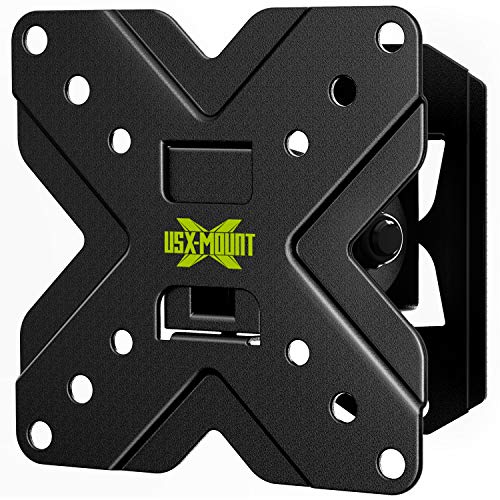
- Fits 10- to 26-inch screens up to 22 pounds
- Provides ±30° tilt and ±45° swivel
- Supports concrete walls or a single wood stud
Best For: Small monitors in compact desks, RVs, and flexible-viewing setups
Best Low-Profile Choice
VIVO Single Monitor Wall Mount

- Supports 17- to 32-inch screens up to 17.6 pounds
- Sits just 5.1cm from the wall
- Adds height adjustment, tilt, swivel, and rotation
Best For: Compact workstations needing a close-to-wall monitor setup
Best Cubicle-Friendly Option
VIVO Cubicle VESA Monitor Mount

- Fits 17- to 32-inch monitors up to 17.6 pounds
- Clamps to 1.75- to 3.5-inch cubicle walls
- Includes height adjustment and cable management
Best For: Cubicle workstations needing a no-drill monitor mounting solution
Compact Full-Motion Pick
XINLEI 13–32-Inch Monitor Wall Mount

- Supports screens up to 32 inches and 33 pounds
- Swivels, tilts, rotates, and retracts near the wall
- Requires a compatible stud, brick, or concrete wall
Best For: Single-monitor small-desk setups
Dual-Screen Space Saver
HUANUO Gaming Dual Monitor Wall Mount

- Supports two monitors up to 32 inches each
- Offers broad swivel, tilt, rotation, and height adjustment
- Includes cable management and lifetime warranty
Best For: Dual-monitor home office and gaming desks
Best Wall-Side Fit
ErGear Full-Motion Monitor Wall Mount

- Supports 13-34-inch monitors up to 19.8 pounds
- Retracts to 3.54 inches and extends to 20.47 inches
- Full motion with 12.2 inches of height adjustment
Best For: Wall-side desks, thick desktops, and tight corners
Best Compact TV-Style Option
IWORKBOARD Full-Motion Wall Mount

- Fits supported 13-31-inch displays
- Sits 2.56 inches from the wall
- Offers tilt, swivel, and 360-degree rotation
Best For: Smaller displays needing a slim, single-stud installation
Best Spring-Arm Adjustability
monTEK Single Monitor Wall Mount

- Supports 17-32-inch monitors up to 19.8 pounds
- Extends 21.7 inches and retracts to about 4 inches
- Includes spring adjustment and cable management
Best For: Compact work or gaming setups with frequent repositioning
Best Compact Swivel Pick – USX MOUNT Small Monitor Wall Bracket
For shoppers comparing monitor wall mounts for small desks, this compact USX MOUNT bracket supports 10- to 26-inch screens and keeps the installation focused on a single wood stud or concrete wall. Its swivel and tilt range helps you position a small monitor for a more comfortable view.
Best For: Small monitors or TVs in compact workspaces, RVs, and setups needing flexible viewing angles.
Pros:
- Supports 10- to 26-inch screens up to 22 pounds.
- Offers ±30° tilt and ±45° swivel adjustment.
- Fits VESA patterns of 50×50, 75×75, and 100x100mm.
- Designed for concrete walls or a single wood stud.
Cons:
- Should not be installed on drywall alone.
- Concrete anchors are not included by default.
Its broad small-screen compatibility and generous movement make it a practical choice when desk space is limited. Confirm your wall type and VESA pattern before ordering.
Best Low-Profile Choice – VIVO Single Monitor Wall Mount
This VIVO mount is a space-saving option for monitor wall mounts for small desks, sitting only 5.1cm from the wall while supporting 17- to 32-inch screens. It adds height adjustment and articulation for users who want to improve monitor positioning without adding a desk stand.
Best For: Home offices and compact workstations that prioritize a close-to-wall profile and ergonomic adjustment.
Pros:
- Supports 17- to 32-inch monitors weighing up to 17.6 pounds.
- Offers ±10° tilt, 20° swivel, and 360° rotation.
- Provides 16cm of height adjustment.
- Includes a three-year manufacturer warranty.
Cons:
- Hardware for curved or recessed monitor backs is not included.
- Its supported size range starts at 17 inches.
The low-profile design is especially useful when every inch matters, while portrait and landscape rotation add flexibility. Check the monitor’s VESA pattern and rear clearance before installation.
Best Heavy-Duty Small-Screen Mount – Mount-It! MI-2829 Small TV Wall Mount
For monitor wall mounts for small desks that need extra weight capacity, the Mount-It! MI-2829 supports 19- to 32-inch monitors up to 44 pounds. Its 2.6-inch profile keeps the screen relatively close to the wall while tilt and swivel adjustment help reduce glare.
Best For: Small monitors or TVs that are heavier than typical compact displays, including office, dorm, kitchen, bedroom, and RV setups.
Pros:
- Holds screens up to 44 pounds.
- Supports 19- to 32-inch displays with 75x75mm or 100x100mm VESA patterns.
- Offers up to 12° downward tilt and 30° swivel in each direction.
- Includes a lifetime manufacturer warranty and US-based support.
Cons:
- Not intended for drywall alone without a stud or masonry anchor.
- Tools are not included.
- Swivel range may decrease with larger or wider screens.
This is a strong fit when capacity matters more than having a fully articulated arm. Verify the hole spacing, wall construction, and required tools before mounting.
Best Cubicle-Friendly Option – VIVO Cubicle VESA Monitor Mount
Among monitor wall mounts for small desks, this VIVO model is designed for cubicle walls rather than permanent wall installation. Its adjustable hanger fits cubicle panels from 1.75 to 3.5 inches thick and provides height adjustment, rotation, and cable management for a tidier workstation.
Best For: Office cubicles and partition-based workstations where drilling into a structural wall is not practical.
Pros:
- Supports 17- to 32-inch monitors up to 17.6 pounds.
- Adjusts to cubicle walls from 1.75 to 3.5 inches thick.
- Offers multiple height settings and screen rotation.
- Includes built-in cable management and installation hardware.
Cons:
- It is intended for cubicle walls, not standard wall mounting.
- Its 14.3-inch bracket height may require additional clearance.
This mount makes the most sense for office users who need monitor elevation without sacrificing desk surface or modifying a building wall. Confirm your cubicle panel thickness and monitor weight first.
Compact Full-Motion Pick – XINLEI 13–32-Inch Monitor Wall Mount
If you need monitor wall mounts for small desks, this compact XINLEI articulating bracket is a practical single-screen option. It supports most 13- to 32-inch monitors up to 33 pounds and can retract close to the wall when you need more workspace.
Best For: Single-monitor setups on compatible wood-stud, brick, or concrete walls.
Pros:
- Supports up to 33 pounds and VESA 75×75 or 100x100mm patterns.
- Offers 180° swivel, ±15° tilt, and 360° rotation.
- Retracts to 1.96 inches and includes installation hardware.
Cons:
- Not designed for drywall installation.
- Single-stud mounting may limit placement options.
- The 100x100mm plate could create potential cable blockage, so clearance should be checked.
Its compact retracted profile and broad movement range make it well suited to space-limited desks, provided your wall and VESA pattern are compatible.
Dual-Screen Space Saver – HUANUO Gaming Dual Monitor Wall Mount
For small desks with two screens, the HUANUO dual monitor wall mount shifts both monitors off the desktop while preserving flexible positioning. Each arm supports monitors up to 32 inches and 17.6 pounds, with built-in cable management for a cleaner workspace.
Best For: Dual-monitor home office or gaming setups mounted to wood studs, solid concrete, or brick.
Pros:
- Holds two 17- to 32-inch monitors with 75×75 or 100x100mm VESA patterns.
- Provides ±90° swivel, ±35° tilt, and 360° rotation for each display.
- Includes height adjustment, cable management, installation hardware, and a lifetime warranty.
Cons:
- Each arm is limited to 17.6 pounds.
- Requires a suitable wood-stud, concrete, or brick mounting surface.
- Its dual-arm design may occupy more wall space than a single-monitor mount.
This is the most capable choice here for reclaiming desk area with two displays, especially when adjustable ergonomics and portrait-orientation flexibility matter.
Ultra-Slim Articulating Option – Suptek Full-Motion Monitor Wall Mount
This Suptek bracket is a versatile choice when monitor wall mounts for small desks need to stay close to the wall without giving up adjustability. It fits many 13- to 34-inch screens, supports up to 33 pounds, and extends up to 400mm for more flexible viewing.
Best For: Small monitors or TVs where a slim retracted profile and long extension are useful.
Pros:
- Supports compatible screens up to 33 pounds with VESA 75×75 or 100x100mm patterns.
- Provides 360° rotation, 180° swivel, and ±20° tilt.
- Retracts to 5.7mm and includes cable-concealment panels and installation materials.
Cons:
- The supplied details list maximum support at 32 inches despite a 13- to 34-inch fit claim.
- Its 400mm extension may require additional clearance behind the desk.
- It is intended for compatible wall surfaces and VESA patterns only.
With an exceptionally slim wall position and generous extension, this mount balances space saving with viewing-angle flexibility for compact work areas.
Best Wall-Side Fit – ErGear Full-Motion Monitor Wall Mount
For shoppers comparing monitor wall mounts for small desks, the ErGear EGDMA102B is a practical choice when a desk clamp is limited by a thick desktop, tight corner, or lack of edge clearance. It supports 13- to 34-inch monitors up to 19.8 pounds and mounts to wood studs, concrete, or brick—not drywall alone.
Best For: Wall-side desks, thick desktops, and compact workspaces that need a monitor arm with broad positioning range.
Pros:
- Supports 13- to 34-inch screens up to 19.8 pounds with 75×75 or 100x100mm VESA compatibility.
- Retracts to 3.54 inches, extends to 20.47 inches, and provides 12.2 inches of height adjustment.
- Offers tilt, ±90-degree swivel, and 360-degree rotation for portrait or landscape positioning.
- Keeps monitor support off the desk and is tested through 50,000 adjustment cycles.
Cons:
- Requires suitable wood-stud, concrete, or brick mounting; it should not be installed on drywall alone.
- Wall installation is less flexible to relocate than a desk-mounted arm.
The ErGear stands out when reclaiming every inch of desktop space is the priority. Its long extension and substantial height range make it especially useful for corner setups, while the wide screen-size range leaves room for a future monitor upgrade.
Best Compact TV-Style Option – IWORKBOARD Full-Motion Wall Mount
The IWORKBOARD full-motion mount is worth considering among monitor wall mounts for small desks if your screen uses a compatible 50×50 to 100x100mm VESA pattern. Its compact profile places the display 2.56 inches from the wall while retaining an articulating arm for adjustments.
Best For: Smaller monitors or TVs in compact workspaces where a close-to-wall installation and single-stud mounting are useful.
Pros:
- Fits many 13- to 31-inch flat or curved TVs and monitors with supported VESA patterns.
- Positions the screen just 2.56 inches from the wall and extends up to 19.91 inches for access and viewing adjustments.
- Provides ±15-degree tilt, 180-degree swivel, and 360-degree rotation.
- Includes installation hardware and offers 10 years of product support.
Cons:
- It is limited to 100x100mm VESA in the listed item highlight unless extension brackets are obtained for larger patterns.
- It should not be mounted to drywall alone.
- The supplied details contain inconsistent screen-size specifications, so verify your display before buying.
This mount prioritizes a slim wall profile and straightforward positioning for smaller displays. Confirm the monitor’s VESA pattern and wall construction first, especially if your screen is near the upper end of the stated size range.
Best Spring-Arm Adjustability – monTEK Single Monitor Wall Mount
For small desks that need frequent screen repositioning, the monTEK single monitor wall mount combines a spring arm with full-motion adjustment. It supports 17- to 32-inch monitors weighing 4.4 to 19.8 pounds and mounts to wood studs, brick, or concrete.
Best For: Home offices, gaming stations, and compact setups that benefit from smooth adjustments and organized cabling.
Pros:
- Supports 17- to 32-inch monitors from 4.4 to 19.8 pounds with 75×75 or 100x100mm VESA compatibility.
- Extends up to 21.7 inches, retracts to about 4 inches, and provides 9.84 inches of height adjustment.
- Offers +90/-90-degree tilt, 180-degree swivel, and 360-degree screen rotation.
- Includes integrated cable management and a quick-release VESA plate.
Cons:
- It supports screens from 17 inches upward, so it is not intended for smaller monitors.
- Installation requires a suitable stud, brick, or concrete wall; drywall alone is not appropriate.
- The listed warranty is one year.
The monTEK is a strong fit when your compact desk needs an arm that can move from close-to-wall storage to an extended viewing position. Its spring-assisted design, cable management, and broad motion range make it particularly practical for work or gaming setups.
How We Picked the Best Monitor Wall Mounts for Small Desks
We focused on mounts suited to compact workstations rather than large television installations. Each option was assessed for screen-size range, supported weight, VESA compatibility, movement, and how much desk space it can free. We also considered practical installation details, including wall or cubicle mounting, arm reach, tilt and swivel adjustment, cable access, and whether the design suits one or two monitors.
Because small desks vary widely, the list includes fixed-style compact brackets, full-motion single-arm models, a cubicle mount, and a dual-monitor solution. Always verify the manufacturer’s specifications before purchase, especially for heavier ultrawide screens.
Quick Comparison
| Best For | Typical Screen Range | Notable Feature |
|---|---|---|
| Basic compact setups | 10–32 inches | Simple wall-mounted support |
| Adjustable positioning | 13–34 inches | Full-motion arms |
| Dual-screen desks | 17–32 inches | Two independently adjustable arms |
| Cubicles | 17–32 inches | VESA cubicle mounting |
Key Buying Factors for Monitor Wall Mounts for Small Desks
Check VESA and Weight Compatibility
Most computer monitors use 75 x 75 mm or 100 x 100 mm VESA mounting holes, but not every display does. Confirm the pattern, screen size, and fully assembled monitor weight. The mount’s maximum capacity should exceed your monitor’s weight, not merely match it.
Measure Wall Clearance and Arm Reach
A short arm saves space when the screen stays close to the wall. A full-motion arm is more useful if you need to pull the display forward, turn it toward another seat, or rotate it for portrait work. Measure the desk depth and the distance from the wall before choosing.
Consider Adjustment and Stability
Tilt and swivel make it easier to reduce glare and set an ergonomic viewing angle. Gas-spring arms offer convenient height adjustment but may require careful tension tuning. Heavier monitors and frequent repositioning benefit from a sturdy mounting plate and secure wall attachment.
Verify the Mounting Surface
These brackets must be attached to suitable structural support. Locate studs where required, use the correct hardware for masonry, and avoid relying on unsuitable drywall anchors for a heavy display. For cubicle models, confirm that the partition design can support the mount.
Who Should Buy Which Monitor Wall Mounts for Small Desks?
Choose a compact fixed or tilt-and-swivel bracket if you mainly want to clear the desk and keep the monitor in one position. A full-motion single-arm mount is better for shared workspaces, glare control, and occasional repositioning. If you use two screens, select a dual-arm model only after confirming both the combined weight and available wall width. Cubicle users should choose a dedicated cubicle mount rather than adapting a standard wall bracket.
For most small workstations, prioritize secure installation, correct VESA fit, and a sensible arm reach over the largest advertised adjustment range. Those factors have the greatest effect on safety, stability, and usable desk space.