
The best Blu-ray drives for Windows make it easier to watch, back up, and burn physical media without installing an internal optical drive. Portable USB models can also support DVDs, CDs, USB-C connections, and memory cards.
We selected 10 external drives with different combinations of disc compatibility, connectivity, portability, and extra features so you can choose a practical match for your PC and media library.
Best 10 Blu Ray Drives for Windows Picks for 2026
Best Plug-and-Play Pick

- Reads and writes Blu-ray, DVD, and CD media
- Adds USB, SD, and TF connectivity
- Supports USB-A and USB-C on Windows PCs
Best For: Windows users wanting a simple drive with extra ports
Best Accessory Bundle
8-in-1 Blu-ray Drive with USB Hub

- Reads and burns BD, DVD, and CD formats
- Provides four USB ports plus card storage access
- Includes case and protective disc sleeves
Best For: PC users needing optical media and expanded connectivity
Best 100GB Backup Option

- Reads and writes Blu-ray discs up to 100GB
- Includes USB, USB-C, SD, and TF expansion
- Compatible with Windows, macOS, and Linux
Best For: Large backups and high-capacity disc authoring
Best High-Capacity Travel Pick

- Supports 100GB Blu-ray disc read/write
- Offers USB, USB-C, SD, and TF ports
- Works with Windows, macOS, and Linux
Best For: Portable high-capacity backups and media work
Most Versatile
8-in-1 Blu-ray Drive and USB-C Hub
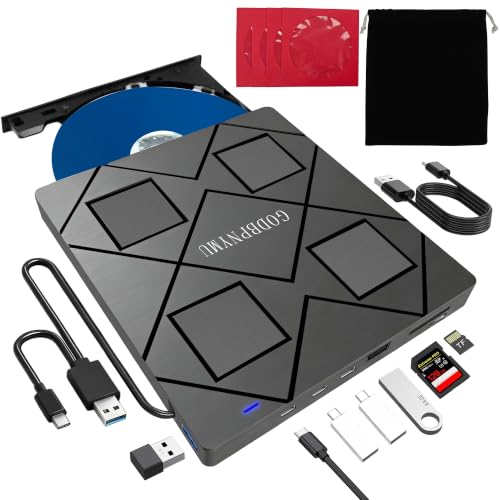
- Burns Blu-ray discs up to 50GB and reads BD-XL
- Adds USB-A, USB-C, and SD/TF connectivity
- Includes a case and four disc sleeves
Best For: Windows users needing a Blu-ray burner and compact USB hub
Best Basic Burner
USB 3.0 and Type-C Blu-ray Drive

- Reads Blu-ray, DVD, and CD media
- Burns compatible DVD and CD discs
- Works with Windows, macOS, and Linux
Best For: Simple computer-based Blu-ray reading and CD/DVD burning
Best for DVD/CD Burning

- Reads Blu-ray, DVD, CD, and M-Disc formats
- Burns DVDs and CDs but not Blu-ray discs
- Adds USB ports and an SD/TF card slot
Best For: Windows users who read Blu-ray but burn mostly DVDs and CDs
Best with Extra Features
XRTFORE External 4K Blu-ray Drive

- Reads 4K UHD Blu-ray and writes Blu-ray, DVD, and CD media
- Adds USB, Type-C, and SD/TF ports
- Includes carrying case and one-year warranty
Best For: Windows users wanting 4K support and extra connectivity
Best for Stable Power

- Reads and writes compatible BD, DVD, and CD media
- Includes an extra USB power cable
- Offers USB 3.0 and Type-C connectivity
Best For: Laptop and PC users needing dependable external power
Best Simple 2-in-1
LLMHHKYK External Blu-ray Drive

- Reads Blu-ray and burns CDs/DVDs
- Includes USB-A and Type-C connectors
- Portable plug-and-play design
Best For: Windows users needing Blu-ray reading and CD/DVD burning
Best Plug-and-Play Pick – 5-in-1 Portable Blu-ray Drive
For shoppers comparing blu ray drives for windows, this BUNUD model is a practical portable option with USB 3.0 and USB-C connectivity. It reads and writes Blu-ray, DVD, and CD media, while its two USB ports and SD/TF slot add useful file-transfer flexibility.
Best For: Windows 11/10 laptop and desktop users who want a slim drive with built-in expansion ports and plug-and-play setup.
Pros:
- Supports Blu-ray, DVD, and CD playback and burning.
- Includes two USB ports plus SD and TF card slots.
- USB-A and USB-C connection options with no driver installation required.
- Lightweight design with an embedded cable and one-year warranty.
Cons:
- Does not play 4K Ultra HD Blu-ray discs.
- Not compatible with tablets, TVs, projectors, phones, or Chrome OS.
This is a well-rounded choice when convenience matters more than advanced disc support. Its extra ports are especially useful on laptops with limited connectivity, though buyers should plan on standard Blu-ray rather than 4K playback.
Best Accessory Bundle – 8-in-1 Blu-ray Drive with USB Hub
This 8-in-1 model stands out among blu ray drives for windows by combining an external Blu-ray burner with a four-port USB hub and card reader. It supports common BD, DVD, CD, and M-Disc formats, making it useful for media playback, backups, and disc creation.
Best For: Windows laptop and desktop owners who need optical-disc support alongside extra USB and memory-card connections.
Pros:
- Reads and burns BD, DVD, and CD formats, including M-Disc.
- Supports BD-R burning at up to 6x and DVD-R at up to 8x.
- Built-in USB-C, USB 3.0, USB 2.0, and TF/SD expansion.
- Includes a carrying case and four disc-protection sleeves.
Cons:
- Does not support 4K Blu-ray playback or BD-XL recording.
- SD and TF cards cannot be read simultaneously.
- Blu-ray playback requires third-party software.
Its accessory bundle and hub make this a strong travel or desk companion, particularly for computers short on ports. The format support is broad, but users should verify software requirements and the 50GB maximum recording limit.
Best 100GB Backup Option – USB 3.0 Blu-ray Burner
For users seeking blu ray drives for windows with higher-capacity media support, this portable juwuoi burner can read and write discs up to 100GB. It also includes USB and card-reader expansion, an extension cable, and an additional power connection for more flexible placement.
Best For: Windows, macOS, and Linux users making large backups or writing high-capacity Blu-ray discs.
Pros:
- Reads and writes 100GB Blu-ray media.
- Offers stated speeds of up to 6x BD, 8x DVD, and 24x CD.
- Includes USB 3.0, USB 2.0, two USB-C ports, SD, and TF slots.
- Works with Windows, Mac OS, and Linux systems.
Cons:
- Does not support 4K Ultra HD Blu-ray discs.
- No playback software is included.
- SD and TF slots cannot be used at the same time.
This model is particularly attractive for data archiving because it supports 100GB discs and includes a power option for demanding sessions. Buyers should budget for compatible third-party Blu-ray software and note the stated limit on simultaneous card use.
Best High-Capacity Travel Pick – 7-in-1 Blu-ray Burner
This Wbacon drive is a compact choice among blu ray drives for windows, with support for reading and writing 100GB discs plus a selection of USB-C, USB, SD, and TF connections. Its slim external design is suited to laptop users who need portable disc burning and file transfers.
Best For: Windows laptop, macOS, and Linux users who want 100GB disc support in a portable multifunction drive.
Pros:
- Reads and writes 100GB Blu-ray discs.
- Supports up to 6x BD, 8x DVD, and 24x CD speeds.
- Provides two USB-C ports, USB 3.0, USB 2.0, SD, and TF access.
- Lightweight form factor with one-year manufacturer coverage.
Cons:
- 4K Blu-ray playback is not supported.
- Separate Blu-ray software is required for playback and writing.
- SD and TF cards cannot be used simultaneously.
This drive combines high-capacity media support with useful expansion ports, making it a flexible option for mobile workstations and home backups. Its main setup consideration is the need to install suitable Blu-ray software before using advanced media functions.
Most Versatile – 8-in-1 Blu-ray Drive and USB-C Hub
For shoppers comparing blu ray drives for windows, this 8-in-1 model stands out by combining disc reading and burning with USB expansion and SD/TF card access. It supports BD, DVD, CD, and M-Disc media, including Blu-ray recording up to 50GB, while offering both USB-A and USB-C connectivity.
Best For: Windows users who want a Blu-ray burner plus a compact hub for peripherals and memory cards.
Pros:
- Reads and burns multiple BD, DVD, and CD formats, with Blu-ray writing up to 50GB.
- Includes two USB-C ports, USB 3.0, USB 2.0, and an SD/TF card slot.
- Supports Windows 11 through Windows 2000 and macOS 10.6 or later.
- Portable design includes a carrying case and four disc sleeves.
Cons:
- Requires third-party software for Blu-ray playback.
- Does not support 4K playback, and Blu-ray recording is limited to 50GB.
- SD and TF cards cannot be read simultaneously.
This is the most feature-rich option in the group, especially if your laptop needs extra ports. Its added hub functionality and Blu-ray burning make it useful for backups, media playback, and travel, though software must be supplied separately.
Best Basic Burner – USB 3.0 and Type-C Blu-ray Drive
This external drive is a straightforward choice among blu ray drives for windows, with USB 3.0 and Type-C connections for laptops and PCs. It reads Blu-ray, DVD, and CD media and can write compatible CD and DVD discs, while its compact design suits travel or occasional use.
Best For: Windows users seeking a simple external Blu-ray reader with CD/DVD burning and flexible USB connectivity.
Pros:
- Supports BD, DVD, and CD reading, plus CD and DVD burning.
- Offers USB 3.0 and USB Type-C interfaces in one cable arrangement.
- Rated read speeds reach 6x for Blu-ray, 8x for DVD, and 24x for CD.
- Compatible with Windows, macOS, and Linux systems.
Cons:
- Playback and writing require separate software that is not included.
- Not compatible with TVs, tablets, PS4, iPads, Chromebooks, projectors, or vehicles.
- The supplied notes do not indicate Blu-ray burning support.
Choose this model when you want broad computer compatibility without the extra card slots or hub ports of the other options. It covers everyday disc access and CD/DVD burning, but budget for compatible Blu-ray software.
Best for DVD/CD Burning – 5-in-1 Blu-ray Reader
If you need blu ray drives for windows primarily for playback and standard disc burning, this 5-in-1 model is a practical fit. It reads Blu-ray, DVD, and CD media, burns DVD and CD discs, and adds a USB hub and SD/TF card slot in a portable body.
Best For: Windows laptop owners who need Blu-ray reading but mainly burn DVDs and CDs.
Pros:
- Reads BD, DVD, and CD formats, including BD-XL and M-Disc.
- Burns DVD and CD media at up to 8x and 24x respectively.
- Combines USB 3.0, USB 2.0, and an SD/TF card slot.
- Includes USB-A/USB-C connectivity, a pouch, and protective disc sleeves.
Cons:
- Cannot burn Blu-ray discs.
- Does not support 4K Blu-ray playback.
- Requires third-party software for Blu-ray playback, and the warranty is six months.
This model makes sense when Blu-ray recording is not a requirement. Its standard DVD/CD burner, card reader, and dual-interface cable provide useful everyday functionality, while the lack of Blu-ray burning keeps it more focused than the first option.
Best with Extra Features – XRTFORE External 4K Blu-ray Drive
For shoppers comparing blu ray drives for windows, the XRTFORE stands out as a feature-rich external option with 4K UHD Blu-ray support, disc writing, and extra ports. It works with Windows 10/11 PCs and laptops, but Blu-ray playback requires compatible third-party software such as PowerDVD.
Best For: Windows users who want a portable 4K-capable Blu-ray drive with built-in USB and SD/TF expansion.
Pros:
- Supports 4K UHD Blu-ray reading plus Blu-ray, DVD, and CD writing functions.
- Includes three USB ports, one Type-C port, and SD/TF card slots.
- Comes with a protective carrying case and an embedded cable design.
- Compatible with Windows 10/11 PCs and laptops, with a one-year warranty.
Cons:
- Requires separate professional playback software for Blu-ray discs.
- May need the included extra power cable if a Windows computer does not provide enough power.
- Not compatible with tablets, TVs, projectors, Chrome OS, phones, or vehicles.
This is the most capable choice of the three for Windows buyers who want 4K support and hub-style connectivity. Check your computer and playback software compatibility before ordering.
Best for Stable Power – Dainty External Blu-ray Drive
The Dainty is a practical pick among blu ray drives for windows, combining BD, DVD, and CD reading and writing with USB 3.0 and Type-C connectivity. Its additional USB power cable is designed to help maintain stable operation, while playback and burning software must be purchased separately.
Best For: Windows laptop and PC owners who prioritize dependable power delivery and broad disc-format support.
Pros:
- Reads Blu-ray, DVD, and CD media and supports writing across compatible formats.
- Dual USB power design helps reduce interruptions caused by insufficient power.
- Combines USB 3.0 and Type-C connections for flexible computer compatibility.
- Supports Windows, macOS, and Linux systems.
Cons:
- Blu-ray playback and writing require separate software.
- Not compatible with TVs, tablets, iPads, Chromebooks, projectors, PS4, or vehicles.
- Maximum Blu-ray writing speeds vary by disc type and are lower than CD/DVD speeds.
Choose the Dainty if stable operation and cross-platform support matter more than 4K playback. The included power arrangement is particularly useful for laptops that may have limited USB power.
Best Simple 2-in-1 – LLMHHKYK External Blu-ray Drive
For buyers seeking straightforward blu ray drives for windows, this portable LLMHHKYK model provides Blu-ray reading alongside CD/DVD playback and burning. It connects through USB 3.0 or Type-C and is plug and play for CD/DVD tasks, while Blu-ray playback requires third-party software.
Best For: Windows users who need a compact reader for Blu-ray discs and a convenient CD/DVD burner.
Pros:
- Reads Blu-ray discs up to 6X, DVDs up to 8X, and CDs up to 24X.
- Burns CDs and DVDs through a plug-and-play USB connection.
- Includes both USB-A and Type-C connectors with 5Gbps USB 3.0 transfers.
- Lightweight design with an embedded data cable for easier travel.
Cons:
- Can read but cannot burn Blu-ray discs.
- Requires third-party software for Blu-ray playback.
- Not compatible with Chromebooks, TVs, tablets, iPads, trucks, or cars.
This model makes sense when CD/DVD burning is important but Blu-ray burning is not. Its dual connector design also makes it convenient for Windows laptops and desktops with different USB ports.
How We Picked the Best Blu Ray Drives for Windows
We focused on the features that matter most for everyday Windows use: Blu-ray, DVD, and CD compatibility; USB 3.0 and USB-C connectivity; read and write support; portability; and useful extras such as card readers, USB hubs, carrying cases, and 4K-oriented playback claims. Because external optical drives can vary significantly in software support, we also considered whether each format is clearly identified and whether the design appears suitable for laptops and desktop PCs.
Before buying, confirm the drive’s supported discs and your computer’s available ports. A drive may read Blu-ray media while requiring separate software for playback, especially with commercial discs or 4K UHD content.
Quick Comparison
- Best all-around choice: Choose a USB 3.0 and USB-C model that reads and writes Blu-ray, DVD, and CD media.
- Best for flexible connectivity: Consider an 8-in-1 drive with a USB-C hub and card reader if you frequently transfer files from memory cards.
- Best for large backups: Look for explicit support for 100GB Blu-ray discs and BD-R/BD-RE writing.
- Best for travel: Select a slim, lightweight drive with a short cable and a protective case.
- Best for 4K media: Verify UHD support, compatible playback software, and your PC’s display and hardware requirements rather than relying on the product title alone.
Key Buying Factors for Blu-Ray Drives for Windows
Disc Formats and Writing Capability
Check whether you need read-only playback or recording. A burner should identify support for BD-R and BD-RE, along with DVD±R, DVD±RW, and CD formats. If you archive large video or data files, 100GB disc compatibility can be particularly useful.
Ports and Power
USB 3.0 generally offers the best practical performance for external optical drives, while USB-C provides convenient compatibility with newer laptops. Some drives include adapters or dual connector support. Confirm whether the drive uses one cable or needs additional power, especially with older computers.
Playback Software and Windows Compatibility
Plug-and-play connectivity does not always include Blu-ray playback software. Windows can recognize the hardware while still requiring a compatible application for commercial Blu-ray menus, codecs, or DRM. Check the software requirements before assuming a drive will play every disc.
Portability and Build
A slim drive is easier to carry, but a sturdier enclosure may better tolerate frequent use. A case, integrated cable storage, and a stable tray or slot-loading mechanism are useful practical details.
Who Should Buy Which Blu Ray Drives for Windows?
Choose a basic portable Blu-ray reader if you mainly watch discs or access archived files. Pick a burner with 100GB support if you create backups or write video and data projects. An 8-in-1 model is a better fit for laptop users who also need card readers and extra USB connectivity. For home theater use, prioritize verified 4K UHD support and compatible software. If you use an older Windows PC, favor a drive with USB 3.0 support and a dependable power connection. Finally, compare the included cables and accessories before purchasing, since the right connector can make setup much simpler.