
A laptop locking cable is a simple way to deter opportunistic theft in offices, classrooms, libraries, and shared workspaces. Combination models add keyless convenience, making them practical for teams and frequent travelers.
Our selection includes standard T-Bar locks, wedge-slot and Nano-compatible designs, coiled cables, multipacks, and universal options. Use the guide below to match the lock type, cable length, and security features to your laptop and workspace.
Best 10 Combination Laptop Locking Cables Picks for 2026
Best Standard-Slot Pick
Kensington Combination Cable T-Bar Lock

- Resettable four-digit code with 10,000 combinations
- Push-button, one-handed engagement
- 6-foot cable for standard Kensington slots
Best For: Laptops and devices with standard Kensington security slots
Best Flexible Fit
Laptop Combination Lock with Adhesive Plate

- Works with devices with or without security slots
- Includes adhesive lock-slot plate and spacers
- 6.23-foot cut-resistant braided cable
Best For: Laptops, tablets, and devices without built-in lock holes
Best Outdoor Versatility
Coiled Combination Security Cable Lock

- 10-foot weather-resistant steel cable
- Resettable four-digit combination
- Compact self-coiling design
Best For: Outdoor gear and multi-purpose cable security
Best for Dell Wedge Slots
Kensington ClickSafe Combination Lock

- Fits compatible Dell and Alienware wedge slots
- ClickSafe one-hand attachment system
- 6-foot cut-resistant carbon steel cable
Best For: Dell and Alienware laptops with wedge-shaped security slots
Two-Pack Value
2-Piece Laptop Combination Lock
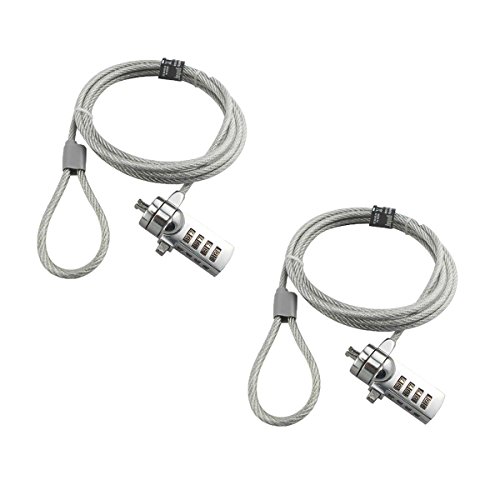
- Two 6-foot cables included
- Resettable 4-digit code
- For compatible 3 x 7 mm keyholes
Best For: Multiple compatible laptops or shared workspaces
Thin-Laptop Fit
Kensington Slim T-Bar Combination Lock

- Slim head keeps laptops flat
- 10,000 resettable combinations
- 6-foot carbon steel cable
Best For: Thin laptops with standard Kensington slots
Dell-Specific Security
Kensington N17 Dell Combination Cable

- Fits Dell and Alienware wedge slots
- 10,000 resettable combinations
- 6-foot carbon steel cable
Best For: Dell or Alienware laptops with wedge-type slots
Best Nano-Slot Pick
Kensington 4-Digit Nano Laptop Lock

- 5-foot carbon steel cable
- Resettable 10,000-code combination
- Slim head for Nano security slots
Best For: Thin laptops with Nano-sized security slots
Most Versatile Option
Kensington Universal 3-in-1 Laptop Lock

- Fits standard, Nano, and wedge slots
- Six-foot carbon steel cable
- Resettable four-number combination
Best For: Multiple laptops with different security-slot styles
Best Standard-Slot Fit
Kensington 4-Digit Standard Laptop Lock

- For standard security slots
- One-handed attachment slider
- 5-foot cable with resettable code
Best For: Thin laptops with standard security slots
Best Standard-Slot Pick – Kensington Combination Cable T-Bar Lock
For laptops with a standard Kensington security slot, this combination laptop locking cable offers a familiar, easy-to-use setup. It combines a resettable four-digit code, push-button engagement, and a 6-foot carbon steel cable for anchoring compatible devices to a fixed structure.
Best For: HP, Lenovo, Acer, Asus, and other devices with a standard Kensington slot in offices, homes, or public spaces.
Pros:
- Resettable four-wheel combination with 10,000 possible codes
- Push-button design supports one-handed attachment
- 6-foot cut-resistant carbon steel cable works with desks, tables, and other fixed structures
- Can secure laptops, monitors, TVs, docking stations, projectors, and other compatible equipment
Cons:
- Not compatible with Dell and Alienware devices using Noble or wedge-shaped slots
- Requires a compatible standard Kensington security slot
This is a straightforward choice when your device has the standard T-Bar slot. Check the laptop’s slot type carefully, especially for Dell models from 2016 onward, before buying.
Best Flexible Fit – Laptop Combination Lock with Adhesive Plate
This versatile option stands out among combination laptop locking cables because it can work with devices that have a built-in security slot or lack one entirely. It includes an adhesive lock-slot plate, a four-digit resettable code, and a 6.23-foot braided cable.
Best For: Laptops, tablets, and other digital devices that may not have a built-in security lock hole.
Pros:
- Includes an industrial-grade double-sided adhesive lock-slot plate for compatible smooth surfaces
- Also works directly with devices that have built-in security slots
- Four-digit customizable combination eliminates the need for keys
- 360-degree rotating push-button and 6.23-foot cable support convenient positioning
Cons:
- Adhesive plate installation adds an extra step
- Adhesive compatibility depends on the device’s surface
Its included plate makes it more adaptable than slot-only locks, while the longer cable helps with reaching a fixed object. Follow the installation instructions and use the appropriate spacer for a secure fit.
Best Outdoor Versatility – Coiled Combination Security Cable Lock
Although designed for broader security use, this coiled combination cable can suit laptop setups when you need a long, flexible cable and a fixed anchor point. The selected version has a 10-foot weather-resistant, vinyl-coated steel cable with a resettable four-digit lock.
Best For: Outdoor gear and multi-purpose security tasks where a long, compact, weather-resistant cable is useful.
Pros:
- Resettable four-digit combination provides keyless access
- Weatherproof, corrosion-resistant construction supports outdoor use
- Self-coiling design stores compactly
- 10mm male end can pass through tight spaces such as kayak or paddleboard scupper holes
Cons:
- Not presented as a laptop-specific lock and may not connect to a laptop security slot directly
- Coiled cable contracts, so the usable working length is less than its extended length
- Requires sizing and anchoring appropriate to the device or gear being secured
This is best viewed as a general-purpose cable rather than a conventional laptop slot lock. Its weather resistance and available lengths make it useful for broader security duties, but verify connector compatibility before using it with a laptop.
Best for Dell Wedge Slots – Kensington ClickSafe Combination Lock
Kensington ClickSafe® Combination Laptop Lock for Wedge-Shaped Security Slot (K67936WW), Black
Check Price On AmazonFor Dell and Alienware laptops with wedge-shaped security slots, this Kensington combination laptop locking cable provides a purpose-built alternative to standard T-Bar locks. Its ClickSafe anchor attaches to the slot, while the 6-foot carbon steel cable secures the laptop to a fixed object.
Best For: Dell and Alienware laptops with compatible wedge-shaped security slots in offices or homes.
Pros:
- Designed for Dell and Alienware wedge-shaped lock slots
- ClickSafe locking technology enables one-hand attachment after the anchor is installed
- 6-foot cut-resistant carbon steel cable anchors to desks, tables, or other fixed structures
- Pivoting head and cable system helps maintain laptop engagement
Cons:
- Designed for wedge-shaped slots, not standard Kensington T-Bar slots
- Supplied details identify the lock type as combination but also list a key-lock feature, so buyers should confirm the exact operating method
This is the most targeted choice in the group for compatible Dell and Alienware hardware. Confirm that your laptop has the wedge-shaped slot before ordering, since slot geometry determines compatibility.
Two-Pack Value – 2-Piece Laptop Combination Lock
This two-pack is a practical option for anyone comparing combination laptop locking cables for multiple notebooks or shared workspaces. Each 6-foot cable uses a resettable four-digit code with 10,000 possible combinations and is designed for compatible 3 x 7 mm keyholes.
Best For: Buyers who need two keyless laptop locks and whose devices use compatible 3 x 7 mm slots.
Pros:
- Includes two 6-foot combination cables.
- Resettable four-number lock provides 10,000 possible codes.
- Galvanized wire rope and hardened stainless steel construction offer cut-resistant protection.
- Keyless design eliminates the need to carry a key.
Cons:
- Compatibility is limited; several Lenovo, Acer, Dell, and Apple models are specifically excluded.
- The combination cannot be reset if the new code is forgotten.
- Setting the code requires a small flat-head screwdriver or similar tool.
Its two-lock value and keyless operation make this a useful straightforward choice, provided your laptop has a compatible slot. Check the model exclusions carefully before ordering and test the new combination before attaching the cable.
Thin-Laptop Fit – Kensington Slim T-Bar Combination Lock
For thin-and-light notebooks, this Kensington model is one of the more purpose-built combination laptop locking cables. Its slim lock head is designed to let compatible laptops lie flat, while the resettable four-wheel code and 6-foot carbon steel cable provide convenient everyday security.
Best For: Thin and light HP, Lenovo, Acer, Asus, and other laptops with a standard Kensington lock slot.
Pros:
- Slim head design helps ultra-thin and 2-in-1 laptops remain flat and stable.
- Four-wheel resettable code offers 10,000 possible combinations.
- Push-button engagement and pivoting cable head support one-handed use.
- Six-foot carbon steel cable anchors to a desk, table, or fixed structure.
Cons:
- Not compatible with Dell or Alienware laptops.
- Not intended for Kensington NanoSaver lock slots.
- It is a single-lock package rather than a two-pack.
This is a strong fit when a standard Kensington slot and low-profile design are priorities. Confirm the slot type before buying, especially if you use a Dell, Alienware, or NanoSaver-equipped device.
Dell-Specific Security – Kensington N17 Dell Combination Cable
Kensington N17 Dell Laptop Computer Lock, Combination Security Locking Cable (K68008WW) Black
Check Price On AmazonDell and Alienware owners need the right slot style when choosing combination laptop locking cables. This Kensington N17 model is made for wedge-type lock slots, combining a resettable four-wheel code, push-button attachment, and a 6-foot carbon steel cable.
Best For: Dell and Alienware laptops with wedge-type lock slots used at home, in offices, or in educational settings.
Pros:
- Designed specifically for Dell and Alienware wedge-type lock slots.
- Resettable four-wheel code offers 10,000 possible combinations.
- Push-button design supports one-handed attachment.
- Six-foot cut-resistant carbon steel cable anchors to a fixed structure.
Cons:
- Not a universal laptop lock; it is intended for Dell and Alienware wedge slots.
- Only one lock and cable are included.
- The wedge-slot fit should be verified before purchase.
This is the most targeted choice of the three for compatible Dell and Alienware devices. Its independently verified testing and five-year warranty add useful reassurance, but the wedge-slot requirement makes compatibility the key buying consideration.
Best Nano-Slot Pick – Kensington 4-Digit Nano Laptop Lock
If you need combination laptop locking cables for a thin laptop with a Nano security slot, the Kensington K60214WW is a focused, travel-friendly option. Its 5-foot carbon steel cable, resettable four-digit code, and slim lock head are designed for securing compatible laptops in shared spaces.
Best For: Thin laptops with Nano-sized security slots used in cafes, shared workspaces, and while traveling.
Pros:
- 5-foot carbon steel cable with an anti-shearing plastic sleeve.
- Resettable four-wheel combination with 10,000 possible codes.
- 360-degree pivoting lock tip and rotating cable help preserve access to nearby ports.
- Slim head lets the laptop lie flat and stable while secured.
Cons:
- Designed specifically for Nano-sized slots, so compatibility must be checked before purchase.
- Five-foot cable may offer less reach than longer alternatives.
This is a practical choice when your laptop has the matching Nano slot and you want a compact combination lock without carrying keys. Verify the slot dimensions before ordering.
Most Versatile Option – Kensington Universal 3-in-1 Laptop Lock
Among combination laptop locking cables, the Kensington K62316WW stands out for broad compatibility. Its interchangeable lock tips fit standard, Nano, or wedge-shaped security slots, making it useful for households, offices, or shared equipment with different laptop designs.
Best For: Users who need one lock that can support laptops with different security-slot styles.
Pros:
- Supports standard, Nano, and wedge-shaped laptop security slots.
- Resettable four-number dial provides 10,000 possible combinations.
- Six-foot carbon steel cable offers useful reach for anchoring.
- Tethered interchangeable tips help keep unused adapters available.
Cons:
- Interchangeable tips add setup complexity compared with a single-slot lock.
- Compatibility still depends on using the correct included lock tip.
The universal design is the main reason to choose this model. It is a strong fit when laptop compatibility may change over time or when several devices need to share one locking solution.
Best Standard-Slot Fit – Kensington 4-Digit Standard Laptop Lock
Kensington Combination Laptop Lock for Standard Security Slot, Resettable (K60213WW), Black
Check Price On AmazonFor laptops with a standard security slot, the Kensington K60213WW provides a straightforward combination-based solution. This 5-foot cable lock combines a slim head, resettable four-wheel code, and one-handed attachment for securing compatible devices at home, in offices, or in public spaces.
Best For: Thin laptops with standard security slots that need quick, key-free attachment.
Pros:
- 5-foot carbon steel cable resists cutting attempts and includes a surface-protective sleeve.
- Resettable four-wheel code offers 10,000 possible combinations.
- One-handed slider supports quick attachment.
- Pivoting head and rotating anchor help maintain access to nearby ports.
Cons:
- Compatible with standard slots rather than Nano or wedge-shaped slots.
- Five-foot length may not suit every anchoring setup.
This model keeps the feature set focused and easy to use. Choose it when your laptop has a standard slot and fast one-handed operation matters more than universal compatibility.
How We Picked These Combination Laptop Locking Cables
We focused on compatibility, usability, and everyday deterrence rather than treating every cable lock as interchangeable. The lineup covers common security-slot formats, including standard T-Bar, wedge-shaped, and Nano slots, along with universal designs. We also considered resettable combination systems, cable length, portability, and whether the format suits an individual user or a multi-device environment.
Before buying, confirm the security slot on your laptop. A lock that does not match the slot type may not attach securely, even if the cable itself is long and sturdy.
Quick Comparison
| Best For | What to Look For |
|---|---|
| Standard office laptops | Standard T-Bar compatibility and a resettable four-digit code |
| Dell systems | N17 compatibility for devices with the matching wedge-style slot |
| Ultrathin laptops | Nano or wedge-slot support and a compact lock head |
| Mixed-device households or offices | Universal 3-in-1 compatibility |
| Shared workstations | Longer cable, simple combination reset, or multipack value |
| Travel | Coiled cable construction and a compact design |
Key Buying Factors for Combination Laptop Locking Cables
Slot Compatibility
Security slots are not universal. Standard T-Bar, Kensington Nano, and wedge-shaped slots use different lock heads. Check your laptop manufacturer’s specifications or inspect the port before ordering. If you protect several laptop models, a 3-in-1 design can reduce compatibility problems.
Combination Design
Resettable four-digit combinations eliminate the need to carry a key and make reassignment easier. Choose a design with clear number wheels and enough spacing to operate while the cable is attached. Record the new combination securely; most resettable locks cannot be opened if the code is forgotten.
Cable Length and Handling
A six-foot cable works for many desks and fixed furniture, while longer options provide more flexibility around large tables or heavy anchor points. Coiled cables are easier to pack and store, but their usable reach may be shorter than the stated extended length.
Anchor Point and Installation
The cable is only as effective as the object securing it. Wrap it around a solid, immovable fixture and avoid thin, removable, or easily cut furniture components. Keep the cable positioned so it does not interfere with ports, ventilation, or normal laptop use.
Who Should Buy Which Combination Laptop Locking Cables?
Choose a standard Kensington combination lock for a typical office laptop with a matching T-Bar slot. Dell owners should prioritize the N17 model when their device uses the compatible slot. For thin laptops, select a Nano or wedge-compatible option rather than relying on a standard lock.
A universal 3-in-1 model is the most practical choice for households, schools, and offices with mixed equipment. A two-pack makes sense when securing multiple devices, while a coiled model is convenient for commuters who value compact storage. For permanent desks or shared work areas, prioritize adequate reach and straightforward combination management over the smallest possible lock.