
Adding Bluetooth to a Linux desktop, mini PC, or single-board computer is usually simple—but choosing a compatible USB adapter is not always straightforward. Chipset support, kernel behavior, range, and Bluetooth version can affect everything from wireless audio to keyboards and game controllers.
We selected 10 Bluetooth adapters for Linux across compact, long-range, budget, and newer-generation categories. Use the guide below to narrow the list by compatibility, connection range, device support, and your everyday workflow.
Best 10 Bluetooth Adapters for Linux Picks for 2026
Best Linux Nano Pick
Edimax BT-8500 Bluetooth 5.0 Adapter
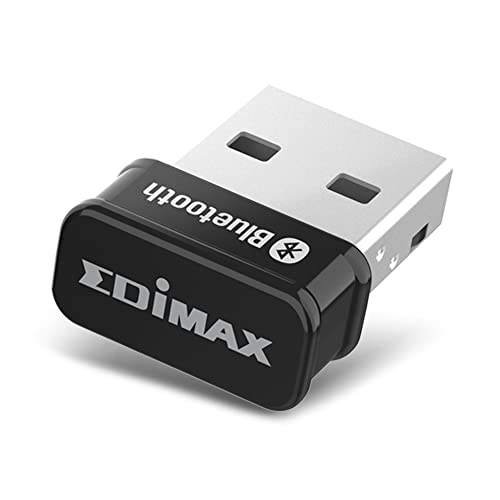
- Nano-sized Bluetooth 5.0 USB design
- Plug-and-play with Linux kernel 5.8+ and Mint 21
- Supports EDR, BLE, and backward compatibility
Best For: Linux users wanting a compact adapter for everyday peripherals
Best Broad Linux Compatibility
Panda PBU40 Bluetooth 4.0 Adapter

- Lists support for many Linux distributions
- Bluetooth 4.0 with BLE and EDR
- Up to 80-foot range with a Bluetooth Smart device
Best For: Linux users on one of the specifically listed distributions
Best Compact Windows Option
TP-Link UB500 Bluetooth 5.4 Adapter

- Nano-sized Bluetooth 5.4 USB dongle
- Supports EDR, BLE, and multiple older versions
- Windows plug-and-play for versions 8.1, 10, and 11
Best For: Windows PC users who want a tiny everyday Bluetooth adapter
Best Nano Pick
Cudy Bluetooth 5.3 Nano USB Adapter

- Tiny USB-A design stays flush with the laptop
- Bluetooth 5.3 supports modern and older devices
- Linux driver available from Cudy’s download center
Best For: Compact Linux setups and everyday wireless peripherals
Best Long-Range Pick
StarTech Bluetooth 5.3 Class 1 Adapter

- Class 1 range reaches up to 328 feet in open areas
- Supports audio, PAN networking, BLE, and BDR/EDR
- Linux support listed for Kernel 5.19.0+
Best For: Linux users prioritizing range and connection versatility
Best Budget Compatibility Pick
Kinivo BTD400 Bluetooth 4.0 Adapter
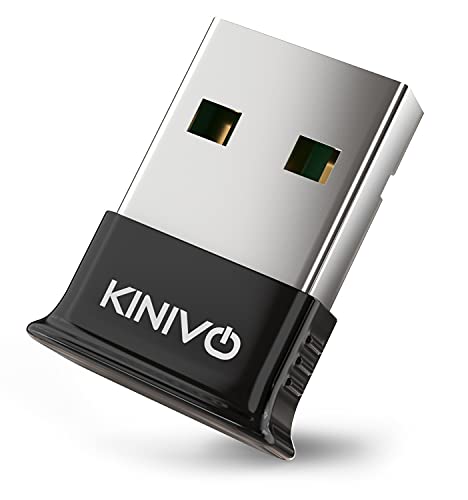
- Supports Linux PCs and Raspberry Pi systems
- Handles common peripherals within a 30-foot range
- Includes a two-year warranty and US-based support
Best For: Basic Linux and Raspberry Pi Bluetooth connectivity
Windows-Only Pick
Avantree DG45 Bluetooth Adapter

- Supports Windows 11, 10, 8.1, and 8
- Pairs with up to seven Bluetooth devices
- Not compatible with Linux, macOS, or ChromeOS
Best For: Windows PCs needing Bluetooth for peripherals and audio
High-Speed Windows Pick
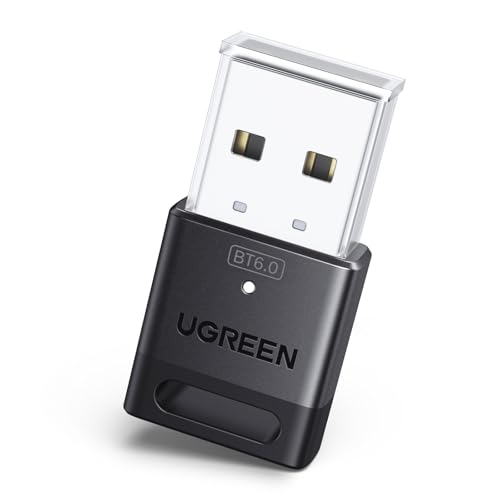
- Bluetooth 6.0 with EDR and BLE
- Connects up to five devices simultaneously
- Plug and play on Windows 11, 10, and 8.1
Best For: Windows PCs wanting newer Bluetooth connectivity
Linux-Compatible Pick
ASUS USB-BT600 Bluetooth 6.0 Adapter

- Supports Linux and Windows 10/11
- Bluetooth 6.0 with BLE
- Connects up to seven devices
Best For: Linux and Windows users seeking a compact multi-device adapter
Best Linux Nano Pick – Edimax BT-8500 Bluetooth 5.0 Adapter
The Edimax BT-8500 is a compact option for shoppers comparing Bluetooth adapters for Linux. It supports plug-and-play operation with Linux kernel 5.8 or newer and Mint 21, while older Linux kernels may require a driver.
Best For: Linux users who want a tiny Bluetooth 5.0 adapter for headphones, keyboards, mice, and other peripherals.
Pros:
- Nano-sized design that can remain connected to a USB port.
- Bluetooth 5.0 with EDR, BLE, and backward compatibility.
- Plug-and-play support for Linux kernel 5.8 or newer and Mint 21.
- Bluetooth SIG certified for compatibility and consistent performance.
Cons:
- Linux plug-and-play support depends on kernel version.
- Older kernels may require a driver, with listed Linux driver support limited to Fedora and Ubuntu.
The BT-8500 is a practical, low-profile choice when Linux compatibility and minimal size matter more than extended range or an adjustable antenna.
Best Long-Range Design – TP-Link UB500 Plus Bluetooth 5.3 Adapter
The TP-Link UB500 Plus stands out among Bluetooth adapters for Linux shoppers who prioritize reception. Its Bluetooth 5.3 connection includes EDR and BLE, and the adjustable antenna is designed to improve reception in different environments. The supplied compatibility information, however, lists Windows rather than Linux support.
Best For: Windows users who need a longer-range Bluetooth adapter with an adjustable antenna.
Pros:
- Bluetooth 5.3 with EDR and backward compatibility to earlier versions.
- Adjustable, multi-direction antenna for positioning and reception.
- Advertised at up to twice the speed and four times the coverage of Bluetooth 4.0 EDR.
- Plug-and-play support for Windows 8.1, 10, and 11.
Cons:
- The supplied notes do not list Linux compatibility.
- Windows 7 requires a downloadable driver.
Although its antenna and range-focused design are appealing, this is not the safest pick for a Linux-specific setup unless compatibility is confirmed separately before purchase.
Best Broad Linux Compatibility – Panda PBU40 Bluetooth 4.0 Adapter
The Panda PBU40 is an older Bluetooth 4.0 nano adapter with an unusually broad list of Linux distributions, making it a notable option among Bluetooth adapters for Linux. The supplied notes mention Mint, Ubuntu, Fedora, openSUSE, Lubuntu, Zorin, Kali Linux, Raspbian Wheezy, and OpenELEC.
Best For: Linux users running one of the listed distributions who need basic connectivity for keyboards, smartphones, and other Bluetooth electronics.
Pros:
- Lists compatibility with numerous Linux distributions.
- Supports Bluetooth 4.0 Smart Ready, BLE, and EDR.
- Offers an operating range of up to 80 feet when connected to a Bluetooth Smart device.
- Supports consumer Bluetooth electronics such as keyboards and smartphones.
Cons:
- Uses the older Bluetooth 4.0 standard rather than Bluetooth 5.x.
- The supplied notes provide limited detail about current Linux plug-and-play behavior.
The PBU40 remains worth considering for distribution compatibility, especially on older or specialized Linux systems, but newer adapters may offer more current Bluetooth features.
Best Compact Windows Option – TP-Link UB500 Bluetooth 5.4 Adapter
The TP-Link UB500 is a tiny Bluetooth 5.4 dongle for Windows PCs, but it is not a suitable choice for a Linux-focused roundup. TP-Link explicitly states that this model supports Windows only and does not support Linux, macOS, TVs, or direct console use.
Best For: Windows users seeking a nano-sized Bluetooth 5.4 adapter for PCs and common peripherals.
Pros:
- Very small nano design for permanent or travel use.
- Bluetooth 5.4 with EDR, BLE, and backward compatibility.
- Supports wireless connections to desktops, printers, phones, and headsets.
- Plug-and-play support for Windows 8.1, 10, and 11.
Cons:
- Explicitly does not support Linux.
- Windows 7 requires a driver.
- An existing internal Bluetooth adapter may need to be disabled to avoid driver conflicts.
For Linux shoppers, skip the UB500 and choose a model with confirmed Linux support. Its small size and newer Bluetooth specification are useful, but only in a compatible Windows environment.
Best Nano Pick – Cudy Bluetooth 5.3 Nano USB Adapter
The Cudy BU530 is a compact choice for shoppers comparing bluetooth adapters for linux. Its USB-A design adds Bluetooth 5.3 to compatible desktops and laptops, while the flush-fitting nano body minimizes bulk around the port.
Best For: Linux users who want a tiny Bluetooth 5.3 adapter for headphones, keyboards, mice, controllers, and other wireless devices.
Pros:
- Very small 20 x 15 x 8 mm design weighs about 2 g.
- Supports Bluetooth 5.3 with backward compatibility for Bluetooth 4.x, 3.x, and 2.x devices.
- Works with Windows and Linux, with a manual Linux driver available from Cudy.
- Supports common peripherals and low-latency audio streaming.
Cons:
- Uses USB-A rather than USB-C.
- Linux may require manual driver installation.
The BU530 is a sensible everyday option when portability and a low-profile connection matter most. Verify the available USB port and Linux driver requirements before buying.
Best Long-Range Pick – StarTech Bluetooth 5.3 Class 1 Adapter
The StarTech AV53C1 is a strong option among bluetooth adapters for linux when connection range is a priority. Its Class 1 Bluetooth 5.3 design and omni-directional antenna are intended for stable connections across larger open areas.
Best For: Linux desktop or laptop users who need extended wireless range for audio, keyboards, mice, smartphones, or PAN networking.
Pros:
- Class 1 Bluetooth 5.3 offers up to 328 feet or 100 meters in open environments.
- Supports A2DP audio, Bluetooth PAN, BDR/EDR, and BLE.
- Compatible with Linux Kernel 5.19.0+ and several Windows versions.
- Supports transfer speeds up to 2 Mbps and backward compatibility to Bluetooth 1.0.
Cons:
- Linux support requires Kernel 5.19.0 or newer.
- The adapter is larger and heavier than a nano-style dongle.
Choose this StarTech adapter if range and connection flexibility outweigh the need for the smallest possible USB device. Check your Linux kernel version before ordering.
Best Budget Compatibility Pick – Kinivo BTD400 Bluetooth 4.0 Adapter
The Kinivo BTD400 is an older Bluetooth 4.0 option for shoppers seeking straightforward bluetooth adapters for linux compatibility. It supports Linux PCs, Raspberry Pi systems, and common wireless accessories within a stated range of up to 30 feet.
Best For: Linux or Raspberry Pi users who need basic Bluetooth connectivity for headphones, controllers, keyboards, mice, printers, and phones.
Pros:
- Compatible with Linux PCs and Raspberry Pi systems running Raspbian or Ubuntu.
- Supports Bluetooth 4.0 Low Energy devices.
- Works with a broad range of peripherals, including Xbox One wireless controllers.
- Includes a two-year warranty and US-based customer support.
Cons:
- Bluetooth 4.0 is older than the Bluetooth 5.3 adapters in this roundup.
- Class 2 range is limited to up to 30 feet or 10 meters.
- Windows 10/11 require driver installation.
The BTD400 makes sense for basic, short-range connections and Raspberry Pi projects. Consider a newer Bluetooth 5.3 model if you want longer range or the latest wireless features.
Windows-Only Pick – Avantree DG45 Bluetooth Adapter
If you are comparing bluetooth adapters for linux, skip this model: the Avantree DG45 is explicitly designed for Windows 11, 10, 8.1, and 8 only. For a compatible Windows PC or laptop, it adds Bluetooth connectivity for headphones, speakers, keyboards, mice, printers, smartphones, tablets, smartwatches, and supported controllers.
Best For: Windows users who need a compact Bluetooth adapter for several peripherals and one active Bluetooth audio device.
Pros:
- Supports Windows 11, 10, 8.1, and 8.
- Can pair with up to seven Bluetooth devices.
- Supports stereo audio streaming, headphone microphones, and compatible data transfers.
- Includes a 12-month warranty, extendable to 24 months with registration.
Cons:
- Not compatible with Linux, macOS, ChromeOS, Windows 7, or older systems.
- Does not support Wi-Fi or 2.4G wireless devices that use USB receivers.
- Only one Bluetooth audio device can be active at a time.
The DG45 is a practical Windows-focused option, but its operating-system limitation makes it unsuitable for a Linux setup. Confirm your computer uses a supported Windows version before buying.
High-Speed Windows Pick – UGREEN Bluetooth 6.0 Dongle
Among bluetooth adapters for linux, this UGREEN dongle is not a match because it supports Windows systems only. On Windows 11, 10, or 8.1, it provides Bluetooth 6.0 connectivity for devices such as headphones, speakers, keyboards, mice, mobile phones, and printers.
Best For: Windows users seeking a Bluetooth 6.0 adapter with multi-device support and plug-and-play setup.
Pros:
- Uses Bluetooth 6.0 with EDR and Bluetooth Low Energy technology.
- Supports up to five connected Bluetooth devices at once.
- Requires no driver installation on Windows 11, 10, and 8.1.
- Supports backward compatibility with Bluetooth 5.4 and 5.3.
Cons:
- Linux, macOS, and Windows 7 are not supported.
- Cannot be used directly with PS3, PS4, PS5, Switch, or Xbox consoles.
- Only one Bluetooth audio device of the same type can play music at a time.
The UGREEN adapter offers a current Bluetooth specification and straightforward Windows installation, but it should not be shortlisted for Linux. Wireless range can also vary with obstructions and interference.
Linux-Compatible Pick – ASUS USB-BT600 Bluetooth 6.0 Adapter
For shoppers specifically seeking bluetooth adapters for linux, the ASUS USB-BT600 is the clearest fit in this group. It supports Linux as well as Windows 10 and 11, and its Bluetooth 6.0, BLE, ultra-compact design, and multi-device capability suit desktops and laptops.
Best For: Linux or Windows 10/11 desktop and laptop users who want a compact Bluetooth 6.0 adapter.
Pros:
- Supports Linux and Windows 10/11.
- Uses Bluetooth 6.0 with Bluetooth Low Energy.
- Supports connections with up to seven devices.
- Ultra-small design is convenient for portability.
Cons:
- The supplied details do not specify particular Linux distributions or driver requirements.
- Compatibility is listed for desktops and laptops, with no console or TV support stated.
- Windows support begins with Windows 10.
The USB-BT600 is the strongest choice here for a Linux-oriented setup because Linux support is explicitly listed. Before purchase, verify compatibility with your distribution and available USB port.
How We Picked These Bluetooth Adapters for Linux
We focused on USB adapters with practical Linux use cases, established operating-system support, compact designs, and current Bluetooth standards. The selection includes Bluetooth 4.0, 5.0, 5.3, 5.4, and 6.0 models, so shoppers can compare proven compatibility with newer features.
We also considered adapter class, antenna and range claims, USB-A convenience, support for low-energy devices, and suitability for desktops, laptops, media centers, and Raspberry Pi projects. Linux support can vary by distribution and kernel, so users should verify chipset behavior and available drivers before buying.
Quick Comparison
| Best For | What to Look For |
|---|---|
| Basic peripherals | A compact Bluetooth 4.0 or newer nano adapter |
| Wireless audio | Stable Linux support and a reliable connection at your listening distance |
| Longer range | Class 1 hardware, an external antenna, or a model with stronger range specifications |
| Several devices | Newer Bluetooth versions and a stated multi-device connection limit |
| Raspberry Pi and Linux projects | Documented compatibility, low power use, and a small USB footprint |
Key Buying Factors for Bluetooth Adapters for Linux
Linux and Kernel Compatibility
Do not judge compatibility by Bluetooth version alone. Linux support depends heavily on the adapter chipset and kernel drivers. Check whether your distribution recognizes the device automatically through BlueZ, and look for recent user reports for Ubuntu, Debian, Fedora, Mint, Arch, or your specific distribution.
Bluetooth Version and Device Support
Bluetooth 5.x and 6.0 models may offer efficiency, range, and newer feature improvements, but they do not automatically make older headphones or keyboards perform better. A well-supported Bluetooth 4.0 adapter can still be an excellent choice for basic peripherals and low-energy devices.
Range, Interference, and Placement
For a desk setup, a nano adapter may be sufficient. If the computer is under a desk, inside a media cabinet, or several rooms away, prioritize a Class 1 model or use a short USB extension cable to move the adapter away from metal and sources of wireless interference.
USB Format and Connections
Most products here use USB-A, which works well with desktops and many hubs. If your computer has only USB-C ports, budget for a compatible hub or adapter. Also check whether the product supports simultaneous connections if you plan to use a mouse, keyboard, controller, and headset together.
Who Should Buy Which Bluetooth Adapters for Linux?
Choose a compact nano adapter if you want Bluetooth for a keyboard, mouse, controller, or occasional headset without occupying much space. These are ideal for everyday desktop upgrades and travel systems.
Pick a newer Bluetooth 5.3, 5.4, or 6.0 adapter if you want a more current platform, use several modern peripherals, or plan to keep the adapter for years. Confirm Linux support for the exact model before prioritizing its version number.
For distant devices, media-center setups, or computers positioned in difficult locations, prioritize range and placement over the smallest possible design. A Class 1 adapter or USB extension can provide a more meaningful improvement than a newer specification alone.
Finally, Raspberry Pi and Linux hobbyist users should favor models with documented compatibility and predictable kernel support. When reliability matters more than headline specifications, an older, widely supported adapter may be the safer purchase.