
A small desk does not have to mean cramped typing space. The right keyboard tray can move your keyboard and mouse below the desktop, freeing room for a monitor, notebook, or other essentials.
We selected 10 compact under-desk and clamp-on options with different platform sizes, mounting styles, finishes, and adjustment features so you can match the tray to your desk and daily workflow.
Best 10 Keyboard Trays for Small Desks Picks for 2026
Compact Clamp-On Pick
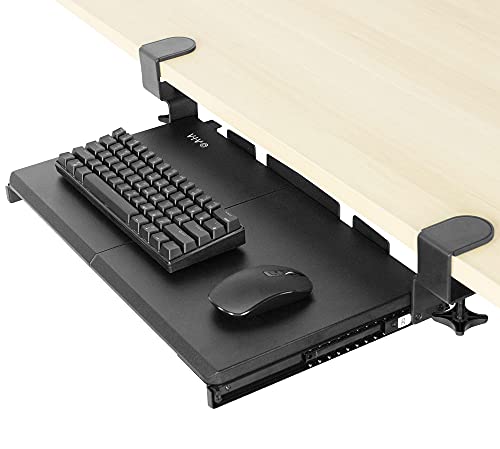
- 20 x 11-inch compact platform
- Supports up to 11 pounds
- No-drill adjustable C-clamp mounting
Best For: Small desks up to 2 inches thick
Spacious Under-Desk Option

- 25.6 x 11.8-inch platform
- No-drill mounting for desks up to 1.97 inches thick
- Requires 31.3 inches of underside width
Best For: Flat, unobstructed desks with extra clearance
Dark Walnut Space Saver

- 20 x 11-inch walnut-finish platform
- Supports up to 11 pounds
- Includes a limited three-year warranty
Best For: Desks up to 1.25 inches thick with straight edges
Wide-Clamp Ergonomic Pick
Zontera Under-Desk Keyboard Tray

- 20 x 11.8-inch platform
- Fits desks up to 2.76 inches thick
- Smooth slide with a keyboard back baffle
Best For: Users needing extra surface room and broad clamp compatibility
Best Rotating Pick
VIVO Clamp-On Rotating Keyboard Tray

- 360-degree pivoting placement
- Rotates under the desk for storage
- Supports up to 11 pounds
Best For: Small workstations needing flexible keyboard placement
Best Compact Slide-Out
Xyndyx Small Under-Desk Keyboard Tray
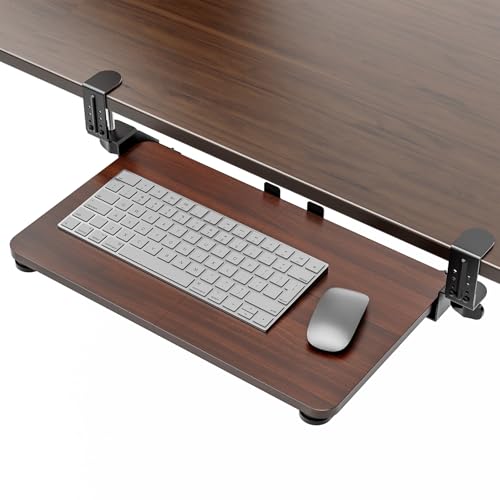
- 20 x 11.8-inch compact surface
- Slides out up to 7.8 inches
- Clamps fit desks up to 2.76 inches thick
Best For: Small to medium desks with a flat, unobstructed underside
Best Full-Size Slide Track
VIVO 25-Inch Under-Desk Keyboard Tray

- 25 x 10-inch keyboard and mouse surface
- 5 inches of height adjustment
- Slides on a 14.25-inch track
Best For: Standard desks with sufficient clearance and support
Large-Surface Space Saver
XINLEI Large C-Clamp Keyboard Tray

- Large 25.6-by-11.8-inch platform
- Quiet metal slide with back baffle
- Clamp or screw-mount installation
Best For: Desks with room for a 30-inch clamp span
Heavy-Duty Clamp Mount
AX WABER Adjustable Keyboard Tray

- Supports up to 11 pounds
- No-drill adjustable C-clamps
- Slides out up to 5.7 inches
Best For: Users needing a sturdy no-drill mounting system
Compact Desk Fit
suptek Small Pull-Out Keyboard Tray

- Compact 20-by-11.8-inch platform
- No-drill dual steel C-clamps
- Supports up to 11 pounds
Best For: Small desks using a compact keyboard
Compact Clamp-On Pick – VIVO 20-Inch Keyboard Tray
For shoppers comparing keyboard trays for small desks, the VIVO MOUNT-KB05ES offers a compact 20 x 11-inch platform that keeps a keyboard and mouse below the desktop. Its sliding design helps free surface space without drilling into the desk.
Best For: Small desks up to 2 inches thick that need a compact, clamp-on tray.
Pros:
- Compact platform supports up to 11 pounds.
- Slides out up to 9.5 inches and stores beneath the desk.
- Adjustable C-clamps install without drilling.
Cons:
- Requires enough clearance for the 20-inch tray and clamps.
- Its 11-inch depth may be limiting for larger keyboards or mice.
This is a practical space-saving choice when desk width and installation simplicity matter most. Confirm your desktop thickness and available underside clearance before ordering.
Spacious Under-Desk Option – BONTEC Pull-Out Keyboard Tray
Among keyboard trays for small desks, the BONTEC Pull-Out Keyboard Tray provides a wider 25.6 x 11.8-inch surface for a standard keyboard and mouse. It uses no-drill C-clamps, but careful compatibility and clearance checks are essential.
Best For: Desks with a flat, unobstructed underside and enough room for a 25.6-inch platform.
Pros:
- Spacious platform accommodates standard keyboards and mice.
- Supports up to 11 pounds with protective clamp pads.
- Pulls out for use and slides beneath the desk afterward.
Cons:
- Requires at least 31.3 inches of underside width and 11.8 inches of depth.
- Not compatible with curved, beveled, or rounded edges or underside crossbars.
- Vertical mice, oversized keyboards, and split ergonomic keyboards require extra clearance checking.
The BONTEC offers more working room than a typical compact tray, but it is not the easiest fit for every small desk. Measure the underside carefully and verify that the clamp area is unobstructed.
Dark Walnut Space Saver – VIVO 20-Inch Keyboard Tray
The VIVO MOUNT-KB05ES-D is a compact option for keyboard trays for small desks, combining a 20 x 11-inch under-desk platform with a dark walnut finish. Its sliding tray and clamp mounting help preserve desktop space without permanent modifications.
Best For: Smaller desks up to 1.25 inches thick where a dark walnut appearance is preferred.
Pros:
- Compact design supports up to 11 pounds.
- Slides out up to 8.5 inches for typing and stores under the desk.
- Includes adjustable C-clamps and a limited three-year manufacturer warranty.
Cons:
- Only fits desks up to 1.25 inches thick.
- Not compatible with desktops featuring beveled edges.
- The 11-inch depth may not suit larger input devices.
This version is a sensible pick when finish and compact dimensions are priorities. Its narrower desk-thickness limit makes measuring your desktop especially important.
Wide-Clamp Ergonomic Pick – Zontera Under-Desk Keyboard Tray
For keyboard trays for small desks that need a little more room, this Zontera tray offers a 20 x 11.8-inch board and space for a keyboard, mouse, and small accessories. Its dual adjustable clamps fit a broad range of desktop thicknesses without drilling.
Best For: Users who want a wider platform and desks up to 2.76 inches thick.
Pros:
- 20 x 11.8-inch surface provides room for a keyboard, mouse, and accessories.
- Adjustable clamps fit desktops up to 2.76 inches thick.
- Back baffle, non-slip pads, and upgraded slides support stable, smooth use.
Cons:
- The clamp-to-clamp length is 25.9 inches, so available desk width must be checked.
- It extends 7.8 inches from the desk edge, requiring sufficient knee and underside clearance.
This tray stands out for its generous clamp range and slightly deeper platform. Measure the full 25.9-inch installation length before buying, especially for compact workstations.
Best Rotating Pick – VIVO Clamp-On Rotating Keyboard Tray
For small desks, the VIVO MOUNT-KB04CB is a space-conscious option among keyboard trays for small desks. Its single clamp mounts below the desktop, while the tray pivots 360 degrees so you can position it for typing or rotate it out of the way when finished.
Best For: Small workstations needing flexible keyboard placement and under-desk storage.
Pros:
- 360-degree rotation supports customized placement.
- Rotates under the desktop for discreet storage.
- Holds up to 11 pounds and fits small to standard keyboards.
- Includes hardware and instructions for clamp-on installation.
Cons:
- Not compatible with lipped or beveled desk edges.
- Requires up to 32 inches of clearance for the rotating circumference.
- Fits desks up to 2 inches thick.
This tray stands out when the ability to swing the keyboard aside matters more than a conventional sliding mechanism. Measure your desk edge and surrounding clearance before buying.
Best Compact Slide-Out – Xyndyx Small Under-Desk Keyboard Tray
The Xyndyx small tray is a practical choice for keyboard trays for small desks, combining a 20 x 11.8-inch surface with a smooth pull-out rail. It extends up to 7.8 inches for typing and slides back under the desk when you need to reclaim workspace.
Best For: Small to medium desks with a flat, unobstructed underside and room for clamp installation.
Pros:
- Compact surface accommodates a keyboard and mouse.
- Smooth sliding rail provides easy access and storage.
- Adjustable C-clamps fit desks up to 2.76 inches thick.
- Non-slip pads and a back baffle help keep the tray and keyboard stable.
Cons:
- Will not work with curved, beveled, or rounded edges.
- Requires a completely flat underside without crossbars or support beams.
- Installation requires at least 31.5 inches of desk width.
This is a strong fit when you want a compact pull-out surface without drilling. Compatibility is the key consideration, so inspect the underside and measure the desk before ordering.
Best Full-Size Slide Track – VIVO 25-Inch Under-Desk Keyboard Tray
The VIVO MOUNT-KB03B offers a wider 25 x 10-inch platform for shoppers comparing keyboard trays for small desks that still need room for a standard keyboard and mouse. Its under-desk track slides the tray forward and back, with rubber padding and 5 inches of height adjustment for a more comfortable setup.
Best For: Standard desks that can support a larger under-mounted tray and provide adequate track clearance.
Pros:
- 25 x 10-inch tray fits most keyboards and mice.
- Provides 5 inches of height adjustment.
- Rubber padding supports more comfortable typing.
- Includes mounting hardware for assembly.
Cons:
- Requires 14.25 inches between the desktop edge and any crossbar.
- Height-adjustable desks may need the separate MOUNT-SPACER01 adapter.
- The total tray weight is 10 pounds, so the desk must support the added under-mounted load.
This model makes sense when you want a roomy platform and adjustable positioning rather than the smallest possible footprint. Check crossbar clearance, desktop thickness, and weight capacity before installation.
Large-Surface Space Saver – XINLEI Large C-Clamp Keyboard Tray
For shoppers comparing keyboard trays for small desks, the XINLEI DSF4 offers a generous under-desk platform for moving a keyboard, mouse, and small accessories off the desktop. Its large surface and slide-out design can add workspace, but the clamp span requires careful measurement before purchase.
Best For: Small workstations that need a spacious tray and can accommodate its wide 30-inch clamp-to-clamp footprint.
Pros:
- 25.6-by-11.8-inch platform holds a keyboard, mouse, and small accessories.
- Metal sliding rail glides in and out quietly, with a back baffle to help prevent falls.
- Offers both C-clamp and screw-mount installation options.
- Ergonomic typing angles may help reduce wrist and shoulder strain.
Cons:
- The total length, including clamps, is 30 inches, so it may not suit very narrow desks.
- C-clamps fit desktops up to 1.63 inches thick, and thicker desktops reduce clearance.
- The tray is relatively heavy at 8.73 pounds.
The XINLEI is a strong choice when tray capacity matters more than the smallest possible footprint. Confirm both available desk width and underside clearance, especially if using the clamp installation.
Heavy-Duty Clamp Mount – AX WABER Adjustable Keyboard Tray
The AX WABER is a practical option for keyboard trays for small desks when you want to reclaim desktop space without drilling. Its adjustable C-clamps and 11-pound capacity provide a secure setup, though the complete clamp-to-clamp width is substantial.
Best For: Users who want a no-drill tray with adjustable clamps and a sturdy platform for a keyboard, mouse, and small accessories.
Pros:
- Holds up to 11 pounds and uses sturdy adjustable C-clamps.
- Slides out up to 5.7 inches for more accessible typing.
- Includes hardware and instructions for straightforward assembly.
- Stores the keyboard below the desktop to free workspace.
Cons:
- The clamp-to-clamp length is 32.5 inches, which may be too wide for some small desks.
- Only fits desktops up to 1.9 inches thick.
- Not compatible with desktops that have beveled edges.
Choose the AX WABER when a firm, adjustable clamp system is a priority. Before ordering, measure the desk width, desktop thickness, and edge shape to avoid fit issues.
Compact Desk Fit – suptek Small Pull-Out Keyboard Tray
The suptek DSF1S is designed specifically for smaller setups, making it a natural pick among keyboard trays for small desks. Its 20-inch tray accommodates a small keyboard and mouse, while dual steel C-clamps install without drilling and help keep the desktop clear.
Best For: Compact desks with a small keyboard, provided the desktop is no thicker than 1.57 inches.
Pros:
- Compact 20-by-11.8-inch platform suits smaller work areas.
- Dual steel C-clamps support up to 11 pounds without drilling.
- Updated slide system is designed for smooth pull-out and push-in movement.
- Non-slip pads help protect the desk, while an edge stopper helps prevent falls.
Cons:
- Does not fit desktops thicker than 1.57 inches.
- The smaller platform may be limiting for larger keyboards or accessories.
- The full clamp-to-clamp width is 24.2 inches, so measurement is still necessary.
The suptek is the most compact choice in this group and keeps installation simple with no drilling. It is best matched with a small keyboard and a desk whose thickness falls within its narrow fit limit.
How We Picked the Best Keyboard Trays for Small Desks
We focused on trays that make efficient use of limited desk space while supporting practical everyday typing. Key considerations included overall platform dimensions, keyboard-and-mouse capacity, clamp or mounting design, slide-out access, adjustability, and compatibility with common desk edges.
Because small desks vary widely, we included both compact 20-inch platforms and larger trays for users who need more mouse room. We also considered whether a model can be installed without drilling, how much clearance its clamps require, and whether the design is likely to interfere with drawers, legs, or under-desk storage.
Quick Comparison
| Tray type | Best for | What to check |
|---|---|---|
| Compact clamp-on | Very small desks and occasional use | Keyboard width and mouse clearance |
| Standard pull-out | Daily typing with a separate mouse | Slide mechanism and under-desk depth |
| Rotating tray | Flexible positioning | Rotation clearance around desk legs |
| Large C-clamp tray | Full-size keyboards and broad mouse movement | Desk-edge space and clamp footprint |
Key Buying Factors for Keyboard Trays for Small Desks
Measure the Desk Before Ordering
Measure the usable width and depth beneath the desktop, not just the desktop surface. Account for front rails, drawers, cable trays, support bars, and desk legs. Also confirm the maximum desktop thickness supported by the clamps.
Choose the Right Platform Size
A compact 20-inch tray may fit a narrow workstation but can leave limited room for a mouse. Models around 23 to 27 inches offer more flexibility, although their clamps and slide rails need additional clearance. If you use a tenkeyless or compact keyboard, a smaller platform may be sufficient.
Consider Mounting and Stability
Clamp-on trays are convenient for renters and standing desks because they usually avoid drilling. Tighten both clamps evenly and verify that the desk edge is strong enough to support repeated typing. A larger tray is not automatically more stable; the mounting system and desk construction matter just as much.
Check Ergonomics and Clearance
The tray should place the keyboard close to elbow height when your shoulders are relaxed. Look for enough knee clearance and make sure the tray does not collide with your chair, drawers, or monitor supports as it slides. A rotating design can help with positioning but needs room to swing.
Who Should Buy Which Keyboard Trays for Small Desks?
Choose a compact clamp-on model if your desk is narrow, you use a compact keyboard, or you want to preserve as much legroom as possible. A standard pull-out tray is a better fit for daily office work when you need space for both a full-size keyboard and mouse. Select a rotating option if you frequently change seating position or want to tuck the tray away at an angle.
For full-size keyboards, large mice, or heavier daily use, consider one of the wider C-clamp trays—but verify the desk can accommodate the longer platform and deeper mounting hardware. Whichever style you choose, prioritize accurate measurements, secure attachment, and comfortable elbow positioning over the largest possible surface.