
A vertical mouse can help keep your hand and wrist in a more natural handshake position during long work sessions. The right model balances comfort with reliable tracking, useful connectivity, and controls that fit your routine.
We selected 10 vertical mouse options for different budgets and preferences, including wired and wireless designs, rechargeable models, quiet switches, and multi-device connectivity.
Best 10 Vertical Mouse Picks for 2026
Premium Ergonomic Pick

- 57-degree angle supports a natural wrist posture.
- 4000 DPI sensor with adjustable cursor speed.
- Wireless, rechargeable, and right-handed.
Best For: Right-handed professionals wanting advanced ergonomic control
Budget Wired Choice
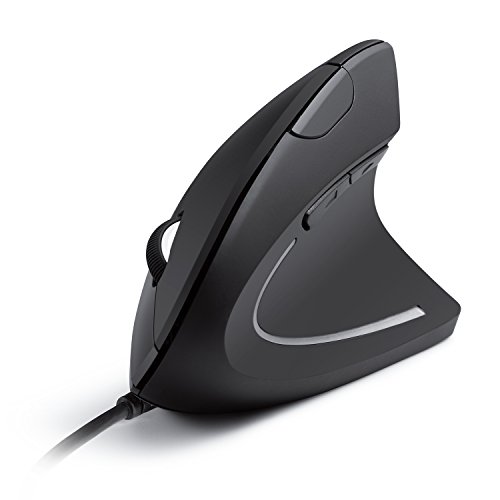
- Wired USB design needs no batteries.
- 1000/1600 DPI optical tracking.
- Five buttons include browser navigation controls.
Best For: Users seeking an affordable, lightweight wired option
Quiet Multi-Device Pick
UGREEN Ergonomic Wireless Mouse

- Bluetooth and 2.4G connections support up to three devices.
- Quiet clicks and five-button layout aid productivity.
- Four DPI levels and up to 12 months of AA battery life.
Best For: Quiet, multi-device office and home setups
Comfortable Compact Pick
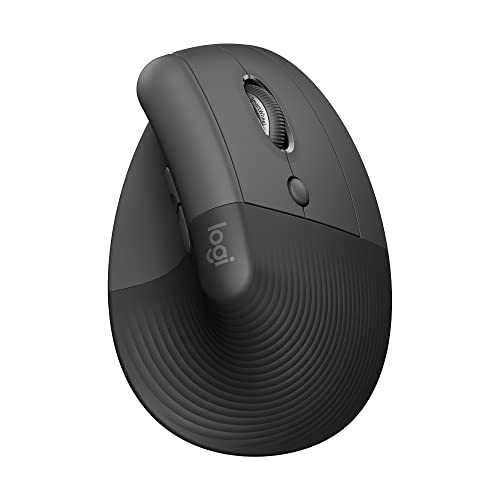
- Designed for small to medium right hands.
- Quiet clicks, customizable buttons, and SmartWheel.
- Bluetooth or Logi Bolt with up to 24 months of battery life.
Best For: Small- to medium-handed users seeking quiet comfort
Best Multi-Device Value
TECKNET 3-Device Vertical Mouse

- Bluetooth and 2.4GHz connections support three devices
- Six DPI levels up to 4800
- Quiet primary clicks and 36-month registered warranty
Best For: Right-handed multi-device users who prefer replaceable batteries
Best Rechargeable Fit
ProtoArc EM11 NL Vertical Mouse

- Rechargeable 500mAh battery with Type-C charging
- Connects to up to three devices
- Designed for small to medium hands under 7.5 inches
Best For: Small- to medium-handed users seeking rechargeable connectivity
Best Simple Wireless Option

- Reliable 2.4GHz USB-receiver connection
- Three DPI settings up to 1600
- Browsing buttons and eight-minute power saving
Best For: Users wanting a basic battery-powered USB vertical mouse
Best Rechargeable Pick
Lekvey Ergonomic Vertical Mouse

- Rechargeable battery lasts up to 150 hours
- Handshake grip with browser navigation buttons
- Plug-and-play 2.4G USB connection
Best For: Right-handed users with medium or large hands seeking a simple rechargeable work mouse
Best for Multi-Device Use
Uineer 3-Device Vertical Mouse

- Switches among up to three devices
- Bluetooth and 2.4G wireless modes
- Four DPI settings and ambient lighting
Best For: Small- to medium-handed users managing multiple computers or mobile devices
Premium Ergonomic Pick – Logitech MX Vertical
The Logitech MX Vertical is a feature-rich vertical mouse for right-handed users who want a more natural grip, wireless convenience, and precise tracking. Its 57-degree angle, textured surface, and adjustable 4000 DPI sensor suit long work sessions.
Best For: Right-handed professionals seeking an advanced wireless ergonomic mouse.
Pros:
- 57-degree vertical angle and handshake position are designed to reduce wrist pressure and muscular activity.
- 4000 DPI optical tracking and a cursor-speed switch support precise, low-movement control.
- Wireless operation offers up to 10 meters of range, with compatibility across Windows, macOS, iPadOS, Linux, and Chrome OS.
- Includes a rechargeable battery, USB receiver, and USB-C cable.
Cons:
- Right-handed design is not suitable for left-handed users.
- Its advanced features and ergonomic construction may be more than casual users need.
Choose the MX Vertical if posture-focused design and high-resolution control matter more than keeping the setup simple or inexpensive.
Budget Wired Choice – Anker Vertical Mouse
The Anker Vertical Mouse is a straightforward wired option for shoppers who want the handshake-style grip without batteries or wireless pairing. Its optical sensor offers selectable 1000/1600 DPI tracking, while the cable keeps it ready for immediate use.
Best For: Budget-conscious computer users who prefer a lightweight wired vertical mouse.
Pros:
- Ergonomic shape is designed to support a natural wrist and arm position.
- Selectable 1000/1600 DPI optical tracking provides practical everyday control.
- Five-button layout includes next and previous buttons for easier browsing and navigation.
- Lightweight body and 4.9-foot USB cable require no battery management.
Cons:
- Wired USB connection limits desk flexibility.
- Its listed operating-system compatibility is narrower than some wireless alternatives.
- The supplied specifications identify the design as ambidextrous, but do not provide left-hand-specific controls.
This is a sensible entry-level vertical mouse when dependable USB connectivity and low-maintenance operation are more important than wireless features.
Quiet Multi-Device Pick – UGREEN Ergonomic Wireless Mouse
The UGREEN Ergonomic Mouse combines a vertical grip with quiet clicks, dual wireless connectivity, and support for up to three devices. Four DPI levels and PTFE glide feet make this vertical mouse flexible for office work, browsing, and other everyday tasks.
Best For: Right-handed multitaskers who need quiet operation and Bluetooth or 2.4G connectivity.
Pros:
- Vertical handshake design is intended to reduce wrist rotation and muscle strain.
- Bluetooth and 2.4G wireless connections support up to three devices and a 10-meter range.
- Quiet clicks, five buttons, and four DPI settings suit shared workspaces and varied tasks.
- One AA battery and smart sleep mode are specified for up to 12 months of battery life.
Cons:
- Right-handed design may not suit left-handed users.
- Requires a replaceable AA battery rather than an included rechargeable battery.
- At 170 g, it is heavier than some listed alternatives.
The UGREEN stands out for users who move between devices or work around others and want quieter, flexible wireless control.
Comfortable Compact Pick – Logitech Lift Vertical Mouse
The Logitech Lift is a compact right-handed vertical mouse designed for small to medium hands. It pairs a 57-degree shape and soft grip with quiet clicks, customizable buttons, SmartWheel scrolling, and Bluetooth or Logi Bolt connectivity.
Best For: Small- to medium-handed users who want a comfortable, quiet wireless mouse.
Pros:
- 57-degree vertical shape, thumb rest, and textured grip promote a more natural forearm posture.
- Whisper-quiet clicks, customizable buttons, and SmartWheel scrolling support focused work.
- Bluetooth Low Energy and Logi Bolt connect to Windows, macOS, iPadOS, Chrome OS, and Linux.
- Included battery is specified to last up to 24 months.
Cons:
- Designed for right-handed users with small to medium hands.
- Its compact fit may be less suitable for users with larger hands.
- Logi Bolt connectivity requires the included USB receiver, while Bluetooth compatibility depends on the device.
Pick the Lift when a smaller ergonomic profile, quiet operation, and long battery life are priorities for daily computer work.
Best Multi-Device Value – TECKNET 3-Device Vertical Mouse
If you need a vertical mouse for switching among several computers or tablets, the TECKNET offers Bluetooth and 2.4GHz USB-A connectivity for up to three devices. Its near-vertical right-handed shape, adjustable DPI, and quiet primary clicks make it practical for everyday work.
Best For: Right-handed users who want multi-device flexibility, quiet left and right clicks, and replaceable-battery convenience.
Pros:
- Connects with two Bluetooth devices and one 2.4GHz USB-A receiver.
- Six DPI settings from 800 to 4800 support different tracking preferences.
- Near-silent left and right clicks suit shared or quiet workspaces.
- Includes a 36-month warranty when registered.
Cons:
- Requires two AAA batteries, which are not included.
- Designed for right-handed use only.
- Side buttons are not compatible with macOS.
The TECKNET is a flexible vertical mouse for users who regularly move between devices. Its battery-powered design avoids charging cables, though Mac users should note the side-button limitation.
Best Rechargeable Fit – ProtoArc EM11 NL Vertical Mouse
The ProtoArc EM11 NL is a rechargeable vertical mouse designed for small to medium hands under 7.5 inches long. It connects to up to three devices through dual Bluetooth and a 2.4G USB-A receiver, while its vertical grip is intended to keep the wrist and forearm in a more natural position.
Best For: Users with small to medium right hands who want a rechargeable multi-device mouse.
Pros:
- Built-in 500mAh battery recharges through the included Type-C cable.
- Supports up to three connected devices through Bluetooth and 2.4G USB-A.
- Quiet left and right clicks can help reduce work distractions.
- Back and forward buttons aid webpage navigation on supported systems.
Cons:
- Its fit is specifically intended for hands under 7.5 inches.
- Users may need one to two weeks to adjust to the vertical shape.
- Back and forward buttons are not compatible with macOS, and buttons are not programmable.
The EM11 NL stands out when hand size and rechargeable power matter most. Confirm the stated hand-size range before buying, and expect an adjustment period while learning the grip.
Best Simple Wireless Option – Anker 2.4G Vertical Mouse
The Anker 2.4G is a straightforward vertical mouse for users who want an ergonomic right-handed shape without Bluetooth or charging. It uses a USB receiver, offers three DPI settings, and includes next and previous buttons for convenient webpage navigation.
Best For: Right-handed laptop and desktop users who prefer a simple USB-receiver connection and replaceable batteries.
Pros:
- Vertical “handshake” design is intended to reduce wrist and arm strain.
- Three DPI settings—800, 1200, and 1600—support adjustable tracking.
- Next and previous buttons simplify webpage browsing.
- Power-saving mode activates after eight minutes of inactivity.
Cons:
- Uses 2.4GHz USB only; Bluetooth is not supported.
- Requires two AAA batteries, which are not included.
- Key click sounds are not silent.
The Anker is a sensible choice if you want a no-frills vertical mouse with basic sensitivity adjustment and browsing buttons. Its USB-only design and audible clicks make it less suitable for Bluetooth-focused or quiet-workspace setups.
Best Rechargeable Pick – Lekvey Ergonomic Vertical Mouse
If you want a straightforward vertical mouse for everyday work, the Lekvey combines a handshake-style grip with wireless convenience and a rechargeable battery. Its six-button layout includes browser back and forward controls, while three DPI settings cover common office tasks.
Best For: Right-handed users with medium or large hands who want a rechargeable, plug-and-play mouse for Windows or Linux.
Pros:
- Ergonomic vertical design encourages a neutral wrist and arm position.
- Rechargeable battery provides up to 150 hours of continuous use.
- Includes convenient page-back and page-forward buttons plus three DPI levels.
- Uses a 2.4G USB receiver with no Bluetooth pairing or drivers required.
Cons:
- Designed for right-handed use and recommended for medium or large hands.
- Forward and back buttons are not compatible with macOS.
- All buttons are non-programmable.
The Lekvey is a practical choice if long battery life and simple USB setup matter more than multi-device connectivity. Allow a few days to adjust to the vertical shape, especially if you are switching from a conventional mouse.
Best for Multi-Device Use – Uineer 3-Device Vertical Mouse
The Uineer is a versatile vertical mouse for people moving between a computer, tablet, and phone. It supports dual Bluetooth modes and 2.4G wireless connectivity, with switching for up to three devices and four DPI settings for different tasks.
Best For: Right-handed users with small to medium hands who need to switch among three compatible devices.
Pros:
- Connects with Bluetooth 5.0/4.0 or a 2.4G USB connection.
- Supports up to three devices with convenient switching.
- Offers four DPI levels from 800 to 2400 for adaptable tracking.
- Includes seven-color ambient lighting and a low-battery reminder.
Cons:
- Best suited to small or medium hands.
- Side buttons do not function on macOS.
- Uses a replaceable C battery rather than a rechargeable battery.
Choose the Uineer if cross-device flexibility is a priority. Its broad operating-system compatibility and automatic power-saving features make it useful for mixed-device workstations, provided the size fits your hand.
Best Quiet Premium Option – TECKNET Rechargeable Vertical Mouse
For a quieter workspace, the TECKNET vertical mouse pairs a 57-degree ergonomic angle with silent buttons and rechargeable power. It also supports Bluetooth and 2.4G wireless connections, switches among three devices, and offers six DPI settings up to 4800.
Best For: Office workers and creators who want quiet clicks, multi-device switching, and long rechargeable battery life.
Pros:
- 57-degree vertical design helps align the forearm, wrist, and hand.
- Silent buttons reduce operating noise by up to 90%.
- Supports Bluetooth 5.3/3.0 and 2.4G connections for three devices.
- Provides six DPI levels and up to three months of use after a 2–3 hour charge.
Cons:
- Side buttons are not supported on macOS.
- Its feature set may be more than needed for basic single-device use.
The TECKNET stands out when quiet operation and flexible connectivity are worth prioritizing. Its rechargeable battery, broad DPI range, and automatic sleep mode make it a strong fit for sustained work across several devices.
How We Picked These Vertical Mouse Models
We focused on the features that matter most in daily use: hand position, grip shape, tracking performance, connection options, battery or charging convenience, button layout, and overall practicality. The roundup includes established ergonomic designs alongside affordable alternatives, so shoppers can compare premium comfort with lower-cost features.
Product specifications can vary by hand size and operating system, so check the manufacturer’s compatibility details before buying. A Vertical Mouse is typically designed for right-handed use, although some models may offer different sizing or control layouts.
Quick Comparison
| Best For | Look For | Models to Consider |
|---|---|---|
| Premium ergonomic comfort | Refined shape, dependable tracking, adjustable controls | Logitech MX Vertical, Logitech Lift |
| Budget-friendly wired use | Plug-and-play USB connection and no batteries | Anker USB Wired Vertical Mouse |
| Multi-device setups | Bluetooth, 2.4GHz wireless, or device switching | TECKNET, UGREEN, Uineer |
| Quiet workspaces | Silent or low-noise switches | UGREEN, TECKNET |
| Rechargeable convenience | Built-in battery and USB charging | ProtoArc, Lekvey, TECKNET |
Key Buying Factors for a Vertical Mouse
Hand Size and Grip Angle
The most important factor is whether the shell supports your hand without forcing your fingers to stretch. Smaller hands may feel better on a compact, less aggressively angled design, while larger hands often benefit from a taller body and longer thumb rest. Look for a relaxed grip that does not require squeezing.
Connection and Compatibility
Wired models are simple and do not need charging, making them useful for fixed desks or shared computers. Wireless models provide a cleaner setup. Bluetooth is convenient for laptops and tablets, while a 2.4GHz receiver often offers straightforward desktop connectivity. Multi-device support is valuable if you regularly switch between work and personal computers.
Tracking, Buttons, and Noise
Higher DPI settings can make cursor movement faster, but precision and smoothness matter more than maximum numbers for office work. Check whether the button arrangement is easy to reach and whether the model includes forward and back buttons. Silent clicks are especially useful in offices, libraries, and shared rooms.
Power and Portability
Rechargeable batteries reduce disposable-battery waste, but charging intervals and cable convenience still matter. Replaceable batteries can be practical for travel because a fresh pair restores operation immediately. Consider the receiver-storage design if you carry the mouse between locations.
Who Should Buy Which Vertical Mouse?
Choose the Logitech MX Vertical or Logitech Lift if you want a polished ergonomic experience from a well-known brand. The Anker wired model suits shoppers who want an inexpensive, dependable USB option without battery concerns. UGREEN and TECKNET are strong choices for quiet clicks, wireless flexibility, and multi-device workstations. ProtoArc and Lekvey are worth considering if rechargeable operation is a priority, while Anker’s wireless vertical option provides a straightforward cordless setup. Uineer is a practical fit for shoppers seeking Bluetooth and multi-device functionality at a value-oriented price.