
USB-C KVM switches make it easier to control two or more computers from one keyboard, mouse, display setup, and USB accessory collection. The right model can also reduce cable clutter, charge a laptop, and support high-resolution video for work, gaming, or creative tasks.
We selected 10 USB-C KVM switches with different combinations of monitor support, bandwidth, power delivery, USB connectivity, and device compatibility. Use the guide below to narrow the options based on your desk setup and daily workflow.
Best 10 USB C Kvm Switches Picks for 2026
Best Dual-Monitor Laptop KVM
Cable Matters Dual 4K USB-C KVM

- Runs two 4K 60Hz displays on compatible Windows/Linux laptops
- Shares four USB 3.0 peripherals
- RF remote included; no laptop charging
Best For: Two USB-C laptops and two-monitor Windows or Linux workstations
Best 3-Computer DisplayPort KVM

- Switches among two USB-C laptops and one DisplayPort system
- Drives one display up to 8K 60Hz or 4K 144Hz
- Offers up to 60W PD on both USB-C inputs
Best For: Mixed laptop-and-desktop setups using one high-resolution DisplayPort monitor
Best Charging USB-C KVM
Cable Matters 4K Dual-Charging KVM

- Switches two USB-C laptops through one 4K 60Hz HDMI display
- Delivers up to 100W to one laptop or 85W each to two
- Adds USB-C and USB-A 10Gbps peripheral ports
Best For: Two-laptop workstations that need charging and high-speed accessory sharing
Best Mixed USB-C and HDMI KVM
MINIX K2 8K USB-C and HDMI KVM

- Switches one USB-C laptop and one HDMI PC
- Supports up to 8K 60Hz with HDMI 2.1 equipment
- Includes 100W PD pass-through and desktop controller
Best For: One-monitor setups combining a laptop with an HDMI desktop PC
Best High-Bandwidth Pick
40Gbps USB-C KVM for Two Laptops

- 40Gbps bandwidth for USB-C, USB4, and Thunderbolt setups
- Supports up to 8K@60Hz or 4K@240Hz with compatible equipment
- Up to 140W PD pass-through and RF remote switching
Best For: Two-laptop workstations with a compatible detachable-cable dock or monitor
Best Three-Computer Option

- Switches three computers through one compatible monitor or dock
- Supports up to 20Gbps data transfer and 140W PD
- Windows video support reaches up to 8K@30Hz or 4K@144Hz
Best For: Three-computer workspaces using compatible USB4 or Thunderbolt 4 equipment
Dual-Display Powerhouse
2-Laptop Dual-Monitor USB-C KVM

- Dual 4K@60Hz monitor support
- Four USB 3.0 ports at up to 5Gbps
- Two 100W PD inputs for laptop charging
Best For: Two-laptop, dual-monitor workstations
Versatile Single-Screen Switcher
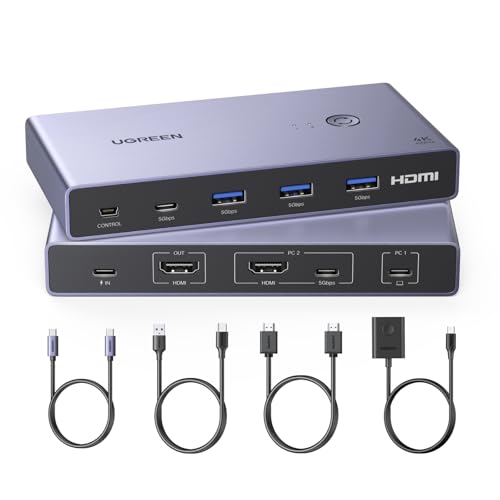
- Single-monitor support up to 4K@60Hz
- Four USB 3.0 peripheral ports
- Includes cables and a desktop controller
Best For: One-monitor laptop-and-desktop setups
Easy PC-and-Laptop Setup
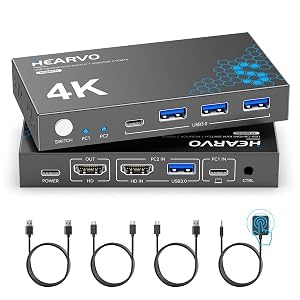
- Single-monitor output up to 4K@60Hz
- Adaptive EDID for steadier switching
- Includes cables, wired remote, and pads
Best For: PC-and-laptop or PC-and-Mac mini desks
Best Dual-Monitor Laptop KVM – Cable Matters Dual 4K USB-C KVM
Among USB C KVM switches, this Cable Matters model is designed for a two-laptop, two-monitor workstation. It can drive two 4K displays at 60Hz on compatible Windows and Linux laptops, while sharing four USB 3.0 peripherals through a single USB-C host connection. MacBook users should note that the two displays mirror rather than extend independently.
Best For: Windows or Linux users who need to switch two USB-C laptops across two 4K monitors and shared peripherals.
Pros:
- Supports up to two 4K 60Hz displays on compatible Windows and Linux laptops.
- Shares four USB 3.0 ports with transfer speeds up to 5Gbps.
- Includes front-button and wireless RF remote switching.
Cons:
- Requires laptops with USB-C DisplayPort Alt Mode; it is not for desktop PCs, Chromebooks, or HDMI/DP-only sources.
- MacBooks mirror both monitors instead of providing two independent extended displays.
- Does not charge laptops or monitors and lacks EDID emulation.
This is a focused solution for compatible dual-laptop setups, especially when two extended monitors and fast shared USB accessories matter. Verify your laptop ports and operating system before buying.
Best 3-Computer DisplayPort KVM – SABRENT USB-C 8K KVM
This SABRENT switch stands out among USB C KVM switches for handling three computers with one DisplayPort monitor, keyboard, and mouse. It accepts two USB-C laptops plus one DisplayPort system, supports up to 8K at 60Hz or 4K at 144Hz, and can deliver up to 60W of power to each compatible USB-C laptop.
Best For: Desks that combine two USB-C laptops with a desktop or other DisplayPort computer and use one high-resolution monitor.
Pros:
- Controls three computers from one DisplayPort monitor and shared peripherals.
- Supports up to 8K 60Hz or 4K 144Hz on a single display.
- Provides up to 60W Power Delivery on both USB-C inputs.
- Includes remote switching, audio jacks, and an aluminum housing.
Cons:
- Supports only one monitor, not dual- or multi-monitor configurations.
- USB peripheral ports are USB 2.0 and are not intended for fast external storage.
- USB-C laptops must support DisplayPort Alternate Mode for video output.
Choose this model when three-computer support and high-refresh DisplayPort output are more important than multi-monitor expansion or fast USB storage sharing. Check each computer’s video connection before purchase.
Best Charging USB-C KVM – Cable Matters 4K Dual-Charging KVM
For a two-laptop desk, this Cable Matters model combines KVM switching, 4K HDMI output, laptop charging, and high-speed USB sharing. It supports up to 100W to one computer or up to 85W per laptop when both are connected, with two USB-C and two USB-A 10Gbps ports for demanding accessories.
Best For: Home-office and hot-desk users who want to switch two USB-C laptops while charging them and sharing fast peripherals.
Pros:
- Supports 4K at 60Hz over HDMI on compatible USB-C or Thunderbolt laptops.
- Provides up to 100W charging to one laptop or up to 85W each for two.
- Includes four 10Gbps USB ports plus two USB 2.0 ports.
- Offers button, RF remote, and optional hotkey switching.
Cons:
- Requires USB-C DisplayPort Alt Mode or Thunderbolt video support.
- Supports one HDMI monitor rather than a dual-monitor setup.
- It is not intended for HDMI-output PCs or USB-C portable monitors.
This is one of the more practical USB C KVM switches for a charging-focused two-laptop workstation. Its 10Gbps ports are useful for SSDs and capture devices, while the included 180W adapter supplies the system.
Best Mixed USB-C and HDMI KVM – MINIX K2 8K USB-C and HDMI KVM
The MINIX K2 is a straightforward option among USB C KVM switches for combining one USB-C laptop with one HDMI-equipped PC. It switches both systems to one HDMI monitor and shared keyboard, mouse, and printer, with support for up to 8K at 60Hz when the host PC, monitor, and cables all meet HDMI 2.1 requirements.
Best For: Users who want to alternate between a USB-C laptop and an HDMI desktop PC on one monitor with physical controls.
Pros:
- Combines USB-C laptop and HDMI PC inputs for one-monitor switching.
- Supports up to 8K 60Hz with compatible HDMI 2.1 equipment.
- Provides 100W PD pass-through charging through the USB-C host connection.
- Includes a desktop controller for convenient manual switching.
Cons:
- Supports only one HDMI monitor.
- Requires a separate wall charger for PD pass-through, and HDMI cables are not included.
- Has no hotkey or automatic switching; wake the laptop before switching.
The K2 makes sense for a mixed laptop-and-PC setup where reliability and a physical desktop controller matter. Its 8K capability depends on a complete HDMI 2.1 chain, so confirm the source, display, and cables can support it.
Best High-Bandwidth Pick – 40Gbps USB-C KVM for Two Laptops
For shoppers comparing usb c kvm switches, the Cable Matters 40Gbps model is a strong choice when two laptops need to share one USB-C or Thunderbolt monitor or dock. It supports high-resolution video, fast peripheral access, and charging for the active laptop, provided the rest of the setup is compatible.
Best For: Two-laptop workstations using a compatible USB-C, USB4, or Thunderbolt dock or monitor.
Pros:
- Up to 40Gbps bandwidth with support for USB-C, USB4, and Thunderbolt setups.
- Supports up to 8K@60Hz, 6K@60Hz, or 4K@240Hz with compatible equipment and DSC where required.
- Passes through up to 140W Power Delivery to the active laptop.
- RF remote switching and built-in cables help keep the workspace organized.
Cons:
- It does not support docks with built-in, non-detachable host cables.
- An 80Gbps dock is limited to 40Gbps through the switch.
- Its built-in cable path should not be extended with a USB-C extension cable.
This is the most capable option here for two-laptop users who prioritize bandwidth and demanding display modes. Check the dock, monitor, cable, and laptop compatibility before buying, especially if your equipment uses captive host cables.
Best HDMI Workstation Value – 4K60 USB-C KVM for Two Laptops
This USB-C KVM switch is designed for two laptops sharing one HDMI monitor, keyboard, mouse, and other USB peripherals. Among usb c kvm switches, it fits users who want a straightforward 4K desktop setup with laptop charging, but compatibility depends on Thunderbolt-capable USB-C ports.
Best For: Two Thunderbolt-equipped laptops sharing one HDMI display and USB 2.0 peripherals.
Pros:
- Supports up to 4K@60Hz and is backward compatible with lower resolutions, including 1440p@120Hz.
- Provides two USB-A 2.0 ports and one USB-C 2.0 data port for peripherals.
- Offers up to 100W charging for the active laptop.
- Lets two laptops share a monitor, keyboard, mouse, printer, scanner, or storage device.
Cons:
- Laptop USB-C ports must support Thunderbolt 3 or later.
- Only HDMI monitor output is supported; the USB-C 2.0 data port does not carry video.
- The power supply must remain connected, and charging applies to only the active computer.
This model makes sense for a conventional HDMI-based desk rather than a high-end single-cable Thunderbolt display setup. Verify the laptop ports and use a high-quality HDMI cable before purchasing.
Best Three-Computer Option – 20Gbps USB-C KVM with 140W PD
For users who need to switch among three computers, this Cable Matters model expands beyond typical two-device usb c kvm switches. It shares a compatible USB-C or Thunderbolt 4 monitor or dock, supports high-speed data, and charges the selected computer, though its 20Gbps bandwidth can limit display performance compared with a direct connection.
Best For: Three-computer setups using a compatible USB-C or Thunderbolt 4 monitor or detachable-cable dock.
Pros:
- Connects and switches among three computers through one monitor or docking station.
- Supports data transfer up to 20Gbps and up to 140W PD charging for the active computer.
- Supports up to 8K@30Hz, 5K@60Hz, or 4K@144Hz on Windows with compatible equipment.
- Includes RF remote control and can convert a compatible dock into a multi-computer KVM setup.
Cons:
- Only the selected computer receives charging.
- Use the included USB4 20Gbps cables; Thunderbolt 3, 4, and 5 cables are not recommended.
- macOS supports one external display and may be limited to 4K@60Hz in the stated single-monitor configuration.
This is the practical pick when three computers must share one dock or display and 20Gbps is sufficient. Consider the 40Gbps alternative if your dock or monitor requires more bandwidth or higher refresh-rate headroom.
Dual-Display Powerhouse – 2-Laptop Dual-Monitor USB-C KVM
If you need to connect two laptops to two external displays, this USB C KVM switch combines docking, peripheral sharing, and display switching in one setup. It supports dual 4K at 60Hz, four USB 3.0 ports, and switching through either a physical button or wired remote.
Best For: Users building a dual-monitor workstation around two compatible USB-C laptops.
Pros:
- Supports two external monitors at up to 4K@60Hz.
- Shares three USB-A and one USB-C peripheral ports at up to 5Gbps.
- Offers two 100W PD inputs for charging connected laptops, with usable laptop power listed at approximately 73–80W.
- Includes physical and wired-remote switching with LED status indicators.
Cons:
- Laptops must support USB-C DP Alt Mode for video, data, and power functions.
- Extend mode is not supported on macOS because of MST limitations on Mac M1/M2 systems.
- Power adapters are not included, and the notes specify 11th-generation-or-newer computer systems.
This is the most capable option here for a two-monitor, two-laptop desk, but compatibility requirements are important. Check each laptop’s USB-C capabilities and have suitable adapters and cables ready before buying.
Versatile Single-Screen Switcher – UGREEN USB-C and HDMI KVM
This UGREEN USB C KVM switch lets one monitor, keyboard, mouse, and other USB devices serve two computers with mixed USB-C and HDMI connectivity. It supports up to 4K at 60Hz and includes a desktop controller for convenient manual switching.
Best For: Home offices or gaming setups that alternate between a USB-C laptop and an HDMI-equipped computer on one monitor.
Pros:
- Supports 4K@60Hz, HDR10+, HDCP 2.2, 3D, and lower resolutions including 1440p@120Hz.
- Provides three USB-A 3.0 ports and one USB-C port for shared peripherals.
- Includes HDMI, USB-C, USB-A-to-C, and desktop-controller accessories.
- Works with Windows, macOS, and Linux without additional drivers.
Cons:
- Supports only one monitor, and the display must use HDMI.
- It does not support automatic or hotkey switching.
- Power adapter and power cable are not included; high-power USB devices may require external power.
Choose this model when a single HDMI monitor is all you need and straightforward button-based switching is acceptable. Confirm that the USB-C computer supports full audio and video transmission before setup.
Easy PC-and-Laptop Setup – Hearvo HDMI and USB-C KVM
The Hearvo USB C KVM switch combines HDMI and full-function USB-C inputs so two computers can share one monitor, keyboard, mouse, and other USB accessories. Its adaptive EDID design is intended to help maintain a stable display when switching, while the wired remote adds flexible placement.
Best For: PC-and-laptop or PC-and-Mac mini workstations using one HDMI monitor.
Pros:
- Supports up to 4K@60Hz with HDCP 2.2 and backward compatibility for 4K@30Hz, 2K, 1080p, and 3D.
- Shares three USB-A and one USB-C port at USB 3.0 speeds up to 5Gbps.
- Offers both on-device and wired-remote switching.
- Includes a full-function USB-C cable, USB-A cables, power cable, remote, and anti-slip pads.
Cons:
- Designed for one monitor rather than a multi-monitor setup.
- Computer 2 requires a full-function USB-C connection for video and data; Computer 1 uses HDMI plus USB-A.
- The supplied notes do not indicate automatic or hotkey switching.
This is a practical choice for a compact single-display workstation, particularly when the included installation accessories matter. Verify the port arrangement on both computers before purchasing.
How We Picked the Best USB C Kvm Switches
We compared these models by looking at the features that most affect everyday usability: supported video resolution and refresh rate, the number of computers and monitors, USB data ports, power delivery, switching methods, and compatibility with laptops, desktops, Thunderbolt systems, HDMI displays, and DisplayPort connections. We also considered whether each switch is designed for a simple single-monitor setup or a more demanding multi-display workstation.
Because USB-C KVM switches can differ substantially in bandwidth and port layout, specifications should be checked against your exact computers, monitors, cables, and peripherals before purchase.
Quick Comparison
- Best for dual 4K displays: Cable Matters Dual 4K 60Hz model.
- Best for high-bandwidth DisplayPort setups: SABRENT USB-C3KM with 8K support and 60W power delivery.
- Best for charging-focused laptop desks: The Cable Matters 140W and dual-charging models.
- Best for compact single-monitor setups: MINIX, UGREEN, and Hearvo options.
- Best for fast USB-C connectivity: The Cable Matters 40Gbps model, especially for compatible Thunderbolt equipment.
Key Buying Factors for USB-C KVM Switches
Video Support
Confirm the required resolution, refresh rate, and number of displays. A switch advertised for 4K at 60Hz may not support higher refresh rates, HDR, ultrawide formats, or two monitors at the same time. Check whether your system uses HDMI, DisplayPort, USB-C video, or an adapter.
Power Delivery
Power delivery is useful for laptop workstations, but wattage varies. A 60W switch may suit a lightweight laptop, while a 100W or 140W model is more appropriate for larger notebooks that charge over USB-C. The connected charger must also provide enough power.
USB Bandwidth and Ports
Consider whether you need only a keyboard and mouse or also external drives, webcams, printers, and audio devices. USB 3.x and higher-speed USB-C ports are preferable for storage and other bandwidth-heavy accessories.
Switching and Compatibility
Look for a convenient physical button, wired controller, or hotkey method. Verify that the switch supports your operating systems and that all computers can send video through their USB-C ports. Some USB-C ports provide data and charging but do not support display output.
Who Should Buy Which USB C Kvm Switches?
Choose a dual-monitor model if you regularly work across two screens and want one control point for multiple computers. A high-bandwidth DisplayPort or Thunderbolt-compatible switch is better for demanding creative, engineering, or high-refresh workflows. Laptop users should prioritize power delivery, stable USB-C video support, and enough USB ports for a dock-like setup.
For a basic home office with one monitor, keyboard, mouse, and two computers, a compact HDMI and USB-C switch is usually the simplest choice. If you frequently connect external storage or several peripherals, choose a model with faster USB support rather than selecting solely by video resolution.