
Managing two or more computers from one desk is easier with the right KVM switch. These devices let you share displays and USB peripherals while switching between systems without constantly moving cables.
Our 2026 roundup covers single- and dual-monitor models, multi-computer HDMI and DisplayPort options, high-refresh-rate designs, and USB 3.0 connectivity for home offices, gaming setups, and workstations.
Best 10 Kvm Switches Picks for 2026
Best Dual-Monitor HDMI Pick

- Dual-monitor copy and extended modes
- Up to 8K@60Hz and 4K@120Hz
- Four USB 3.0 ports with external power
Best For: Dual-monitor HDMI workstations
Best Triple-Display Option
UGREEN 8K HDMI/DisplayPort KVM

- Switches two computers across three monitors
- Up to 8K@60Hz and 4K@240Hz support
- Includes four USB 3.0 ports and cables
Best For: Triple-monitor professional setups
Best Four-Computer Value

- Controls four computers from one monitor
- Supports 4K@60Hz with EDID Adaptive
- Four USB 3.0 ports and wired remote
Best For: Single-monitor four-PC workstations
Best Dual-Monitor Pick

- Runs two computers across two HDMI monitors
- Supports 4K@60Hz with extend and mirror modes
- Includes four USB 3.0 peripheral-sharing ports
Best For: Dual-monitor HDMI workstations and home offices
Best Remote-Control Value

- Shares one monitor among four computers
- Supports 4K@60Hz video output
- Switches by remote control or push button
Best For: Four-computer offices, classrooms, and shared workstations
Best USB Expansion
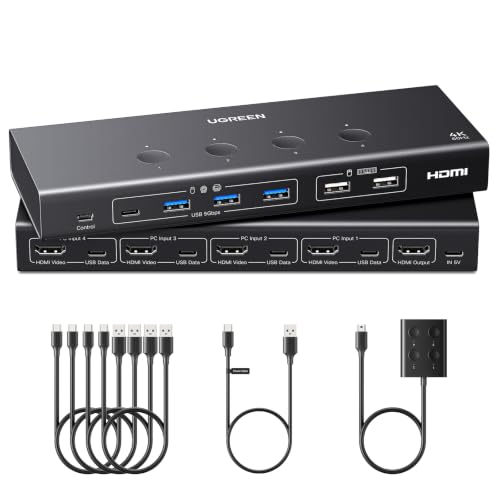
- Shares one monitor across four computers
- Provides six USB peripheral ports
- Adds EDID emulation for faster source switching
Best For: USB-heavy four-PC workstations and office setups
Best Compact Value

- Shares one monitor between two computers
- Supports 4K at 60Hz
- Needs no external power supply
Best For: Simple HDMI-equipped two-computer desks
Best USB Flexibility

- Shares one monitor between two computers
- Provides three USB-A and one USB-C port
- Supports 4K at 60Hz with adaptive EDID
Best For: Single-monitor desks with mixed USB peripherals
Best Dual-Monitor HDMI Pick – 8K HDMI KVM for 2 Computers
This dual-monitor HDMI KVM switch is designed for users who want to control two computers with one keyboard and mouse while sharing two displays and four USB peripherals. It supports copy and extended display modes, with resolutions up to 8K at 60Hz and 4K at 120Hz. Note that each computer needs two HDMI outputs and support for multiple displays.
Best For: Dual-monitor home offices, workstations, and users who need high-resolution HDMI switching between two computers.
Pros:
- Supports dual-monitor copy or extended display modes.
- Offers up to 8K@60Hz and 4K@120Hz video output.
- Includes four USB 3.0 ports and a 12V power adapter for stable peripheral operation.
- Can be switched using the front panel or included wired controller.
Cons:
- Requires two HDMI outputs from each computer for extended dual-display use.
- Does not support keyboard hotkey switching.
- High-power USB devices may require the included external power supply.
For shoppers comparing KVM switches, this model is a strong HDMI option when dual-display support and high refresh rates matter. Confirm your computers’ graphics outputs and display capabilities before purchasing.
Best Triple-Display Option – UGREEN 8K HDMI/DisplayPort KVM
This UGREEN KVM switch is built for two computers and three monitors, using two DisplayPort inputs plus one HDMI input per computer. It supports up to 8K@60Hz on each output, along with high refresh rates such as 4K@240Hz, and shares four USB 3.0 peripherals. Both computers must support triple-monitor output for all three displays to work simultaneously.
Best For: Content creators, IT professionals, and multi-monitor users who need three-display switching between two computers.
Pros:
- Supports three monitors with mirror and extended display modes.
- Provides DisplayPort 1.4 and HDMI 2.1 connectivity with up to 8K@60Hz output.
- Supports HDR10+, VRR, FreeSync, and G-Sync for compatible setups.
- Includes four USB 3.0 ports, required cables, a power adapter, and a desktop controller.
Cons:
- Each computer needs two DisplayPort outputs and one HDMI output for triple-display use.
- Does not support keyboard hotkey switching or EDID emulation.
- Longer cables, signal converters, and docking stations may cause compatibility issues.
Among KVM switches, this is the most display-capable choice in the group, but its setup requirements are substantial. Verify your graphics hardware, monitors, and cable lengths before ordering.
Best DisplayPort Dual-Monitor Pick – 4K@144Hz DisplayPort KVM Switch
This DisplayPort KVM switch lets two computers share two monitors and four USB devices, with support for extended or copy display modes. It handles resolutions up to 4K@144Hz and uses two DisplayPort connections per computer. The package includes USB cables and a wired controller, but DisplayPort cables are not included.
Best For: Dual-monitor DisplayPort users who prioritize smooth 4K gaming, creative work, or high-refresh desktop performance.
Pros:
- Supports 4K resolution at up to 144Hz.
- Offers dual-monitor extended and copy modes.
- Includes four USB 3.0 ports with up to 5Gbps transfer speeds.
- Provides front-panel and wired-controller switching with external 12V power.
Cons:
- Requires two DisplayPort outputs and two DisplayPort cables per computer.
- DisplayPort cables are not included.
- Does not support keyboard hotkey switching.
This is a practical choice among KVM switches for a two-monitor DisplayPort setup where refresh rate matters. Check your graphics outputs, cables, and monitor compatibility before buying.
Best Four-Computer Value – 4-Port 4K HDMI KVM Switch
This four-port HDMI KVM switch controls four computers from one monitor, keyboard, and mouse, making it useful for multi-PC workspaces that do not need dual-monitor output. It supports 4K@60Hz video through HDMI 2.0 and shares four USB 3.0 ports, including three USB-A ports and one USB-C data port.
Best For: Home offices, IT workstations, and test benches that need convenient switching among four computers on one display.
Pros:
- Switches between four computers using numbered front-panel buttons.
- Supports 4K@60Hz HDMI 2.0 video with EDID Adaptive.
- Shares four USB 3.0 peripherals, including USB-A and USB-C connectivity.
- Includes a wired remote and under-desk mounting hardware.
Cons:
- Supports one monitor rather than a multi-monitor setup.
- Does not support keyboard hotkey switching.
- The supplied package lists one HDMI cable, so additional video cables may be needed.
For shoppers seeking straightforward KVM switches for several computers, this model offers the highest port count in the roundup without requiring a multi-display setup. It is best suited to users who can work from a single 4K monitor.
Best Dual-Monitor Pick – 4K HDMI KVM for Two Computers
Among kvm switches, the UGREEN AK500 stands out for setups that need two computers to share two HDMI monitors. It supports extend and mirror modes, 4K at 60Hz, and plug-and-play operation without software or drivers.
Best For: Home offices and professional workstations using two HDMI monitors with two computers.
Pros:
- Supports two computers and two monitors with extend or mirror modes.
- Offers 4K@60Hz, HDR, HDR10+, HDMI 2.0, and HDCP support.
- Includes four USB 3.0 ports, including USB-A and USB-C connectivity.
- Provides both front-panel and wired desktop-controller switching.
Cons:
- It is an HDMI model, not a DisplayPort KVM switch.
- Each computer requires two HDMI cables and one USB-A connection.
- It does not support EDID emulation or keyboard hotkey switching.
This is a strong choice when dual-monitor control is more important than hotkey convenience. Keep the included connection requirements and HDMI-only design in mind before buying.
Best Remote-Control Value – 4-Port 4K HDMI KVM
This 4-port HDMI KVM switch lets four computers share one monitor and four USB 3.0 devices. It combines 4K@60Hz support with push-button or remote-control switching, making it practical for offices, classrooms, and multi-PC work areas.
Best For: Users managing four computers from one HDMI display with a remote or front-panel control.
Pros:
- Connects four computers to one shared monitor.
- Supports resolutions up to 4K@60Hz and is backward compatible with lower resolutions.
- Provides four USB 3.0 ports for keyboards, mice, printers, scanners, and webcams.
- Includes both a remote-control option and physical push-button switching.
Cons:
- Hotkey switching is not supported.
- The supplied notes do not indicate that HDMI cables are included.
- It supports one monitor rather than a multi-monitor arrangement.
Choose this model if four-source capacity and remote switching matter more than dual-monitor support or keyboard shortcuts. Its metal construction and plug-and-play design suit shared work environments.
Best USB Expansion – 4-Computer 4K HDMI KVM
For buyers comparing kvm switches with generous peripheral connectivity, this UGREEN model supports four computers sharing one monitor and six USB ports. It adds EDID emulation for retaining display settings and offers 4K@60Hz output with wired-controller switching.
Best For: Four-computer setups that need to share several USB peripherals while minimizing display reconnection issues.
Pros:
- Supports four computers sharing one monitor at up to 4K@60Hz.
- Includes four USB 3.0 ports and two USB 2.0 ports.
- EDID emulation can preserve monitor identification, resolution, and display configuration.
- Offers push-button and wired desktop-controller switching.
Cons:
- HDMI cables and the power adapter are not included.
- Each PC needs both an HDMI cable and a USB-A-to-C data cable.
- It is not supported for use with a docking station.
This is the most feature-rich option here for USB-heavy, four-PC environments, especially when EDID behavior is useful. Budget for the required cables and power supply, and wake laptops before switching.
Best with Extra Features – 4K120 Dual-Monitor KVM
For shoppers comparing kvm switches for a two-computer, two-monitor setup, this model combines dual-display control with high-refresh-rate HDMI performance. It lets one keyboard and mouse control both computers while sharing four USB 3.0 peripherals.
Best For: Users with two computers and two HDMI monitors who want extended or copy display modes and 4K at 120Hz support.
Pros:
- Supports two monitors and two computers with extended or copy mode.
- Handles up to 4K at 120Hz and is backward compatible with lower resolutions.
- Offers four USB 3.0 ports with transfer speeds up to 5Gbps.
- Includes front-panel and wired-controller switching, plus an external power adapter.
Cons:
- Each computer requires two HDMI ports, and the computers and monitors must support the desired display setup.
- Does not support keyboard hotkey switching.
- HDMI cables are not specified as included.
This is the most capable option here for a genuine dual-monitor workstation, especially when high refresh rates and fast USB peripheral sharing matter. Confirm your computers have two suitable HDMI outputs before buying.
Best Compact Value – 4K60 Single-Monitor KVM
This compact HDMI KVM switch is designed for sharing one monitor, keyboard, and mouse between two computers. It offers straightforward button or wired-controller switching without requiring an external power supply.
Best For: Basic single-monitor setups using two HDMI-equipped computers and standard USB peripherals.
Pros:
- Supports up to 4K at 60Hz and several lower resolutions.
- Provides both switch-body and desktop wired-controller operation.
- Plug-and-play design requires no external power supply or drivers.
- Includes two USB 2.0 ports and clear PC-status LEDs.
Cons:
- Limited to one monitor and two USB 2.0 peripheral ports.
- Does not support keyboard hotkey switching.
- The manufacturer does not recommend it for Mac devices, and HDMI cables are not included.
Choose this model when simplicity and a tidy desk matter more than USB 3.0 speeds or dual-monitor output. Use high-quality, short HDMI 2.0 cables for the stated 4K performance.
Best USB Flexibility – USB-C 4K60 HDMI KVM
Among kvm switches for a single-monitor desk, the Hearvo S7232H stands out for its broad USB connectivity. It switches two computers through one HDMI display while sharing three USB-A devices and one USB-C device.
Best For: Users who need fast USB 3.0 sharing and a mix of USB-A and USB-C peripherals.
Pros:
- Supports 4K at 60Hz, HDCP 2.2, 4K at 30Hz, 2K, 3D, and 1080p.
- Includes three USB-A and one USB-C USB 3.0 ports with speeds up to 5Gbps.
- Offers front-button and wired-remote switching.
- Uses adaptive EDID and supports plug-and-play operation without drivers or an external power supply.
Cons:
- Designed for one monitor, not a dual-monitor setup.
- Requires HDMI connections and compatible computers, displays, and peripherals.
- Does not offer the 4K at 120Hz support of the dual-monitor model.
This is a strong fit for mixed-peripheral workspaces where USB-C access is useful. Its single-monitor layout keeps the setup relatively simple while providing faster and more versatile USB sharing than a USB 2.0 switch.
How We Picked These Kvm Switches
We selected models based on the connections they support, the number of computers and monitors they can manage, stated resolution and refresh-rate capabilities, USB peripheral support, and practical switching features. The lineup includes compact two-computer switches as well as four-port models for larger desks.
Because compatibility depends on the entire signal path, we also considered features such as EDID support, extended versus mirrored display modes, wired controllers, and the availability of HDMI or DisplayPort inputs. Check the product specifications carefully before buying, especially when using high-refresh-rate gaming monitors or multiple displays.
Quick Comparison
- For one monitor and two computers: Choose a two-port HDMI model with USB sharing.
- For dual-monitor workstations: Look for a dual-display KVM with extended-mode support and matching video connections.
- For high-refresh gaming: Prioritize models that explicitly support 4K at 120Hz or 144Hz, plus the correct HDMI or DisplayPort standard.
- For three or four computers: Select a four-port KVM and confirm that all connected systems can use the advertised resolution.
- For several accessories: A built-in USB 3.0 hub provides faster support for storage devices and other peripherals than USB 2.0.
Key Buying Factors for Kvm Switches
Video Inputs and Display Arrangement
Match the switch to your computers and monitors. HDMI models are broadly compatible, while DisplayPort can be preferable for modern PCs and high-refresh displays. Dual-monitor models must support the exact arrangement you want, such as extended desktop rather than duplicated output.
Resolution and Refresh Rate
Do not rely on a headline maximum alone. A switch may support 8K on one display but offer different limits when two monitors are connected. Check the specifications for the resolution and refresh rate at your intended number of screens.
USB Connectivity and Switching
Confirm that the switch supports your keyboard, mouse, webcam, printer, storage drive, or other peripherals. USB 3.0 ports are useful for data-heavy devices, while a dedicated wired controller can make switching easier when the KVM is mounted out of reach.
EDID and Reliability
EDID management can help computers maintain display settings during switching and reduce problems with window rearrangement or signal detection. Still, results vary by monitor, cable, graphics card, and operating system.
Who Should Buy Which Kvm Switches?
Office and home-office users should favor a reliable two-computer HDMI switch with USB 3.0 and straightforward button or wired-controller switching. Dual-monitor professionals need a model specifically rated for two displays and extended mode. Gamers and creators should prioritize verified 4K high-refresh support and appropriate DisplayPort or HDMI bandwidth. Small teams or power users managing several computers should choose a four-port KVM, while buyers with numerous peripherals should select the model offering the most suitable USB hub capacity.