
If you want more screen space without upgrading to a bulky desktop setup, laptop screen extenders can be a smart, travel-friendly fix.
This guide focuses on the best laptop screen extenders under $500, with an emphasis on portability, compatibility, and real-world productivity for work, school, and remote travel.
Best 10 Laptop Screen Extenders Under 500 Picks for 2026
Clean-Cable Triple Display Pick
ZUMWALT 15.6" FHD Triple Monitor
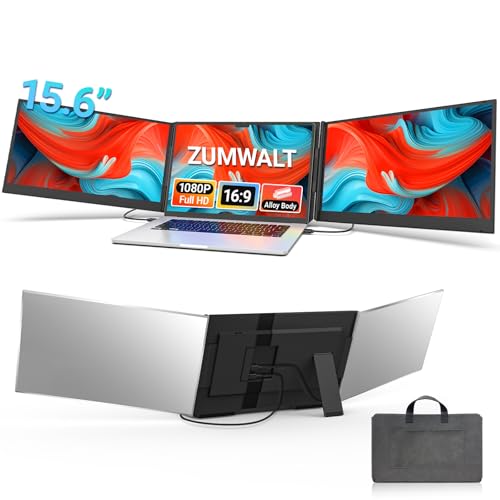
- Two 15.6-inch 1080p displays
- Reduced cable clutter and simpler setup
- 4 lb aluminum shell with carry bag
Best For: Traveling professionals who want a tidy triple-screen workflow
Ultra-Light Triple-Screen Pick
Vixtan 14" Triple Laptop Screen Extender

- 3.0 lb, 0.3-inch-thin portable design
- 14-inch FHD IPS with 100% sRGB
- Plug-and-play with USB-C, USB-A, and HDMI
Best For: Travelers who want a lightweight triple-screen extender
Balanced Portable Choice
Synnov 15.6" Ultra Light Triple Monitor

- About 4 lbs and 0.19 inches thin
- 15.6-inch FHD IPS with extend, mirror, and portrait modes
- Includes carry bag, adapter, and cables
Best For: Remote workers who want a lightweight, polished triple-monitor extender
Ultra-Light Productivity Pick
14.2" Slim Dual Monitor Extender

- 1.87-lb ultra-portable 14.2" extender
- 1080P IPS display with 300 nits
- USB-C or HDMI + USB-A plug-and-play
Best For: Students and remote workers who need a lightweight travel monitor
Ultra-Slim Triple-Screen Pick – KEFEYA 15.6" FHD Portable Triple Monitor
If you want laptop screen extenders under 500 that prioritize a big, bright workspace, this KEFEYA model is built for multitasking on the move. It adds two 15.6-inch FHD IPS displays with 100% sRGB, so you can spread out documents, calls, and media without constantly swapping tabs.
Best For: Remote workers, programmers, traders, and travelers who want a lightweight triple-screen setup with strong portability.
Pros:
- Two 15.6-inch 1080p IPS screens with 300-nit brightness and 100% sRGB color
- Very thin at 0.16 inches and relatively light at 3.9 lbs for a triple-screen unit
- Supports mirror, extend, and portrait/landscape viewing with 180-degree rotation
- Includes a leather bag and multiple cables for plug-and-play setup
Cons:
- Not compatible with Mac M1/M2/M3 chips without a separate adapter
- Full setup may require specific port support for video transmission
This is a strong pick if your priority is maximum screen space in a portable format. The KEFEYA leans into productivity and travel convenience, but buyers should check port compatibility before counting on a no-hassle setup.
Travel-Ready Aluminum Pick – 15.6" Ultra-Slim Triple Portable Monitor
Among laptop screen extenders under 500, this 15.6-inch model stands out for its travel-friendly design and straightforward plug-and-play setup. It combines a full HD IPS panel, a slim body, and a free-standing aluminum bracket, making it a practical choice for mobile workstations.
Best For: Frequent travelers, remote workers, and anyone who wants a slim triple-screen extender with a stable stand.
Pros:
- 15.6-inch 1080p IPS display with 300 nits and 1000:1 contrast ratio
- Ultra-slim 0.18-inch profile and 3.9 lb weight for easier travel
- Aluminum body with anti-slip free-standing bracket for added stability
- Smart InnovRay software adds brightness, color, split-screen, and eye-care controls
Cons:
- Compatibility notes mention special cable needs for some laptops, including M1-M4 MacBooks
- Requires laptops with two video output ports for the simplest connection path
This model is best if you want a clean, travel-ready setup with built-in display controls. Its stand-based design is appealing for desk use, but you should double-check cable requirements before buying.
Detachable Vertical-Mode Pick – FLYTOCCA 15.6" FHD Screen Extender
If your search for laptop screen extenders under 500 is really about flexibility, this FLYTOCCA unit is easy to like. It offers a detachable 15.6-inch FHD IPS screen, supports vertical mounting, and keeps the setup light enough to move between home, office, and travel.
Best For: Coders, document-heavy users, and social media or vertical video workflows that benefit from portrait mode.
Pros:
- Detachable 15.6-inch 1080p IPS display with 300-nit brightness
- Supports vertical mounting for coding, long documents, and vertical video editing
- Lightweight 1.5 lb design makes the screen easy to carry when detached
- Plug-and-play connection options include USB-C or USB-A plus HDMI
Cons:
- Only two height positions are listed
- Single-screen portability is best after detaching, since the full unit is larger than a standalone monitor
This is a smart pick for buyers who want more than just extra display space. The detachable screen and vertical option make it especially practical for users whose work changes throughout the day.
Clean-Cable Triple Display Pick – ZUMWALT 15.6" FHD Triple Monitor
For shoppers comparing laptop screen extenders under 500, this ZUMWALT model focuses on a cleaner setup and a larger triple-screen workspace. It uses two 15.6-inch FHD displays, a slim aluminum shell, and simplified cabling to make multi-monitor productivity feel less messy.
Best For: On-the-go professionals who want a lightweight triple-screen extender with minimal cable clutter.
Pros:
- Two 15.6-inch 1080p screens with 280 nits brightness and a 178-degree viewing angle
- Upgraded internals reduce cable clutter and simplify the connection process
- Lightweight 4 lb aluminum-alloy design with included leather carry bag
- Supports extend, mirror, and portrait modes for work or presentations
Cons:
- M1/M2/M3 MacBooks and non-full-function USB-C laptops need extra cable support
- Some setups may require driver installation when using the alternate connection path
This is a strong option if you value portability and a tidier desk or travel setup. It looks well suited to users who want triple-screen efficiency without overcomplicating the connection process.
Ultra-Light Triple-Screen Pick – Vixtan 14" Triple Laptop Screen Extender
If you want laptop screen extenders under 500 that prioritize portability, the Vixtan 14" triple screen extender is built for travelers and mobile work setups. It adds three-screen productivity in a slim, 3.0 lb package, while still offering full HD IPS visuals and plug-and-play setup for fast use on the road or at a desk.
Best For: Remote workers, students, and digital nomads who want a very light triple-screen setup.
Pros:
- Very portable at 0.3 inches thin and 3.0 lbs
- 14-inch FHD IPS panel with 300-nit brightness and 100% sRGB
- Supports extended, mirrored, and portrait display modes
- Includes USB-C, USB-A, and HDMI cables for plug-and-play use
Cons:
- MacBook M1/M2/M3 models support single-screen only without a DisplayLink adapter
- May need a 5V/3A power adapter if brightness or flicker issues appear
The Vixtan is a strong pick if your priority is getting triple-screen utility without adding much bulk. It balances travel-friendly design with practical display quality, making it a flexible option for home office, campus, or business trips.
Detachable Dual/Triple Workhorse – 15.6" Rotating Laptop Screen Extender
Among laptop screen extenders under 500, this 15.6-inch model stands out for flexibility. It offers 235° horizontal rotation, 90° vertical rotation, and a detachable design that lets you use each side independently, so it can adapt to presentation work, travel, or a more permanent multi-screen desk setup.
Best For: Users who want a customizable extender that can switch between stacked, portrait, and detachable use.
Pros:
- 235° horizontal and 90° vertical rotation for flexible positioning
- Detachable design allows single-sided use when traveling
- 15.6-inch FHD IPS screens with built-in speakers
- Supports USB-C, USB-A, and HDMI connections with no driver required
Cons:
- When using HDMI, an additional USB-A to USB-C cable is needed for power
- Mac support excludes M1/M2/M3 chip models per the notes
This is a versatile choice if you want more than a basic add-on monitor. Its rotation and detachable layout make it easier to tailor the setup to different tasks, but compatibility details are worth checking before you buy.
Balanced Portable Choice – Synnov 15.6" Ultra Light Triple Monitor
If you are comparing laptop screen extenders under 500, the Synnov 15.6-inch model is aimed at users who want portability without giving up a larger display. It combines a thin aluminum-alloy build, FHD IPS panels, and a simplified plug-and-play connection process for a practical mobile workstation.
Best For: Remote workers and travelers who want a lightweight 15.6-inch triple-monitor setup.
Pros:
- Lightweight design at about 4 lbs and 0.19 inches thin
- 15.6-inch FHD IPS screen with 178° viewing angle
- Supports extend, mirror, and portrait modes
- Includes cables, power adapter, and leather carry bag
Cons:
- Requires at least one full-featured USB-C port
- MacBook with M1/M2/M3 chips is not compatible per the notes
The Synnov makes sense if you want a refined, travel-ready extender with a sturdier feel than many ultra-budget options. Its combination of portability, accessory bundle, and simplified setup should appeal to people who move between home, office, and travel often.
Travel-Ready Dual-Screen Pick – Blackview 14" FHD Portable Monitor Extender
If you’re shopping for laptop screen extenders under 500, this Blackview model is a practical option for users who want a sturdy, travel-friendly second screen without a complicated setup. It delivers a 14-inch 1080P FHD IPS display, one-cable USB-C plug-and-play use, and wide laptop compatibility for 13" to 17.3" systems.
Best For: Frequent travelers, remote workers, and anyone who wants a durable dual-screen setup for everyday multitasking.
Pros:
- Premium galvanized steel shell with matte finish helps resist scratches and fingerprints.
- 6-point mounting and 90° adjustable stand add stability for travel and desk use.
- 1080P FHD IPS panel with 300 nits and TÜV SÜD eye-comfort certification.
- Supports extend, mirror, and portrait modes for flexible productivity.
Cons:
- Single-screen expansion may be less versatile than triple-screen options.
- HDMI use requires USB-A power, so not every setup stays truly one-cable.
Overall, this Blackview extender stands out for users who value portability and dependable build quality as much as screen clarity. It’s a solid fit if you want a simple, comfortable way to add screen space on the go.
Ultra-Light Productivity Pick – 14.2" Slim Dual Monitor Extender
For buyers comparing laptop screen extenders under 500, this ultra-light 14.2-inch model is built around portability and fast setup. It pairs a 1080P IPS display with a compact 1.87-lb design, making it a strong choice when you need extra screen space for work sessions, meetings, or travel days.
Best For: Students, remote workers, and frequent travelers who want a lightweight extra display with simple plug-and-play use.
Pros:
- Very light at 1.87 lbs and only 0.27" thin for easy transport.
- Supports extend, mirror, and portrait modes to reduce tab switching.
- 1080P IPS panel with 300 nits brightness and a 0-226° adjustable viewing angle.
- Includes the needed cables and supports USB-C or HDMI + USB-A connection.
Cons:
- Focuses on portability rather than premium build materials like metal construction.
- Best fit is for 14" to 17.3" laptops, so smaller systems are not listed as compatible.
This is a straightforward pick for users who want a lightweight second screen that’s easy to pack and quick to connect. If portability matters more than extra frills, it makes a lot of sense.
Triple-Screen Power Option – Macsecor 14" Triple Laptop Extender
If you want to maximize output and are browsing laptop screen extenders under 500, this triple-screen Macsecor model is built for users who need more workspace than a standard dual monitor add-on. It turns a compatible laptop into a three-screen setup with 14-inch 1080P IPS panels, plug-and-play connectivity, and a built-in stand for flexible positioning.
Best For: Power users who want a triple-display workflow for coding, trading, meetings, or heavy multitasking.
Pros:
- Triple-screen layout can boost workspace and reduce tab switching.
- Two 14-inch FHD 1080P IPS screens with HDR mode and anti-glare features.
- Built-in aluminum stand adjusts up to 90° and supports 180° rotation.
- Works with 13" to 17.3" laptops and includes all necessary cables.
Cons:
- Heavier than the lighter dual-screen options at about 3 lbs.
- M1/M2/M3 MacBooks and some non-full-featured USB-C laptops may need an additional H5-T cable.
For users who want the biggest productivity jump, this is the most ambitious option in the group. It’s best suited to desk-based or semi-mobile setups where extra screen real estate matters more than shaving off every ounce.
How We Picked the Best Laptop Screen Extenders Under 500
For Laptop Screen Extenders Under 500, the most important filters are simple: display size, weight, connection method, compatibility, and how easy the setup is for daily use. We favored models that balance extra workspace with practical portability, since the best option is usually the one you’ll actually carry and use.
We also looked for useful features like full HD resolution, USB-C plug-and-play support, adjustable mounting, and designs that work across common laptop sizes from 12 to 17.3 inches.
Quick Comparison
If you want the shortest path to the right choice, think in three buckets: maximum productivity, maximum portability, or best all-around value. Larger 15.6-inch extenders usually give you the most comfortable split-screen workspace. Smaller 14-inch models tend to be easier to pack and lighter to carry. If you move between offices, coffee shops, or client sites, weight and setup speed matter as much as panel quality.
Key Buying Factors for Laptop Screen Extenders Under 500
Screen Size and Resolution
Most buyers will be happiest with 14-inch to 15.6-inch panels in 1080p. That combination is large enough for side-by-side documents, spreadsheets, and browser tabs without making the setup feel oversized.
Portability and Weight
If you commute often, look closely at total weight and folded thickness. A lighter extender is easier to travel with, but some ultra-light designs trade away stability. The best balance depends on whether you prioritize mobility or desk comfort.
Compatibility and Connectivity
Check laptop size support, USB-C requirements, and whether your machine can power the display directly. Plug-and-play setups are the easiest, but some laptops may need extra cables or a specific port configuration. Make sure the extender matches your operating system and graphics output before buying.
Mounting and Adjustability
Features like rotation, detachable panels, and vertical mounting can make a big difference if you multitask with code, timelines, or long documents. More adjustability also helps reduce neck strain.
Who Should Buy Which Laptop Screen Extenders Under 500?
If you want the most screen real estate for spreadsheets, creative tools, or split-view work, choose a larger triple-screen model. If you travel constantly and care most about a light bag, a 14-inch option is usually the better fit. For mixed use, pick a balanced model that combines full HD, reliable USB-C connectivity, and straightforward mounting.
In short, the best Laptop Screen Extenders Under 500 are the ones that match your workflow, your laptop, and how often you carry them. Focus on compatibility first, then choose the largest and lightest design that still fits your daily routine.