
If your workspace is short on room but long on multitasking, the right screen extender can make a laptop feel far more capable. These picks focus on compact footprints, easy setup, and practical portability for everyday work.
We looked for models that help small-desk users add usable screen space without turning the entire setup into a permanent workstation.
Best 10 Laptop Screen Extenders for Small Desks Picks for 2026
Balanced Portable Pick

- 14-inch FHD IPS with 300 nits
- One-cable or HDMI/USB-A setup
- 180-degree rotation and multiple modes
Best For: Compact desks with flexible device compatibility
Desk-Space Saver
InnoView 15.6" Portable Monitor

- 15.6-inch 1080p IPS with HDR
- Cover doubles as a stand
- Portrait mode helps save desk space
Best For: Small desks needing a larger single portable monitor
Most Adjustable Choice

- Detachable screen with 4-in-1 modes
- 15.6-inch 1080p IPS with 100% sRGB
- 100W PD reverse charging support
Best For: People who want maximum flexibility on a small desk
Ultra-Light Travel Choice
14.2" Ultra-Portable Dual Monitor

- Only 1.87 lb and 0.27" thin
- 1080P IPS panel with 300 nits brightness
- No-driver setup with USB-C or HDMI
Best For: travel-friendly workstations and tight desk setups
Triple-Screen Desktop Booster
15.6" Slim Triple Monitor Extender
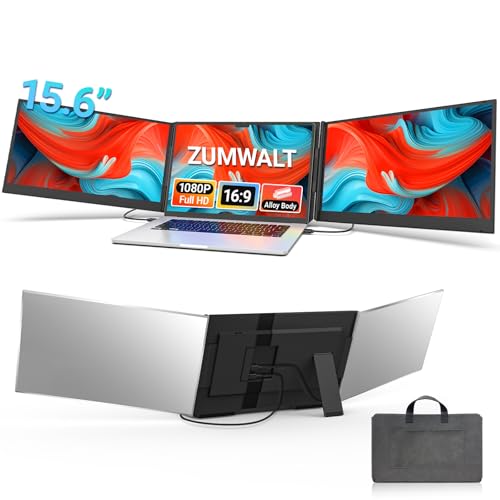
- Two 15.6-inch 1080p panels
- Fewer-cable setup for cleaner desks
- Includes carry bag and accessories
Best For: Users who want maximum screen space on a small desk
Compact Everyday Pick
14" Lightweight Dual Screen Extender

- 1.8 lb portable dual-screen design
- 14-inch FHD IPS panel
- Adjustable kickstand for tight desks
Best For: Portable everyday use on small desks
Compact Dual-Screen Pick – domyfan 14" FHD Extender
If you want laptop screen extenders for small desks, this 14-inch domyfan model is a strong space-conscious option. It clamps to the top of your laptop, adds a second FHD IPS display, and keeps the setup portable enough for office, home, or travel use.
Best For: Users who want a lightweight dual-screen setup with broad device compatibility and easy plug-and-play use.
Pros:
- 14-inch 1080p IPS panel with 300 cd/m² brightness and 1000:1 contrast
- Supports extended, duplicated, and second-screen modes for multitasking
- Ultra-light 2.33 lb design with included carry bag for portability
- Plug-and-play setup with USB-C, HDMI, and USB-A cable options
Cons:
- Requires a full-featured USB-C port or HDMI plus USB-A for video
- Best fit is limited to laptops in the 13.3″-17″ range
Overall, this is a practical choice if desk space is tight and you still want a real productivity boost from a second screen. Its lightweight build and flexible viewing adjustments make it especially useful for mobile work setups.
Balanced Portable Pick – ROYY 14" 1080P Monitor
For shoppers comparing laptop screen extenders for small desks, the ROYY 14-inch model keeps the footprint modest while adding a crisp IPS second display. It supports one-cable USB-C use when your laptop is compatible, or HDMI plus USB-A for a wider range of setups.
Best For: People who want a compact extender with strong color, flexible viewing angles, and simple connectivity.
Pros:
- 14-inch FHD IPS panel with 300 nits brightness and 1000:1 contrast
- One-cable plug-and-play option plus HDMI/USB-A fallback
- 180-degree rotation and mirror, extend, landscape, and portrait modes
- Compatible with Windows, Mac, Chrome, Linux, PS4, Xbox, and Switch
Cons:
- Some older devices may not support the needed USB-C ports
- Smaller screen size may not suit users who prefer more workspace
This model makes sense if you need a tidy desk layout but still want a flexible second screen for work, study, or entertainment. The combination of portability and broad compatibility gives it a useful middle ground.
Desk-Space Saver – InnoView 15.6" Portable Monitor
Product not found.The InnoView 15.6-inch portable monitor is a smart option if you need extra screen space without crowding a small desk. Its built-in cover stand, landscape or portrait use, and slim profile make it easier to place than bulkier dual-screen extenders.
Best For: Users who want a larger portable second monitor with a protective cover stand and low-profile desk use.
Pros:
- 15.6-inch 1080p IPS display with HDR and 178-degree viewing angle
- Smart protective cover doubles as a stand for flexible positioning
- Landscape and portrait modes help save desk space
- Two full-function USB-C ports and one HDMI port for broad connectivity
Cons:
- USB-C connection requires Thunderbolt 3/4 or USB 3.1 DP Alt Mode support
- HDMI use may require a separate power cable that is not included
- At 15.6 inches, it takes more desk room than 14-inch extenders
If your priority is a simple external display that still works well on a limited desk, this is a practical fit. The stand cover and portrait option make it especially helpful when you need a monitor that adapts to your workspace.
Most Adjustable Choice – Detachable 15.6" Dual Screen
If you want laptop screen extenders for small desks but still need a full-featured dual-screen setup, this 15.6-inch detachable model adds flexibility. It offers extend, mirror, and portrait modes, plus a removable screen and adjustable stand that help you tailor the layout to tight workspaces.
Best For: Remote workers and travelers who want a highly adjustable dual-monitor setup with charging support.
Pros:
- Detachable screen and 4-in-1 modes for flexible desk arrangements
- 15.6-inch 1080p IPS display with 280 nits brightness and 100% sRGB
- USB-C port supports 100W PD reverse charging to reduce battery drain
- Reinforced stand with multi-level height adjustment and 192-degree rotation
Cons:
- At 15.6 inches, it is larger than the most compact extender options
- USB-C video requires Thunderbolt 3/4 or DP Alt Mode support
- Full setup may be more involved than simpler single-screen portable monitors
This is the most adaptable option in the group, especially if you want to fine-tune ergonomics on a cramped desk. The detachable design and charging support make it a strong pick for long work sessions.
Compact Productivity Pick – 14-inch 1080P Portable Monitor
If you want a laptop screen extender for small desks, this 14-inch model keeps the footprint modest while still giving you a full 1080P FHD second display. It supports extend, mirror, and portrait modes, so you can add workspace without making your setup feel crowded.
Best For: Home office users, travelers, and anyone who wants a portable dual-screen setup on a tight desk.
Pros:
- 14-inch 1080P FHD IPS panel with 72% NTSC color and 300 nits brightness.
- Supports extended, mirrored, and portrait modes for flexible multitasking.
- Lightweight at 2.34 lb and folds to 0.9″ thick for easier storage.
- Works with USB-C, HDMI, and USB-A connection options, with cables included.
Cons:
- Best fit is limited to laptops up to 15.35″ wide.
- HDMI use requires an extra USB-A to USB-C power connection.
- Smaller 14-inch screen may feel less expansive than larger extenders.
This is a practical choice if desk space is limited and you still want a straightforward, portable second screen. It balances compact size with useful flexibility, making it a strong everyday pick for mobile productivity.
Ultra-Light Travel Choice – 14.2" Ultra-Portable Dual Monitor
For laptop screen extenders for small desks, this 14.2-inch dual monitor keeps things slim and easy to position without taking over your workspace. The ultra-thin build and 1.87 lb weight make it especially appealing if you want extra screen space that still packs away cleanly.
Best For: Frequent travelers, remote workers, students, and programmers who need a lightweight dual-screen setup.
Pros:
- Very light at 1.87 lb and only 0.27″ thin.
- 1080P IPS display with 300 nits brightness for clear everyday use.
- Supports extend, mirror, and portrait modes for flexible workflows.
- No driver required, with USB-C or HDMI + USB-A connection options.
Cons:
- It is designed for 14″ to 17.3″ laptops, so smaller machines may not fit.
- Best results depend on having the right port combination for setup.
- Compact size is great for portability, but not as large as a 15.6″ option.
This model stands out when portability matters as much as extra screen space. If you work from cafés, airports, or tight home-office setups, it offers a practical way to add productivity without adding bulk.
Space-Saving Big Screen – 15.6" Detachable Laptop Extender
If you want a laptop screen extender for small desks but still need a larger viewing area, this 15.6-inch option gives you more room without adding a separate monitor stand. The detachable screen and vertical mounting support make it easier to tailor the layout to your task and available space.
Best For: Coders, document-heavy workers, and anyone who wants a larger portable second screen with flexible orientation.
Pros:
- 15.6-inch FHD display offers more viewable space than common 14-inch models.
- Detachable screen and vertical mounting support help adapt to narrow desk layouts.
- Fits 13″ to 17.3″ laptops with a telescoping design and top hooks.
- One-cable USB-C setup, with USB-A and HDMI as alternatives.
Cons:
- At 1.5 lb, it is portable, but larger than compact 14-inch competitors.
- It may feel like more screen than you need if desk space is extremely tight.
- Single-screen detach option is useful, but the full setup still spans more width than smaller models.
This is the strongest pick if you want a bigger workspace but still need a setup that can be packed away. The detachable design and vertical mode give it an edge for tasks that benefit from extra screen height and flexibility.
Triple-Screen Desktop Booster – 15.6" Slim Triple Monitor Extender
If you’re comparing laptop screen extenders for small desks, this triple-screen model is built to add a lot of workspace without a lot of setup clutter. It uses two 15.6-inch 1080p panels and a simpler cable layout, so you can expand your screen space while keeping the desk cleaner and more organized.
Best For: Remote workers, multitaskers, and travelers who want a triple-screen setup with fewer cables on a compact desk.
Pros:
- Two 15.6-inch FHD 1080p displays create a large triple-screen workspace.
- Upgraded internals are designed to minimize cables for a cleaner setup.
- Ultra-slim aluminum shell and included carry bag make it easier to move and store.
- Supports extend, mirror, and portrait modes for different workflows.
Cons:
- At 4 lbs, it’s less lightweight than smaller dual-screen options.
- Some laptops may need the additional H5-T cable setup.
- Compatibility may require extra checking for laptops without full-featured USB-C.
For small desks, this is the most workspace-heavy option in the group, but it makes sense if you want maximum screen real estate and can handle a larger footprint. The cleaner cable approach helps offset the size, especially for users who value a tidy desk over ultra-minimal hardware.
Compact Everyday Pick – 14" Lightweight Dual Screen Extender
Among laptop screen extenders for small desks, this 14-inch dual-screen model stands out for keeping the setup light, tidy, and easy to adjust. It adds a second screen without much bulk, and the built-in aluminum kickstand gives you more control over height and viewing angle when desk space is tight.
Best For: People who need a simple, portable dual-screen setup for small workspaces, travel, or shared desks.
Pros:
- Very light at 1.8 lbs, so it won’t add much bulk to your setup.
- 14-inch FHD IPS display offers clear visuals and wide viewing angles.
- Plug-and-play via USB-C or HDMI with no drivers required.
- Adjustable kickstand helps fit the screen comfortably on compact desks.
Cons:
- Only adds one extra screen, so it’s not as expansive as triple-monitor models.
- Some users may need to verify port compatibility before buying.
- Best for mobility and flexibility rather than maximum screen size.
This is the easiest choice if you want more screen space without overwhelming a small desk. It focuses on portability and simple setup, which makes it especially practical for users who move between home, office, and travel work.
Budget-Friendly Travel Screen – 14" Foldable Dual Extender
If you want laptop screen extenders for small desks with a strong travel focus, this 14-inch foldable dual monitor is a practical pick. It folds down to 0.9 inches thick and includes multiple connection options, making it easy to use at a compact desk or pack away when you’re done.
Best For: Travelers, remote workers, and mobile professionals who need a foldable dual-screen extender that stores easily.
Pros:
- Foldable design is only 0.9 inches thick for easier storage.
- 14-inch FHD IPS display with 300-nit brightness and 60Hz refresh rate.
- Plug-and-play setup with Type-C or HDMI-based connection options.
- Compatible with many systems, including Windows, Mac, Chrome, Linux, and phones with Type-C.
Cons:
- At 2.34 lbs, it’s not the lightest option in the group.
- HDMI use requires an additional USB-A to USB-C cable for power.
- Some devices, like Surface Pros, may not be supported.
This model makes a lot of sense if your desk is small but your schedule moves around. The fold-flat form factor and broad compatibility are its biggest strengths, while the setup details around power and port support are worth checking before you buy.
How We Picked the Best Laptop Screen Extenders for Small Desks
For Laptop Screen Extenders for Small Desks, the biggest priorities are simple: a slim profile, stable mounting, compatible connections, and a display size that adds productivity without overwhelming the workspace. We also favored plug-and-play designs, since small-desk buyers usually want less cable clutter and fewer setup steps.
Resolution, panel quality, and adjustability also matter. A good extender should be easy to position, readable for long sessions, and flexible enough to support work, study, or travel.
Quick Comparison
Most buyers will choose between 14-inch and 15.6-inch models. Fourteen-inch options are usually easier to fit beside a laptop on a compact desk, while 15.6-inch screens provide more room for split-screen work. Triple-screen designs offer the most space, but they also demand the most desk width and are best for users who truly need a larger multi-window setup.
Display Size Vs. Desk Space
If your desk is very tight, prioritize a lighter 14-inch extender or an ultra-slim model. If you can spare a little more room, a 15.6-inch unit often feels more comfortable for spreadsheets, editing, and reference-heavy tasks.
Key Buying Factors for Laptop Screen Extenders for Small Desks
Footprint: Check the folded and expanded dimensions, not just the screen size. A compact frame can matter more than a slightly larger panel.
Connection options: USB-C with video support is the cleanest setup, but HDMI and USB-A compatibility can be useful for older laptops.
Weight and stability: Light units are easier to move, but they still need a secure mount so the display does not feel tippy on a narrow desk.
Ease of use: For busy users, plug-and-play support is a major advantage. Less setup means less cable mess and faster transitions between home, office, and travel.
Panel quality: Look for at least 1080p resolution and IPS viewing angles for clearer text and better all-day comfort.
Who Should Buy Which Laptop Screen Extenders for Small Desks?
If you work from a small apartment desk, a 14-inch or ultra-slim dual-screen extender is usually the best balance of space and function. If you need more room for side-by-side documents, coding, or creative work, a 15.6-inch model may be worth the extra width. Travelers and hybrid workers should prioritize lightweight designs with simple cable handling, while power users who regularly juggle many windows may prefer a triple-screen option despite the larger footprint.
In short, the best choice depends on how much desk space you have and how much screen area you actually need. For most people, the sweet spot is a compact, 1080p extender that adds productivity without making the desk feel crowded.