
The best compact smart displays make useful information easier to see without taking over a counter, desk, nightstand, or wall. The right model can manage calendars, reminders, recipes, music, video calls, smart-home controls, or a focused dashboard.
This roundup compares ten options across screen size, platform, audio, portability, and specialized uses, from voice-controlled home hubs to touchscreen planners and configurable secondary displays.
Best 10 Compact Smart Displays Picks for 2026
Best Overall

- 8.7-inch HD display with spatial audio
- Built-in smart-home hub and Alexa control
- Auto-framing camera for video calls
Best For: Everyday entertainment, organization, and smart-home control
Best Family Organizer
Digital Calendar Command Center
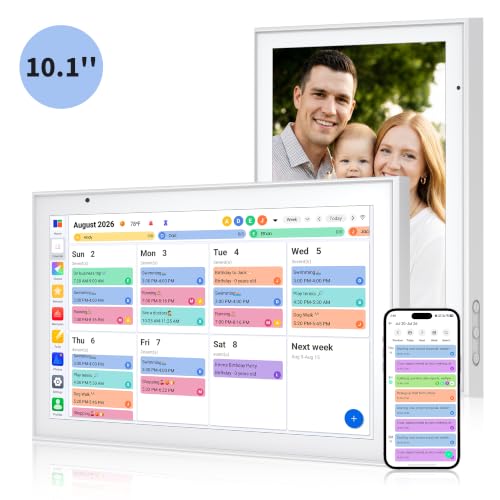
- Syncs multiple family calendar services
- Tracks chores, meals, and to-do lists
- Works as a wall- or desk-mounted photo frame
Best For: Shared household scheduling and family organization
Best Large-Screen Hub

- 15.6-inch Full HD kitchen display
- Built-in Fire TV and included remote
- Widgets for calendars, tasks, weather, and smart home
Best For: Large, shared kitchen and family-space displays
Best Portable Second Screen

- 15.6-inch Full HD IPS display
- USB-C and HDMI connectivity
- Portrait mode, HDR, FreeSync, and travel cover
Best For: Portable work, gaming, and laptop screen expansion
Best Nightstand Pick
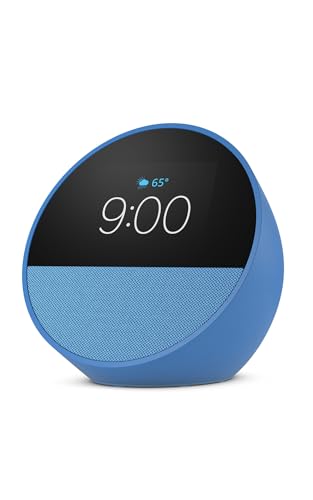
- Customizable clock face and glanceable information
- Rich audio with Alexa routines
- eero Built-in can extend compatible Wi-Fi
Best For: Nightstands and compact smart-home control
Best PC Setup Display
Lian Li 8.8-inch Universal LCD

- 1920×480 IPS panel with 500-nit brightness
- USB-powered independent secondary monitor
- Customizable ARGB frame and L-Connect 3 layouts
Best For: Gaming PCs and workstation dashboards
Best Video-Calling Pick
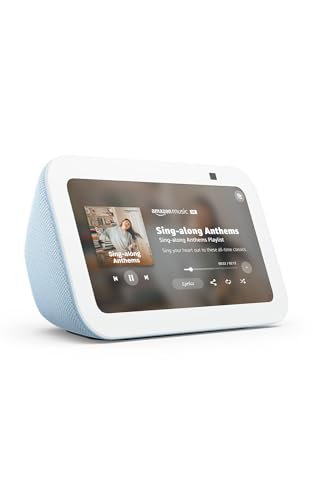
- 5.5-inch display for weather, shows, and photos
- 2 MP camera supports video calls and camera viewing
- Deeper bass with privacy controls and camera shutter
Best For: Video calling and compact home monitoring
Best for PC Monitoring
Crystal 9.16-inch Secondary Display

- Ultra-wide 1920×462 IPS panel
- Displays live PC performance data
- Desk or PC-case mounting options
Best For: Custom PC builds and Windows system monitoring
Best for Low-Power Dashboards
reTerminal E1002 E Ink Display

- 7.3-inch color E Ink display
- Up to three months in deep sleep
- No-code and smart-home integrations
Best For: Home automation and DIY information dashboards
Best for Everyday Smart-Home Help

- Google Assistant with touchscreen control
- Handles media, reminders, and recipes
- Compact design for counters and nightstands
Best For: Everyday Google smart-home and household assistance
Best Overall – Echo Show 8
The newest Echo Show 8 is a versatile choice among compact smart displays, combining an 8.7-inch HD touchscreen with Alexa, spatial audio, video calling, and built-in smart-home control. Its compact footprint suits kitchens, desks, and shared living spaces.
Best For: Shoppers seeking a balanced smart display for entertainment, household organization, video calls, and Alexa-compatible devices.
Pros:
- Vibrant HD display with 15% more viewing area than the 2023 Echo Show 8
- Spatial audio, crisper vocals, wider soundstage, and up to twice the bass of the prior model
- Built-in smart-home hub and camera controls for compatible devices
- Centered auto-framing camera with 3.3x zoom and noise reduction
Cons:
- Some Alexa+ features may depend on service availability
- Its 8.7-inch screen is smaller than larger kitchen-hub displays
This is the most well-rounded option in the group for buyers who want a genuinely smart display rather than a simple secondary screen. It adds strong audio and useful home controls without taking up much space.
Best Family Organizer – Digital Calendar Command Center
This 10.1-inch digital calendar is a focused alternative among compact smart displays, designed to keep family schedules, chores, meals, and shopping tasks in one visible location. It can sit on a desk or counter, or mount on a wall.
Best For: Families that need a shared calendar and household command center rather than a media-focused smart display.
Pros:
- Syncs with Google, iCloud, Outlook, Cozi, and Yahoo calendars
- Color coding helps distinguish each family member’s schedule
- Includes chore tracking, meal planning, and to-do lists
- Converts into a digital photo frame when not displaying schedules
Cons:
- More specialized for planning than general smart-assistant functions
- Does not include the entertainment and smart-home features described for the Echo displays
Choose this display if household coordination is the priority. Its dedicated planning tools and flexible placement make it practical for kitchens, entryways, or family work areas.
Best Large-Screen Hub – Echo Show 15
The Echo Show 15 is the largest option here, giving compact smart displays a kitchen-oriented format with a 15.6-inch Full HD screen. Customizable widgets, Fire TV, video calling, and smart-home controls make it a central household display.
Best For: Kitchens and family spaces where a larger screen is more useful for calendars, entertainment, and home controls.
Pros:
- Large 15.6-inch 1080p display for widgets and video
- Built-in Fire TV supports services including Prime Video, Netflix, YouTube, and Apple TV
- Useful family widgets for calendars, to-do lists, weather, and smart-home controls
- Centered auto-framing camera with wide field of view and 3.3x zoom
Cons:
- Its larger size requires more wall or counter space
- Some streaming services may require subscriptions
This is the strongest pick when visibility matters more than minimal footprint. It functions as a family organization hub and entertainment screen, making it especially suitable for a busy kitchen.
Best Portable Second Screen – MNN Portable Monitor
The MNN 15.6-inch portable monitor is not a voice assistant or standalone smart display, but it can serve as a compact smart-display-style second screen for laptops, phones, consoles, and other compatible devices. Its slim design and included cover make it travel-friendly.
Best For: Travelers, remote workers, students, and gamers who need an additional screen rather than an Alexa-enabled display.
Pros:
- Full HD IPS panel with 178-degree viewing angles
- Supports USB-C plug-and-play connections and HDMI connectivity
- Landscape and portrait modes support flexible work and gaming setups
- HDR mode, FreeSync, and a protective cover that doubles as a stand
Cons:
- Requires a compatible connected device and power source
- Does not provide built-in Alexa, calendar syncing, or smart-home control
- USB-C video requires a device supporting the specified display modes
Consider this model only if your idea of a compact smart display is a portable connected screen. It offers flexibility and useful display features, but it is fundamentally a monitor rather than a standalone home assistant.
Best Nightstand Pick – Echo Spot
For shoppers comparing compact smart displays, the newest Amazon Echo Spot is a practical choice for a nightstand, office, or kitchen. Its customizable clock face, Alexa controls, routines, and built-in speaker make it useful for quick information and hands-free tasks.
Best For: Nightstands, wake-up routines, and compact Alexa-enabled smart-home control.
Pros:
- Customizable clock faces show the time, weather, reminders, and song titles.
- Rich sound with clear vocals and deep bass for music, podcasts, and audiobooks.
- Supports Alexa routines, motion detection, and compatible smart-home controls.
- Can extend an existing eero network by up to 1,000 square feet with eero Built-in.
Cons:
- Its compact display is better suited to glanceable information than extended viewing.
- eero Wi-Fi extension requires an existing compatible eero network.
The Echo Spot focuses on bedside convenience rather than video calling or entertainment viewing. Choose it when a small, attractive Alexa clock with useful routines and strong audio is the priority.
Best PC Setup Display – Lian Li 8.8-inch Universal LCD
The Lian Li SM088X is a compact smart display for desktop builders who want a secondary screen for system stats, media, or custom visuals. It connects by USB, includes adjustable mounting, and adds a customizable ARGB frame to a gaming or workstation setup.
Best For: Gaming PCs and workstations needing a small customizable secondary display.
Pros:
- 8.8-inch IPS screen offers 1920×480 resolution, 60Hz refresh, and 500-nit brightness.
- USB connection works as an independent monitor and helps free GPU ports.
- Height- and tilt-adjustable mounting supports flexible positioning.
- Diffused ARGB lighting and layouts can be customized through L-Connect 3.
Cons:
- It is designed for desktop setups rather than general-purpose smart-home use.
- Installation requires following the guide and using the specified screws.
- Some preset temperature templates use a fixed unit.
This Lian Li display is a specialized hardware accessory, not an Alexa-style smart display. It makes the most sense if you want compact stats or visuals integrated into a PC build and value lighting customization.
Best Video-Calling Pick – Echo Show 5
The Amazon Echo Show 5 is one of the more versatile compact smart displays for shoppers who want Alexa features in a small footprint. Its 5.5-inch screen supports glanceable news and weather, streaming, compatible camera viewing, photo slideshows, and video calls.
Best For: Small rooms, bedside tables, video calling, and basic smart-home monitoring.
Pros:
- 5.5-inch display shows news, weather, shows, photos, and song titles.
- Deeper bass and clearer vocals support music, podcasts, and compatible streaming services.
- Built-in 2 MP camera enables video calls and viewing compatible cameras or doorbells.
- Includes camera shutter plus mic and camera controls for privacy.
Cons:
- The 5.5-inch screen is compact for watching shows or viewing camera feeds.
- Video calling and camera features depend on compatible Alexa devices, apps, or doorbells.
Choose the Echo Show 5 when communication and camera access matter as much as Alexa commands. It offers more visual and calling functionality than a clock-focused display while remaining suitable for smaller spaces.
Best for PC Monitoring – Crystal 9.16-inch Secondary Display
This ultra-wide IPS panel is one of the more specialized compact smart displays for desktop builders. It shows live CPU, GPU, RAM, temperature, network, and clock data while also supporting custom wallpapers, widgets, and animations through dedicated Windows software.
Best For: Custom PC builds, desktop monitoring, and users who want a secondary system-status screen without using a GPU port.
Pros:
- Sharp 1920×462 IPS display with a 60Hz refresh rate.
- One USB cable can provide power and data.
- Supports desk, portrait, landscape, or PC-case installation.
- Custom themes, wallpapers, animations, and sensor layouts.
Cons:
- Software is limited to Windows 10 and 11.
- Its ultra-wide format is designed primarily for monitoring rather than general media use.
- Internal installation may require a compatible motherboard connection.
Choose this model when real-time PC telemetry and build integration matter more than smart-home features. Its mounting flexibility and customizable interface make it a practical dedicated dashboard for a Windows-based setup.
Best for Low-Power Dashboards – reTerminal E1002 E Ink Display
The reTerminal E1002 is a maker-oriented option among compact smart displays, using a 7.3-inch color E Ink panel for dashboards, reminders, and information boards. Its low-power design can run for up to three months in deep-sleep mode with a six-hour refresh interval.
Best For: Home automation dashboards, smart-office information panels, DIY projects, and users who want a display that can operate away from a power cable.
Pros:
- Color 800×480 E Ink Spectra 6 display remains clear in bright light.
- Up to three months of battery life in the specified deep-sleep mode.
- No-code dashboard creation through SenseCraft HMI.
- Works with Home Assistant, ESPHome, TRMNL plugins, and maker tools.
Cons:
- E Ink is better suited to information dashboards than frequently changing content.
- Its maker-focused features may require setup and configuration.
- Expansion capabilities are useful but may be unnecessary for basic display needs.
This is a strong fit if long battery life and customizable information panels are priorities. It offers more flexibility than a simple reminder display, especially for users comfortable with smart-home platforms, APIs, sensors, or DIY development.
Best for Everyday Smart-Home Help – Google Nest Hub 7-inch
Google Nest Hub 7” Smart Display with Google Assistant (1st Gen) - Chalk (Bulk Packaging)
Check Price On AmazonThe first-generation Google Nest Hub is a straightforward choice for shoppers seeking compact smart displays with voice assistance and touchscreen control. Its 7-inch screen fits comfortably on a kitchen counter, desk, bedroom table, or nightstand while handling smart-home controls, media, photos, and daily reminders.
Best For: Google Assistant users who want a compact home hub for compatible devices, timers, weather, recipes, music, videos, and Google Photos.
Pros:
- Google Assistant provides hands-free help and voice-based smart-home control.
- Touchscreen control complements voice commands.
- Supports music, videos, photos, weather, timers, reminders, and recipes.
- Compact design suits kitchens, bedrooms, offices, and nightstands.
Cons:
- This is the first-generation model.
- The supplied unit is a Korean/international version, so language may need to be changed during setup.
- Bulk packaging is listed rather than standard retail packaging.
Consider the Nest Hub when you want a familiar, general-purpose smart display rather than a PC monitor or programmable maker panel. Its main advantage is the combination of Google Assistant, a touchscreen, and broad everyday household functions in a compact form.
How We Picked These Compact Smart Displays
We selected products that fit small-space use while covering several common buying needs: household organization, voice assistance, bedside alarms, kitchen entertainment, smart-home control, and customizable information dashboards. We also considered screen quality, operating platform, connectivity, audio capability, installation flexibility, privacy features, and how much setup each device typically requires.
The list includes true smart displays as well as specialized touchscreen and secondary-display alternatives. That distinction matters: some products are ready to use with Alexa or Google Assistant, while others are better suited to calendars, PC monitoring, Home Assistant, or custom dashboards.
Quick Comparison
- Best all-around Alexa option: Amazon Echo Show 8.
- Best for household organization: Amazon Echo Show 15 or a dedicated digital family calendar.
- Best for a nightstand: Amazon Echo Spot or Echo Show 5.
- Best for Google users: Google Nest Hub.
- Best for flexible dashboard projects: reTerminal E1002.
- Best for PC or gaming-related display use: MNN portable monitor or a specialized secondary display.
Key Buying Factors for Compact Smart Displays
Screen Size and Placement
Measure the available surface before buying. Smaller models work well beside a bed or on a crowded desk, while 8- to 10-inch screens are easier to read for recipes, calendars, and shared lists. Larger displays are more useful as central kitchen or family hubs but need more wall or counter space.
Platform and Ecosystem
Choose Alexa, Google Assistant, or another platform based on the devices and services already in your home. Ecosystem compatibility affects voice commands, streaming services, smart-home control, calendars, and multiroom audio. A dedicated calendar or programmable dashboard may be better if you want fewer account dependencies.
Display, Sound, and Camera Features
Look for a resolution and brightness suited to the viewing distance. Better speakers matter for music and calls, while a camera can support video calling but may raise privacy concerns. Check for a physical microphone or camera shutter if privacy is important.
Connectivity and Customization
Wi-Fi is standard, but HDMI, USB-C, Bluetooth, touch support, and app compatibility vary widely. Portable monitors and DIY-oriented panels can offer more flexibility than mainstream smart displays, but they may require an external computer, power source, or additional configuration.
Who Should Buy Which Compact Smart Displays?
Buy the Echo Show 8 if you want a balanced everyday assistant with a readable screen and useful audio. Choose the Echo Show 15 or a dedicated family calendar when shared schedules, chores, meal planning, and reminders are the priority. The Echo Spot and Echo Show 5 suit bedside or personal spaces where a smaller footprint matters most.
Choose the Nest Hub if your household already relies on Google services. For a customizable technical dashboard, the reTerminal E1002 or a secondary display may be the better fit, especially for Home Assistant or PC-related information. Finally, prioritize a portable monitor when HDMI or USB-C input, rather than voice assistance, is the main requirement.