
A usb hub with nvme enclosure combines everyday ports with high-speed SSD storage in one compact device. It’s a practical way to add display output, card reading, charging, and expandable storage without carrying multiple adapters.
In this roundup, we focused on models that balance speed, port variety, and convenience for work, travel, and content creation.
Best 10 USB Hub with Nvme Enclosure Picks for 2026
Desktop Hub + SSD Dock
SABRENT 6-Port Hub with M.2 SSD Dock

- Built-in M.2 slot for 2242/2260/2280 drives
- 4K@60Hz HDMI plus Gigabit Ethernet
- 90W PD pass-through and 6 total ports
Best For: Desk setups that need hub functions and integrated SSD storage
Magnetic Creator Dock
ORICO Magnetic 8-Port Dock with 2230 NVMe
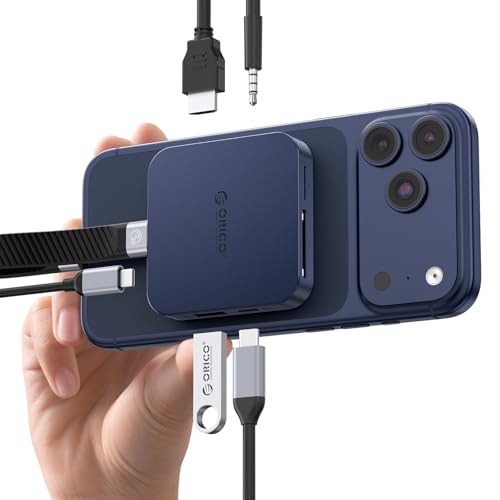
- Magnetic attachment for phone-friendly use
- M.2 2230 NVMe enclosure up to 2TB
- 4K@60Hz HDMI, SD/TF, AUX, and 100W PD
Best For: Phone creators who want magnetic mounting and direct SSD recording
Tool-Free Portable Enclosure
SABRENT Tool-Free 10Gbps NVMe Enclosure

- Tool-free flip-open installation
- 10Gbps USB-C with aluminum cooling
- Fits 2230 to 2280 NVMe drives
Best For: Portable NVMe storage, cloning, and troubleshooting
All-in-One Expansion Dock
WAVLINK 8-in-1 Hub with NVMe/SATA Enclosure

- Supports both M.2 NVMe and M.2 SATA drives
- 4K@60Hz HDMI with SD/TF card slots
- 10Gbps ports and up to 87W charging
Best For: Users who want a versatile dock with storage, video, and card readers
ORICO 9-in-1 Docking Hub
10Gbps USB-C Hub with NVMe Enclosure

- M.2 NVMe support up to 8TB
- 10Gbps ports with SD/TF and Gigabit Ethernet
- Built-in fan plus heatsink for cooling
Best For: All-in-one desktop or laptop users who want storage, charging, and networking in one hub
Ramnnycetus 9-in-1 Hub

- Supports NVMe or SATA SSDs up to 1000MB/s
- Includes 4K HDMI, 10Gbps USB-C, and SD/TF
- Slim aluminum build with 100W PD
Best For: Portable users who want fast storage plus HDMI and card-reader convenience
Aoyvsktv 11-in-1 Dock
NVMe SSD Hub with Dual Display
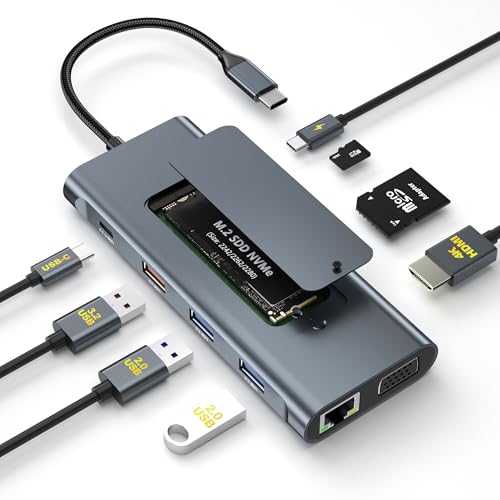
- 11-in-1 design with HDMI, VGA, Ethernet, and USB
- M.2 NVMe slot runs at 10Gbps
- Includes heatsink, thermal pad, and screwdriver
Best For: Desk users who want maximum ports and built-in SSD expansion
Portable 6-in-1 Hub
4K HDMI USB C Hub with NVMe Enclosure
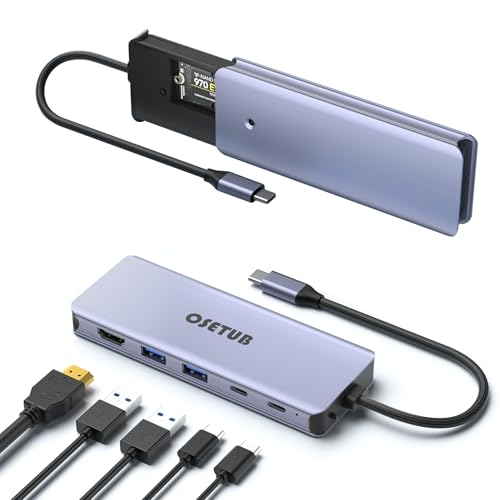
- Built-in M.2 NVMe enclosure
- 4K@60Hz HDMI plus 10Gbps ports
- 100W PD charging passthrough
Best For: USB-C laptop users who want portable storage and core hub ports
Travel-Ready 8-in-1 Dock
ORICO 8-in-1 Hub with SSD Enclosure
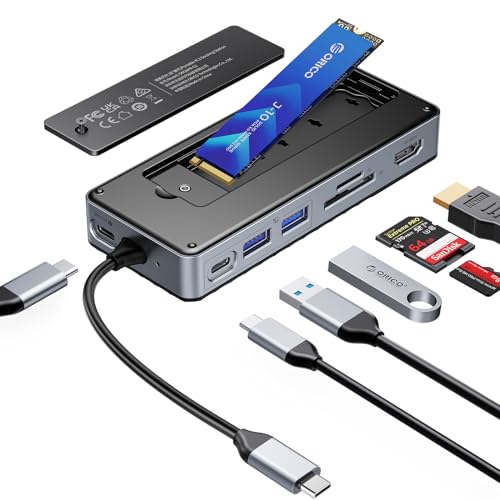
- M.2 NVMe/SATA enclosure and 8 interfaces
- 4K@60Hz HDMI with SD/TF reader
- Includes cooling accessories and USB-C cable
Best For: People who want a fuller dock with storage and card access
Upgraded 8-in-1 Hub
8-in-1 USB C Hub with NVMe Enclosure

- M.2 NVMe/SATA slot for storage expansion
- 4K HDMI, 100W PD, and SD/TF reader
- 10Gbps USB-C and USB 3.2 ports
Best For: Users who want storage, charging, and card reading in one hub
Desktop Hub + SSD Dock – SABRENT 6-Port Hub with M.2 SSD Dock
If you want a usb hub with nvme enclosure that combines ports, display output, and basic storage in one compact unit, the SABRENT HB-6PNV is built for exactly that role. It puts a real M.2 slot inside a 6-port USB-C hub, while also adding 4K HDMI, Gigabit Ethernet, and 90W pass-through charging for a cleaner desk setup.
Best For: Users who need a desktop-style USB-C hub with integrated SSD storage, wired networking, and monitor output.
Pros:
- Built-in M.2 enclosure supports 2242, 2260, and 2280 NVMe or SATA drives.
- Includes 4K@60Hz HDMI and Gigabit Ethernet for a fuller workstation setup.
- 90W USB-C PD pass-through helps charge the host device while in use.
- Aluminum body and thermal pad are designed to help keep the drive cool.
Cons:
- The internal drive slot runs at up to 5Gbps, not full NVMe speeds.
- No SD or microSD card reader is included.
- Only one HDMI output is provided.
This is a practical all-in-one hub if your priority is convenience and integration rather than maximum SSD performance. It makes the most sense for laptops and tablets that can use one cable for data, display, charging, and extra storage.
Magnetic Creator Dock – ORICO Magnetic 8-Port Dock with 2230 NVMe
This usb hub with nvme enclosure is aimed at phone-first creators who want fast capture and easy expansion in one magnetic dock. ORICO combines an M.2 2230 NVMe slot with an 8-port USB-C hub, 4K@60Hz HDMI, SD/TF card reading, audio, and 100W pass-through charging.
Best For: iPhone and USB-C users who need magnetic attachment, direct video storage, and multiple expansion ports.
Pros:
- Built-in M.2 2230 NVMe enclosure supports up to 2TB storage.
- Magnetic design is intended for firm attachment and one-handed use.
- Includes 4K@60Hz HDMI, SD/TF reader, and 3.5mm AUX.
- 10Gbps USB-C/A ports and 100W PD support fast transfers and charging.
Cons:
- Only M.2 2230 NVMe drives are supported, so larger SSD sizes will not fit.
- New SSDs must be formatted to exFAT before first use.
- Some iPhone users need an OTG-compatible adapter.
As a creator-oriented dock, this model stands out for its magnetic mounting and direct-save workflow. It is especially useful if you want to move footage quickly from a supported phone while keeping a compact set of ports on hand.
Tool-Free Portable Enclosure – SABRENT Tool-Free 10Gbps NVMe Enclosure
If you mainly want a usb hub with nvme enclosure alternative for fast portable storage, this SABRENT model is a simpler, drive-first option. It is a USB-C NVMe enclosure with a tool-free flip-open design, 10Gbps USB 3.2 Gen 2 connectivity, and aluminum cooling for stable transfer performance.
Best For: Users who want a fast, compact NVMe enclosure for portable storage, cloning, or troubleshooting.
Pros:
- Tool-free flip-open design makes SSD installation quick and easy.
- Supports M.2 NVMe drives in 2230, 2242, 2260, and 2280 sizes.
- 10Gbps USB-C connection is suitable for fast transfers and no external power.
- Aluminum top and thermal pad help with heat transfer during long workloads.
Cons:
- Not compatible with M.2 SATA SSDs.
- It is an enclosure, not a full hub with multiple device ports.
- Compatible with one drive only.
This is the best fit if your priority is straightforward NVMe portability rather than extra I/O. It keeps the focus on speed, cooling, and simple installation for creators, gamers, and repair work.
All-in-One Expansion Dock – WAVLINK 8-in-1 Hub with NVMe/SATA Enclosure
The WAVLINK dock is a feature-packed usb hub with nvme enclosure for users who want storage expansion and everyday connectivity in one unit. It combines an M.2 SSD enclosure with 4K HDMI, 10Gbps USB ports, SD/TF card slots, USB-A 2.0, and up to 87W charging support.
Best For: Users who want a broad mix of ports plus either NVMe or SATA SSD expansion.
Pros:
- Supports M.2 NVMe PCIe and M.2 SATA drives with up to 4TB capacity.
- Includes 4K@60Hz HDMI, SD/TF card slots, and multiple USB ports.
- 10Gbps USB-C and USB-A ports help move large files quickly.
- 87W charging support helps keep a compatible laptop powered.
Cons:
- The enclosure is only compatible with specific M.2 key types.
- Requires the host USB-C port to support video output and charging.
- New SSDs need to be formatted before use.
This WAVLINK model is a strong all-rounder if you want one dock to handle storage, display, and card access. It is most appealing for users who value versatility over a more specialized single-purpose enclosure.
ORICO 9-in-1 Docking Hub – 10Gbps USB-C Hub with NVMe Enclosure
If you want a usb hub with nvme enclosure that also works as a compact docking station, this ORICO model is built for multitasking. It combines M.2 NVMe expansion with multiple USB ports, SD/TF slots, Gigabit Ethernet, and 100W PD passthrough, while also adding a built-in fan and heatsink for better cooling during heavier use.
Best For: Users who want a travel-friendly hub-dock combo with fast storage expansion, wired networking, and extra port flexibility.
Pros:
- Supports M.2 NVMe 2230/2242/2260/2280 SSDs up to 8TB.
- Includes 10Gbps USB-C and USB-A data ports plus SD/TF card slots.
- Built-in fan and heatsink help manage heat during sustained use.
- Gigabit Ethernet and 100W PD add useful dock functionality.
Cons:
- SSDs larger than 1TB require an external power supply.
- Cooling and high-speed transfer can still make the drive warm.
Overall, this is a practical choice if you want one device to cover storage, charging, networking, and everyday peripheral connections. It stands out most for buyers who value a compact all-in-one setup with active cooling.
Ramnnycetus 9-in-1 Hub – NVMe/SATA Hub with 4K HDMI
This usb hub with nvme enclosure is aimed at users who want storage expansion and everyday connectivity in one slim device. The hub combines an M.2 NVMe/SATA slot with 4K HDMI, 10Gbps USB-C and USB 3.2 ports, 100W PD charging, and SD/TF card reading, making it a strong fit for work and travel setups.
Best For: Users who want a lightweight hub with fast storage, display output, and card access for portable productivity.
Pros:
- Supports M.2 SATA or PCIe NVMe SSDs in 2230/2242/2260/2280 sizes.
- Offers 4K HDMI, 10Gbps USB-C, USB 3.2, and SD/TF card reader support.
- 100W PD passthrough lets you charge while using the hub.
- Aluminum alloy body is slim, lightweight, and designed for heat dissipation.
Cons:
- HDMI output depends on the connected device supporting USB-C video.
- 4K output is listed at 4K@30Hz, not a higher refresh rate.
For buyers who need a compact do-it-all accessory, this model balances storage expansion with the core ports most people use daily. Its lightweight aluminum design makes it especially appealing for mobile workstations.
Aoyvsktv 11-in-1 Dock – NVMe SSD Hub with Dual Display
If you need a usb hub with nvme enclosure that can replace several separate accessories, this Aoyvsktv dock is the most expansion-heavy option here. It builds an M.2 NVMe SSD slot into an 11-port dock with HDMI, VGA, Gigabit Ethernet, 100W PD, USB 3.2 Gen2, USB-A ports, and SD/TF card slots for a broad desktop-style setup.
Best For: Users who want the widest port selection and dual-display support in a single USB-C dock.
Pros:
- Built-in M.2 NVMe slot supports up to 2TB drives.
- Includes 11 ports total, covering HDMI, VGA, Ethernet, USB, and card readers.
- Both the SSD slot and USB 3.2 Gen2 ports run at 10Gbps.
- Comes with a heatsink, thermal pad, screwdriver, and setup guide.
Cons:
- M.2 SATA SSDs are not supported.
- USB-C host port must support charging, data, and video output.
This is the strongest fit if you want maximum connectivity and an integrated SSD slot without carrying multiple adapters. The included cooling accessories and dual-display support make it especially practical for workstations and presentation setups.
Portable 6-in-1 Hub – 4K HDMI USB C Hub with NVMe Enclosure
If you want a USB hub with nvme enclosure that also covers your everyday desk setup, this 6-in-1 model keeps things simple. It combines an M.2 NVMe SSD enclosure with HDMI, fast USB ports, USB-C data, and power delivery, making it a practical all-in-one option for laptops that need both expansion and storage.
Best For: MacBook and USB-C laptop users who want portable storage plus a compact multiport hub.
Pros:
- Built-in M.2 NVMe enclosure supports 2230/2242/2260/2280 drives
- 4K@60Hz HDMI and 10Gbps USB-A/USB-C data ports for flexible connections
- 100W PD charging lets you power a laptop while using the hub
- Aluminum body is slim, lightweight, and designed for heat dissipation
Cons:
- HDMI output requires a Type-C port with video support
- Only works with PCIe 3.0 NVMe M.2 SSDs as described
- No included SSD, so storage must be purchased separately
This is a strong fit if you want fewer accessories on your desk and a travel-friendly hub that also adds SSD storage. It focuses on the essentials rather than adding card readers or extra display outputs, which helps keep the design compact.
Travel-Ready 8-in-1 Dock – ORICO 8-in-1 Hub with SSD Enclosure
This USB hub with nvme enclosure is built for users who want a more complete dock in one device. ORICO combines an M.2 SSD enclosure with HDMI, USB ports, SD/TF card reading, and 100W PD charging, so it works well as a grab-and-go workstation for files, media, and display output.
Best For: Users who need a versatile dock with storage expansion, card reading, and a stronger port mix.
Pros:
- 2-in-1 design combines an M.2 NVMe/SATA enclosure with an 8-port dock
- 10Gbps USB 3.2 Gen2 speeds are suited to fast backups and large file transfers
- 4K@60Hz HDMI supports mirrored or extended displays on compatible devices
- Includes heatsink, silicone cooling pad, cable, screwdrivers, and quick-start guide
Cons:
- SD and TF cards cannot be used at the same time
- PD charging adapter and cable are not included
- HDMI use still depends on host device video support
Compared with simpler hubs, this one is better suited to people who regularly move files from cameras or cards and want more complete connectivity in one unit. It leans more toward a compact docking station than a minimal travel adapter.
Upgraded 8-in-1 Hub – 8-in-1 USB C Hub with NVMe Enclosure
For buyers looking for a USB hub with nvme enclosure that adds more than just extra ports, this 8-in-1 model is a balanced choice. It combines an M.2 NVMe/SATA SSD slot with HDMI, 10Gbps USB-C and USB 3.2 ports, 100W PD charging, and an SD/TF reader for a flexible everyday setup.
Best For: Laptop and tablet users who want storage expansion plus display output and card transfers.
Pros:
- Supports both M.2 SATA and PCIe NVMe SSDs in common 2230-2280 sizes
- 10Gbps USB-C and USB 3.2 ports handle fast transfers and large backups
- 4K HDMI and 100W PD make it useful for work and charging at the same time
- SD/TF reader adds camera and media card convenience without drivers
Cons:
- HDMI output is listed at 4K@30Hz rather than 60Hz
- Performance depends on the SSD, USB port, and computer used
- USB 2.0 ports are included, which are slower than the main 10Gbps ports
This model makes sense if you want a more feature-complete hub without moving to a larger dock. It is especially appealing when storage expansion, charging, and card imports all need to happen from a single portable device.
How We Picked the Best USB Hub with Nvme Enclosure
We prioritized hubs that offer useful all-in-one functionality, stable NVMe performance, and the port mix most buyers actually need. That includes 10Gbps data support, reliable USB-C power delivery, HDMI output, card readers, Ethernet where available, and designs that make SSD access easy.
Because this category varies widely, we also weighed compatibility, enclosure format, and whether the hub is better suited to desk use or portable setups.
Quick Comparison
Some options focus on maximum versatility with HDMI, Ethernet, and charging. Others are more storage-first, with simpler layouts that emphasize the NVMe enclosure and everyday USB expansion. If you want the best balance, look for a hub that matches your laptop’s port needs rather than just the highest port count.
Key Buying Factors for a USB Hub with Nvme Enclosure
SSD Support and Speed
Check whether the enclosure supports the M.2 form factor and protocol you need, especially NVMe versus SATA. For most buyers, 10Gbps USB 3.2 Gen 2 is the practical sweet spot, since it supports fast transfers without overcomplicating setup.
Power Delivery and Pass-Through Charging
If you plan to connect a laptop and multiple peripherals, strong USB-C PD support matters. A higher wattage rating helps maintain charging while powering the hub, display output, and storage at the same time.
Display and Peripheral Ports
Think about whether you need 4K HDMI, SD/TF card slots, USB-A ports, or Ethernet. A good USB Hub with Nvme Enclosure should reduce clutter, not create new bottlenecks by leaving out the ports you use daily.
Thermals and Build Quality
NVMe drives can run warm, especially during large file transfers. Metal housings, built-in fans, and solid internal design can improve sustained performance and long-term reliability.
Who Should Buy Which USB Hub with Nvme Enclosure?
Choose a storage-focused model if your main goal is fast local file access and a clean portable setup. Pick a feature-rich dock if you need one device for docking, external display, charging, and expansion. Creators, remote workers, and laptop users with limited ports usually benefit most from the most complete hubs, while minimalists may prefer a simpler enclosure-first design.
In short, the best choice depends on whether you value desk-dock convenience, travel portability, or SSD performance first.