
Meeting notes are only useful if you can find them, share them, and turn them into action. Smart notebooks offer several ways to bridge handwritten notes and digital files, from scan-and-erase pages to connected pens and E Ink tablets.
The right choice depends on how you work: a reusable pad may suit quick meeting recaps, while a smart pen or tablet may be better if you want notes captured as you write. Here’s how to weigh the trade-offs before buying.
Best 10 Smart Notebooks for Business Meetings Picks for 2026
Best for Automatic Handwriting Capture
Noteorius Smart Pen & Reusable Notebook

- Captures pen strokes as you write
- Exports through app to major cloud tools
- Reusable surface; no subscription
Best For: Handwritten meeting notes without page scanning
Best Executive-Size Pick
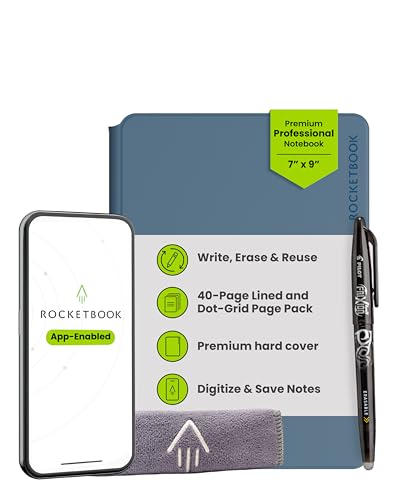
- 40-page interchangeable page pack
- NFC opens app for scanning
- Vegan leather cover
Best For: Compact, polished meeting notes with flexible layouts
Best for Meeting Transcription

- 18-language voice transcription
- AI meeting summaries and note Q&A
- Portable 8.2-inch E Ink display
Best For: Recorded meetings and organized follow-ups
Best Full-Size Writing Space

- 32 reusable dotted pages
- Letter-size room for diagrams
- App scans to cloud services
Best For: Spacious meeting notes and sketches
Best for Real-Time Capture
Ophaya Smart Digital Notebook 5-Pack

- Syncs writing to the app in real time
- Searches and converts handwritten notes
- Includes five A5 notebooks
Best For: Frequent meetings requiring live capture and shareable notes
Best Reusable Pick
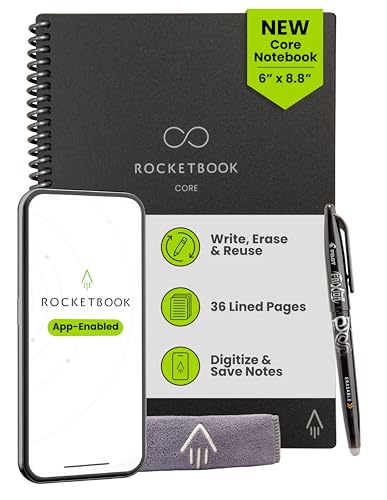
- 36 reusable lined pages
- Scans to supported cloud services
- Compact 6 x 8.8-inch format
Best For: Portable, reusable meeting notes with cloud filing
Best for Audio Review
Ophayapen Smart Pen & Notebook
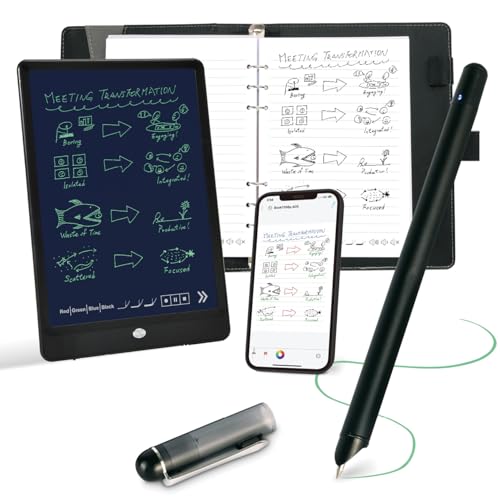
- Syncs handwriting to the mobile app
- Links notes to recorded audio
- Requires proprietary paper
Best For: Reviewing meeting discussion alongside handwritten notes
Best for Repeat Meetings

- 36 reusable pages
- Cloud uploads and searchable notes
- Pen and cloth included
Best For: Reusable, cloud-organized meeting notes
Best for Full-Size Notes

- XL ruled pages
- 176-page hard-cover notebook
- Moleskine Smart Pen compatible
Best For: Longer handwritten meeting notes
Best Pocket Pick
Rocketbook Mini Reusable Notepad

- Pocket-size 3.5 x 5.5 inches
- 48 reusable dotted pages
- App scans to cloud services
Best For: Quick action items between meetings
Best for Automatic Handwriting Capture – Noteorius Smart Pen & Reusable Notebook
Among smart notebooks for business meetings, this Noteorius set suits people who want to keep writing by hand without scanning pages afterward. The smartpen captures strokes as you write, stores them until they sync to the free app, and works with a reusable writing surface.
Best For: Meeting attendees who want handwritten notes captured automatically and exported to their existing cloud tools.
Pros:
- Pen powers on when uncapped and captures writing as you go.
- Notes can be sent from the app to Google Drive, OneNote, Evernote, or Dropbox without a subscription.
- Reusable notepad needs no charging; the included folio has a magnetic closure.
Cons:
- You must tap the arrow to sync a finished page, then clear the surface before reusing it.
- The smartpen needs charging, even though the notepad does not.
Choose this if automatic pen capture matters more than keeping several physical pages visible at once. Its app-and-cloud workflow makes it practical for filing meeting notes after the room clears.
Best Executive-Size Pick – Rocketbook Pro 7×9
The Rocketbook Pro is a polished choice among smart notebooks for business meetings when you prefer an executive-size page and a traditional pen workflow. Its 7-by-9-inch format comes with a 40-page lined and dot-grid pack, plus a scratch-resistant vegan leather cover.
Best For: Professionals who want a compact, reusable notebook with interchangeable page layouts.
Pros:
- Included FriXion pen, towel, and reusable pages cover the basic write-scan-wipe workflow.
- NFC chip opens the Rocketbook app for scanning notes to services including Google Drive, Dropbox, and OneNote.
- Page packs can be swapped; planners and goal trackers are available separately.
Cons:
- Digitizing notes requires scanning them with the app rather than automatic capture while writing.
- Additional page packs cost extra.
The Pro is a strong fit if presentation and layout flexibility matter in client-facing meetings. Allow a little time afterward to scan pages and wipe them clean before reuse.
Best for Meeting Transcription – iFLYTEK AINOTE Air 2
For teams comparing smart notebooks for business meetings, the iFLYTEK AINOTE Air 2 offers more than handwritten capture. This 8.2-inch E Ink tablet combines a matte writing surface with voice transcription, AI meeting summaries, and tools for turning marked notes into to-dos.
Best For: Professionals who want recorded meeting speech, structured summaries, and handwritten notes in one portable device.
Pros:
- Transcribes speech in 18 languages and produces AI summaries after recordings.
- Supports handwriting-to-text in more than 100 languages and lets you ask questions about the current note.
- Lightweight 8.2-inch design includes adjustable warm and cool reading lights.
Cons:
- Voice transcription and handwriting-to-text conversion cannot run simultaneously.
- The compact display offers less writing area than a larger notebook or tablet.
Pick the Air 2 when meeting follow-up depends on finding decisions and action items quickly. Its transcription and summary features are the draw; the smaller screen is the trade-off for portability.
Best Full-Size Writing Space – Rocketbook Core Letter Size
If your search for smart notebooks for business meetings starts with room to sketch and spread out notes, the letter-size Rocketbook Core is worth a look. Its 8.5-by-11-inch dotted pages give you a full-size writing area, while the Rocketbook app scans finished work to supported cloud services.
Best For: People who want reusable, full-size pages for meeting notes, diagrams, and planning.
Pros:
- 32 dotted pages provide flexible space for notes and visual work.
- Includes a Pilot FriXion pen and microfiber cloth for writing and wiping pages clean.
- App uploads scans to services including Google Drive, Dropbox, and OneNote.
Cons:
- Notes must be scanned with the app; writing is not captured automatically.
- Letter-size pages take up more table and bag space than executive-size options.
The Core keeps the process straightforward: write, scan what matters, then wipe and reuse. It is the practical pick here when generous page space matters more than automatic syncing.
Best for Real-Time Capture – Ophaya Smart Digital Notebook 5-Pack
Among smart notebooks for business meetings, this Ophaya set suits anyone who wants handwritten notes to appear in the Ophaya Pro+ phone or tablet app as they write, without photographing pages. It includes a smart pen and five A5 notebooks.
Best For: Meeting-heavy teams that want live digital copies and a supply of paper notebooks.
Pros:
- Real-time syncing removes the need to scan each page.
- Searchable notes, handwriting-to-Word conversion, and several export formats support follow-up.
- Audio-linked notes help revisit the discussion behind a written point.
- Offline writing saves notes for syncing when connectivity returns.
Cons:
- Digital features depend on the compatible iOS or Android app.
- The included paper notebooks are not described as reusable.
Choose this bundle if capturing and distributing meeting notes matters more than wiping pages clean for reuse.
Best Reusable Pick – Rocketbook Core Executive
For buyers comparing smart notebooks for business meetings, the Rocketbook Core Executive offers a compact, reusable place for handwritten agendas and action items. Scan pages with the Rocketbook app, send them to a supported cloud service, then wipe them clean with a damp cloth.
Best For: Professionals who want a portable notebook they can reuse after saving meeting notes.
Pros:
- The 6 x 8.8-inch format fits easily in a briefcase or bag.
- Reusable pages reduce the need to replace filled notebooks.
- Smart Titles and Smart Tags help organize scanned files.
- Supports cloud destinations including Google Drive, Dropbox, and OneNote.
Cons:
- Digitizing requires scanning pages rather than live syncing.
- Pages must be wiped with a damp cloth before reuse.
This is the practical choice when reusability and cloud filing outweigh the need for instant digital capture.
Best for Audio Review – Ophayapen Smart Pen & Notebook
For smart notebooks for business meetings, this Ophayapen set is worth considering when a written action item needs the context of the conversation around it. The pen syncs handwriting to the Ophaya Pro+ mobile app in real time, while audio-linked notes let you revisit what was said as you wrote.
Best For: Meeting participants who need to review recorded discussion alongside their handwritten notes.
Pros:
- Bluetooth sync creates a digital copy as you write on paper.
- Tap notes to return to their corresponding moment in an audio recording.
- OCR conversion, search, and multi-format export make notes easier to find and share.
- Offline writing saves notes until they can sync.
Cons:
- The app does not work on computers.
- The smart pen requires Ophaya proprietary paper.
Pick this set for its recording-linked workflow, but account for its mobile-app and paper requirements before committing.
Best for Repeat Meetings – Rocketbook Flip Executive
Rocketbook Smart Reusable Notebook, Flip Executive Size Spiral Notebook, Green, (6" x 8.8"")
Check Price On AmazonFor smart notebooks for business meetings, the Rocketbook Flip Executive offers a reusable 6 x 8.8-inch writing surface. Its 36 pages let you capture notes, scan them to the Rocketbook app, and wipe them clean for the next meeting.
Best For: Professionals who want reusable meeting notes they can organize in cloud services.
Pros:
- Works with cloud services including Google Drive, OneNote, and Slack.
- Smart titles, search, and email transcription help organize scanned notes.
- Includes a Pilot Frixion pen and microfiber cloth.
Cons:
- Requires compatible Pilot Frixion ink and a damp cloth for reuse.
- Ink needs about 15 seconds to dry before handling.
The executive size is a practical middle ground for meeting notes, while the scan-and-erase routine is worth considering if you prefer to keep paper pages intact.
Best for Full-Size Notes – Moleskine Smart Notebook XL
If you prefer more room for handwritten agendas and discussion notes, this XL Moleskine is a larger option among smart notebooks for business meetings. It has 176 ruled pages, a hard cover, and an elastic closure.
Best For: Professionals who want a larger, ruled notebook compatible with the Moleskine Smart Pen.
Pros:
- XL page size offers room for longer meeting notes.
- 176 ruled pages provide substantial writing space.
- Hard cover and elastic closure suit carrying between meetings.
Cons:
- The supplied description says it is compatible with a Moleskine Smart Pen but does not say a pen is included.
- Its larger format is less compact than a pocket notepad.
Choose this model for its spacious, familiar notebook format; check what is included if Smart Pen use is central to your purchase.
Best Pocket Pick – Rocketbook Mini Reusable Notepad
Among smart notebooks for business meetings, the Rocketbook Mini is built for quick notes rather than full-page minutes. Its 3.5 x 5.5-inch size fits easily in a pocket or bag, and its 48 dotted pages can be scanned with the Rocketbook app and wiped clean.
Best For: Capturing action items and ideas while moving between meetings.
Pros:
- Pocket-size format is easy to carry.
- Reusable pages can be scanned and uploaded to cloud services.
- Includes a pen and has a waterproof cover.
Cons:
- Small pages leave limited space for detailed meeting minutes.
- Reusing pages requires wiping them with a damp cloth.
This is a useful companion for short lists and follow-ups, but a larger notebook will be more comfortable for extensive notes.
How We Picked These Smart Notebooks for Business Meetings
This selection covers three approaches to handwritten meeting notes: reusable notebooks that you scan, pen-and-paper systems designed to capture writing digitally, and an E Ink tablet for paper-like digital writing. We prioritized formats useful in meetings—portable sizes, room for longer notes, and ways to move notes into a digital workflow. Products with similar names can differ in page size and layout, so compare the exact listing rather than assuming they work identically.
These are different tools, not interchangeable upgrades. A reusable notebook is often the simpler purchase, but it requires a scan step. A connected pen depends on its compatible notebook and app. An E Ink tablet is a standalone device with charging and software considerations.
Quick Comparison: Which Format Fits Your Workflow?
- Reusable scan-to-app notebooks: Consider the Rocketbook Core, Pro, Flip, or Mini if you are comfortable scanning pages after meetings and wiping them for reuse. The Mini favors portability; letter-size pages give you more writing space.
- Connected pen systems: Consider the Ophaya, Ophayapen, Moleskine, or smart pen-and-folio options if capturing handwriting through a paired pen is central to your workflow. Check what paper, pen, and app each system requires.
- E Ink tablet: Consider the iFLYTEK AINOTE Air 2 if you prefer writing on a digital device rather than managing physical pages. Check its current software features and export options before committing.
Key Buying Factors for Smart Notebooks for Business Meetings
Capture Method and Meeting Pace
Think about when your notes need to become digital. Scanning after a meeting is straightforward but easy to postpone. A connected pen may reduce that delay, provided it is paired and working. A tablet keeps notes digital from the start, but it introduces battery life and device setup to your meeting routine.
Page Size and Writing Feel
Executive-size notebooks balance desk space and portability. Letter-size pages better accommodate agendas, diagrams, and dense discussions; a pocket notepad is better for brief reminders than full minutes. Reusable pages, conventional paper, and E Ink surfaces feel different, so prioritize the writing experience you are likely to use consistently.
Apps, Exports, and Privacy
Before buying, verify support for your phone and the destinations your team actually uses. Check whether you can export notes in a usable format, search handwriting if needed, and share files without locking colleagues into the same app. For confidential meetings, review account requirements, storage location, and your company’s data-handling policy before syncing notes to a cloud service.
Ongoing Costs and Setup
Factor in compatible pens, ink refills, replacement notebooks or pages, and any paid app features. Also check the daily routine: scanning and erasing, charging and pairing a pen, or charging a tablet. The best system is the one you will maintain between meetings.
Who Should Buy Which Smart Notebooks for Business Meetings?
Choose a reusable Rocketbook-style notebook if you want a familiar writing format and do not mind scanning later. Pick letter size for detailed minutes, executive size for everyday meetings, or the Mini for quick notes on the move. Choose a connected pen system if paper is nonnegotiable and you want a more direct path from handwriting to your phone; confirm compatibility and replacement supplies first. Choose an E Ink tablet if you want to keep meeting notes on one device and are willing to manage charging, software, and a higher-commitment purchase.