
Wi-Fi is convenient, but a wired connection can deliver lower latency, steadier speeds, and fewer dropouts. The right Ethernet adapter gives your laptop a simple way to connect to a router, modem, dock, or network switch.
Our selection covers USB-A and USB-C adapters, compact gigabit models, multiport hubs, and a 2.5Gbps option for compatible high-speed networks. Use the guide below to match port compatibility, speed, portability, and features to your setup.
Best 10 Ethernet Adapters for Laptops Picks for 2026
Best Dual-Connector Pick
BENFEI USB A/C to Gigabit Ethernet

- USB-A and USB-C connectivity
- Up to 1,000 Mbps wired speeds
- 18-month warranty
Best For: Users needing one adapter for USB-A and USB-C devices
Best USB-C Value
UGREEN USB-C Gigabit Ethernet Adapter

- Up to 1,000 Mbps speeds
- Aluminum housing and reinforced cable
- Works with many USB-C devices
Best For: USB-C users wanting a portable Gigabit connection
Best Compact Premium Pick

- Up to 1 Gbps wired speeds
- Lightweight, compact construction
- Aluminum body with braided cable
Best For: Travelers wanting a polished USB-C Ethernet adapter
Best Simple USB-A Pick
Amazon Basics Gigabit Ethernet Adapter
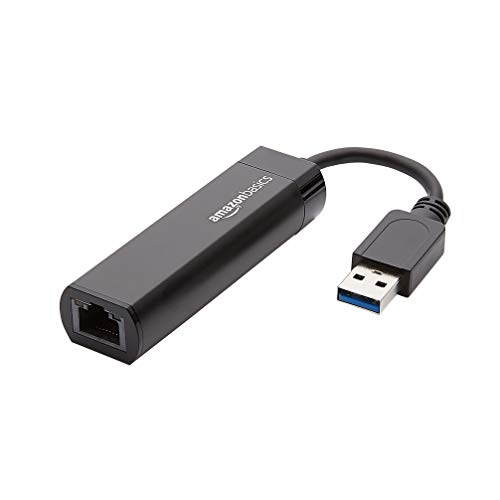
- Gigabit speeds over USB 3.0
- Supports Wake-on-LAN
- Designed for Windows and macOS computers
Best For: Users needing a basic USB-A wired network adapter
Best USB-C Pick

- USB-C to Gigabit Ethernet
- Compact, lightweight travel design
- Plug-and-play across major platforms
Best For: USB-C laptops and tablets needing reliable wired networking
Best Durable Design

- Gigabit speeds with broad USB-C compatibility
- Braided cable and aluminum housing
- 18-month unconditional warranty
Best For: Frequent travelers using multiple USB-C devices
Best USB-A Option
TP-Link Switch-Compatible Adapter

- USB-A to Gigabit Ethernet
- Supports Nintendo Switch
- Foldable, driver-free design
Best For: USB-A laptops and Nintendo Switch wired connections
Top 2.5GbE Pick
Acer 2.5Gbps USB-C Ethernet Adapter

- Up to 2.5Gbps wired networking
- Aluminum housing with braided cable
- Broad USB-C and Thunderbolt compatibility
Best For: USB-C laptops needing faster-than-Gigabit networking
Best USB-A/C Hub
Acer 1Gbps Ethernet Adapter with 3 USB Ports

- Gigabit Ethernet plus three USB-A ports
- Convertible USB-A and USB-C connection
- Up to 5Gbps shared USB bandwidth
Best For: Laptops needing Ethernet and multiple USB-A peripherals
Best Budget Hub Design
ALL-LUCKY USB A/C Ethernet Adapter

- Gigabit Ethernet with three USB 3.0 ports
- Convertible USB-A and USB-C connector
- Compact plug-and-play 4-in-1 design
Best For: Everyday laptop networking and USB peripheral expansion
Best Dual-Connector Pick – BENFEI USB A/C to Gigabit Ethernet
For shoppers comparing ethernet adapters for laptops, the BENFEI stands out because it combines USB-A and USB-C connectivity in one compact adapter. It supports wired speeds up to 1,000 Mbps, requires no external power, and works with a broad range of operating systems.
Best For: Users who need one portable Gigabit Ethernet adapter for laptops or tablets with either USB-A or USB-C ports.
Pros:
- USB-A/C design adds flexibility across newer and older devices.
- Supports 10/100/1000 Mbps Ethernet, Wake-on-LAN, and duplex operation.
- Driver-free installation with native support for Chrome, Mac, and Windows.
- Includes an 18-month warranty and LED link/activity indicators.
Cons:
- Requires a CAT6-or-better cable to reach 1 Gbps.
- Not compatible with Windows RT or Nintendo Switch.
The BENFEI is a practical all-around choice when port flexibility matters. Its broad compatibility and Gigabit performance make it especially useful for work, streaming, video calls, and gaming on a wired network.
Best USB-C Value – UGREEN USB-C Gigabit Ethernet Adapter
The UGREEN is a straightforward option for anyone seeking ethernet adapters for laptops with USB-C or Thunderbolt ports. It adds a Gigabit RJ45 connection, offers plug-and-play setup on several current operating systems, and uses an aluminum housing for portability and heat dissipation.
Best For: USB-C laptop, tablet, smartphone, Nintendo Switch, and Steam Deck users who want a compact wired connection.
Pros:
- Supports speeds up to 1,000 Mbps and falls back to 100/10 Mbps networks.
- Driver-free on Windows 11/10/8.1/8, macOS, Chrome OS, and Android.
- Aluminum alloy case helps with heat dissipation.
- Compatible with USB-C and Thunderbolt 3/4 devices.
Cons:
- Drivers are required for Windows XP/7/Vista and Linux.
- USB-C only, so it does not directly support USB-A ports.
With broad modern-device compatibility and a durable aluminum build, the UGREEN is a strong fit for users moving between laptops, tablets, and handheld gaming devices. Check your operating system before buying if you use Linux or an older Windows version.
Best Compact Premium Pick – Anker USB-C Gigabit Adapter
Anker’s adapter is a slim, portable choice among ethernet adapters for laptops. It connects USB-C devices to a stable wired network at speeds up to 1 Gbps, while its aluminum exterior and braided-nylon cable complement modern laptops and tablets.
Best For: Travelers and everyday laptop users who prioritize a compact USB-C adapter with a polished build.
Pros:
- Provides wired speeds up to 1 Gbps from compatible USB-C devices.
- Compact design is just over half an inch thick and weighs about 22.68 g.
- Aluminum exterior and braided-nylon cable offer a premium feel.
- Compatible with many laptops, tablets, smartphones, and Steam Deck devices.
Cons:
- Provides one RJ45 port and requires a USB-C or Thunderbolt port.
- No external power plug is included.
The Anker is a sensible pick when portability and finish are as important as network performance. It keeps the feature set simple while delivering Gigabit connectivity for compatible USB-C devices.
Best Simple USB-A Pick – Amazon Basics Gigabit Ethernet Adapter
The Amazon Basics adapter is a no-frills solution for adding Gigabit Ethernet to a USB 3.0 laptop or computer. It connects to a router, modem, or network switch and supports useful features such as Wake-on-LAN and energy-efficient Ethernet.
Best For: Windows and macOS computer users who need a basic USB 3.0-to-RJ45 adapter for wired networking.
Pros:
- Supports 10/100/1000 Mbps Gigabit Ethernet.
- Works with compatible Windows and macOS computers and laptops.
- Supports Wake-on-LAN and IEEE 802.3az energy-efficient Ethernet.
- Checksum offload can help reduce CPU loading.
Cons:
- Does not support smart TVs or gaming consoles such as Nintendo Switch.
- Compatibility information specifies Windows 8.1 or higher and Mac OS.
- USB-A design is less suitable for laptops with USB-C-only ports.
If you want a straightforward adapter for a conventional USB 3.0 computer, this Amazon Basics model covers the essentials without adding unnecessary ports. Verify your laptop’s operating system and USB port before ordering.
Best USB-C Pick – Compact Gigabit Adapter
If you need ethernet adapters for laptops with USB-C ports, the TP-Link UE300C is a compact way to add a wired Gigabit Ethernet connection. It supports 10/100/1000 Mbps networking and is designed for plug-and-play use across several common operating systems.
Best For: USB-C laptops, tablets, and travelers who want a small wired connection for meetings, streaming, gaming, or file transfers.
Pros:
- Supports up to 1Gbps Gigabit Ethernet through USB-C 3.0.
- Compact 2.8 x 1 x 0.6-inch design weighs about 18.14 g.
- No driver required for Windows, macOS, Chrome OS, and Ubuntu Linux.
- Compatible with Thunderbolt 3/4 and many MacBook, Surface, Dell, Chromebook, and iPad models.
Cons:
- Requires a USB-C port; it does not directly support USB-A laptops.
- Cat6 or better Ethernet cabling is recommended to reach 1Gbps.
The UE300C is a straightforward choice when your laptop has USB-C and you want a portable Gigabit adapter from an established networking brand. Its two-year manufacturer warranty adds useful purchase reassurance.
Best Durable Design – BENFEI USB-C Ethernet Adapter
The BENFEI adapter is one of the more versatile ethernet adapters for laptops with USB-C, supporting Gigabit Ethernet on compatible laptops, tablets, smartphones, and newer iPhone models. Its aluminum casing and braided nylon cable are aimed at frequent use.
Best For: USB-C device owners who want broad compatibility, a durable cable design, and wired networking when Wi-Fi is inconsistent.
Pros:
- Provides up to 1Gbps connectivity and supports 100Mbps and 10Mbps networks.
- Braided nylon cable and aluminum casing add durability and heat insulation.
- Compatible with many MacBook, iPad Pro, Dell XPS, Chromebook, Samsung, and iPhone 15 devices.
- Includes an 18-month unconditional warranty.
Cons:
- Not compatible with Nintendo Switch.
- Cat6 or better cable is needed to reach 1Gbps.
- USB-C compatibility should be confirmed for your specific device and operating system.
BENFEI stands out for its wide device list and reinforced construction. It is a practical pick for users who move an adapter between several USB-C devices, provided Nintendo Switch support is not required.
Best USB-A Option – TP-Link Switch-Compatible Adapter
For laptops with traditional USB-A ports, the TP-Link UE306 is a useful alternative to USB-C ethernet adapters for laptops. Its USB 3.0 connection adds a 10/100/1000 Mbps RJ45 port without requiring an external power supply.
Best For: USB-A laptops, Ultrabooks, tablets, and Nintendo Switch users who want a portable wired connection for gaming, streaming, downloads, or video calls.
Pros:
- Supports Gigabit Ethernet at up to 1000 Mbps through USB 3.0.
- Works with USB 2.0 and USB 1.1, with no external power required.
- Plug-and-play support for Nintendo Switch, Windows 11/10/8.1/8, and Linux.
- Foldable, portable design measures 2.8 x 1 x 0.6 inches.
Cons:
- Uses USB-A rather than USB-C.
- macOS support is not specifically listed in the supplied compatibility details.
- Cat6 or better cabling may be needed for full Gigabit performance.
The UE306 is a strong fit when your laptop lacks an RJ45 port but still has USB-A. Nintendo Switch support and the foldable design make it especially appealing for portable gaming and travel setups.
Top 2.5GbE Pick – Acer 2.5Gbps USB-C Ethernet Adapter
If you need ethernet adapters for laptops with more speed than standard Gigabit networking, this Acer USB-C model supports up to 2.5Gbps. It is a focused choice for compatible USB-C or Thunderbolt systems used for NAS transfers, gaming, streaming, and large files.
Best For: USB-C laptop users who want 2.5Gbps wired networking and a compact, durable adapter.
Pros:
- Supports up to 2.5Gbps and remains compatible with 1Gbps, 100Mbps, and 10Mbps networks.
- Aluminum housing, braided cable, and dual LEDs provide a sturdy, practical design.
- Works across Windows, macOS, ChromeOS, Linux, iPadOS, and iOS with compatible USB-C or Thunderbolt ports.
Cons:
- Reaching 2.5Gbps requires a USB-C 5Gbps-or-faster port, Cat6-or-better cable, and compatible 2.5G networking equipment.
- Some older systems, including certain Windows 7, Windows 10, and Linux setups, may need a Realtek driver.
This is the strongest performance-oriented option in the group, but its higher network speed depends on the rest of your setup. Check your laptop port and network hardware before buying.
Best USB-A/C Hub – Acer 1Gbps Ethernet Adapter with 3 USB Ports
Among ethernet adapters for laptops, this Acer model is useful when you need wired internet and extra USB-A connectivity from one accessory. Its dual USB-A/USB-C connector design supports a range of laptops, tablets, and phones while providing three USB 3.0 ports.
Best For: Users who need a Gigabit Ethernet connection plus several USB-A peripherals for work, travel, or a compact workstation.
Pros:
- Combines a Gigabit Ethernet port with three USB-A 3.0 ports.
- Offers USB-A and USB-C connection options for broad device compatibility.
- Supports up to 5Gbps USB data transfer, with all listed ports usable at the same time.
- Aluminum construction helps with durability and heat dissipation.
Cons:
- The three USB-A ports share a total 5Gbps bandwidth.
- It does not include HDMI, a USB-C data port, or PD charging.
- Older systems such as Windows XP or Windows 7 may require a driver, and some older devices may not recognize it.
This is the most versatile pick if your laptop is short on USB-A ports as well as Ethernet. Choose it over a single-port adapter when peripheral expansion matters more than 2.5Gbps networking.
Best Budget Hub Design – ALL-LUCKY USB A/C Ethernet Adapter
This ALL-LUCKY model combines a Gigabit Ethernet port with three USB 3.0 ports, making it a practical choice among ethernet adapters for laptops that lack both wired networking and peripheral connections. Its convertible connector can attach through USB-A or USB-C.
Best For: Students, office users, and travelers who want a compact 4-in-1 hub for Gigabit networking and basic USB accessories.
Pros:
- Provides one Gigabit Ethernet port and three USB 3.0 ports in a single hub.
- Convertible USB-A/USB-C connector improves compatibility with different devices.
- Supports up to 5Gbps USB data transfer and is designed for plug-and-play use.
- Works with compatible Windows, macOS, iPadOS, and ChromeOS devices.
Cons:
- Reaching 1Gbps requires a Cat6-or-better Ethernet cable.
- The USB ports do not support charging and have a maximum output current of 900mA.
- Windows 7 requires a driver.
This is a straightforward expansion hub for everyday wired networking and accessories. Its limitations around charging and older operating systems are worth noting, but the convertible connector makes it flexible for mixed-device households.
How We Picked These Ethernet Adapters for Laptops
We focused on adapters that provide a practical wired-network upgrade without requiring a full docking station. The lineup includes USB-A and USB-C models, with attention to advertised Ethernet speed, plug-and-play support, operating-system compatibility, portability, and useful extras such as additional USB ports. We also included options from established accessory brands and a 2.5Gbps model for newer high-speed networks.
Before buying, confirm the laptop port, operating-system requirements, and the speed supported by your router, switch, internet plan, and cabling. An adapter cannot increase the maximum speed of the rest of the network.
Quick Comparison
| Type | Best For | Typical Ethernet Speed | Main Consideration |
|---|---|---|---|
| USB-A adapter | Older laptops and desktops | Up to 1Gbps | Requires a full-size USB port |
| USB-C adapter | Modern thin laptops and tablets | Up to 1Gbps | Check USB-C port compatibility |
| USB-C 2.5Gbps adapter | Fast local networks and premium internet plans | Up to 2.5Gbps | Every network component must support 2.5Gbps |
| Ethernet hub | Users needing wired networking and USB expansion | Usually up to 1Gbps | Uses more desk space and one host port |
Key Buying Factors for Ethernet Adapters for Laptops
Port and Device Compatibility
Choose USB-A for traditional rectangular USB ports and USB-C for newer laptops, phones, and tablets. USB-C describes the connector, not necessarily the data standard, so check that the port supports data rather than charging only. Thunderbolt 3 or 4 ports generally support compatible USB-C adapters, but manufacturer requirements still matter.
Ethernet Speed
Gigabit Ethernet is sufficient for many broadband plans, office networks, streaming setups, and gaming connections. A 2.5Gbps adapter makes sense when your laptop, router or switch, cabling, and internet or local-network workload can all use the higher rate. For ordinary browsing, the difference may not justify the extra cost.
Adapter or Hub Design
A compact single-port adapter is easiest to carry and usually the best choice for travel. A hub with three USB 3.0 ports can be more useful at a desk, especially for laptops with few connectors, but it may be larger and can draw more power from the host device.
Drivers, Operating Systems, and Reliability
Plug-and-play support reduces setup time, but some operating systems may require drivers or updates. Check compatibility before purchase, particularly for macOS, Linux, ChromeOS, tablets, phones, and gaming consoles. A sturdy cable, secure RJ45 socket, and adequate ventilation are also worthwhile for frequent use.
Who Should Buy Which Ethernet Adapters for Laptops?
- For a modern ultraportable: Choose a compact USB-C gigabit adapter.
- For an older laptop: Pick a USB-A gigabit model with the correct operating-system support.
- For limited-port workstations: Select a USB-C hub that adds Ethernet and USB 3.0 ports.
- For high-speed home or office networks: Consider the 2.5Gbps adapter, but only if the rest of the network supports it.
- For travel and temporary connections: Favor the smallest single-port adapter and a detachable or well-protected cable design.