
A fingerprint reader can make PC sign-in faster without giving up the protections built into Windows Hello. But these USB devices are not interchangeable: some target everyday Windows login, while others advertise business authentication or stronger on-device matching.
This roundup covers 10 readers with different sizes, cable layouts, and stated security features, so you can narrow the field before checking compatibility with your PC and workplace requirements.
Best 10 Biometric Fingerprint Readers for Secure Access Picks for 2026
Best Desktop Placement
Kensington VeriMark Desktop 1.0

- 3.9-foot USB cable for flexible placement
- Windows Hello and Hello for Business certified
- FIDO U2F certified; FIDO2 WebAuthn compatible
Best For: Windows desktop setups needing flexible scanner placement
Best for Software-Based Setups

- 512 dpi USB optical scanner
- Metal casing helps resist movement
- Designed for use with authentication software
Best For: Compatible software-based fingerprint capture setups
Best Compact Windows Key
Kensington VeriMark Gen2 USB-A

- Windows Hello and Hello for Business support
- Sensor-isolated fingerprint data
- Tap-and-Go CTAP2 for compatible workflows
Best For: Windows users seeking a compact USB-A fingerprint key
Best for Windows Hello Basics
USB Fingerprint Reader for Windows 10/11

- Windows Hello login on Windows 10/11
- Match-in-Sensor fingerprint processing
- 4-foot cable and angled sensor
Best For: Straightforward Windows PC fingerprint sign-in
File Encryption Pick
TEC TE-FPA2 Mini USB Fingerprint Reader
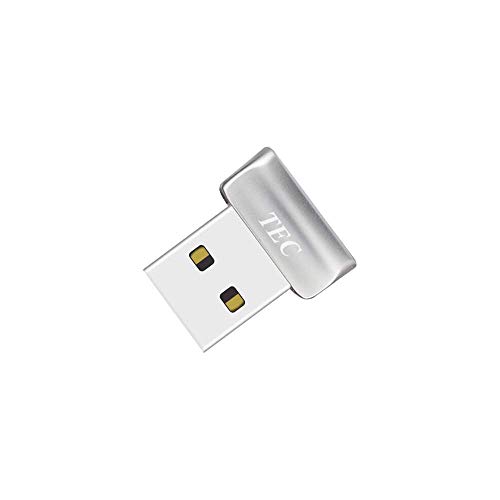
- Windows Hello authentication
- Advertised document and folder encryption
- Not compatible with ARM chipsets
Best For: Windows 10 users seeking sign-in and file-encryption support
Travel-Friendly Pick
USB Windows Hello Match-in-Sensor Reader
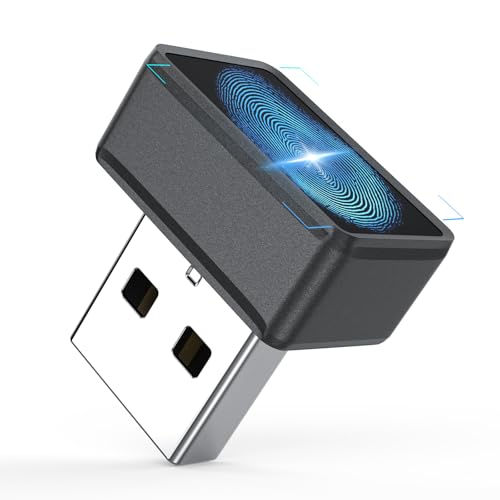
- Flush-fitting USB design
- Match-in-sensor authentication
- Windows Hello only; no Mac or Linux
Best For: Portable Windows 10/11 PC sign-in
On-Chip Security Pick

- Match-on-chip fingerprint storage and matching
- 360° sensor; up to 10 fingerprints
- Windows Hello sign-in
Best For: Windows users prioritizing on-chip biometric matching
Best Compact Pick
ineo USB Fingerprint Reader for Windows Hello

- Direct-plug metal design
- Windows Hello sign-in
- Stores up to 10 fingerprints
Best For: Portable Windows laptop setups
Best Desk Setup
ineo USB Fingerprint Reader with 5ft Cable

- Flexible 5ft cable
- Optical fingerprint sensor
- One-touch screen locking
Best For: Windows desktop workstations
Best Multi-Angle Scan
Yoidesu USB Fingerprint Reader

- 360° capacitive recognition
- Up to 10 fingerprints per account
- Compact direct-plug design
Best For: Compatible Windows PCs needing flexible touch recognition
Best Desktop Placement – Kensington VeriMark Desktop 1.0
Among biometric fingerprint readers for secure access, the Kensington VeriMark Desktop 1.0 suits a workstation where you want the scanner within easy reach. Its 3.9-foot USB cable gives you more placement flexibility than a reader that sits directly in a port.
Best For: Windows desktop users who want fingerprint sign-in alongside FIDO authentication options.
Pros:
- Certified for Windows Hello and Windows Hello for Business.
- FIDO U2F certified and FIDO2 WebAuthn compatible; older U2F services can use Tap-and-Go rather than biometric authentication.
- Match-in-Sensor technology offers 360° readability, anti-spoofing, and encrypted end-to-end security.
Cons:
- Windows ARM-based computers are not currently supported.
- Tap-and-Go with older FIDO U2F services does not use biometric authentication.
The cable and desktop format are the main reasons to choose this model. Check your computer’s architecture and the authentication method your services support before buying.
If your search for biometric fingerprint readers for secure access starts with an existing authentication software setup, the HID DigitalPersona URU4500 is worth a look. This USB optical scanner is designed for use with a range of software, including authentication solutions.
Best For: Buyers selecting a fingerprint capture device for compatible authentication software.
Pros:
- 512 dpi optical capture with 8-bit grayscale and a red flash indicating image capture.
- Metal casing resists unintentional movement.
- Specified features include encrypted fingerprint data, latent-print rejection, and performance with dry, moist, or rough fingerprints.
Cons:
- The notes do not identify Windows Hello or FIDO support; confirm compatibility with your intended software.
- Operating-system information is broad, so verify the required software and drivers for your setup.
This is a software-oriented scanner rather than a clearly documented plug-and-play Windows Hello key. Match it to your authentication application before ordering.
The Kensington VeriMark Gen2 is a compact USB-A option among biometric fingerprint readers for secure access. It combines Windows Hello fingerprint login with Tap-and-Go CTAP2 support for compatible passkey and password-manager workflows.
Best For: Windows 10 or 11 users who want a USB-A fingerprint key with CTAP2 support.
Pros:
- Designed for Windows Hello and Windows Hello for Business, with support for up to 10 fingerprints.
- Match-in-Sensor processing keeps fingerprint data isolated in the sensor and transfers only an encrypted match.
- Supports Tap-and-Go CTAP2 for compatible passkey and password-manager use.
Cons:
- Not compatible with macOS or ChromeOS.
- Password-manager support depends on the named tools and, for some, a Premium plan.
Choose this model when Windows sign-in and compatible CTAP2 workflows matter more than cross-platform use. Check that your preferred service supports the authentication method you plan to use.
For buyers comparing biometric fingerprint readers for secure access primarily to unlock a Windows PC, this USB reader keeps its purpose narrow: Windows Hello sign-in on Windows 10 or 11. The angled sensor and included 4-foot extension cable make it easier to position on a desk.
Best For: Windows PC users who want straightforward fingerprint login without separate authentication software.
Pros:
- Designed for Windows Hello on Windows 10 and 11, with no third-party app required.
- Match-in-Sensor processing performs fingerprint matching inside the sensor.
- Includes a 4-foot USB extension cable and supports up to 10 fingerprints.
Cons:
- Not for Mac or Linux.
- Does not communicate directly with websites or apps; their sign-in options depend on Windows Hello and the service.
It is a practical choice for PC unlocks, but do not mistake it for a standalone website authentication key. Confirm Windows Hello is available and enabled on your system.
File Encryption Pick – TEC TE-FPA2 Mini USB Fingerprint Reader
Among biometric fingerprint readers for secure access, the TEC TE-FPA2 stands out for pairing Windows Hello sign-in with stated document and folder encryption support. Its small USB design suits a PC where you want fingerprint authentication without a larger desktop scanner.
Best For: Windows 10 users who want fingerprint sign-in and the reader’s advertised file-encryption feature.
Pros:
- Supports Windows Hello authentication.
- Offers 360° fingerprint recognition and multi-fingerprint registration.
- Compact, 5 g USB form factor.
Cons:
- Not compatible with ARM-based chipsets.
- Driver installation may require troubleshooting.
The listed minimum requirement is Windows 10. Although the title mentions Windows 11, confirm compatibility with your particular PC before buying.
Travel-Friendly Pick – USB Windows Hello Match-in-Sensor Reader
If you’re comparing biometric fingerprint readers for secure access on a Windows laptop, this mini USB model focuses on straightforward Windows Hello sign-in. Its flush-fitting design is especially convenient for travel and everyday carry.
Best For: Windows 10 or 11 users who want a compact, plug-and-play reader for PC login.
Pros:
- Uses match-in-sensor fingerprint authentication.
- Requires no separate drivers or apps on supported Windows Hello systems.
- Supports enrollment of up to 10 fingerprints.
Cons:
- Not compatible with Mac or Linux.
- Works through Windows Hello only, not directly with websites or third-party apps.
Choose this one for a small, uncomplicated Windows sign-in accessory, but check that Windows Hello is available and configured on your PC.
On-Chip Security Pick – TEC SecureTouch TE-FPA4-MC
For shoppers prioritizing how fingerprints are handled, the TEC SecureTouch TE-FPA4-MC is one of the biometric fingerprint readers for secure access that specifies match-on-chip storage and matching. It provides Windows Hello sign-in in an ultra-mini USB format.
Best For: Windows 10 or 11 users who prefer on-chip fingerprint matching for PC sign-in.
Pros:
- Stores and matches fingerprint data inside the chip, according to TEC.
- Supports 360° recognition and enrollment of up to 10 fingerprints.
- Advertises 0.23-second authentication and Enhanced Sign-in Security.
Cons:
- Designed for Windows Hello PC sign-in; other platform support is not specified.
Its on-chip approach is the main reason to consider it over a basic login dongle. Treat the stated speed as a product specification rather than a guarantee for every setup.
Best Compact Pick – ineo USB Fingerprint Reader for Windows Hello
Among biometric fingerprint readers for secure access, this compact ineo model is a practical way to add fingerprint sign-in to a Windows 10 or 11 PC without a built-in sensor. Its small metal design plugs directly into a USB port, making it easy to carry with a laptop.
Best For: Windows users who want a portable, cable-free fingerprint reader for everyday sign-in.
Pros:
- Works with Windows Hello without extra software on most genuine Windows systems.
- Supports up to 10 fingerprints for shared-device flexibility.
- Compact metal body adds little bulk to a laptop setup.
Cons:
- Not compatible with Mac.
- A manual driver update may be needed on some systems.
Choose this one if portability matters more than placing the sensor away from your computer; check your Windows setup before relying on plug-and-play installation.
Best Desk Setup – ineo USB Fingerprint Reader with 5ft Cable
If you prefer a sensor within reach on your desk, this cabled ineo reader is another option among biometric fingerprint readers for secure access. Its listed 5ft cable gives you placement flexibility, while the optical sensor supports fingerprint login on Windows 10 and 11.
Best For: Desktop users who want a conveniently positioned reader for sign-in and quick screen locking.
Pros:
- 5ft cable lets you position the reader away from the USB port.
- Supports one-touch screen locking using the Win + L shortcut.
- USB connection and straightforward setup avoid complex installation.
Cons:
- Not compatible with Mac.
- The cable adds more desk clutter than a direct-plug reader.
This is the more convenient ineo format for a fixed workstation, especially when the computer’s USB ports are awkward to reach.
Best Multi-Angle Scan – Yoidesu USB Fingerprint Reader
For shoppers comparing biometric fingerprint readers for secure access on Windows, the Yoidesu stands out for its compact direct-plug design and 360° fingerprint recognition. It works through Windows Hello on supported Windows 10 and 11 systems, with no separate app needed on most genuine installations.
Best For: Windows users who want a tiny reader that accepts touches from different angles.
Pros:
- Capacitive sensor offers approximately 0.5-second, 360° recognition.
- Supports multiple Windows accounts and up to 10 fingerprints per account.
- Small USB body suits laptops and desktops without built-in fingerprint sensors.
Cons:
- Does not support Mac, Linux, or Chrome OS.
- Trimmed-down Windows versions may lack the biometric components it needs.
- USB 3.0 docking stations may cause unstable recognition; a motherboard USB 2.0 port is recommended.
This is a sensible pick for compatible Windows PCs, but pay close attention to the stated OS and USB-port limitations before buying.
How We Picked the Best Biometric Fingerprint Readers for Secure Access
We focused on USB readers relevant to secure PC access, comparing their stated Windows compatibility, authentication features, physical design, and setup requirements. The selection includes compact dongles, cabled desktop readers, and models positioned for business use. Features listed by a seller are a starting point, not proof of certification or compatibility: confirm current drivers, supported Windows versions, and your organization’s policies before buying.
Quick Comparison: Which Type Fits?
For a tidy laptop setup, a compact USB-A key or dongle takes little desk space but may be awkward beside tightly packed ports. A cabled reader is easier to position on a desktop or dock and can be more convenient for shared workstations. If you need more than Windows sign-in, shortlist products that explicitly claim support for your authentication workflow, then verify that claim against the services you use.
Key Buying Factors for Biometric Fingerprint Readers for Secure Access
Operating System and Login Support
Check the exact Windows edition and version, USB connector, and whether the device supports Windows Hello, Windows Hello for Business, or a separate application. Several options here are advertised for Windows 10/11 rather than Mac; do not assume cross-platform support. Windows Hello enrollment alone does not guarantee compatibility with every website or company login.
Security Architecture
Terms such as match-in-sensor, match-on-chip, encryption, anti-spoofing, FIDO2, and FIDO U2F describe different capabilities. They are not interchangeable. If a particular standard or protection is mandatory, check the manufacturer’s documentation and your identity provider’s supported-device list. Ask where fingerprint templates are stored and whether matching happens on the device or through the host system.
Fit, Placement, and Maintenance
Choose a cable length and sensor position you can reach naturally. Consider USB-A availability, docking-station behavior, driver installation rights, and whether multiple users must enroll fingerprints. Keep a PIN, security key, or other approved recovery method available: wet fingers, sensor wear, and account changes can interrupt biometric sign-in.
Who Should Buy Which Biometric Fingerprint Readers for Secure Access?
Home users who mainly want quicker Windows login can start with a straightforward Windows Hello reader and prioritize confirmed compatibility and convenient placement. Laptop users may prefer a small plug-in design; desktop users may prefer a cabled sensor. Business buyers should begin with their IT requirements—especially Windows Hello for Business, FIDO support, driver deployment, and security documentation—before comparing price. For the HID DigitalPersona model, verify the required software and integration rather than treating it as a generic plug-and-play Windows Hello accessory. The best Biometric Fingerprint Readers for Secure Access are the ones that support your actual sign-in workflow, not simply the longest feature list.