
For professionals who work in shared offices, conference rooms, classrooms, hotels, and public spaces, a laptop locking cable adds a practical layer of theft deterrence. The right model should fit your laptop’s security slot, resist casual tampering, and remain easy to use throughout the workday.
This roundup compares 10 laptop locking cables for professionals, including keyed, combination, universal, and adhesive-anchor options for different devices and workplace setups.
Best 10 Laptop Locking Cables for Professionals Picks for 2026
Proven T-Bar Protection
Kensington K65035AM Keyed Cable Lock
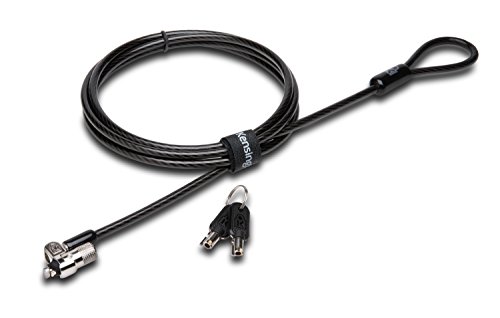
- 6-foot carbon steel cable
- Pivoting 10mm keyed lock head
- For standard Kensington security slots
Best For: Office devices with a Kensington T-Bar slot
Universal Slot Coverage
StarTech 3-in-1 Laptop Cable Lock

- Supports three common slot types
- 6.6-foot vinyl-coated steel cable
- Includes two keys and push-to-lock design
Best For: Mixed-device offices and IT deployments
Simple Combination Access
Kensington K64673AM Resettable Lock

- Resettable four-digit combination
- 6-foot cut-resistant cable
- Push-button one-handed engagement
Best For: Shared workstations needing keyless access
Flexible Device Coverage

- Includes two adhesive anchor plates
- 6.6-foot steel cable and two keys
- Works with slot and non-slot devices
Best For: Shared and commercial spaces with varied electronics
Reliable Keyed Security

- 6-foot vinyl-coated galvanized steel cable
- 360-degree swiveling cable head
- Two keys and one-year limited warranty
Best For: Office users seeking a simple keyed laptop lock
Flexible Combination Security

- Supports built-in slots or an adhesive plate
- Customizable 4-digit combination
- 6.23-foot cable with rotating push button
Best For: Key-free protection across varied digital devices
Professional Universal Coverage
AboveTEK 3-in-1 Universal Laptop Cable Lock

- Fits K-Slot, Nano, and Wedge slots
- Key lock with two included keys
- 360-degree rotating ball joint and 12-month warranty
Best For: Mixed-device offices and business travel
Best Slim Nano-Slot Pick
Kensington NanoSaver Combination Lock

- Slim head helps preserve laptop stability and port access
- Resettable four-wheel code with 10,000 combinations
- Six-foot cable plus two-year warranty and support
Best For: Compatible HP, Lenovo, and Asus laptops with nano-sized slots
Best Flexible Compatibility

- Supports standard slots on many laptops
- Adhesive plate works with slot-free devices
- Six-and-a-half-foot cut-resistant steel cable
Best For: Mixed laptop, tablet, phone, monitor, and projector environments
Best for Dell and Alienware
Kensington N17 Combination Lock

- Designed for Dell and Alienware wedge slots
- Push-button, one-handed engagement
- Six-foot cable and resettable 10,000-code combination
Best For: Dell and Alienware laptops with compatible wedge-type slots
Proven T-Bar Protection – Kensington K65035AM Keyed Cable Lock
For professionals seeking laptop locking cables for professionals, the Kensington K65035AM offers a keyed T-Bar design, a 6-foot carbon steel cable, and compatibility with devices using a standard Kensington security slot. Its pivoting lock head is designed to make attachment easier, including on thin devices.
Best For: Offices and workstations using laptops or other equipment with a Kensington T-Bar security slot.
Pros:
- 6-foot carbon steel cable with a plastic sheath to help resist cutting attempts.
- Pivoting 10mm lock head and special hinge support easier locking and unlocking.
- Works with laptops, monitors, desktops, docking stations, projectors, and other compatible devices.
- Includes hidden-pin tubular lock technology and an eight-year limited warranty.
Cons:
- Does not work with 2016-and-newer Dell devices using a wedge lock slot.
- Some HP devices and Chromebooks require a Nano Saver-compatible lock instead.
- Requires keeping track of the included key.
This is a solid choice when your equipment has a standard Kensington slot and you prefer keyed access over memorizing a combination. Verify the device’s lock-slot type before buying.
Universal Slot Coverage – StarTech 3-in-1 Laptop Cable Lock
The StarTech 3-in-1 lock is a practical option for professionals seeking laptop locking cables for professionals across mixed device fleets. Interchangeable heads support Kensington K-Slot, Kensington Nano, and Noble Wedge slots, while the 6.6-foot steel cable provides flexible workstation anchoring.
Best For: IT teams and offices securing laptops, tablets, monitors, docks, or projectors with different security-slot formats.
Pros:
- Three interchangeable lock heads cover K-Slot, Nano, and Noble Wedge formats.
- 6.6-foot vinyl-coated steel cable helps prevent scratches on equipment and furniture.
- Push-to-lock button enables quick attachment without entering a combination.
- Includes two keys and meets RoHS and UL specifications.
Cons:
- Keyed operation means the keys must be stored and managed.
- Changing heads adds an extra setup step compared with a single-format lock.
- Its two-year warranty is shorter than some competing options.
For organizations with varied laptops and peripherals, the interchangeable heads make this one of the more adaptable choices. It is especially useful when the lock-slot standard is not consistent across users’ devices.
Simple Combination Access – Kensington K64673AM Resettable Lock
The Kensington K64673AM combines a 6-foot cut-resistant carbon steel cable with a resettable four-digit code. For professionals comparing laptop locking cables for professionals, its no-key design can simplify shared workstations while the push-button mechanism supports one-handed engagement.
Best For: Offices, classrooms, and public work areas where multiple users need access without sharing or storing a key.
Pros:
- Four-wheel combination lock offers 10,000 possible codes.
- Push-button design supports one-handed attachment.
- 6-foot carbon steel cable anchors to desks, tables, and other fixed structures.
- Compatible with many laptops, monitors, desktops, docking stations, and projectors using a standard Kensington slot.
Cons:
- Not compatible with Dell or Alienware devices using different lock-slot designs.
- Users must remember or manage the resettable combination.
- Compatibility should be checked for newer Dell models and some Chromebooks.
This model is a convenient fit for shared environments because it avoids key handoffs. Confirm that the laptop has a standard Kensington security slot, particularly when securing Dell, Alienware, or Chromebook devices.
Flexible Device Coverage – Laptop and Tablet Lock Kit
This security kit expands laptop locking cables for professionals beyond standard-slot laptops. It includes a 6.6-foot steel cable, two keys, and two adhesive anchor plates for securing compatible laptops, tablets, phones, POS devices, monitors, and other electronics in shared or commercial spaces.
Best For: Retail counters, classrooms, libraries, coworking areas, showrooms, and workstations with both slot-equipped and non-slot devices.
Pros:
- Supports standard 3 x 7 mm security slots and includes adhesive plates for non-slot devices.
- 6.6-foot reach makes it easier to loop around desks, shelves, counters, and monitor arms.
- Includes two keys and two self-adhesive anchor plates.
- Suitable for laptops, tablets, iPads, phones, POS terminals, displays, and monitors.
Cons:
- Adhesive plates require clean, dry, smooth surfaces and setup time before use.
- Full adhesive bonding can take up to 72 hours.
- The 5 mm cable is intended to deter quick grab-and-go theft rather than provide an absolute guarantee against theft.
This is the most flexible choice for environments containing devices without built-in security slots. Plan installation carefully, since the adhesive anchors need adequate curing time before they are relied upon.
Reliable Keyed Security – HP T1A62UT Keyed Cable Lock
For professionals comparing laptop locking cables for professionals, the HP T1A62UT is a straightforward keyed option with a 6-foot vinyl-coated, galvanized steel cable. Its swiveling cable head helps with positioning, while the included two keys keep everyday operation simple.
Best For: Office users who want a conventional keyed lock backed by a one-year limited warranty.
Pros:
- 6-foot cable wraps around a secure fixed object.
- 360-degree swiveling cable head supports flexible positioning.
- Includes two keys and a one-year limited warranty.
Cons:
- Keyed design requires carrying and managing keys.
- Notes do not indicate compatibility with multiple slot formats.
The HP T1A62UT favors familiar, uncomplicated security over combination convenience or universal slot coverage. It is a sensible fit when your notebook accepts the appropriate lock and you prefer a basic keyed setup from HP.
Flexible Combination Security – Universal Laptop Cable Lock
This combination lock is a versatile choice for professionals comparing laptop locking cables for professionals, especially when devices may or may not have built-in security slots. It supports a 4-digit code and includes an adhesive lock slot plate for compatible devices without a security hole.
Best For: Users who want key-free access and compatibility options for laptops, tablets, and other digital devices.
Pros:
- Works with devices that have built-in slots or use the included adhesive plate.
- 4-digit customizable combination offers over 10,000 possible codes.
- 6.23-foot cable and 360-degree rotating push button support flexible positioning.
- Includes three spacers and an adhesive lock slot plate.
Cons:
- Adhesive plate installation adds an extra setup step for devices without slots.
- Combination users must remember their selected code.
Its combination format eliminates lost keys, while the included plate broadens device coverage. Consider it when your equipment mix includes devices without a standard security opening and you are comfortable installing the adhesive accessory.
Professional Universal Coverage – AboveTEK 3-in-1 Universal Laptop Cable Lock
The AboveTEK TL-280K is designed for professionals comparing laptop locking cables for professionals across different computer brands and models. Its 3-in-1 design supports Kensington K-Slot, Nano, and Wedge slots, with a key-operated mechanism and a 360-degree rotating ball joint for easier positioning.
Best For: Office teams, business travelers, and professionals securing devices with different security slot formats.
Pros:
- Compatible with K-Slot, Nano, and Wedge security slots.
- Galvanized steel cable has a vinyl coating and reinforced internal core.
- 360-degree rotating ball joint supports flexible access and positioning.
- Includes two keys, six secure spacers, and a 12-month warranty.
Cons:
- Keyed operation still requires keeping track of physical keys.
- Its universal design may be more than needed for a single compatible laptop.
With broad slot compatibility and professional-oriented construction, the AboveTEK is the most adaptable option in this group. It makes particular sense for workplaces or travel setups where devices may use different security slot standards.
Best Slim Nano-Slot Pick – Kensington NanoSaver Combination Lock
For professionals comparing laptop locking cables for professionals, the Kensington NanoSaver is a streamlined option for compatible HP, Lenovo, and Asus laptops and select Kensington docking stations. Its slim lockhead helps the laptop remain flat while leaving nearby ports accessible.
Best For: Offices, homes, and public workspaces using laptops with a compatible nano-sized lock slot.
Pros:
- Resettable four-wheel combination offers 10,000 possible codes.
- Slim lockhead supports stable placement and continued port access.
- Six-foot carbon-steel cable is designed to resist cutting and tampering.
- Includes code registration support, a two-year warranty, and lifetime technical support.
Cons:
- Compatibility is limited to devices with a nano-sized lock slot.
- Not intended as a universal fit for every laptop brand or model.
This is a strong choice when a professional needs a low-profile combination lock and already knows the laptop has a compatible NanoSaver slot. Verify the device specifications before buying.
Best Flexible Compatibility – Hardware Security Cable Lock
Among laptop locking cables for professionals, this hardware security cable lock stands out for supporting standard laptop slots while also offering an adhesive anchor-plate option for tablets and other devices without a slot. The 6.5-foot cable provides extra reach around a fixed object.
Best For: Mixed-device workspaces securing standard-slot laptops, tablets, phones, monitors, projectors, or Surface devices.
Pros:
- Works with many standard laptop lock slots.
- Adhesive anchor plate expands compatibility to devices without a standard slot.
- Six-and-a-half-foot PVC-coated, twisted steel cable offers flexible reach.
- Rotating stainless-steel lock head supports positioning and keyed use.
Cons:
- Some devices require use of the I3C adhesive security plate.
- Using the adhesive plate requires attaching it to the device’s hard surface.
- Compatibility should be checked before relying on the anchor-plate method.
This is the most adaptable option of the three for teams protecting different device types. Its broader setup flexibility is useful, but professionals should confirm whether their particular device needs the adhesive plate.
Best for Dell and Alienware – Kensington N17 Combination Lock
Kensington N17 Dell Laptop Computer Lock, Combination Security Locking Cable (K68008WW) Black
Check Price On AmazonFor professionals seeking laptop locking cables for professionals with Dell hardware, the Kensington N17 is built for Dell and Alienware laptops with wedge-type lock slots. Its push-button design enables one-handed attachment, while the combination system avoids carrying a key.
Best For: Dell and Alienware laptops with compatible wedge-shaped security slots in offices, homes, and educational settings.
Pros:
- Designed specifically for Dell and Alienware wedge-type lock slots.
- Resettable four-wheel combination provides 10,000 possible codes.
- Push-button engagement supports one-handed installation.
- Six-foot carbon-steel cable is designed to anchor to fixed structures and resist cutting.
Cons:
- Limited to laptops with compatible Dell wedge-type slots.
- Not a universal lock for laptops using other slot designs.
This is the focused pick for Dell and Alienware deployments. Its dedicated wedge-slot connection and independently verified testing make it a practical fit when the laptop model matches the required slot type.
How We Picked the Best Laptop Locking Cables for Professionals
We focused on the features that matter in real professional environments: security-slot compatibility, cable construction, locking mechanism, ease of installation, portability, and everyday usability. The selection includes standard T-Bar locks, Nano and wedge-compatible designs, combination locks, keyed models, and universal systems for devices without a built-in slot.
We also considered whether a lock is better suited to a fixed workstation, a hot-desk setup, travel, or mixed-device fleets. A cable lock is primarily a deterrent rather than an impenetrable anti-theft system, so compatibility and consistent use are just as important as cable thickness.
Quick Comparison
- Best for standard office laptops: A keyed T-Bar lock offers straightforward, dependable daily use.
- Best for shared workspaces: A resettable combination lock avoids managing keys between users.
- Best for thin laptops: NanoSaver or Nano Wedge-compatible models are designed for newer slim devices.
- Best for mixed devices: A 3-in-1 universal lock can support different security-slot formats.
- Best for devices without a slot: An adhesive anchor plate can provide a mounting point when properly installed.
Key Buying Factors for Laptop Locking Cables for Professionals
Check the Security Slot First
Identify whether your laptop has a standard T-Bar/Kensington slot, a Nano slot, a wedge-shaped slot, or no built-in slot. A cable that does not match the device cannot provide reliable protection. For company fleets, confirm compatibility across every laptop model before purchasing in bulk.
Choose Keyed or Combination Security
Keyed locks are quick and familiar, but replacement keys and distribution can become an administrative issue. Combination locks are convenient for hot desks and shared equipment, especially when the code can be reset. Avoid simple codes that are easy to guess and store the combination securely.
Consider Cable Length and Construction
A 6-foot cable generally works well around a desk leg or other fixed anchor. Longer cables offer more placement flexibility but add weight and bulk. Cut-resistant steel cable is standard for this category; look for a robust lock head, secure swivel action, and a cable coating that protects furniture and device surfaces.
Plan for Daily Use
Professionals who travel frequently should prioritize compact designs and simple attachment procedures. For permanent desks, a durable keyed lock may be preferable. If the laptop moves between locations, select a model that can be attached and removed without tools while still locking firmly.
Who Should Buy Which Laptop Locking Cables for Professionals?
IT departments and office managers should favor standardized locks that match the organization’s laptop fleet and support consistent key or combination management. Remote workers and frequent travelers should choose a lightweight model compatible with their specific laptop slot. Shared offices and coworking users may prefer resettable combination locks to avoid carrying keys. Owners of tablets, monitors, or slot-free devices should consider a universal cable with an adhesive anchor, provided the surface is clean, smooth, and suitable for permanent bonding.
Before buying, verify the exact slot type, included accessories, cable length, and return policy. The best Laptop Locking Cables for Professionals are the ones that fit the device correctly and are convenient enough to use every time the workstation is left unattended.