
A laptop lock is a simple way to add physical security when you need to step away from your computer in a library, classroom, lab, or shared dorm space. The best choice depends on your laptop’s security slot, how often you move between locations, and whether you prefer keys or a combination.
We compared 10 laptop locking cables for students across compatibility, locking style, cable length, mounting options, and everyday portability to help you choose a practical deterrent without adding unnecessary bulk to your backpack.
Best 10 Laptop Locking Cables for Students Picks for 2026
Best Standard-Slot Combination Lock
Kensington T-Bar Combination Cable Lock

- Resettable four-digit combination with 10,000 codes
- Six-foot cut-resistant carbon-steel cable
- Push-button attachment for standard Kensington slots
Best For: Students with compatible standard Kensington slots who prefer a keyless lock
Best Adhesive-Anchor Kit
AboveTEK Laptop and Tablet Security Cable

- Includes two adhesive anchor plate sets
- Six-foot galvanized-steel security cable
- Works with laptops, tablets, and smartphones
Best For: Students securing devices without built-in security slots
Best Keyed Standard-Slot Lock
Kensington T-Bar Keyed Laptop Cable
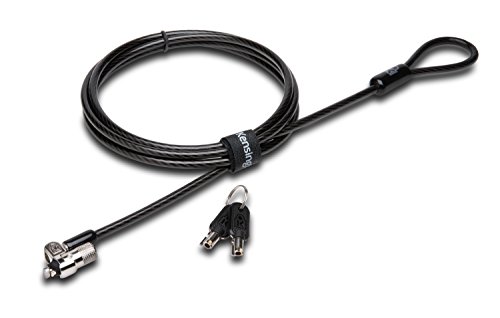
- Pivoting 10 mm head suits thinner compatible devices
- Six-foot carbon-steel cable with plastic sheath
- Keyed tubular lock with hinged locking design
Best For: Students wanting a traditional keyed lock for a standard Kensington slot
Best Flexible Compatibility
Laptop Cable Lock with Adhesive Anchor

- Supports standard-slot laptops and adhesive anchors
- Six-and-a-half-foot PVC-coated steel cable
- Fits tablets, phones, monitors, and projectors
Best For: Students securing a varied mix of laptops and mobile devices
Best Dell-Fit Choice
Kensington N17 Combination Lock

- Fits Dell and Alienware wedge slots
- Resettable four-wheel combination
- Six-foot carbon steel cable
Best For: Students with compatible Dell or Alienware laptops
Best Keyed Budget Option

- Key lock includes two keys
- 4.6-foot steel cable
- PVC jacket helps reduce scratches
Best For: Students with K-slot devices who prefer keyed access
Best Universal Fit
Kensington Universal 3-in-1 Lock

- Fits standard, nano, and wedge slots
- Resettable four-number combination
- Six-foot sheathed carbon steel cable
Best For: Students using multiple laptop slot types or planning upgrades
Best Overall Flexibility
Multi-Device Laptop Security Cable Kit

- Includes cable, two keys, and two adhesive anchor plates
- Works with standard-slot and compatible non-slot devices
- 6.6-foot cable suits desks, shelves, and shared spaces
Best For: Students securing laptops, tablets, phones, and other electronics
Best Heavy-Duty Pick
Keyed Push-to-Lock Laptop Cable

- Designed for Kensington, Nano, Mini Saver, Noble Wedge, and Samsung slots
- Push-to-lock operation makes setup quick
- Includes two keys and a six-foot cable
Best For: Students with laptops using different common security-slot formats
Best for Wedge Slots
6.7-Foot Rotating Laptop Cable Lock

- Fits specified 6 x 2.5 mm wedge-type slots
- Extra-long 6.7-foot cable offers flexible tethering
- Rotating lock head helps position the cable smoothly
Best For: Students with compatible wedge-slot laptops in public spaces
Best Standard-Slot Combination Lock – Kensington T-Bar Combination Cable Lock
For students seeking laptop locking cables for students, this Kensington model offers a resettable four-digit combination and a six-foot carbon-steel cable. It is designed for devices with a standard Kensington security slot and can attach to a desk, table, or other fixed structure.
Best For: Students using HP, Lenovo, Acer, ASUS, or other devices with a standard Kensington slot who prefer a key-free combination lock.
Pros:
- Resettable four-wheel combination provides 10,000 possible codes.
- Push-button design supports one-handed engagement.
- Six-foot cut-resistant carbon-steel cable offers useful reach around desks and tables.
- Works with laptops, monitors, projectors, docking stations, and other compatible devices.
Cons:
- Not compatible with Dell and Alienware devices using a Noble or wedge-style slot.
- Requires a compatible Kensington standard security slot.
This is a practical campus choice when students want to avoid carrying a key, but checking the laptop’s lock-slot type before purchase is essential.
Best Adhesive-Anchor Kit – AboveTEK Laptop and Tablet Security Cable
Among laptop locking cables for students, the AboveTEK kit stands out for including adhesive anchor plates for devices without a built-in security slot. Its six-foot galvanized-steel cable and keyed lock are suited to laptops, tablets, and phones used in libraries, cafés, classrooms, or retail settings.
Best For: Students securing multiple mobile devices, including tablets and phones, or laptops that lack a standard lock slot.
Pros:
- Includes two adhesive sticker-and-anchor plate sets for multiple devices.
- Industrial-grade 3M adhesive is designed for most flat surfaces.
- Six-foot cut-resistant galvanized-steel cable allows movement while secured.
- Keyed stainless-steel lock is designed for straightforward operation.
Cons:
- Adhesive anchors require a suitable flat surface and proper installation.
- Keyed design means students must keep track of the included keys.
The adhesive-anchor approach broadens compatibility beyond standard laptop slots, making this a flexible option for students carrying a mix of notebooks, tablets, and smartphones.
Best Keyed Standard-Slot Lock – Kensington T-Bar Keyed Laptop Cable
This Kensington keyed model is a strong candidate for laptop locking cables for students who want a traditional key-operated lock. Its six-foot carbon-steel cable and pivoting 10 mm lock head fit devices with a standard Kensington security slot and anchor to fixed structures.
Best For: Students with compatible standard Kensington slots who prefer a keyed lock and a compact locking head for thinner devices.
Pros:
- Pivoting 10 mm lock head is designed for thin laptops and devices.
- Patented hidden-pin tubular lock technology supports pick resistance.
- Six-foot carbon-steel cable has a plastic sheath and resists cutting attempts.
- Special hinge helps with locking and unlocking at awkward angles.
Cons:
- Does not fit Dell devices using the newer wedge lock slot.
- Some HP EliteBook, X2 tablet, and Chromebook models use a different Nano security slot.
- Students must verify compatibility and keep track of the keys.
Its compact head and hinged design make it convenient for everyday desk use, provided the laptop has the required standard Kensington slot.
Best Flexible Compatibility – Laptop Cable Lock with Adhesive Anchor
For students comparing laptop locking cables for students, this cable lock accommodates both laptops with standard slots and devices that need an adhesive anchor plate. The six-and-a-half-foot PVC-coated twisted-steel cable provides extra reach for securing a laptop, tablet, phone, monitor, or projector to a fixed object.
Best For: Students who need one cable system for standard-slot laptops and devices such as iPads, Surface tablets, Kindle devices, and smartphones.
Pros:
- Works with most laptops that have standard security slots.
- Adhesive anchor plate supports tablets and phones without standard slots.
- Six-and-a-half-foot cut-resistant twisted-steel cable offers flexible reach.
- Rotating stainless-steel lock head turns 360 degrees.
Cons:
- Some devices require use of the included I3C adhesive security plate.
- Adhesive installation may not suit users who prefer not to attach hardware to a device.
- Compatibility still depends on the laptop having a standard slot or a suitable anchor surface.
This is a versatile pick for students sharing security hardware across different devices, though the adhesive-plate requirement should be considered before buying.
Best Dell-Fit Choice – Kensington N17 Combination Lock
Kensington N17 Dell Laptop Computer Lock, Combination Security Locking Cable (K68008WW) Black
Check Price On AmazonFor students using compatible Dell or Alienware laptops, the Kensington N17 is a purpose-built option among laptop locking cables for students. Its wedge-slot fit, resettable combination, and six-foot cable make it practical for securing a laptop to a desk or other fixed structure.
Best For: Students with Dell or Alienware laptops that have a wedge-shaped security slot.
Pros:
- Designed to fit Dell and Alienware wedge-type lock slots.
- Resettable four-wheel combination provides 10,000 possible codes.
- Six-foot carbon steel cable and push-button engagement support convenient everyday use.
Cons:
- Compatibility is limited to devices with the appropriate wedge-shaped slot.
- Combination locks require remembering or securely storing the code.
This is a strong match for Dell-focused student setups, especially where quick, keyless attachment matters. Confirm that the laptop has a compatible wedge slot before buying.
Best Keyed Budget Option – Manhattan Laptop Lock
The Manhattan Laptop Lock is a straightforward choice for students comparing laptop locking cables for students and preferring a traditional key. It works with compatible K-slot devices and includes a 4.6-foot steel cable with a PVC jacket to help protect nearby surfaces from scratches.
Best For: Students using K-slot-compatible laptops or electronics who want a keyed lock with two keys.
Pros:
- Key-operated design includes two keys.
- 4.6-foot steel cable can attach a device to a desk or other fixed object.
- PVC jacket helps protect devices, furniture, and surrounding surfaces from scratches.
Cons:
- Requires a compatible built-in K-slot.
- Shorter than the six-foot cables in the Kensington options.
- Keys can be misplaced or unavailable when needed.
Choose this model if your school or study setup uses standard K-slot hardware and you prefer physical keys over a combination. Its compact, conventional design suits classrooms, shared spaces, and travel.
Best Universal Fit – Kensington Universal 3-in-1 Lock
The Kensington Universal 3-in-1 stands out among laptop locking cables for students who use different laptops or may upgrade devices. Its interchangeable tips support standard, nano, and wedge-shaped security slots, while the resettable combination avoids the need to carry a key.
Best For: Students, households, or shared spaces with laptops using different security-slot styles.
Pros:
- Supports standard, nano, and wedge-shaped laptop security slots.
- Resettable four-number dial offers 10,000 possible combinations.
- Six-foot carbon steel cable has a plastic sheath and includes tethered interchangeable tips.
Cons:
- Requires selecting and changing the appropriate lock tip for the device.
- A universal design may be more than needed for a single laptop with one slot type.
This is the most flexible pick of the three for students sharing equipment or planning future device changes. Its broad slot compatibility can reduce the need to replace the lock when the laptop changes.
Best Overall Flexibility – Multi-Device Laptop Security Cable Kit
For students comparing laptop locking cables for students, this kit stands out when you need to secure more than a standard laptop. It includes a 6.6-foot, 5 mm steel cable, two keys, and two adhesive anchor plates for devices with or without a standard 3 x 7 mm security slot.
Best For: Students, classrooms, libraries, cafes, and shared spaces where laptops, tablets, phones, or other electronics need flexible protection.
Pros:
- Includes the lock, two keys, and two self-adhesive anchor plates.
- Supports standard security-slot devices and compatible non-slot devices.
- Long 6.6-foot cable loops around desks, table legs, shelves, and other fixed objects.
- Works across laptops, tablets, monitors, POS devices, and other shared electronics.
Cons:
- Adhesive plates require clean, dry surfaces and waiting time before use.
- Compatibility depends on having a standard 3 x 7 mm slot or a suitable smooth surface for the anchor plate.
This is the most versatile option of the three, especially for students who share spaces or carry multiple types of electronics. Allow the adhesive anchor plates to bond fully before relying on them.
Best Heavy-Duty Pick – Keyed Push-to-Lock Laptop Cable
This Sendt lock is a practical pick for students who want a keyed cable with push-to-lock operation. It is designed to work with many common security-slot formats, including Kensington, Nano, Mini Saver, Noble Wedge, and Samsung slots.
Best For: Students using laptops with varied security slots in libraries, classrooms, public areas, and other shared spaces.
Pros:
- Designed for broad compatibility with several common security-slot types.
- Push-to-lock design supports quick installation.
- Includes two keys and a hook-and-loop cable tie.
- Six-foot cut-resistant cable helps deter grab-and-go theft.
Cons:
- Users should still confirm their laptop’s slot compatibility before buying.
- It is a keyed lock, so the keys need to be kept available when unlocking.
The broad slot compatibility and push-button locking make this a convenient everyday choice. Its six-foot length offers useful reach without being as long as some alternatives.
Best for Wedge Slots – 6.7-Foot Rotating Laptop Cable Lock
Students looking for laptop locking cables for students with a wedge-type slot may prefer this straightforward option. It is made for 6 x 2.5 mm wedge slots and combines quick locking with a 6.7-foot cable and a rotating lock head.
Best For: Students with compatible wedge-slot laptops who work in libraries, cafes, offices, or other public spaces.
Pros:
- Designed specifically for 6 x 2.5 mm wedge-type slots.
- 6.7-foot cable provides flexibility around desks, shelves, and fixed objects.
- 360-degree rotating lock head helps with positioning.
- Quick press-to-secure locking design.
Cons:
- Compatibility is limited to the specified 6 x 2.5 mm wedge slot.
- The lock core must remain partially out so the key can be turned.
This is a focused choice rather than a universal one. Verify the laptop’s wedge-slot dimensions first, then use the rotating head and extra cable length to position the device comfortably.
How We Picked These Laptop Locking Cables for Students
We focused on the features that matter most in student settings: compatibility with common laptop security slots, straightforward operation, durable cable construction, and portability. The selection includes Kensington T-Bar, Nano, and wedge-compatible designs, as well as universal and adhesive-anchor systems for devices without a built-in slot.
We also considered the tradeoffs between keyed and combination locks, cable length, resettable codes, and included accessories. These products are theft deterrents rather than guarantees against determined thieves, so proper anchoring and correct fit are essential.
Quick Comparison
| Lock type | Best for | Main advantage | Potential drawback |
|---|---|---|---|
| Combination | Students who travel often | No key to carry | Codes must be remembered and protected |
| Keyed | Simple, familiar security | Fast to use and dependable | Keys can be misplaced |
| Universal or adhesive anchor | Devices without a compatible slot | Works with more hardware | Adhesive placement and surface strength matter |
| Longer cable | Large desks and fixed objects | More anchoring flexibility | Can add weight and tangling |
Key Buying Factors for Laptop Locking Cables for Students
Check the Security Slot First
Before buying, identify whether your laptop has a standard T-Bar slot, a Nano slot, a wedge-shaped slot, or no slot at all. A lock that does not match the opening may not engage securely. When the manufacturer lists a specific compatibility standard, compare it with your laptop model rather than relying only on a generic product title.
Choose Keyed or Combination Operation
Combination locks are convenient for shared study spaces because there is no key to lose, and resettable models let you create a personal code. Keyed locks can be quicker and simpler, especially if you prefer not to remember another combination. Keep spare keys in a secure location rather than inside your laptop bag.
Consider Cable Length and Anchoring
A six-foot cable generally offers useful flexibility around desk legs, shelving, or other fixed objects. Shorter cables may be lighter and easier to pack. Always anchor the cable to something genuinely fixed and difficult to remove; wrapping it around a movable chair or lightweight fixture provides little protection.
Look at Installation and Daily Portability
Adhesive anchor plates can expand compatibility for tablets and laptops without built-in slots, but they require a clean, suitable surface and careful placement. For students who lock and unlock their device several times a day, prioritize a smooth mechanism, manageable cable stiffness, and a design that fits easily in a sleeve or backpack pocket.
Who Should Buy Which Laptop Locking Cables for Students?
- Choose a combination lock if you frequently study in public spaces and want to avoid carrying keys.
- Choose a keyed Kensington-compatible lock if your laptop has a standard slot and you want straightforward, familiar operation.
- Choose a universal or adhesive-anchor kit if your laptop or tablet lacks a compatible built-in security slot.
- Choose a longer cable if you regularly secure your device to large desks, tables, or substantial fixed fixtures.
- Choose a compact cable if low weight and easy packing matter more than maximum reach.
For most students, the best overall fit is the lock that matches the laptop’s slot, feels easy to use consistently, and can be anchored securely wherever the device is left unattended.