
Choosing the right streaming encoder can simplify a multi-camera production, improve broadcast reliability, and reduce the need for a separate computer-based workflow. The best option depends on your cameras, preferred protocols, resolution, and how much switching or recording you want built in.
We’ve selected 10 notable encoders and live-production systems for different setups, including portable creators, event teams, houses of worship, educators, and professional broadcasters.
Best 10 Streaming Encoders for Multi Camera Setups Picks for 2026
Premium Production Hub

- Eight HDMI inputs with 4K60 scaling
- 4K ISO recording and six-camera replay
- 11.2-inch OLED touchscreen with 10-hour battery
Best For: Large multi-camera events, sports, and advanced mobile productions
Flexible SDI/HDMI Mixer

- Four SDI and four HDMI inputs
- Keying, PIP, DSK, and multiple transitions
- Streams to up to three platforms
Best For: Mixed-format event productions and professional live switching
Portable Social Streaming Kit

- Four HDMI inputs with 4K switching
- Supports horizontal and vertical streaming
- NDI, SRT, ISO recording, and network bonding
Best For: Mobile creators and events targeting social platforms
Protocol-Rich IP Encoder
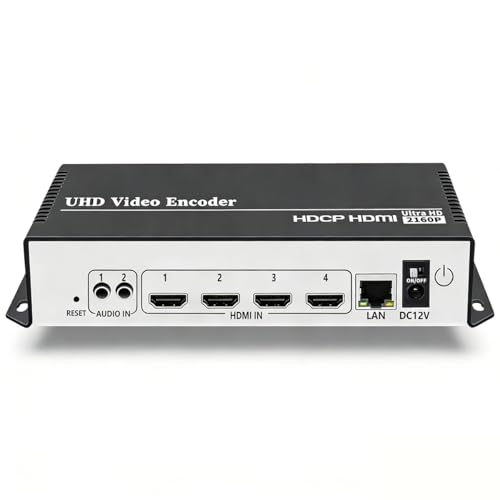
- 4K H.264/H.265 encoding at up to 30fps
- Four simultaneous streams with varied protocols
- Overlays and adjustable video/audio settings
Best For: Server-based HDMI encoding and custom IP workflows
Professional 4K SDI Pick
Blackmagic Streaming Encoder 4K
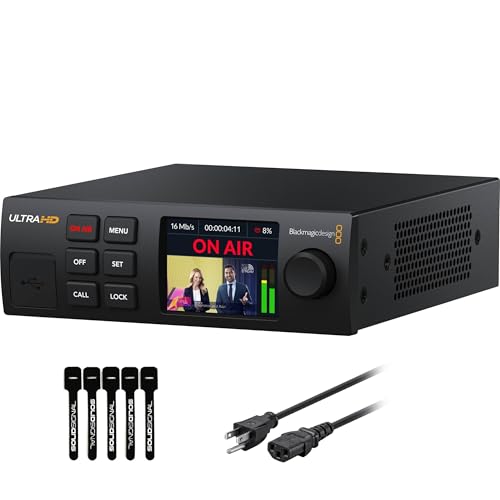
- 12G-SDI encoding up to 2160p60
- Ethernet plus mobile auto-failover
- Camera control, tally, and talkback support
Best For: SDI-based broadcast and multi-camera productions
Flexible HDMI/IP Pick
Magewell Ultra Encode HDMI Plus

- 4K HDMI encoding with loop-through
- NDI|HX and multiple streaming protocols
- Streams and records simultaneously
Best For: HDMI-based live production and IP workflows
Budget 1080p Multi-Stream Pick

- H.265/H.264 encoding up to 1080p60
- Up to four protocol-based output streams
- Text, logo, timestamp, and audio controls
Best For: Affordable HDMI streaming to multiple destinations
Premium Hybrid Production Pick

- HDMI and SDI inputs with source mixing
- 4K H.264/HEVC encoding
- Up to six streams plus recording
Best For: Professional multi-camera productions using mixed HDMI and SDI sources
4K Multi-Platform Value

- 4K HDMI encoding up to 30 fps
- Four simultaneous protocol outputs
- Supports overlays and stream customization
Best For: HDMI workflows distributing one source to multiple platforms
High-Density HDMI Streaming Pick

- Eight HDMI inputs in a compact unit
- Dual streams from each input
- Broad protocol and customization support
Best For: 1080p HDMI multi-camera systems with many independent feeds
Premium Production Hub – YoloBox Extreme
For demanding streaming encoders for multi camera setups, the YoloBox Extreme combines extensive HDMI connectivity, ISO recording, replay, and touchscreen control in a portable all-in-one system. It is designed for productions that need multiple cameras, 4K workflows, and less reliance on a computer.
Best For: Sports, events, churches, and advanced multi-camera productions requiring extensive inputs and recording flexibility.
Pros:
- Connects up to eight HDMI sources with built-in 4K60 scaling.
- Records inputs separately in up to 4K30 or 1080p60, depending on the number of inputs recorded.
- Supports up to six NDI HX inputs and offers real-time replay for six cameras at 1080p60.
- Large 11.2-inch 2.5K OLED touchscreen and stated 10-hour battery life support extended field sessions.
Cons:
- Its larger feature set may be more than simpler streaming setups require.
- ISO recording limits vary by the number of inputs in use.
The YoloBox Extreme is a strong choice when input count, isolated recordings, and live replay matter more than a compact, minimal workflow. Its HDMI, NDI, and battery features make it particularly capable for mobile or event production.
Flexible SDI/HDMI Mixer – Osee GoStream Duet
Osee GoStream Duet Multiple Camera SDI and HDMI Live Stream Video Mixer Switcher
Check Price On AmazonThe Osee GoStream Duet is a practical option among streaming encoders for multi camera setups when a production uses both SDI and HDMI sources. It combines switching, effects, NDI HX support, and direct multi-platform streaming in a compact chassis.
Best For: Live events and small professional productions using mixed SDI, HDMI, NDI, and USB-C sources.
Pros:
- Accepts four SDI, four HDMI, USB-C, NDI HX, and playback sources.
- Offers chroma key, luma key, pattern key, PIP, DSK, and several transition modes.
- Can stream to up to three platforms simultaneously through Ethernet or a smartphone hotspot.
- Supports control from its built-in GUI, Mac or Windows software, and Bitfocus Companion.
Cons:
- NDI HX support requires downloading the latest firmware to unlock the included license.
- It does not present the same all-in-one touchscreen-and-battery emphasis as the YoloBox models.
Choose the GoStream Duet when source compatibility and production control are priorities. Its mix of SDI and HDMI inputs, effects, and control options makes it well suited to installations or crews working across different camera formats.
Portable Social Streaming Kit – YoloBox Ultra
The YoloBox Ultra brings switching, encoding, recording, and monitoring together for creators comparing streaming encoders for multi camera setups. Its four HDMI inputs, vertical and horizontal output support, and network-bonding options make it adaptable for social, event, and remote productions.
Best For: Creators, churches, schools, sports teams, and mobile productions that need horizontal and vertical streaming.
Pros:
- Combines a 4K encoder, switcher, recorder, and eight-inch touchscreen in one device.
- Handles four HDMI sources plus USB-C and USB-A connectivity for more than ten sources.
- Supports up to three horizontal or two vertical platform streams at once.
- Offers ISO recording, NDI and SRT, and cellular bonding across up to five network connections.
Cons:
- Cellular bonding may involve additional charges.
- Its four HDMI inputs provide less direct HDMI capacity than the YoloBox Extreme.
The YoloBox Ultra is a versatile middle ground for users who want a self-contained multi-camera workflow without carrying a laptop. Its vertical-streaming support is especially useful for productions targeting TikTok or Instagram alongside conventional platforms.
Protocol-Rich IP Encoder – URayCoder UHE265-4-4K
The URayCoder UHE265-4-4K takes a more focused approach than an all-in-one switcher. For streaming encoders for multi camera setups where each source is already managed through a production system, it converts HDMI video to network streams and supports a broad range of delivery protocols.
Best For: Fixed HDMI sources, streaming servers, and technical workflows needing broad protocol and customization support.
Pros:
- Supports 4K input and output at up to 30fps, with up to 120fps at 2K and lower resolutions.
- Can output four video streams simultaneously using different protocols.
- Supports RTMP(S), SRT, HLS, WebRTC, UDP, RTSP, ONVIF, and other listed protocols.
- Provides overlays, cropping, rotation, audio-source selection, and adjustable encoding settings.
Cons:
- It has one HDMI port, so multi-camera switching requires separate cameras, switchers, or production hardware.
- It is an encoder rather than a complete touchscreen live-production system.
- Its broad configuration options may be less approachable for buyers seeking one-tap operation.
The UHE265-4-4K is best viewed as a network encoding component rather than a standalone multi-camera studio. It makes sense when protocol flexibility, simultaneous stream outputs, and integration with OBS, vMix, or streaming servers are more important than built-in switching.
Professional 4K SDI Pick – Blackmagic Streaming Encoder 4K
For streaming encoders for multi camera setups, the Blackmagic Design Streaming Encoder 4K is a strong choice when your production uses SDI cameras and needs 4K capability. It encodes H.264 or H.265 video up to 2160p60, supports SRT and RTMP, and works without a separate encoding computer.
Best For: Broadcast-style multi-camera productions using SDI, remote control, and dependable network connectivity.
Pros:
- 12G-SDI input with loop output and automatic standards conversion for HD and Ultra HD sources.
- Ethernet and USB-C 4G/5G tethering with automatic failover.
- Includes camera control, tally, talkback, timecode, closed-caption, REST API, and webcam-output features.
Cons:
- Its SDI-centered design may not suit HDMI-only camera systems.
- Advanced broadcast features can be more than a simple streaming workflow requires.
This is the most production-oriented option in the group, particularly for teams that need SDI compatibility, redundancy, and control-room features alongside direct platform streaming.
Flexible HDMI/IP Pick – Magewell Ultra Encode HDMI Plus
The Magewell Ultra Encode HDMI Plus is a versatile option for streaming encoders for multi camera setups built around HDMI sources. It can encode up to 4096×2160p30, pass the signal through to a display or switcher, and stream through protocols including RTMP, RTMPS, SRT, NDI|HX, HLS, and TS over UDP/RTP.
Best For: HDMI camera, switcher, education, corporate AV, and event workflows that need recording and IP-streaming flexibility.
Pros:
- 4K HDMI input with loop-through for local monitoring or downstream equipment.
- Supports simultaneous streaming and recording to internal, USB, or network storage.
- Offers Ethernet with PoE, Wi-Fi, 4G/5G modem support, overlays, web control, and API access.
Cons:
- 4K encoding is specified up to 30 frames per second rather than 60.
- 4G/5G modem hardware is not included.
With NDI|HX, multiple streaming protocols, and built-in recording, this encoder fits producers who want to bridge HDMI equipment into a modern IP workflow without giving up local monitoring.
Budget 1080p Multi-Stream Pick – URayCoder HDMI Encoder
For budget-conscious streaming encoders for multi camera setups, the URayCoder HDMI to IP encoder provides a practical 1080p solution. It supports H.265 and H.264 encoding at up to 60 fps, accepts HDMI or line-in audio, and can output multiple streams using a broad selection of network protocols.
Best For: HDMI-based 1080p streaming to multiple platforms, IPTV systems, OBS, NVRs, or custom network workflows.
Pros:
- Supports H.265/H.264 encoding with 1920×1080 input and output at up to 60 fps.
- Can output up to four streams using protocols such as RTMP(S), SRT, HLS, RTSP, and UDP/RTP.
- Includes overlays, adjustable bitrate and frame rate, audio options, and remote status viewing.
Cons:
- Limited to 1080p rather than 4K video.
- Provides HDMI connectivity rather than SDI inputs for broadcast cameras.
- Advanced customization and secondary development may require technical support.
This encoder offers considerable protocol and customization support for its class, making it a useful fit when your cameras output HDMI and your production does not require 4K or SDI features.
Premium Hybrid Production Pick – Magewell Ultra Encode AIO
The Magewell Ultra Encode AIO is a strong choice among streaming encoders for multi camera setups when your workflow may include both HDMI and SDI sources. It supports 4K encoding, input mixing, multi-destination streaming, and recording in one rack-mountable unit.
Best For: Multi-camera productions that need HDMI/SDI flexibility, 4K output, overlays, and simultaneous streaming and recording.
Pros:
- Combines HDMI and SDI inputs with picture-in-picture and side-by-side layouts.
- Supports 4K encoding with H.264 or HEVC compression.
- Streams to up to six destinations and records to SD, USB, or network storage.
- Includes overlays, scaling, cropping, PoE, Wi-Fi, and 4G modem support.
Cons:
- Its professional feature set may be more than a basic single-camera stream requires.
- SDI 4K input support is listed up to 30 fps, while HDMI supports up to 60 fps.
For demanding live productions, the Ultra Encode AIO stands out because it combines source flexibility, video processing, recording, and broad protocol support without requiring separate encoder and mixer hardware.
4K Multi-Platform Value – URayCoder UHE265-1L-4K
The URayCoder UHE265-1L-4K is a practical HDMI encoder for multi camera setups that need 4K input and flexible network delivery. Its H.265/H.264 support, four simultaneous output streams, and built-in customization tools make it useful for sending one source to several platforms or servers.
Best For: HDMI-based streaming workflows that need 4K input, multi-platform output, overlays, and protocol flexibility.
Pros:
- Supports 4K input and output at up to 30 fps, plus up to 120 fps at 2K and lower resolutions.
- Can output four streams simultaneously using different protocols.
- Supports RTMP(S), SRT, HLS, RTSP, UDP, WebRTC, and other delivery formats.
- Offers text, logo, timestamp, cropping, rotation, mirroring, and audio adjustments.
Cons:
- Provides an HDMI connection rather than the HDMI-and-SDI combination found on more production-focused encoders.
- 4K frame rate is limited to 30 fps.
This model is best suited to HDMI-centered systems where distribution flexibility matters more than integrated source mixing. Its lifetime warranty and technical support may also appeal to users planning a customized or enterprise-oriented deployment.
High-Density HDMI Streaming Pick – URayCoder UHE265-8
The URayCoder UHE265-8 is designed for multi camera setups that need several HDMI sources handled in a compact encoder. It provides eight HDMI ports, dual stream outputs for each input, and support for common broadcast, streaming, IPTV, and monitoring protocols.
Best For: Multi-input 1080p HDMI installations that need independent streams, protocol choices, and centralized customization.
Pros:
- Includes eight HDMI ports for a high-density multi-camera workflow.
- Each HDMI input can output two streams simultaneously.
- Supports RTMP(S), RTSP, SRT, HLS, UDP, RTP, MP4, FLV, and other formats.
- Provides text, logo, timestamp, cropping, rotation, mirroring, and adjustable output audio.
Cons:
- Listed for 1080p HD workflows rather than 4K encoding.
- Requires cameras or sources with HDMI outputs; SDI inputs are not listed.
- Its compact multi-channel design may require more configuration than a simple single-input encoder.
For venues, IPTV systems, and broadcast-style installations with many HDMI feeds, the UHE265-8 offers useful channel density and per-stream flexibility. Its SDK, API, and CGI documentation also support more integrated control setups.
How We Picked the Best Streaming Encoders for Multi Camera Setups
We focused on the capabilities that matter most when combining multiple cameras into a dependable live workflow. That includes supported video inputs, maximum resolution, encoding formats, streaming protocols, switching or mixing features, recording options, networking, and ease of deployment.
The selection includes all-in-one production systems as well as dedicated HDMI, SDI, and IP encoders. Because these products serve different roles, the best choice is not necessarily the most expensive or highest-resolution model. Compatibility with your existing cameras and distribution platform is just as important.
Quick Comparison
| Setup Type | Best Fit | Features to Prioritize |
|---|---|---|
| Portable multi-camera production | Creators and small crews | Built-in switching, touch controls, battery or mobile connectivity |
| SDI and HDMI event production | Live events and venues | Low-latency inputs, monitoring, reliable switching, long cable support |
| Fixed IP video distribution | Installations and broadcast networks | RTMP, RTSP, SRT, HLS, multicast, and WebRTC support |
| Professional 4K workflows | Production teams and studios | HEVC, NDI, recording, redundant connectivity, and format flexibility |
Key Buying Factors for Streaming Encoders for Multi-Camera Setups
Inputs and Camera Compatibility
Check whether the encoder accepts HDMI, SDI, NDI, or multiple input types. HDMI works well for short cable runs and consumer or prosumer cameras, while SDI is generally better for professional cameras and longer runs. If your cameras output different formats, confirm that the device can handle the required resolutions and frame rates.
Switching, Mixing, and Production Control
A dedicated encoder may simply convert one source into an IP stream. An all-in-one system can also switch cameras, add layouts, mix audio, display graphics, or manage picture-in-picture scenes. Choose integrated production features if you want to reduce the number of devices in your setup.
Resolution, Codecs, and Protocols
4K support provides greater detail and cropping flexibility, but it requires more bandwidth and processing power. H.264 offers broad compatibility, while H.265 or HEVC can reduce bitrate requirements when the destination supports it. For delivery, verify support for the exact protocol you need, such as RTMP, RTMPS, SRT, RTSP, HLS, UDP, or NDI.
Network Reliability and Recording
Look for wired Ethernet when stability matters, plus Wi-Fi, cellular, or dual-network options if you stream from changing locations. SRT can help maintain quality over less predictable connections. Local recording is valuable for backups, editing, and recovery if a live stream is interrupted.
Who Should Buy Which Streaming Encoders for Multi Camera Setups?
Choose an all-in-one encoder if you want camera switching, streaming, recording, and basic production tools in one portable unit. These systems are especially useful for solo operators and small crews.
Choose an SDI/HDMI encoder or mixer for venue, worship, education, and event productions that already use dedicated cameras and need dependable physical inputs.
Choose a dedicated IP encoder for fixed installations, IPTV, remote contribution, or custom broadcast networks. Prioritize protocol support, codec efficiency, and management features over built-in creative controls.
Choose a 4K model when your cameras and destination support 4K and you have sufficient network bandwidth. Otherwise, a reliable 1080p workflow may provide better stability and lower operating costs.