
The right teleprompter can help you maintain eye contact, stay on script, and deliver smoother livestreams without sounding overly rehearsed. This roundup compares 10 options for creators using smartphones, tablets, cameras, and dedicated displays.
From portable foldable designs to larger beam-splitter systems, these teleprompters suit different production styles, screen sizes, and budgets. Use the guide below to narrow your choices before buying.
Best 10 Teleprompters for Livestreaming Picks for 2026
Best Built-In Display

- Built-in 9-inch FHD display
- Shows scripts, chat, or other windows
- Works with cameras, webcams, and smartphones
Best For: Computer-based livestreaming and video calls
Best Tablet-Based Value
NEEWER Basics X12B 12-inch Teleprompter

- 12-inch reflected reading area
- No-assembly aluminum design
- Remote and app control included
Best For: Tablet-based livestreams and presentations
Best Compact Phone Option
LENSGO TC7S Portable Phone Teleprompter

- Folds in about one second
- Works with phones and small tablets
- Includes Bluetooth remote and script app
Best For: Portable phone-based livestreaming
Best for Camera Rigs
SMALLRIG 3646 Tablet Teleprompter

- Supports tablets up to 11 inches
- Fits 49mm–95mm lens diameters
- Includes glare flag and filter adapter
Best For: DSLR, mirrorless, and camcorder rigs
Best All-in-One Setup
NEEWER X11 2-in-1 Teleprompter
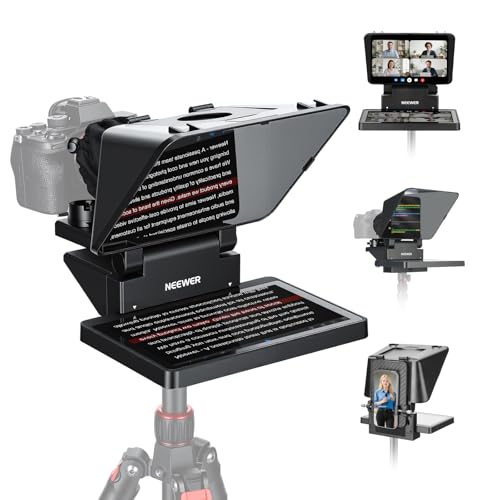
- Built-in 9-inch HD LCD monitor
- Supports phone mirroring and computer display use
- Works with cameras, webcams, and phones
Best For: Livestreamers wanting an integrated monitor and teleprompter
Best Portable Pick
LENSGO TCQI 10P Smartphone Teleprompter

- Lightweight setup with mini tripod
- Bluetooth remote and dedicated prompting app
- Supports vertical and horizontal phone shooting
Best For: On-the-go smartphone creators and mobile livestreamers
Best for Tablets
NEEWER X12 14-Inch Aluminum Teleprompter

- Fits compatible tablets and smartphones
- 75% light-transmission beam-splitter glass
- Includes remote, app support, and carrying case
Best For: Livestreamers and educators using a tablet-based script display
Best for Mobile Creators
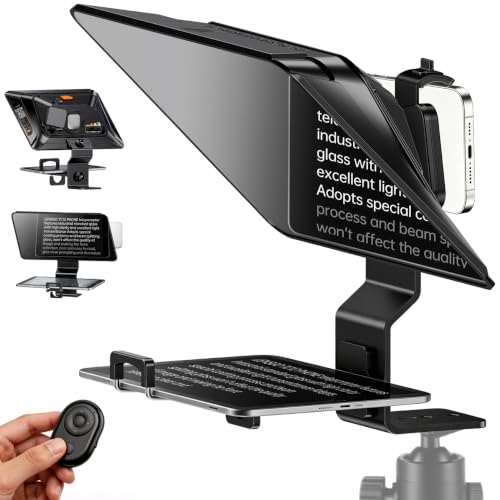
- Large 14.5-inch HD beam-splitter glass
- Supports phones and tablets
- Remote and app control included
Best For: Mobile creators, livestreamers, and walk-and-talk video
Best Compact Camera Option

- Works with phones, DSLRs, and mirrorless cameras
- Quick-release setup takes about two minutes
- App and Bluetooth remote control
Best For: Portable solo recording, livestreams, and presentations
Best for Studio Camera Rigs

- Supports cameras and tablet displays
- Adjustable 50°–90° viewing angle
- Aluminum alloy frame with remote control
Best For: Studio, classroom, and professional camera setups
Best Built-In Display – Elgato Prompter
If you want teleprompters for livestreaming that do not require a separate phone or tablet, the Elgato Prompter is a particularly streamlined option. Its built-in 9-inch FHD display works like an additional monitor, allowing you to place scripts, Twitch chat, or other windows directly in front of the camera.
Best For: Streamers and video-call users who want integrated script and chat access with professional eye contact.
Pros:
- Built-in display eliminates the need for a separate tablet or smartphone screen.
- Can show scripts, Twitch chat, or other computer windows.
- Supports DSLR cameras, webcams, and smartphones, with compatibility for wide lenses.
- Works with PC or Mac and integrates with the Camera Hub app and Stream Deck.
Cons:
- DisplayLink software is required on Mac, and DisplayLink Presenter is required on Android.
- Its computer-controlled setup may be more than needed for simple phone-based prompting.
The Elgato Prompter stands out for replacing the usual tablet-based workflow with a dedicated monitor-style display. It is a strong fit for computer-centered livestreaming, conferencing, and production setups.
Best Tablet-Based Value – NEEWER Basics X12B 12-inch Teleprompter
For creators seeking teleprompters for livestreaming with a larger reflected reading area, the NEEWER Basics X12B uses your iPad or tablet rather than functioning as its own monitor. Its no-assembly aluminum design folds for storage and includes app and remote controls for adjusting scripts during a recording.
Best For: Tablet users making livestreams, online courses, presentations, and tutorial videos.
Pros:
- 12-inch display area reflects text from a compatible tablet and supports reading from up to 10 feet.
- No-assembly design includes a liftable platform to help keep the lens centered.
- Bluetooth remote and NEEWER app control playback, speed, pages, and font size.
- Foldable structure fits into the included carry case.
Cons:
- Not designed for phone shooting, despite support for some smartphone-based app control.
- Does not function as a monitor or provide direct on-screen self-view.
- The remote requires an AAA battery, which is not included.
The X12B is a practical tablet-based choice when you already own an iPad or compatible tablet. Its portable folding design and remote-controlled app make it convenient for structured livestreams and presentations.
Best Compact Phone Option – LENSGO TC7S Portable Phone Teleprompter
The LENSGO TC7S is a compact choice for teleprompters for livestreaming with a phone. Its 9.7-inch foldable design is aimed at mobile creators, while the included Bluetooth remote and TCQI app support scrolling scripts, font adjustments, and multiple ways to add text.
Best For: Mobile livestreamers, vloggers, online teachers, and creators who prioritize quick setup and portability.
Pros:
- Folds in about one second for convenient travel and storage.
- Supports smartphones and smaller tablets, with vertical or horizontal placement.
- TCQI app and Bluetooth remote control playback, speed, pages, fonts, and display colors.
- Scripts can be entered, pasted, imported as TXT files, or added as images.
Cons:
- Its listed compatibility is focused on phones and tablets below 8 inches, rather than larger tablets.
- The compact 7.9-inch screen is smaller than the tablet-oriented options in this roundup.
- Image-based script import is described as less recommended in the supplied notes.
The TC7S makes the most sense for creators who record with a phone and need a lightweight prompting setup. Its fast-folding body and app-based controls are useful for livestreams, interviews, and travel shooting.
Best for Camera Rigs – SMALLRIG 3646 Tablet Teleprompter
For DSLR, mirrorless, and camcorder users comparing teleprompters for livestreaming, the SMALLRIG 3646 provides a more camera-rig-oriented design. It accommodates tablets up to 11 inches, supports a broad range of lens diameters, and includes features such as a top flag and filter adapter for controlled production setups.
Best For: Camera-based livestreamers using an iPad or tablet with a 15mm rail-supported rig.
Pros:
- Accommodates iPads and tablets up to 11 inches for reading within 16.4 feet.
- Supports lenses with diameters from 49mm to 95mm.
- SmallGoGo app can extract editable text from PDFs, pictures, Word documents, and TXT files.
- Includes a top flag to reduce glare and ghosting plus a 4 x 5.65-inch filter adapter.
Cons:
- Not compatible with smartphones.
- Requires a separately available 15mm LWS baseplate or rail support system.
- Lens compatibility depends on focal length; no vignetting is specified at 22mm or longer.
The SMALLRIG 3646 is best suited to a more advanced camera setup rather than casual phone streaming. Its rail requirement adds complexity, but the lens range, glare control, and tablet support make it useful for dedicated production rigs.
Best All-in-One Setup – NEEWER X11 2-in-1 Teleprompter
For creators who want a monitor built into their teleprompter, the NEEWER X11 is a versatile option among teleprompters for livestreaming. Its 9-inch LCD supports computer use and screen mirroring, while the 11-inch beam-splitter glass keeps scripts readable from up to 2.5 meters.
Best For: Livestreamers and video-conference users who want an integrated monitor for cameras, webcams, or phones.
Pros:
- Built-in 9-inch HD LCD can display mirrored phone or tablet content.
- Works as a second monitor with Windows and macOS computers.
- Supports lenses with threads up to 72 mm and focal lengths from 35 to 200 mm.
- Adjustable Arca-type holder and tripod-mounting options provide flexible positioning.
Cons:
- Voice synchronization is not supported.
- Some USB and HDMI connection methods require drivers or specific computer ports.
- Screen mirroring is limited to smartphones with DP protocol support.
The X11 stands out when you want one unit to handle prompting and monitoring without relying on a separate tablet. Check your computer ports, phone compatibility, and lens specifications before buying.
Best Portable Pick – LENSGO TCQI 10P Smartphone Teleprompter
The LENSGO TCQI 10P is a lightweight choice for creators who need teleprompters for livestreaming, vlogging, or mobile video shoots. It includes a mini tripod, magnetic phone base, Bluetooth remote, and a free prompting app for quick setup and hands-free script control.
Best For: Mobile creators making YouTube, TikTok, Zoom, interview, and walk-and-talk content with a smartphone.
Pros:
- Weighs about 0.8 pounds with the tripod and sets up quickly.
- Supports horizontal and vertical shooting by rotating the phone holder.
- Bluetooth remote controls pausing, page speed, and script navigation.
- Includes four shading rings and supports phones under 3.82 inches wide.
Cons:
- Designed for smartphones rather than dedicated cameras or tablets.
- Android phones require the included magnetic ring for attachment.
- The app’s auto-sleep behavior may interrupt longer idle sessions.
With its compact build and included accessories, the TCQI 10P is convenient for creators who move between locations. Its phone-size limit and magnetic mounting system are the main compatibility points to confirm.
Best for Tablets – NEEWER X12 14-Inch Aluminum Teleprompter
The NEEWER X12 is a roomy tablet-based option for teleprompters for livestreaming, online teaching, and vlogging. Its beam-splitter glass offers 75% light transmission, and the reflected script can be read from up to 10 feet when paired with a compatible camera setup.
Best For: Streamers and educators who prefer displaying scripts on an iPad, compatible tablet, or large smartphone.
Pros:
- Fits smartphones and tablets up to 9.84 by 8.68 inches.
- Included Bluetooth remote and app support script navigation and speed control.
- Adjustable hood accommodates various compatible camera and phone lenses.
- Aluminum-alloy construction folds for storage and transport.
Cons:
- Not compatible with wide-angle lenses or lenses with focal lengths under 28 mm.
- Does not fit the 12-inch iPad Pro.
- Requires the NEEWER app for pairing the included remote.
The X12 is a practical choice when a larger script display matters more than the smallest possible footprint. Verify your tablet dimensions and camera focal length, especially if you use a wide-angle livestreaming lens.
Best for Mobile Creators – LENSGO TC12P 14.5-Inch
For creators who need teleprompters for livestreaming and mobile video, the LENSGO TC12P emphasizes a large viewing area, phone and tablet compatibility, and portable shooting. Its adjustable setup supports both horizontal and vertical recording.
Best For: Smartphone, tablet, TikTok, Zoom, YouTube, and walk-and-talk creators.
Pros:
- Large 14.5-inch HD beam-splitter glass can display larger text with fewer scroll breaks.
- Supports smartphones and tablets up to 7.3 inches in landscape orientation.
- Includes a Bluetooth remote and app support for scrolling, playback, speed control, and mirror mode.
- Quick assembly, adjustable front panel, foam light sealing, and anti-glare coated glass suit mobile setups.
Cons:
- Designed for smartphone and tablet shooting rather than DSLR or mirrorless camera setups.
- Its larger glass panel may be less convenient than a compact teleprompter for travel.
The TC12P is a strong choice when readable script text and flexible mobile positioning matter more than a traditional camera-mounted workflow. The included remote and adjustable design make it practical for solo livestreams and longer recordings.
Best Compact Camera Option – 9.3-Inch Teleprompter
This 9.3-inch model is a compact option for teleprompters for livestreaming, interviews, courses, and presentations. It works with smartphones, DSLR cameras, and mirrorless cameras while offering app-based script control and a quick-release setup.
Best For: Solo presenters who want a portable teleprompter for phone or camera recording.
Pros:
- Compatible with smartphones, DSLR cameras, and mirrorless cameras.
- 70/30 beam-splitter glass reflects script text while maintaining camera visibility.
- Quick-release design can be ready in about two minutes.
- Includes an app for iOS and Android plus a Bluetooth remote with up to 10 meters of range.
Cons:
- The 9.3-inch screen is smaller than the display on larger teleprompter models.
- Script management depends on a compatible iOS or Android device and app.
Choose this model if portability and broad camera compatibility are priorities. Its smaller footprint should suit travel and on-location work, while remote controls help presenters manage scripts without reaching toward the prompting device.
Best for Studio Camera Rigs – 13-Inch Camera Teleprompter
For camera-based teleprompters for livestreaming, this 13-inch model provides a wider script display, adjustable positioning, and compatibility with DSLR, mirrorless, and camcorder setups. Its aluminum alloy frame is intended for studio, classroom, office, and on-location use.
Best For: Camera operators, online instructors, interviewers, and presenters using tablets for scripts.
Pros:
- Supports DSLR cameras, mirrorless cameras, camcorders, and tablets.
- HD beam-splitter glass provides clear script reflection while preserving camera image quality.
- Adjustable height and a 50°–90° viewing angle accommodate different camera arrangements.
- Includes wireless remote control and iOS/Android tablet app support for playback and scroll-speed control.
Cons:
- At 7.43 pounds, it is substantially heavier than compact teleprompter designs.
- Its larger package dimensions may make transport and storage more demanding.
- It requires a tablet as the script display device.
This is the most suitable pick here for a more substantial camera workflow. The adjustable viewing range and durable aluminum frame add flexibility, but its weight favors semi-permanent setups over frequent handheld travel.
How We Picked the Best Teleprompters for Livestreaming
We focused on the features that matter during real-time broadcasts: compatibility with cameras and phones, supported screen sizes, glass quality, portability, mounting flexibility, and control options. We also included a range of designs, from smartphone teleprompters for mobile creators to larger tablet and monitor-ready models for studio setups.
A good teleprompter should keep text readable while placing the lens close enough to the reflected script to preserve natural eye contact. Remote controls and app support can make scrolling easier, but the best choice depends on your workflow and the device displaying your script.
Quick Comparison
| Best For | Look For |
|---|---|
| Phone-based livestreaming | Compact housing, magnetic or flexible mounting, Bluetooth remote |
| Tablet scripts | Wide interior, adjustable device support, stable camera attachment |
| Studio cameras | Large beam-splitter glass, lens compatibility, sturdy construction |
| Portable production | Foldable design, low weight, quick setup |
| Professional presentation | Dedicated display, clear glass, smooth app or remote control |
Key Buying Factors for Teleprompters for Livestreaming
Device and Lens Compatibility
Check whether the model supports your camera body, smartphone, webcam, or tablet. Pay close attention to lens diameter, mounting rings, and whether the teleprompter is designed for a phone rather than a camera. Tablet-compatible models generally offer more script space but may require a stronger stand.
Glass Size and Reading Distance
Larger glass is easier to read from farther away and works better for full-size cameras or wide framing. Compact units are convenient for desk setups, but their text area and viewing distance may be limited. Look for low-reflection, clear beam-splitter glass for easier reading under lights.
Power, Apps, and Scrolling Control
Some models use a phone or tablet running a teleprompter app, while others include a built-in monitor or support screen mirroring. Confirm compatibility with your operating system and decide whether you need a Bluetooth remote, wired control, or manual scrolling.
Build Quality and Portability
Aluminum alloy construction can provide better durability, while lightweight folding designs are easier to carry. For frequent livestreaming, prioritize fast assembly and a secure camera mount over features you will rarely use.
Who Should Buy Which Teleprompters for Livestreaming?
Choose a compact smartphone teleprompter if you livestream from a desk, travel frequently, or use a phone as your primary camera. A tablet-ready model is better for longer scripts, interviews, lessons, and presentations where larger text improves readability. Creators using interchangeable-lens cameras should select a model with appropriate lens adapters and a stable tripod mount.
If you produce regular studio broadcasts, consider a larger teleprompter with a dedicated monitor or screen-mirroring support. For occasional use, a foldable model with app and remote compatibility can deliver the essential benefits without taking up much storage space. Before ordering, verify every camera, screen, mount, and app requirement against your existing setup.