
Working in a café, airport, classroom, or shared office can expose sensitive information to nearby viewers. The right privacy screen narrows the viewing angle while helping reduce glare and visual distractions.
We selected 10 options in common 14-inch and 15.6-inch formats, including touchscreen-ready designs, magnetic mounts, removable shields, and flip-over models. Use the guide below to match screen size, aspect ratio, installation style, and everyday viewing needs.
Best 10 Touchscreen Compatible Laptop Privacy Screens Picks for 2026
Best Touchscreen Pick
StarTech.com 14-inch 16:10 Flip-Over Privacy Screen

- Preserves touch responsiveness
- Flip-over design for quick privacy changes
- Limits side viewing to about ±30°
Best For: 14-inch 16:10 touchscreen laptops used in public spaces
Best Four-Way Coverage
ZOEGAA 14-inch 16:10 Privacy Screen

- Offers privacy in four directions
- Reversible glossy and matte surfaces
- Supports slide-mount or adhesive installation
Best For: Compatible 14-inch 16:10 laptops needing all-around privacy
Best for Larger Screens
SightPro 15.6-inch 16:9 Privacy Filter
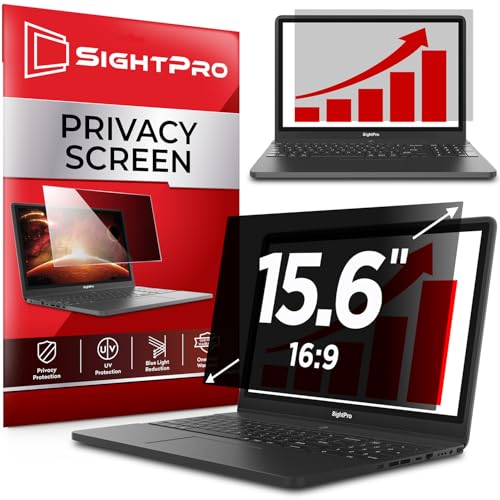
- Fits 15.6-inch 16:9 displays
- Includes adhesive and slide-mount options
- Helps reduce glare and filter UV and blue light
Best For: 15.6-inch 16:9 non-touch laptops used in public spaces
Best Magnetic 14-Inch Fit
PYS 16:10 Laptop Privacy Screen

- Magnetic, removable installation
- Matte anti-glare and blue-light filter
- Not optimized for touchscreens
Best For: 14-inch 16:10 Lenovo, HP, and Dell laptops
Best for Everyday Use
STARY 14-Inch 16:10 Privacy Screen

- Four-way privacy outside a 30-degree angle
- Glossy and matte sides
- Slide-in or adhesive installation
Best For: Users wanting broad privacy coverage on 14-inch 16:10 laptops
Best for 15.6-Inch Laptops
Verponity Magnetic 15.6-Inch Privacy Screen

- Quick magnetic attachment and removal
- Matte anti-glare surface
- Explicitly not for touchscreen laptops
Best For: 15.6-inch 16:9 laptops used in public or professional settings
Best Broad-Angle Privacy
F FORITO 15.6-Inch Privacy Shield

- 360-degree anti-peeping design
- Touch-sensitive and ultra-thin
- Anti-glare, blue-light, and scratch protection
Best For: 15.6-inch 16:9 laptops needing privacy from sides and behind
Best Touchscreen Pick – StarTech.com 14-inch 16:10 Flip-Over Privacy Screen
For shoppers comparing touchscreen compatible laptop privacy screens, this StarTech.com model is a practical 14-inch 16:10 option. Its microlouver design limits side viewing to about ±30 degrees, while the flip-over format lets you quickly move the filter behind the display when privacy is not needed.
Best For: 14-inch 16:10 touchscreen laptops used in public spaces, offices, and travel.
Pros:
- Preserves touch responsiveness.
- Flip-over design avoids uninstalling the filter.
- Does not interfere with top-mounted webcams or sensors.
- Blocks up to 51% of blue light and offers anti-glare benefits.
Cons:
- Only fits 14-inch displays with a 16:10 aspect ratio.
- Light transmittance is listed at 60%, which may affect screen brightness.
This is the most purpose-built choice here for touchscreen use, especially if you need to alternate between private work and screen sharing. Confirm your laptop’s display size and aspect ratio before ordering.
Best Four-Way Coverage – ZOEGAA 14-inch 16:10 Privacy Screen
This ZOEGAA filter is a flexible option among touchscreen compatible laptop privacy screens for 14-inch 16:10 laptops. It offers four-way privacy coverage, reversible glossy and matte surfaces, and two installation methods, though the supplied information does not specifically confirm touchscreen compatibility.
Best For: Users who want broad directional privacy and a choice between glossy and matte viewing.
Pros:
- Provides privacy protection from left, right, above, and below.
- Reversible surfaces offer glossy privacy or matte anti-glare viewing.
- Includes slide mounts and adhesive installation options.
- Includes cleaning and dust-removal accessories.
Cons:
- Not compatible with Surface and MacBook series computers.
- Touchscreen compatibility is not stated in the supplied product notes.
- Requires careful measurement beyond the 14-inch diagonal size.
Choose this model if four-direction privacy matters more than a touchscreen-specific design. Verify the 11 14/16-inch width and 7 6/16-inch height, along with your laptop’s compatibility, before buying.
Best for Larger Screens – SightPro 15.6-inch 16:9 Privacy Filter
SightPro 15.6 Inch 16:9 Laptop Privacy Screen Filter - Computer Monitor Privacy Shield and Protector
Check Price On AmazonFor larger laptops, this SightPro filter is a straightforward privacy option, but it is not optimized for touchscreens. It uses a multilayer film to darken side views, includes both adhesive strips and slide mounts, and adds glare, UV, and blue-light protection.
Best For: 15.6-inch 16:9 non-touch laptops used in travel, open offices, healthcare, or other public settings.
Pros:
- Designed for 15.6-inch 16:9 displays.
- Includes adhesive strips and removable slide mounts.
- Helps reduce glare and filters UV and blue light.
- Suitable for commuters, mobile workers, and business travelers.
Cons:
- Not optimized for touchscreen use.
- Does not block visibility from directly behind the user.
- Screen measurements should be verified rather than relying only on diagonal size.
This is a better fit for shoppers whose priority is screen privacy on a larger traditional laptop rather than touch interaction. Its two mounting choices make it convenient for occasional removal.
Best Eye-Protection Claims – Protescreen 14-inch 16:10 Privacy Filter
This Protescreen model combines a 14-inch 16:10 fit with reversible viewing surfaces and removable installation. It is worth considering among touchscreen compatible laptop privacy screens, but the supplied notes do not explicitly confirm touchscreen support, so touch users should verify compatibility before ordering.
Best For: 14-inch 16:10 laptop users seeking strong light-filtering claims and flexible installation.
Pros:
- Limits the viewing angle to approximately ±30 degrees.
- Reversible matte and glossy sides support different viewing preferences.
- Claims to reduce blue light, UV light, and reflected glare.
- Includes adhesive strips, slide mounts, cleaning cloths, and alcohol wipes.
Cons:
- Touchscreen compatibility is not confirmed in the supplied notes.
- Must match the stated 302 × 188 mm screen dimensions.
- Some installation guidance in the notes is inconsistent about aspect ratio, so measurements are especially important.
This filter stands out for its included installation accessories and reversible finish. Confirm the exact display dimensions and touchscreen suitability before purchase, particularly for a slim-bezel laptop.
Best Magnetic 14-Inch Fit – PYS 16:10 Laptop Privacy Screen
The PYS 14-inch magnetic privacy screen is a practical option for shoppers seeking touchscreen compatible laptop privacy screens, but its supplied specifications specifically say it is not optimized for touchscreens. It fits 14-inch laptops with a 16:10 display and should be matched by measuring the visible screen area rather than relying on diagonal size alone.
Best For: 14-inch 16:10 Lenovo, HP, and Dell laptops used in offices, classrooms, or public spaces.
Pros:
- Magnetic, removable installation with a storage clip and included storage folder.
- Matte anti-glare finish and blue-light blocking support.
- Designed to obscure the display from side-angle viewers while preserving front-facing clarity.
- Includes a cleaning kit and installation kit, with a stated three-year warranty.
Cons:
- Not compatible with MacBooks.
- Not optimized for touchscreen use.
- Requires a precise 16:10 screen measurement: approximately 12 by 7.5 inches.
Choose this PYS filter when your laptop matches the specified 16:10 dimensions and you prioritize easy magnetic removal, glare reduction, and basic privacy protection. Touchscreen users should consider a model explicitly designed for touch interaction instead.
Best for Everyday Use – STARY 14-Inch 16:10 Privacy Screen
The STARY 14-inch filter is worth considering when comparing touchscreen compatible laptop privacy screens, although the supplied information does not confirm touchscreen optimization. It is sized for 14-inch 16:10 laptops, including many Lenovo, HP, Dell, Acer, ASUS, and Samsung models, and requires careful display-area measurement before ordering.
Best For: Users who want broad four-way privacy coverage and the choice of glossy or matte viewing surfaces.
Pros:
- Claims four-way privacy protection, blocking views from the top, bottom, left, and right outside a 30-degree angle.
- Reversible glossy and matte sides let users prioritize stronger privacy or reduced glare.
- Offers slide-in or adhesive installation, with removable and reusable functionality.
- Claims 98% blue-light and UV blocking plus scratch resistance.
Cons:
- Not compatible with MacBook or Surface devices.
- Touchscreen compatibility is not specified in the supplied notes.
- Diagonal size alone is not recommended for fit verification; dimensions are approximately 11.89 by 7.40 inches.
The STARY stands out for shoppers who want more comprehensive viewing-angle coverage than a typical side-only filter and appreciate finish flexibility. Confirm both the laptop’s display dimensions and touchscreen needs before purchasing.
Best for 15.6-Inch Laptops – Verponity Magnetic 15.6-Inch Privacy Screen
This 15.6-inch magnetic filter is not a touchscreen compatible laptop privacy screen: the supplied compatibility notes explicitly exclude touchscreen laptops. For compatible 16:9 Dell, HP, Lenovo, Acer, ASUS, and Samsung laptops, it combines quick magnetic attachment with a matte surface and side-view privacy protection.
Best For: 15.6-inch 16:9 business, healthcare, legal, and education laptops used in public spaces.
Pros:
- Magnetic design attaches and removes quickly without adhesive residue.
- Claims a roughly 26-degree privacy angle for blocking side views while keeping the front view clear.
- Matte anti-glare surface, plus claimed 98% blue-light and 99% UV blocking.
- Washable and reusable, with a storage folder for portability.
Cons:
- Not compatible with touchscreen laptops or MacBooks.
- Direct viewing from directly behind cannot be blocked.
- Requires a precise 16:9 fit of approximately 13.56 by 7.625 inches.
This Verponity filter is a sensible fit for standard 15.6-inch 16:9 laptops when convenient magnetic removal and glare reduction matter. It is unsuitable for touchscreen systems, so verify both the display dimensions and device type before ordering.
Best Magnetic Fit – Peslv 14-Inch 16:9 Privacy Screen
The Peslv is a practical option for shoppers seeking touchscreen compatible laptop privacy screens for a 14-inch, 16:9 display. Its magnetic attachment makes it quick to install and remove, but careful screen measurement is essential before ordering.
Best For: 14-inch laptops with a 16:9 display used in public spaces, offices, or while traveling.
Pros:
- Magnetic design allows quick installation and removal.
- Limits side visibility from the left and right 30-degree angles.
- Reduces blue light, UV light, glare, and everyday scratches.
- Includes a storage clip, cleaning kit, adhesive magnets, and cleaning cloth.
Cons:
- Only fits screens with a display area measuring about 12.2 by 6.9 inches.
- Does not block viewing from directly in front.
- Compatibility depends on a 16:9 aspect ratio, not simply the laptop’s advertised screen size.
Choose this model if convenient magnetic mounting matters more than universal compatibility. Confirm the visible screen dimensions before purchase, especially if your laptop has a narrow bezel or unusual display layout.
Best Touchscreen-Friendly Film – 15.6-Inch Anti-Glare Privacy Screen
This 15.6-inch film is designed for shoppers comparing touchscreen compatible laptop privacy screens with anti-glare and blue-light filtering features. It uses electrostatic adsorption for installation and is intended for 16:9 laptops, including many HP, Lenovo, Dell, Acer, ASUS, and Samsung models.
Best For: 15.6-inch 16:9 touchscreen laptops used by commuters, remote workers, students, and professionals.
Pros:
- Designed to remain compatible with touchscreen operation.
- Limits side visibility beginning around 25 degrees.
- Reduces blue light and UV exposure while minimizing glare, reflections, fingerprints, and smudges.
- Electrostatic installation includes cleaning accessories and maintains clear front viewing.
Cons:
- Not intended for MacBooks.
- Requires a 15.6-inch display measuring approximately 13.56 by 7.63 inches.
- Lower brightness improves side privacy but may reduce viewing clarity.
This is a strong fit when touchscreen usability and a matte, comfortable viewing surface are priorities. Measure the display area and verify the 16:9 format before applying the film.
Best Broad-Angle Privacy – F FORITO 15.6-Inch Privacy Shield
The F FORITO privacy shield stands out among touchscreen compatible laptop privacy screens for its stated 360-degree anti-peeping design. It is made for 15.6-inch, 16:9 laptops and combines touchscreen sensitivity with anti-glare, anti-blue-light, and scratch-resistant protection.
Best For: 15.6-inch HP, Lenovo, Dell, Acer, ASUS, and ThinkPad laptops used in offices, classrooms, or shared spaces.
Pros:
- 360-degree privacy design restricts viewing from the sides and behind.
- Touch-sensitive construction supports touchscreen use.
- Provides anti-glare, anti-blue-light, anti-reflection, and scratch-resistant features.
- Ultra-thin design is intended to allow the laptop to close without interference.
Cons:
- Requires a 15.6-inch 16:9 display measuring about 13.6 by 7.6 inches.
- Its broader privacy coverage may not suit users who need an unobstructed view from nearby angles.
- Precise measurement is necessary despite the listed brand compatibility.
Consider this model if privacy from more than just side viewers is your main concern. Its touchscreen support and thin profile add everyday convenience, while the fit remains dependent on the exact screen dimensions.
How We Picked These Touchscreen Compatible Laptop Privacy Screens
We focused on screens that clearly identify their supported laptop dimensions and aspect ratios, with extra attention to models designed for touch use or removable installation. We also compared mounting systems, privacy coverage, glare reduction, blue-light filtering claims, and compatibility details. Because a privacy filter can only fit correctly when its dimensions match the display, screen size and aspect ratio received more weight than secondary features.
Product listings and specifications can change, so verify the exact measurements, attachment method, and touchscreen compatibility before ordering.
Quick Comparison
| What to compare | Best fit | Why it matters |
|---|---|---|
| 14-inch 16:10 | Many newer business laptops | Matches taller displays such as 1920×1200 panels |
| 15.6-inch 16:9 | Common mainstream laptops | Fits traditional Full HD laptop screens |
| Magnetic attachment | Frequent removal | Fast to install and take off, but requires compatible bezels |
| Flip-over design | Convenient privacy on demand | Allows quick switching between private and unrestricted viewing |
| 360-degree privacy | Maximum side-angle protection | Useful in crowded public spaces, though the display may appear darker |
Key Buying Factors
Size and Aspect Ratio
Do not choose by diagonal size alone. Measure the visible display area and check whether the laptop uses 16:10 or 16:9. A 14-inch 16:10 filter will not properly fit a 14-inch 16:9 screen, and a mismatch can leave exposed edges or cover part of the display.
Touchscreen Compatibility
Look for a model explicitly described as touchscreen-compatible or designed to sit away from the active panel. Adhesive strips, magnetic tabs, and rigid overlays can affect touch response if installed incorrectly. Confirm that the mounting system does not interfere with the webcam, bezel, hinge, or screen-closing clearance.
Attachment and Removal
Magnetic and removable filters are practical for laptops used both at home and on the road. Flip-over designs are convenient when privacy is needed only occasionally. Adhesive mounts can feel more secure but may be less convenient to remove and reposition.
Visibility, Glare, and Brightness
Privacy protection usually reduces off-angle visibility, but it can also narrow the comfortable viewing angle for the person directly in front of the screen. Anti-glare coatings help in bright environments, while blue-light filtering may be useful for comfort but should not be treated as a substitute for good lighting or screen-break habits.
Who Should Buy Which Touchscreen Compatible Laptop Privacy Screens?
Choose a 14-inch 16:10 model for compatible business and productivity laptops with taller displays. Select a 15.6-inch 16:9 option for the many HP, Acer, ASUS, and similar laptops using standard Full HD panels. Travelers who remove the filter regularly should prioritize magnetic or removable designs. Users working in busy public places may prefer stronger 360-degree coverage, while home-office users may find a flip-over screen more convenient. If touch accuracy, webcam clearance, or a slim bezel is especially important, prioritize a model that explicitly lists touchscreen support and verify the measurements before purchasing.