
The best capture cards make it easier to stream console gameplay, record high-quality footage, or use a camera as a webcam. The right model depends on your console, resolution, refresh rate, and connection type.
Our selection includes portable USB devices, high-performance internal cards, camera-focused options, and affordable HDMI capture hardware for different streaming and recording needs.
Best 10 Capture Cards Picks for 2026
Best All-Rounder

- 4K60 capture with HDR10 support
- 1440p120 and 1080p240 passthrough
- Analog audio input and USB-C connectivity
Best For: Console players seeking flexible 4K capture and high-refresh passthrough
Best Plug-and-Play Pick
AVerMedia Live Gamer Extreme 3

- 4K30 capture with 4K60 HDR passthrough
- VRR passthrough up to 1440p120
- No drivers or external power required
Best For: Streamers wanting simple setup and direct audio connections
Best Internal Upgrade

- 8K60 passthrough with 4K60 HDR10 capture
- HDMI 2.1 and up to 1080p240 recording
- VRR support and dual-PC compatibility
Best For: Windows creators building high-refresh or dual-PC setups
Best for Ultrawide Gaming

- 4K60 capture with HDR and VRR passthrough
- Supports 3440x1440 and 2560x1080 inputs
- RGB24 and 5.1 audio support on Windows
Best For: Ultrawide PC gamers and advanced OBS streaming setups
Premium Camera Conversion

- 1080p60 and 4K capture support
- Works with cameras and compatible iPhones
- Ultra-low latency with PC, Mac, and iPad support
Best For: Creators upgrading to a dedicated camera setup
Budget-Friendly Versatility

- 1080p60 output with up to 4K30 input
- Plug-and-play USB-C and USB 3.0 design
- Supports consoles, cameras, OBS, Zoom, and more
Best For: Portable everyday HDMI capture and streaming
Console Streaming Pick

- 4K60 HDR passthrough
- 1080p60 capture for streaming and recording
- Works with major consoles, computers, and iPad
Best For: Console gamers who want high-resolution passthrough
Top 2K Loop-Out Pick

- 2K recording at 30fps and 1080p at 60fps
- 4K input and HDMI loop-out
- USB-A/USB-C plug-and-play design
Best For: Gamers and creators wanting 2K capture with 4K passthrough
Best Portable Starter Option
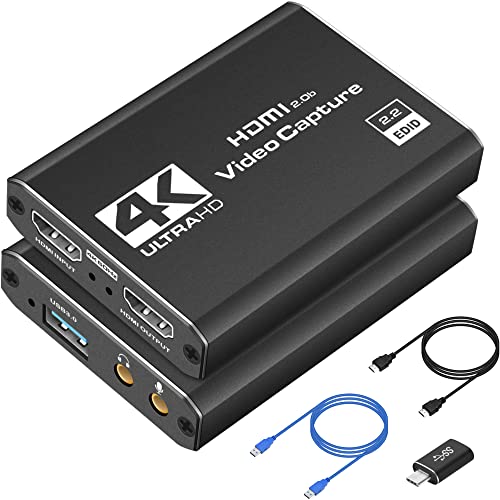
- 1080p capture at 60fps
- 4K HDMI preview and passthrough
- Includes useful connection adapters
Best For: Beginners and mobile creators streaming from consoles or cameras
Best for Mic Commentary

- 1080p HDMI capture over USB 3.0
- HDMI loop-out for gameplay
- 3.5mm TRS microphone input
Best For: Gamers adding external voice commentary to live streams
Best All-Rounder – Elgato 4K S
The Elgato 4K S is a versatile external option among capture cards, combining 4K60 recording with high-refresh-rate passthrough. It supports consoles including PS5, Xbox Series X/S, and Switch 2, while its analog audio input can help capture game chat or commentary.
Best For: Console players who want 4K60 capture, HDR10 support, and flexible cross-platform compatibility in a compact USB-C device.
Pros:
- Captures gameplay at up to 4K60 with HDR10 support.
- Supports 1440p120 and 1080p240 passthrough for responsive play.
- Includes a 3.5mm analog audio input for chat or commentary.
- Works with Windows, macOS, and iPadOS devices with compatible hardware.
Cons:
- Listed capture resolution details may require checking software and setup compatibility.
- Windows use requires Windows 11, while macOS requires version 13 or later.
Choose the 4K S if you want a straightforward external capture card with strong console support, HDR capability, and high-refresh passthrough without moving to an internal PCIe installation.
Best Plug-and-Play Pick – AVerMedia Live Gamer Extreme 3
The AVerMedia Live Gamer Extreme 3 is one of the more convenient capture cards for streaming setups. It records at 4K30, passes through 4K HDR at 60Hz, supports VRR at selected resolutions, and connects to compatible systems without extra drivers or external power.
Best For: Streamers who prioritize simple setup, low-latency gameplay, and direct headset or microphone connections.
Pros:
- Plug-and-play operation requires no extra drivers or external power.
- Captures at 4K30 while supporting 4K60 HDR passthrough.
- Supports VRR passthrough at 1440p120 or 1080p120.
- Provides 3.5mm audio input and output for chat and commentary.
Cons:
- Capture is limited to 4K30 rather than 4K60.
- Requires a computer with a USB 3.2 Gen 1 Type-C port.
This model is a practical fit for creators who want quick compatibility with OBS, Twitch, and major consoles. Its 4K60 HDR passthrough keeps gameplay smooth even though recorded footage tops out at 4K30.
Best Internal Upgrade – Elgato 4K Pro
The Elgato 4K Pro is an internal PCIe capture card designed for demanding gaming and broadcast setups. Its HDMI 2.1 connections support 8K60 passthrough, 4K60 capture, up to 1080p240 recording, and VRR for smooth, low-latency play.
Best For: Windows users building a high-end or dual-PC streaming system that needs HDMI 2.1 and advanced high-refresh support.
Pros:
- Supports 8K60 passthrough and 4K60 HDR10 capture.
- Handles up to 1080p240 recording through HDMI 2.1 connectivity.
- Includes VRR passthrough for smoother gameplay.
- Works with major streaming and conferencing applications, including OBS, Twitch, Zoom, and Teams.
Cons:
- Requires a Windows 10 computer with an available PCIe slot.
- Internal installation is less portable than USB capture cards.
- The supplied minimum requirements list 1080p capture capability despite the product’s higher capture features.
The 4K Pro makes the most sense when your PC can accommodate an internal card and your setup benefits from HDMI 2.1 bandwidth. It is especially compelling for high-refresh gaming and dual-PC broadcasting.
Best for Ultrawide Gaming – AVerMedia Live Gamer Ultra S
The AVerMedia Live Gamer Ultra S stands out among capture cards for its combination of 4K60 capture, HDR and VRR passthrough, and ultrawide input support. It can handle 3440×1440 and 2560×1080 sources, while Windows users can access RGB24 full-color and 5.1-channel audio features through the supported workflow.
Best For: Gamers and creators using ultrawide monitors, high-refresh consoles or PCs, and advanced OBS-based audio setups.
Pros:
- Captures at 4K60 and supports 1440p144 or 1080p240 capture modes.
- Offers 4K60 HDR and VRR passthrough for smooth gameplay.
- Supports 21:9 ultrawide input resolutions, including 3440×1440.
- Provides RGB24 full-color and 5.1-channel audio support on Windows through compatible software.
Cons:
- Some advanced features depend on Windows and Streaming Center or its OBS plug-in.
- Requires compatible HDMI equipment and a USB 3.2 Gen 1 connection.
This is the strongest choice in the group for ultrawide users and creators who want more specialized capture options. Its broad resolution support and 4K60 workflow make it suitable for both console and PC streaming.
Premium Camera Conversion – Elgato Cam Link 4K
For creators who want to turn a DSLR, mirrorless camera, camcorder, action cam, or compatible iPhone into a high-quality webcam, the Elgato Cam Link 4K is one of the more capable capture cards to consider. It connects over USB 3.0 and supports up to 1080p60 or 4K capture, depending on the camera and model configuration.
Best For: Streamers and video creators using a dedicated camera for live video, recording, meetings, or iPad monitoring.
Pros:
- Supports 1080p60 and 4K capture options.
- Works with cameras, camcorders, action cameras, and compatible iPhones.
- Ultra-low latency helps keep audio and video synchronized.
- Compatible with PC, Mac, iPad, OBS, Zoom, and Discord.
Cons:
- Requires a compatible camera and suitable computer setup.
- 4K support depends on the specific Cam Link model and connected equipment.
The Cam Link 4K is a strong pick when image quality and camera flexibility matter more than having a basic, budget-oriented HDMI capture device. Its compact design and broad software compatibility also suit mobile or desktop production setups.
Budget-Friendly Versatility – Guermok 4K USB Capture Card
The Guermok 4K USB capture card is a practical option for recording or streaming HDMI sources through a computer. With USB 3.0 transmission, USB-C and USB connectivity, and support for up to 1080p60 output, it fits gaming, meetings, teaching, and portable live-streaming setups.
Best For: Buyers seeking a compact plug-and-play capture card for consoles, cameras, online meetings, and general HDMI recording.
Pros:
- Supports up to 1920×1080 at 60Hz output and 2K at 30Hz.
- Includes USB-C and USB 3.0 connection options.
- Requires no additional drivers or external power supply.
- Works with Windows, Mac, Linux, Android, OBS, Zoom, and common HDMI sources.
Cons:
- Capture software is required; it does not directly cast to a monitor or TV.
- USB-C-to-HDMI conversion is not supported as a normal operating direction.
- Resolution and audio behavior can vary with adapters, formats, and software settings.
This Guermok model offers broad compatibility and easy portability, making it useful for everyday capture needs. Use a USB 3.0 port when possible, and expect to configure or restart OBS after changing audio settings.
Console Streaming Pick – Elgato Game Capture Neo
The Elgato Game Capture Neo is designed for console players who want a compact route into game recording and streaming. It provides 4K60 HDR passthrough while capturing Full HD gameplay at 1080p60, so you can keep a high-resolution gaming display while sending video to a computer or iPad.
Best For: Console gamers using PlayStation, Xbox, Switch, or compatible mobile devices for low-latency streaming and recording.
Pros:
- Supports 4K60 HDR passthrough without limiting the console display resolution.
- Captures Full HD video at 1080p60.
- Compatible with PlayStation, Xbox, Switch, iPhone, PC, Mac, and iPad setups.
- Works with Elgato software, QuickTime, OBS Studio, Discord, Teams, and Zoom.
Cons:
- Capture resolution is listed as 1080p, rather than 4K recording.
- Its primary design is for gaming and compatible console workflows.
For gamers, the Game Capture Neo balances a small footprint with useful passthrough support. It is especially appealing when preserving 4K HDR gameplay on the display is important while streaming or recording at 1080p60.
Top 2K Loop-Out Pick – UGREEN 2K Capture Card
For shoppers comparing capture cards, the UGREEN model stands out for 2K recording at 30fps, 1080p recording at 60fps, and 4K input with HDMI loop-out. Its USB-A and USB-C support, broad device compatibility, and plug-and-play setup make it a flexible choice for gaming and streaming.
Best For: Gamers and creators who want 2K recording with 4K passthrough and low-latency monitoring.
Pros:
- Captures up to 2K at 30fps or 1080p at 60fps.
- Supports 4K@30Hz input and loop-out for real-time preview.
- Includes USB 3.0 Type-C and Type-A connectivity with no external power required.
- Works with Windows, macOS, Linux, Android, and devices including Switch, PS5, Xbox, and Meta Quest.
Cons:
- Does not record 4K video.
- iPhone cannot be used as a data acquisition device.
- PS4 and PS5 require HDCP to be turned off.
This is a strong all-around option when 2K capture and 4K loop-out matter more than native 4K recording. The aluminum casing and 24-month warranty are useful extras for frequent use.
Best Portable Starter Option – Dcyfol 1080p Capture Card
This Dcyfol device is one of the more approachable capture cards for streaming 1080p footage at 60fps. It offers plug-and-play USB 3.0 operation, HDMI passthrough, and included adapters and cables for flexible setup with consoles, cameras, and computers.
Best For: Beginners and traveling creators who need straightforward 1080p capture from HDMI devices.
Pros:
- Captures 1080p video at 60fps while accepting 4K HDMI input for preview.
- Works with OBS Studio, Streamlabs, XSplit, and compatible Windows or Mac systems.
- Supports passthrough for real-time gameplay with low latency.
- Compact design includes HDMI, USB, and USB-to-Type-C connection accessories.
Cons:
- Requires a USB 3.0 port.
- 4K video is recorded at 1080p 60fps rather than natively at 4K.
- The listed warranty is only one year.
Choose this model if easy setup and portability are priorities. Its 1080p output is well suited to mainstream streaming, while the 4K preview and passthrough add flexibility without implying 4K recording.
Best for Mic Commentary – VIXLW 1080p HDMI Capture Card
Among capture cards aimed at gaming commentary, this VIXLW model adds a 3.5mm microphone input to standard 1080p capture. It uses USB 3.0, HDMI loop-out, and automatic device detection, making it a practical fit for live streaming through OBS, Twitch, YouTube, and similar platforms.
Best For: Gamers who want to add external microphone commentary while capturing 1080p HDMI video.
Pros:
- Captures HDMI video at up to 1080p.
- HDMI loop-out supports playing with no stated gameplay delay.
- Plug-and-play setup requires no driver or external power supply.
- Includes a microphone input for external commentary and supports Windows, Mac OS, and Linux.
Cons:
- Capture resolution is limited to 1080p.
- The microphone input accepts only a 3.5mm TRS standard microphone headset.
- Requires a computer with USB 3.0.
This is a sensible choice for console streamers who value simple operation and direct voice commentary. It is less suitable for buyers specifically seeking 2K or 4K recording, but its loop-out and mic input cover the essentials for 1080p gameplay broadcasts.
How We Picked These Capture Cards
We focused on Capture Cards that cover the most common gaming and content-creation setups, from PS5, Xbox Series X/S, and Switch 2 to DSLR cameras and camcorders. We considered supported input and passthrough resolutions, frame rates, HDR compatibility, connection type, ease of setup, and whether each card suits live streaming, local recording, or camera capture.
Because specifications vary significantly, buyers should distinguish between passthrough resolution and the resolution the card actually records or sends to streaming software. A device may pass through 4K video while capturing at 1080p, which can still be an excellent choice for many broadcasts.
Quick Comparison
- Best for current consoles: Elgato 4K S and AVerMedia Live Gamer Ultra S.
- Best for a desktop PC: Elgato 4K Pro Internal Capture Card.
- Best for camera input: Elgato Cam Link 4K.
- Best portable choices: Elgato Game Capture Neo and compact USB 3.0 models.
- Best for budget streaming: Guermok, UGREEN, and generic 1080p60 HDMI capture devices.
Key Buying Factors for Capture Cards
Resolution and Frame Rate
Choose a card based on the footage you want to produce, not only the maximum passthrough specification. For smooth gameplay, 1080p at 60 frames per second is a practical minimum. If you want 4K recording, verify that the card supports 4K capture at the desired frame rate. Competitive players should also check whether high-refresh passthrough is available while recording at a lower resolution.
Passthrough and HDR
Passthrough sends the video signal to your TV or monitor with minimal disruption. Look for 4K passthrough, HDR support, and variable-refresh-rate compatibility if you play on a modern console. These features matter most when you want to preserve the display experience while capturing gameplay.
Connection and Compatibility
USB 3.0 or faster is generally preferable for external Capture Cards, while internal PCIe cards can provide a more integrated desktop setup. Confirm that your computer has the required port and that your operating system, streaming software, and HDMI devices are supported. HDCP-protected content typically cannot be captured.
Audio and Setup
Check how the card handles HDMI audio, microphone input, party chat, and separate audio sources. Plug-and-play models simplify setup, but advanced streamers may prefer software controls, multiple inputs, or dedicated audio routing.
Who Should Buy Which Capture Cards?
Console streamers should prioritize reliable 4K passthrough, low latency, HDR, and VRR support. PC creators who stream from a second computer may benefit from an internal PCIe model with higher bandwidth. Camera users should choose a camera-focused HDMI-to-USB adapter and confirm that their camera offers clean HDMI output.
If you mainly need occasional 1080p60 streaming, an affordable USB 3.0 model can be sufficient. Choose a premium capture card when you need 4K recording, advanced passthrough, high-refresh gaming, or the most dependable performance for frequent broadcasts.