
The best smart home hubs with touchscreen displays combine voice control with an at-a-glance interface for lights, cameras, media, calendars, and household routines. The right model depends on whether you prioritize Alexa or Google Assistant, wall-mounted control, family planning, or broader device compatibility.
We’ve gathered ten touchscreen hubs and smart displays in different sizes and price categories, including dedicated control panels, family calendars, and multifunctional assistant displays. Use the guide below to narrow the options by ecosystem, screen size, connectivity, and daily use.
Best 10 Smart Home Hubs with Touchscreen Displays Picks for 2026
Best All-Around Pick

- 11-inch Full-HD touchscreen with more viewing area
- Built-in hub controls compatible smart home devices
- Spatial audio, video calls, and privacy controls
Best For: Alexa households wanting entertainment and smart home control in one display
Best Family Command Center

- Large Full-HD touchscreen for shared household planning
- Google Play supports multiple calendar and productivity apps
- Wall or countertop setup with no subscription requirement
Best For: Families wanting a customizable shared calendar and home dashboard
Best In-Wall Control Panel
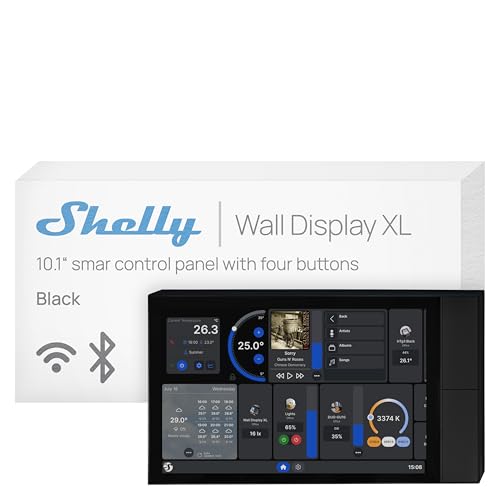
- 10.1-inch touchscreen with built-in 5A relay
- Four customizable buttons for scenes and appliances
- Works with Shelly, Home Assistant, Alexa, Google, and HomeKit
Best For: Installed smart home control in homes, apartments, and commercial spaces
Best International Setup

- 10-inch display with multilingual compatibility
- Universal power adapter supports international use
- Suitable for tabletop or wall placement
Best For: International users needing a multilingual Google smart display
Best Integrated Control Panel

- 4.7-inch touchscreen control panel
- Energy, camera, thermostat, and lighting controls
- Customizable security modes with alerts
Best For: Compact, centralized smart-home control
Best Family Organizer
Westsee 15.6-Inch Digital Calendar

- Large touchscreen for shared family planning
- Calendar, chores, meals, rewards, and grocery lists
- No subscription for core functions
Best For: Family schedules and household routines
Best for Multi-Camera Monitoring

- 8-inch touchscreen security display
- Four simultaneous live camera feeds
- Local event replay and security summaries
Best For: Centralized eufy property monitoring
Best for Immersive Control

- 10-inch HD touchscreen
- Built-in 6.5 MP Nest Cam
- 50W stereo audio system
Best For: Large-screen smart-home control, monitoring, and entertainment
Best Compact All-Rounder

- Compact 7-inch touchscreen
- Works with 200+ compatible devices
- Supports YouTube, Spotify, and Google Photos
Best For: Everyday smart-home control in compact spaces
Best for Simple, Compact Setup

- 7-inch compact display
- Voice and touch smart-home control
- English language can be enabled
Best For: Compact rooms and buyers comfortable with an international model
Best All-Around Pick – Echo Show 11
The Echo Show 11 is a versatile choice among smart home hubs with touchscreen displays. Its vibrant Full-HD screen, built-in smart home hub, Alexa support, camera controls, and spatial audio make it useful for both everyday tasks and entertainment.
Best For: Households wanting a large Alexa display for smart home control, video calls, recipes, calendars, and streaming.
Pros:
- 11-inch Full-HD touchscreen provides 60% more viewing area than the Echo Show 8 (2025 release).
- Controls compatible lights, thermostats, cameras, and other devices without a separate hub.
- Spatial audio, centered auto-framing camera, and photo slideshow add entertainment and convenience.
- Includes multiple microphone and camera privacy controls.
Cons:
- Some personalized Alexa+ features depend on the Alexa+ experience.
- Its larger footprint may require more counter space.
Choose this model if you want one display to handle home control, family organization, entertainment, and calls. It is less specialized than a dedicated family calendar or in-wall control panel, but offers a broader mix of features.
Best Family Command Center – Mazera 21.5-Inch Smart Hub
The Mazera is a strong option for shoppers seeking smart home hubs with touchscreen displays that also organize household routines. Its large Full-HD panel runs apps through Google Play, allowing families to combine calendars, planners, reminders, widgets, and smart home controls without subscribing to one proprietary calendar system.
Best For: Busy families needing a large shared dashboard for schedules, chores, meal plans, reminders, photos, and compatible smart home apps.
Pros:
- Large 21.5-inch anti-glare Full-HD touchscreen is easy to view across a room.
- Google Play access supports Google Calendar, Apple Calendar, Outlook, Cozi, and other apps.
- Works as a wall-mounted or countertop display with the included metal stand.
- Can display photos, widgets, weather, notes, and smart home controls.
Cons:
- Its large size may be excessive for smaller spaces.
- Hands-free features depend on supported Google Gemini capabilities and compatible services.
The Mazera stands out when visibility and flexibility matter more than compactness. It is best viewed as a household command center with smart home capabilities rather than a conventional voice-first smart display.
Best In-Wall Control Panel – Shelly Wall Display XL
The Shelly Wall Display XL takes a more permanent approach to smart home hubs with touchscreen displays. Designed for installation in a standard electrical wall box, it combines a 10.1-inch touchscreen, built-in relay, customizable buttons, and support for Shelly, Home Assistant, Alexa, Google, and HomeKit ecosystems.
Best For: Homeowners and installers wanting a dedicated, wall-mounted control point for lights, appliances, scenes, and audio.
Pros:
- 10.1-inch touchscreen provides centralized control from the wall.
- Built-in 5A relay and four customizable buttons support appliance and lighting control.
- Integrates with Shelly Smart Control and Home Assistant, plus Alexa, Google, and HomeKit.
- Can control Bluetooth or Sonos audio and supports automations and schedules.
Cons:
- Requires wall installation and a neutral wire.
- Its built-in relay is rated at 5A, which may limit some appliance applications.
- It is less portable and less entertainment-focused than countertop displays.
This is the practical pick for a dedicated control station that blends into a room instead of occupying a counter. Confirm wiring and load requirements before installation, especially for retrofit projects.
Best International Setup – Google Nest Hub Max
The Japan-model Google Nest Hub Max is a consideration for shoppers comparing smart home hubs with touchscreen displays across languages or locations. This bundle includes English, Spanish, French, Japanese, and global language compatibility, along with a universal power adapter for international use.
Best For: International users or travelers who want a multilingual 10-inch Google smart display with flexible placement.
Pros:
- Supports English, Spanish, French, Japanese, and global language compatibility.
- Includes a universal power adapter for international outlets.
- 10-inch display fits on a nightstand, shelf, countertop, or wall.
- Language settings can be changed to suit different users or locations.
Cons:
- This is a Japan model, so buyers should verify regional compatibility and warranty expectations.
- The supplied notes provide fewer smart home and app details than the other products.
- Its 5.3-pound weight may make wall placement less convenient.
The Nest Hub Max is most compelling when multilingual operation and international power compatibility are priorities. For buyers focused primarily on detailed home automation features, confirm regional service support before purchasing.
Best Integrated Control Panel – SONOFF NSPanel Pro 120
The SONOFF NSPanel Pro 120 is a practical choice for shoppers seeking smart home hubs with touchscreen displays and a compact wall-control format. Its 4.7-inch screen brings lighting, thermostat adjustments, energy monitoring, compatible camera feeds, and security controls into one interface.
Best For: Homeowners who want a compact touchscreen for everyday controls, energy tracking, camera viewing, and basic security monitoring.
Pros:
- Combines lighting, thermostat, camera, energy, and security controls in one panel.
- Supports three customizable security modes with alarms and phone notifications when sensors trigger.
- Tracks daily energy consumption over a week for supported devices.
- Can save webpages for quick access to music, videos, or other content.
Cons:
- The 4.7-inch display is smaller than the screens on the other products here.
- Camera viewing is limited to the four supported camera types.
Choose this panel when you value a focused, always-available control point rather than a large family-planning display. Its feature mix is especially useful for homes already using compatible SONOFF and Zigbee devices.
Best Family Organizer – Westsee 15.6-Inch Digital Calendar
The Westsee 15.6-inch Digital Calendar takes a family-first approach to smart home hubs with touchscreen displays. It combines shared schedules, chores, meals, shopping lists, reminders, and photo display, with core functions available without a subscription.
Best For: Families that need a shared kitchen, entryway, or office display for calendars, chores, meal planning, and household coordination.
Pros:
- Syncs with Google, iCloud, Outlook, and other calendars through the Zical App.
- Includes schedules, tasks, rewards, meal plans, grocery lists, and photo display without a subscription for main functions.
- Offers 32GB of built-in memory for storing photos and videos.
- Includes both a table stand and wall-mount kit for flexible placement.
Cons:
- It is primarily a family planner rather than a hub for lighting, cameras, or other smart-home devices.
- Advanced tools such as the AI Assistant may require a future subscription.
This is the strongest fit for household organization, not traditional device automation. Its large display, color-coded responsibilities, reminders, and habit-building tools make shared routines easy to see at a glance.
Best for Multi-Camera Monitoring – eufy Smart Display E10
The eufy Smart Display E10 is a security-focused option among smart home hubs with touchscreen displays. Its 8-inch panel can show up to four live camera feeds, provide event alerts, and offer quick access to recorded activity through the eufy security ecosystem.
Best For: Households that want an accessible touchscreen monitor for doorbell, camera, door, package, and property activity.
Pros:
- Displays four simultaneous live camera feeds for broad property awareness.
- Can automatically show a live feed and voice alert when supported events occur.
- Stores historical events locally for quick replay without waiting for buffering.
- Uses facial and package recognition through HomeBase 3 to compile daily security summaries.
Cons:
- Its strongest features depend on compatible eufy cameras, doorbells, and HomeBase 3.
- The security-centered design may be less useful for general lighting or thermostat control.
If camera visibility is your priority, the E10 offers a more purpose-built experience than a general smart display. The 8-inch touchscreen and automatic event presentation should also make monitoring approachable for children and seniors.
Best for Immersive Control – Nest Hub Max
The Google Nest Hub Max is a strong choice among smart home hubs with touchscreen displays if you want a larger screen, built-in camera, and more powerful audio. Its 10-inch HD touchscreen supports smart-home management, entertainment, and video calling or monitoring through the integrated Nest Cam.
Best For: Households that want a large smart display with a built-in camera and robust stereo sound.
Pros:
- Large 10-inch, 1280 x 800 touchscreen
- Built-in 6.5 MP Nest Cam with 1080p video capture
- Stereo speakers with a 30W subwoofer and 50W total output
- Touchscreen and Google Assistant support for compatible smart-home devices
Cons:
- Larger footprint than the 7-inch Nest Hub models
- The built-in camera may not suit users seeking a camera-free display
- Only 4 GB of listed storage capacity
The Nest Hub Max is the most capable option here for users who prioritize screen size, audio performance, and camera functionality. Choose it over the smaller hubs when those features justify the added space.
Best Compact All-Rounder – Nest Hub 1st Gen
The first-generation Google Nest Hub is a compact pick among smart home hubs with touchscreen displays. Its 7-inch screen brings together Google Assistant, smart-home controls, media streaming, weather, calendars, photos, and personalized routines in a countertop-friendly design.
Best For: Kitchens, bedrooms, desks, and other spaces where a compact Google Assistant display is enough.
Pros:
- Compact 7-inch touchscreen with 1024 x 600 resolution
- Compatible with more than 200 devices from over 50 brands
- Supports YouTube, Spotify, Pandora, and Google Photos
- Voice Match enables personalized calendars, commutes, and reminders
Cons:
- Smaller display than the 10-inch Nest Hub Max
- No built-in camera is listed in the supplied specifications
- First-generation model
This Nest Hub offers a practical balance of size and functionality for everyday organization and smart-home control. It is a sensible fit when you want Google Assistant features without a larger display.
Best for Simple, Compact Setup – Nest Hub H1A
Google Nest Hub 7” Smart Display with Google Assistant (1st Gen) - Chalk (Bulk Packaging)
Check Price On AmazonThe Google Nest Hub H1A is a compact option among smart home hubs with touchscreen displays, offering voice and touch control in a 7-inch design. This Korean/international version can be changed to English through the Google Home app or device settings, making setup details especially important for buyers.
Best For: Buyers seeking a compact Google Assistant display for kitchens, nightstands, desks, or offices.
Pros:
- Compact 7-inch smart display
- Supports voice and touchscreen control of compatible smart-home devices
- Handles music, videos, photos, weather, timers, reminders, and recipes
- Language can be changed to English after setup
Cons:
- Korean/international version rather than a standard domestic listing
- Bulk packaging is specified
- First-generation model
The H1A provides the core Nest Hub experience in a small footprint, but its international model status deserves attention before purchase. It is best suited to shoppers comfortable confirming language and packaging details.
How We Picked the Best Smart Home Hubs with Touchscreen Displays
We selected models that offer a touchscreen interface alongside smart-home control, voice assistance, or household organization features. The lineup includes compact displays for bedrooms and kitchens, larger family planners, wall-oriented control panels, and hubs designed to connect with security or energy-monitoring systems.
We also considered ecosystem compatibility, display size, installation style, connectivity, privacy-related features, and whether a device requires a subscription for core functions. Because these products serve different purposes, the best choice is not necessarily the largest or most feature-packed model.
Quick Comparison
| Best For | Look For |
|---|---|
| Alexa households | Echo Show models with Alexa integration and entertainment features |
| Google households | Nest Hub displays with Google Assistant and Google services |
| Wall-mounted control | Dedicated panels from Shelly or SONOFF with fixed-location access |
| Family scheduling | Large digital calendars with clear, shared touchscreen views |
| Security-focused control | Hubs that integrate cameras, sensors, alarms, or monitoring tools |
Key Buying Factors for Smart Home Hubs with Touchscreen Displays
Smart-Home Ecosystem
Start with the platform you already use. Alexa and Google Assistant displays are easiest to operate when your lights, plugs, cameras, and routines are already linked to the same ecosystem. A dedicated Zigbee or Wi-Fi panel may be more suitable for users building around compatible third-party devices.
Screen Size and Placement
Seven- and eight-inch displays work well on a nightstand, counter, or desk. Ten-inch and larger screens are easier to read from across a room and better for calendars, recipes, camera feeds, and shared household information. Check whether the product is designed for tabletop use, wall mounting, or both.
Connectivity and Compatibility
Review support for Wi-Fi, Zigbee, Bluetooth, Matter, or other protocols before buying. Compatibility can vary by device category, region, and software version. Also confirm that the display supports the services you use most, such as streaming, video calls, cameras, or music.
Privacy, Subscriptions, and Support
Look for microphone and camera controls if privacy is important, and check whether calendars, family-planning tools, or security features require a monthly fee. Reliable software updates and clear regional language support matter just as much as hardware specifications.
Who Should Buy Which Smart Home Hubs with Touchscreen Displays?
Choose an Amazon Echo Show if your home already relies on Alexa and you want a general-purpose display for voice commands, media, routines, and visual information.
Choose a Google Nest Hub if Google Assistant, Google services, and a simple countertop display fit your existing setup. Larger versions are preferable for video calls, camera viewing, and room-wide visibility.
Choose a Shelly or SONOFF panel if you want a more dedicated, wall-oriented control point for compatible smart-home devices, sensors, energy information, or security functions.
Choose a large digital calendar if the main goal is coordinating family schedules, chores, reminders, and household information without paying a recurring subscription. Before ordering, verify dimensions, mounting requirements, app support, and the visibility of the display in your intended room.