
The best document cameras with built-in lighting make printed pages, books, artwork, and small objects easier to show on screen—even when room lighting is uneven. The right model can also double as a webcam for teaching, video calls, and live demonstrations.
We compare 10 options ranging from compact foldable USB cameras to higher-resolution models with wireless, HDMI, microphone, and A3-size capture support. Use the guide below to match features with your classroom, office, or home setup.
Best 10 Document Cameras with Built in Lighting Picks for 2026
Best Large-Format Detail

- 4K video with a 13MP Sony sensor
- Captures documents up to A3 size
- Built-in LED and Documate software
Best For: Large documents, artwork, and professional classroom presentations
Best Wireless Flexibility
IPEVO VZ-X Wireless Document Camera
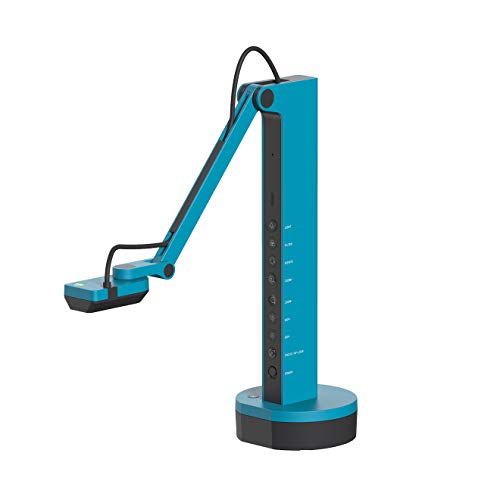
- Wi-Fi, HDMI, and USB connectivity
- Built-in LED and up to 33-foot wireless range
- Approximately 9–12 hours of battery life
Best For: Wireless teaching, projectors, displays, and flexible presentations
Best Portable 4K Pick
INS-Flip 4 Foldable Document Camera

- Foldable 0.67-pound design
- 4K video from a 13MP Sony sensor
- Built-in LED and webcam functionality
Best For: Portable teaching, remote meetings, and product demonstrations
Best Simple USB Setup
IPEVO V4K Ultra HD Document Camera

- 8MP Sony sensor with Ultra HD capture
- Up to 30 fps at Full HD
- Fast autofocus and built-in lighting
Best For: USB-connected teaching, live demonstrations, and remote instruction
Best Handheld Pick

- 2K imaging at up to 30fps with a B4-plus capture area
- LED light, brightness control, autofocus, and anti-glare sheet
- Documate software includes OCR, annotation, recording, and 16x zoom
Best For: Portable classroom and hands-on object demonstrations
Best 4K-Style Feature Set

- 8MP camera with up to 2448P, 30fps output
- Three-level LED lighting and adjustable image reversal
- Foldable multi-joint body with dual microphones
Best For: A3-size teaching presentations and live demonstrations
Best Manual-Focus Budget Option

- Manual focus helps maintain a deliberately set image
- Foldable arm reaches 20.4 inches and rotates 360 degrees
- 2MP/1080p output with a built-in noise-reducing microphone
Best For: Computer-based lessons and video calls with controlled setups
Best All-Around Pick
THUSTAR 8MP 4K Document Camera

- 8MP video up to 2448P at 30 fps
- Three-level LED ring light with brightness control
- Foldable A3-size design with dual microphones
Best For: Teachers and presenters needing a versatile, portable USB camera
Best for HDMI Presentations
TreasLin 15MP 4K Document Camera

- 15MP sensor with 4K video support
- HDMI and USB connectivity options
- Built-in LED light and TF card image storage
Best For: Classrooms and presenters using projectors, monitors, or TVs
Best Budget-Friendly USB Option

- 8MP 2448P imaging with one-touch autofocus
- Three-level LED light and 10 exposure settings
- Foldable A3-size body with image-reversal controls
Best For: USB-based classroom and distance-learning setups
Best Large-Format Detail – INS-2 UHD 4K Document Camera
For educators who need document cameras with built in lighting, the INS-2 combines a 13MP Sony sensor, 4K video, and an adjustable arm designed for documents up to A3 size. Its built-in LED, anti-glare sheet, autofocus modes, and brightness controls help produce polished presentations for classrooms, artwork, and large displays.
Best For: Professional educators and art instructors showing large documents, artwork, two-page spreads, and detailed objects.
Pros:
- 4K capture with a 13MP Sony sensor for detailed images.
- Supports documents up to A3 size with a flexible multi-joint arm.
- Built-in LED, anti-glare sheet, macro focus, and brightness control support varied materials.
- Documate software adds annotation, recording, whiteboard, and OCR tools.
Cons:
- At 2.3 pounds, it is less portable than the foldable INS-Flip 4.
- Connectivity is USB rather than wireless or HDMI.
The INS-2 is a strong choice when image quality, large-format coverage, and presentation controls matter more than compact portability. Its built-in lighting and software features make it especially capable for detailed classroom and art demonstrations.
Best Wireless Flexibility – IPEVO VZ-X Wireless Document Camera
The IPEVO VZ-X is a versatile option among document cameras with built in lighting, offering Wi-Fi, HDMI, and USB connectivity. Its built-in LED illuminates the viewing area, while the 8MP Sony sensor, swiveling head, and multi-jointed stand give presenters freedom to work from different positions.
Best For: Teachers and presenters who need wireless operation, direct HDMI output, or flexible connections to computers, mobile devices, displays, and projectors.
Pros:
- Three connection modes: Wi-Fi, HDMI, and USB.
- Built-in LED helps illuminate documents and objects.
- Battery provides approximately 9–12 hours of use.
- Wireless range reaches up to 33 feet for room-wide demonstrations.
Cons:
- Maximum listed resolution varies by mode, from Full HD in Wi-Fi and HDMI to near 4K in USB.
- Focus type is listed as manual, which may require more adjustment than autofocus models.
The VZ-X stands out for connection flexibility rather than a single maximum-resolution workflow. It is a practical pick for classrooms and presentations where wireless movement, direct display connections, and long battery life are valuable.
Best Portable 4K Pick – INS-Flip 4 Foldable Document Camera
For users who want document cameras with built in lighting without giving up portability, the INS-Flip 4 folds into a pencil-case-sized design and weighs just 0.67 pounds. It delivers 4K video from a 13MP Sony sensor, includes an LED, and can also serve as a webcam for online meetings.
Best For: Mobile educators, remote presenters, and anyone who needs a lightweight camera for documents, books, products, and 3D objects.
Pros:
- 4K video and a 13MP Sony sensor provide detailed live images.
- Compact foldable design weighs only 0.67 pounds.
- Built-in LED, autofocus, and macro capture from as close as 3.9 inches.
- Works as both a document camera and webcam.
Cons:
- USB connectivity does not provide the wireless or HDMI options of the IPEVO VZ-X.
- Its lightweight format may be less suited to permanent, heavy-duty installations.
The INS-Flip 4 is the most travel-friendly option in this group while retaining high-resolution capture and built-in illumination. Choose it when quick setup, easy packing, and webcam versatility are priorities.
Best Simple USB Setup – IPEVO V4K Ultra HD Document Camera
The IPEVO V4K is a straightforward USB model for users seeking document cameras with built in lighting and high-resolution live capture. Its 8MP Sony CMOS sensor supports up to 3264 x 2448 images, while fast focusing and a multi-jointed stand help keep demonstrations moving.
Best For: Teachers and presenters who want a simple USB document camera for Mac, Windows, or Chromebook use, including live demonstrations and remote teaching.
Pros:
- 8MP Sony sensor captures Ultra HD images up to 3264 x 2448.
- Streams at up to 30 fps at Full HD for responsive live video.
- Fast autofocus helps when switching between materials.
- Multi-jointed stand supports flexible positioning and can be tightened over time.
Cons:
- USB is the only listed connectivity option.
- No zoom is listed.
- It does not offer the 4K video capture specified for the INS-2 and INS-Flip 4.
The V4K is a sensible choice for a dependable, computer-connected setup. Its fast focusing and high frame rate are useful for live instruction, while the built-in light and Sony sensor help it handle less-than-ideal lighting.
Best Handheld Pick – INS-3 LED Document Camera
The INS-3 is a flexible choice for anyone comparing document cameras with built in lighting. Its handheld design, LED light, anti-glare sheet, and 2K live imaging support clear demonstrations of documents, artwork, small objects, and 3D models.
Best For: Teachers, presenters, and remote instructors who need a portable camera for hands-on demonstrations.
Pros:
- Captures 2560×1920p video at up to 30fps and covers materials larger than B4 size.
- Built-in LED lighting, seven brightness levels, autofocus, and an anti-glare sheet help manage difficult lighting.
- Documate software adds annotation, recording, snapshots, OCR, whiteboard tools, and 16x digital zoom.
- Works with Windows, Mac, Chromebook, and compatible iPad devices, plus Zoom, Teams, and Google Meet.
Cons:
- The handheld format may require more positioning by the presenter than a fixed-base model.
- iPad use requires iPadOS 17 or later and a USB-C port.
The INS-3 stands out for its combination of portability, built-in illumination, software tools, and broad compatibility. It is particularly practical when demonstrations involve objects rather than flat pages alone.
Best 4K-Style Feature Set – Kitchbai KB-700 Visualiser
The Kitchbai KB-700 is a strong option among document cameras with built in lighting, combining an 8MP sensor, a foldable multi-joint design, and three LED brightness levels. Its broad A3 capture area suits lessons and presentations involving larger pages or objects.
Best For: Teachers who want a foldable visualiser with adjustable lighting, image reversal, and dual microphones.
Pros:
- 8MP imaging delivers up to 2448P video at 30fps and covers an A3-sized area.
- Three brightness levels help compensate for dark or overly bright shooting environments.
- Foldable, multi-joint construction supports multi-angle positioning and easier storage.
- Built-in dual microphones are designed to reduce noise and improve sound quality.
Cons:
- The listed video resolution is up to 2448P rather than true 4K output.
- Autofocus is activated with a focus-button press instead of continuously tracking movement.
With its large coverage area, lighting controls, image-reversal adjustment, and foldable frame, the KB-700 is well suited to desk-based teaching. It offers useful presentation controls without taking much space when folded.
Best Manual-Focus Budget Option – USB Manual-Focus Visualiser
This USB visualiser is a straightforward choice for shoppers seeking document cameras with built in lighting alternatives, though its supplied specifications describe a microphone rather than a built-in light. Manual focus, a flexible 360-degree structure, and a foldable design make it suitable for controlled demonstrations and video calls.
Best For: Computer-based teaching, conferencing, and home use where manual focus and flexible positioning matter more than high resolution.
Pros:
- Manual focus lets users set clarity precisely and avoid repeated autofocus blur.
- Flexible structure reaches up to 20.4 inches and rotates up to 360 degrees.
- Foldable construction helps with carrying and storage.
- Built-in noise-reducing microphone supports video chats, conferences, and instructional videos.
Cons:
- Its 2MP, up-to-1080p output is less detailed than the higher-resolution models in this roundup.
- It must connect to a computer and is not compatible with iPads, phones, or other portable devices.
- The supplied notes specify no flash, so built-in lighting is not confirmed for this model.
The main appeal here is control: manual focusing and a tall, rotating arm can help maintain a stable view during demonstrations. Choose it when computer compatibility and positioning flexibility are priorities, and verify lighting needs before buying.
Best All-Around Pick – THUSTAR 8MP 4K Document Camera
The THUSTAR is a versatile choice among document cameras with built in lighting, combining 8MP imaging, 4K video capture, and a foldable design. Its three-level LED ring light and adjustable brightness controls help maintain visibility in uneven lighting, while autofocus and image-reversal controls add flexibility for teaching, demonstrations, and video calls.
Best For: Teachers and presenters who want a foldable USB camera with built-in lighting, dual microphones, and broad operating-system compatibility.
Pros:
- 8MP camera supports up to 2448P output at 30 fps.
- Three-level LED lighting and manual brightness controls help with dim or bright environments.
- Foldable, multi-joint design covers documents and objects up to A3 size.
- Compatible with Windows, macOS, Chrome OS, and common video platforms.
Cons:
- Uses a USB 2.0 connection rather than HDMI.
- Its many manual controls may take some setup to master.
With strong image resolution, built-in lighting, microphones, and a portable folding body, the THUSTAR offers a well-rounded feature set for classroom and remote-presentation use.
Best for HDMI Presentations – TreasLin 15MP 4K Document Camera
The TreasLin stands out among document cameras with built in lighting for users who need direct HDMI connectivity as well as USB operation. Its 15MP sensor supports 4K video, the built-in LED helps illuminate dark scenes, and a TF card slot allows still images to be saved during HDMI use.
Best For: Classrooms, meeting rooms, and presenters who want HDMI output, high-resolution imaging, and onboard image storage.
Pros:
- 15MP CMOS sensor supports 4K at 15Hz and 1080p at 30Hz.
- Can connect directly to a TV, monitor, or projector through HDMI.
- Built-in LED light helps capture subjects in darker environments.
- TF card slot supports saving images when connected through HDMI.
Cons:
- 4K capture is limited to 15Hz.
- Mac USB use requires a USB-C adapter.
- The notes do not specify a foldable design or microphone features.
Its HDMI flexibility and TF card storage make the TreasLin especially practical for direct-to-display presentations, while the 15MP sensor provides detailed images for documents and three-dimensional objects.
Best Budget-Friendly USB Option – PAKOTOO 8MP Document Camera
The PAKOTOO is a straightforward option among document cameras with built in lighting, offering 8MP imaging, autofocus, and three brightness levels in a compact folding body. Its physical image-reversal and exposure controls are useful for distance teaching, although setup requires selecting the camera manually in the computer rather than relying on full plug-and-play detection.
Best For: Teachers and remote learners who need an affordable USB document camera for A3 or A4 materials and 2D or 3D demonstrations.
Pros:
- 2448P resolution with one-touch autofocus and close-up capture down to 3.94 inches.
- Three-level LED lighting and 10 exposure levels support clearer images in changing conditions.
- Foldable multi-joint design covers areas up to A3 size.
- USB-C cable can connect directly to compatible devices such as MacBooks.
Cons:
- Does not support HDMI or zoom.
- Not fully plug and play; the USB camera must be selected in the computer system.
- Does not support iPad use according to the supplied notes.
The PAKOTOO focuses on essential classroom features and portability. It is a sensible fit for USB-based teaching setups, provided you are comfortable choosing the camera manually and do not need HDMI output.
How We Picked the Best Document Cameras with Built in Lighting
We focused on the features that matter most when a camera is used for teaching, demonstrations, remote learning, and document sharing. The selection includes 4K and 8MP models, compact foldable designs, wireless and wired connectivity, A3-capable capture areas, built-in microphones, and adjustable LED illumination.
We also considered practical usability: compatibility with common computers and conferencing software, ease of positioning, portability, focusing controls, and whether the light can help reduce shadows or improve readability. Specifications can vary by retailer and software, so confirm current compatibility and included accessories before buying.
Quick Comparison
- Best for highest detail: Choose a 4K model with a 13MP or similarly high-resolution sensor for fine text, artwork, and demonstrations.
- Best for flexible connections: The IPEVO VZ-X supports Wi-Fi, HDMI, and USB, making it useful across different teaching and presentation setups.
- Best for portability: Foldable and handheld models are easier to carry between classrooms or store in a small workspace.
- Best for large materials: Look for A3-size capture support when showing posters, textbooks, maps, or artwork.
- Best for online lessons: Prioritize a built-in microphone, webcam functionality, and straightforward USB compatibility.
Key Buying Factors for Document Cameras with Built-In Lighting
Resolution and Image Quality
Higher resolution helps preserve small print and fine lines, but lighting and focus are just as important. A 4K camera can show more detail when your computer, software, and display support it. For ordinary worksheets and live lessons, a good 8MP camera may already be sufficient.
Lighting and Positioning
Built-in LED lighting is valuable for dim rooms, glossy pages, and close-up objects. Check whether the light has multiple brightness levels and whether the arm or camera head can be angled independently. Adjustable positioning helps prevent glare and shadows.
Connection Options
USB is usually the simplest choice for Windows, macOS, and Chromebook setups. HDMI can connect directly to displays or classroom equipment, while wireless connectivity adds flexibility but may require more setup. Verify the ports and operating-system support you need.
Capture Area, Focus, and Audio
A3 support gives you more room for books and artwork than an A4-only camera. Autofocus is convenient for changing subjects, while manual focus can be useful for controlled demonstrations. A built-in microphone is helpful for video calls, but dedicated audio equipment may still sound better in larger rooms.
Who Should Buy Which Document Cameras with Built in Lighting?
Teachers and presenters should look for A3 capture, adjustable LEDs, reliable USB operation, and image-invert controls for flexible demonstrations. Remote instructors may prefer a webcam-capable model with a microphone and broad conferencing compatibility. Traveling educators and students should choose a lightweight foldable or handheld design. Art instructors and makers will benefit from high resolution, flexible angles, strong close-up focus, and even lighting. If you need one camera for both documents and video calls, prioritize models that clearly support webcam use rather than document capture alone.