
The best document cameras with HDMI output make it easier to display books, worksheets, handwritten notes, small objects, and live demonstrations on a projector, monitor, or interactive panel. HDMI connectivity can also simplify classroom and conference-room setups by sending a direct video signal without relying on a computer.
This roundup compares 10 selected models across resolution, connection options, portability, software support, and teaching-focused features. Whether you need a basic USB visualizer, a flexible HDMI/USB camera, or a higher-resolution scanner-style device, the right choice depends on how and where you plan to present.
Best 10 Document Cameras with Hdmi Output Picks for 2026
Best 4K Versatility
JOYUSING V500-4K Document Camera

- 13MP sensor with 4K video
- HDMI/VGA projection without a computer
- Autofocus, 100x digital zoom, and LED lighting
Best For: High-resolution classroom and presentation use
Best Established HD Option

- 1080p video at 30fps
- HDMI, USB, and VGA connectivity
- Includes microscope adapter and A/V recording
Best For: Classrooms and microscope demonstrations
Best Portable Dual-Mode Pick
- HDMI projection and USB computer modes
- Up to 1080p HDMI video
- Portable stand with webcam functionality
Best For: Mobile teaching and hybrid presentations
Best for Books and OCR

- 24MP camera with A3 scanning capacity
- HDMI support and real-time preview
- Page flattening and ABBYY OCR
Best For: Book digitization and editable document capture
Best 4K HDMI Flexibility

- Up to 4K video capture
- HDMI and USB connectivity
- A3 coverage with TF card storage
Best For: Teachers and presenters needing high-resolution direct HDMI display
Best Foldable USB Visualizer
Kitchbai 8MP A3 Document Camera

- Foldable, portable design
- A3 coverage with 8MP imaging
- Three-level light and dual microphones
Best For: USB-based distance learning and portable demonstrations
Best Premium Dual-Mode Pick

- 4K HDMI and USB dual mode
- Direct connection without a computer
- 13MP Sony sensor with tactile controls
Best For: Classrooms connecting directly to projectors, TVs, or interactive panels
Top 4K HDMI Pick
- 15MP sensor with up to 4K video
- Direct HDMI output to displays and projectors
- A3 coverage plus built-in LED light
Best For: Teachers and presenters needing high-resolution HDMI video
Best USB Clarity

- 8MP resolution up to 3264 x 2448
- Full HD streaming at up to 30 fps
- Fast autofocus and multi-jointed stand
Best For: Computer-based teaching and web conferencing
Most Flexible Connectivity

- HDMI, USB, VGA, and Wi-Fi modes
- Up to six hours from a 7200mAh battery
- 1080p at 30 fps with expandable card storage
Best For: Mobile presentations and multi-connection classroom setups
Best 4K Versatility – JOYUSING V500-4K Document Camera
The JOYUSING V500-4K is a flexible choice among document cameras with HDMI output. Its 13MP sensor supports 4K video at 30fps and 1080p at 60fps, while HDMI and VGA connections allow direct projection to a TV, monitor, or projector without a computer.
Best For: Teachers, presenters, and remote instructors who want high-resolution capture plus direct HDMI/VGA projection.
Pros:
- 13MP sensor with 4K at 30fps and 1080p at 60fps.
- HDMI and VGA output can project without a computer.
- Autofocus, 100x digital zoom, and three-level dimmable LED lighting.
- Includes HDMI cable, remote control, adapter, and USB cable.
Cons:
- At approximately 2 kg, it is less portable than lightweight folding models.
- Software download requires visiting the manufacturer’s website.
With strong resolution, multiple output options, and built-in lighting, the V500-4K is a feature-rich pick when image quality and direct display connectivity matter most.
Best Established HD Option – Epson DC-13 Document Camera
Epson DC-13 High-Definition Document Camera with HDMI, 16x Digital Zoom and 1080p Resolution,White
Check Price On AmazonThe Epson DC-13 is a straightforward HD choice among document cameras with HDMI output. It delivers 1080p video at 30fps, includes HDMI connectivity, and adds useful presentation features such as a microscope adapter and one-touch audio/video recording.
Best For: Classrooms and labs that need dependable 1080p display, microscope compatibility, and integrated recording tools.
Pros:
- 1080p output with smooth 30fps video.
- HDMI connectivity plus USB and VGA support.
- Included microscope adapter supports many standard microscopes.
- Built-in microphone and one-touch A/V recording.
Cons:
- Its 16x digital zoom and 2MP sensor offer less resolution than newer 4K models.
- At 5.6 pounds, it is relatively heavy for frequent transport.
The DC-13 favors practical classroom functionality over maximum resolution, making it a sensible option for users who value microscope support and a broad set of included accessories.
Best Portable Dual-Mode Pick – IPEVO VZ-R Document Camera
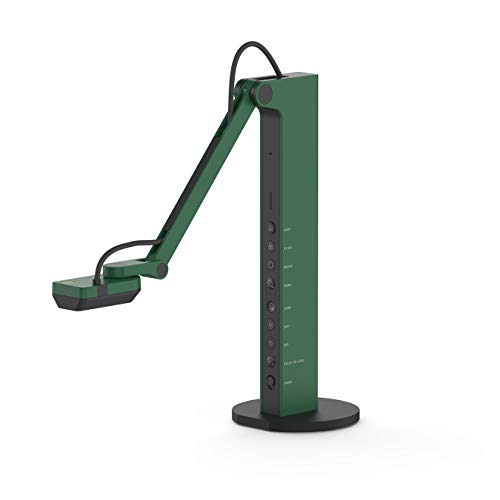
The IPEVO VZ-R combines HDMI projection and USB computer connectivity in a portable design. As one of the more flexible document cameras with HDMI output, it can work with or without a computer, double as a webcam, and capture up to 1080p in HDMI mode.
Best For: Mobile educators, presenters, and video-call users who need quick switching between direct projection and computer-based software.
Pros:
- Works in HDMI mode without a computer or through USB with Mac, Windows, and Chromebook.
- 8MP Sony CMOS camera with up to 1080p HDMI output.
- Swiveling head and multi-jointed stand support varied angles and orientations.
- Built-in LED light, tactile controls, and webcam functionality.
Cons:
- HDMI cable and wall power adapter are not included.
- HDMI mode is limited to 1920 × 1080, despite higher USB-mode capture capability.
The VZ-R is particularly appealing when portability and flexible setup are more important than 4K output. Its dual-mode design makes it easy to move between classroom projection and online conferencing.
Best for Books and OCR – CZUR ET24 Pro Document Camera
The CZUR ET24 Pro is a book scanner that also supports HDMI output for use as a document camera. Its 24MP camera, A3 scanning area, page-flattening technology, and ABBYY OCR make it especially useful for digitizing books and large documents while providing a real-time preview.
Best For: Users who need HDMI presentation alongside book scanning, page flattening, and editable OCR output.
Pros:
- 24MP camera with 5696 × 4272 resolution and 320 DPI.
- Supports HDMI connection for faster, stable data transfer.
- Handles documents up to A3 size and uses technology to flatten curved book pages.
- ABBYY OCR converts JPG files into editable PDF, Excel, and Word files in 180+ languages.
Cons:
- Very reflective paper is not recommended.
- At 4.5 kg, it is designed more for a desktop than frequent travel.
- OCR language support has stated limitations, including Thai and Hebrew.
The ET24 Pro is the specialized option in this group: choose it when scanning and OCR are as important as HDMI presentation, particularly for books, magazines, receipts, and other large-format materials.
Best 4K HDMI Flexibility – TreasLin 15MP Document Camera
For shoppers comparing document cameras with HDMI output, the TreasLin stands out with direct HDMI connectivity plus USB support. Its 15MP sensor captures up to 4K video, covers A3-sized materials, and includes an LED light and TF card slot for practical classroom and presentation use.
Best For: Teachers and presenters who need high-resolution HDMI display, broad operating-system compatibility, and standalone image storage.
Pros:
- Supports up to 4K at 15Hz and 1080p at 30Hz.
- Connects directly to a TV, monitor, or projector through HDMI.
- 15MP camera covers materials up to A3 size and includes built-in LED lighting.
- TF card slot allows image storage while using HDMI.
Cons:
- 4K video is limited to 15Hz.
- Mac USB use requires a USB-C adapter.
The TreasLin is a capable choice when image detail and flexible output matter. Its HDMI mode supports direct presentation, while USB connectivity works with common conferencing platforms and operating systems.
Best Foldable USB Visualizer – Kitchbai 8MP A3 Document Camera
The Kitchbai is a compact USB visualizer for shoppers who want portable document-camera functionality, though its supplied specifications list USB rather than HDMI output. It combines 8MP imaging, A3 coverage, adjustable brightness, image reversal, and dual microphones for online teaching and demonstrations.
Best For: Users prioritizing a foldable USB setup for web conferencing, classroom demonstrations, and distance learning.
Pros:
- Foldable design saves space and makes transport easier.
- Captures A3-sized materials and 2D or 3D objects.
- Three brightness levels help in varied lighting conditions.
- Built-in dual microphones support online meetings and lessons.
Cons:
- The supplied details identify USB connectivity, not HDMI output.
- Its 8MP resolution is lower than the other cameras in this roundup.
This model is best viewed as a flexible USB alternative rather than a direct match for buyers specifically requiring HDMI. Its foldable construction, adjustable image controls, and microphones make it practical for computer-based teaching.
Best Premium Dual-Mode Pick – IPEVO VZ-R Ultra 13MP Camera
The IPEVO VZ-R Ultra is a strong option for buyers seeking document cameras with HDMI output and the flexibility of USB mode. It connects directly to IFPs, TVs, monitors, and projectors without a computer, while its 13MP Sony CMOS sensor delivers up to 4K in HDMI mode.
Best For: Classrooms and training spaces that need direct display connections, high-resolution imaging, and tactile real-time controls.
Pros:
- HDMI and USB dual-mode operation supports direct display and software-based use.
- Captures up to 4K in HDMI mode and 4096 × 3072 in USB mode.
- 13MP Sony CMOS sensor provides autofocus, noise reduction, and vibrant color.
- Dedicated controls adjust rotation, exposure, focus, and video filters.
Cons:
- It is heavier than a basic portable webcam-style document camera.
- Scanning features require an optional upgrade module.
The VZ-R Ultra is the most versatile HDMI-focused choice here, especially for classrooms using projectors or interactive flat panels. Its durable stand, built-in light, and tactile controls add convenience for frequent instructional use.
Top 4K HDMI Pick – TreasLin 15MP Document Camera
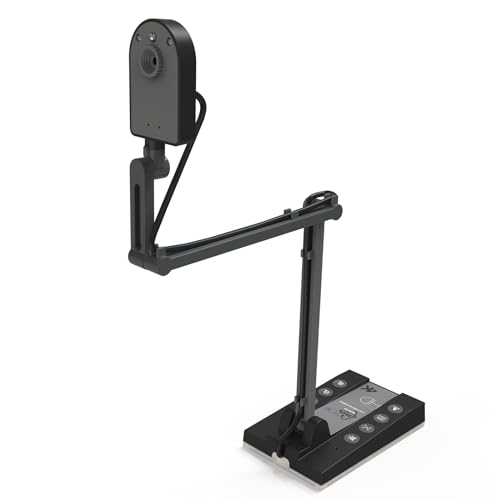
For shoppers comparing document cameras with HDMI output, the TreasLin stands out with a 15MP sensor, 4K video support, and direct connections to a TV, monitor, or projector. Its A3-sized coverage and built-in LED light make it well suited to classroom demonstrations and presentations.
Best For: Teachers and presenters who want high-resolution HDMI or USB video with broad document coverage.
Pros:
- Supports up to 4K at 15 fps and 1080p at 30 fps.
- Direct HDMI connection works with TVs, monitors, and projectors.
- 15MP autofocus camera covers up to A3-sized materials.
- Compatible with Windows, macOS, Chrome OS, Linux, and video-conferencing apps.
Cons:
- 4K capture is limited to 15 fps.
- Mac USB use requires a USB-C adapter.
- Storage through the TF card slot applies when using HDMI.
The TreasLin is a versatile choice when HDMI connectivity and image detail matter most. Its combination of 4K support, A3 coverage, lighting, and TF-card image storage gives it flexibility for both live instruction and presentations.
Best USB Clarity – IPEVO V4K 8MP Document Camera
The IPEVO V4K is a strong USB option for shoppers considering document cameras with HDMI output but willing to use a computer-based setup. It delivers up to 3264 x 2448 resolution, fast autofocus, and smooth Full HD streaming for online teaching and demonstrations.
Best For: Mac, Windows, and Chromebook users who need a responsive USB document camera for live lessons or web conferencing.
Pros:
- 8MP camera captures images up to 3264 x 2448 pixels.
- Streams at up to 30 fps in Full HD.
- Fast focusing helps when switching between materials.
- Multi-jointed stand and Sony CMOS sensor support everyday classroom use.
Cons:
- Connectivity is USB only; the supplied notes do not list HDMI output.
- Maximum shooting area is about 13.46 by 10.04 inches.
- Requires suitable computer hardware for lag-free streaming.
The V4K is best treated as a dependable USB alternative rather than a direct HDMI model. Its fast focus, high-resolution sensor, and platform compatibility make it practical for computer-led instruction and conferencing.
Most Flexible Connectivity – JOYUSING 8MP Wireless Camera
The JOYUSING offers unusually broad connectivity for a document camera, including HDMI, USB, VGA, and Wi-Fi modes. It produces 1080p video at 30 fps and includes a 7200mAh battery rated for up to six hours, making it useful when presentations need to move beyond a fixed desk setup.
Best For: Teachers and presenters who value wireless operation, multiple connection options, and extended battery life.
Pros:
- Supports Wi-Fi, USB, VGA, and HDMI connection modes.
- 7200mAh battery provides up to six hours of continuous use.
- Delivers 1080p video at 30 fps for smooth live streaming.
- Supports SD, SDHC, and SDXC cards for expandable storage.
Cons:
- Its 8MP sensor offers less stated resolution than the TreasLin model.
- Fixed focus provides less focusing flexibility than an autofocus design.
- Software must be downloaded from the manufacturer’s website for computer use.
The JOYUSING is a practical pick for mobile or multi-display presentations. Its HDMI output, wireless capability, long battery life, and expandable storage make it especially adaptable, though users should plan for software setup and fixed-focus operation.
How We Picked the Best Document Cameras with Hdmi Output
We focused on models that offer HDMI connectivity or a clearly documented HDMI-based presentation workflow, then compared their resolution, compatibility, viewing flexibility, and practical classroom features. We also considered USB support for video conferencing, compatibility with Windows, macOS, Chromebooks, and interactive displays, as well as features such as autofocus, zoom, built-in lighting, microphones, image rotation, and foldable designs.
Because these cameras serve different purposes, image quality was not the only consideration. A teacher presenting worksheets may value quick setup and reliable HDMI output, while a book-scanning user may prioritize high megapixel capture, software tools, and page-flattening features.
Quick Comparison
| Best For | Look For | Typical Advantage |
|---|---|---|
| Classroom projection | HDMI, autofocus, flexible arm | Fast, direct display on projectors and panels |
| Hybrid teaching | HDMI plus USB, microphone support | Works for both in-room and online students |
| Detailed demonstrations | 4K or high-resolution sensor, zoom | Sharper text and small objects |
| Book scanning | Scanning software and page correction | Better digital capture and document processing |
| Mobile classrooms | Foldable body or battery operation | Easier transport and flexible placement |
Key Buying Factors for Document Cameras with Hdmi Output
HDMI Compatibility and Video Resolution
Check whether the camera provides a direct HDMI output or requires a computer for display. Confirm that its output resolution matches your projector, monitor, or interactive flat panel. A 1080p model is usually sufficient for worksheets and handwriting, while 4K or higher-resolution sensors can preserve more detail when zooming in on small objects.
USB Connectivity and Software Support
USB is valuable for Zoom, Teams, recording, OCR, and document-camera software. If you use a Chromebook or Mac, verify operating-system compatibility and whether required features work through standard UVC drivers or proprietary software.
Framing, Focus, and Workspace Coverage
Look for autofocus, a flexible neck, image rotation, and enough coverage for the materials you use. A3 support is useful for books, artwork, maps, and larger worksheets. Built-in LED lighting can help with dim classrooms, but adjustable brightness is preferable for reflective pages.
Portability and Controls
Foldable designs are easier to store, while battery-powered models can reduce cable clutter. Remote controls, one-touch focus, and physical zoom controls are helpful when presenting from a distance.
Who Should Buy Which Document Cameras with Hdmi Output?
Choose a straightforward HDMI/USB model if your priority is displaying papers and objects on a classroom projector. Pick a higher-resolution 4K or 13MP-class camera when you regularly show fine print, artwork, technical parts, or demonstrations that require digital zoom. For online and hybrid instruction, prioritize simultaneous HDMI and USB use, microphone support, and broad operating-system compatibility. If your main goal is converting books into digital files rather than presenting live material, a scanner-oriented model with OCR and page-processing software may be the better fit. Finally, frequent travelers and teachers who move between rooms should favor foldable or battery-equipped designs over larger fixed setups.