
If you want fast audio control without reaching for system menus, a mechanical keyboard with volume knob is a practical upgrade. It’s a small feature that makes a big difference for gaming, calls, music, and daily work.
Below, we focus on the best options for different budgets, layouts, and connectivity needs so you can choose a board that feels right from day one.
Best 10 Mechanical Keyboard with Volume Knob Picks for 2026
Thocky 96% Pick
RK R98 Pro Wired Mechanical Keyboard

- 98-key layout with numpad and function keys
- Detachable aluminum volume knob
- Hot-swappable with pre-lubed linear switches
Best For: Full-featured wired use with creamy sound and easy volume control
Wireless Workhorse
Redragon K742 Wireless Mechanical Keyboard
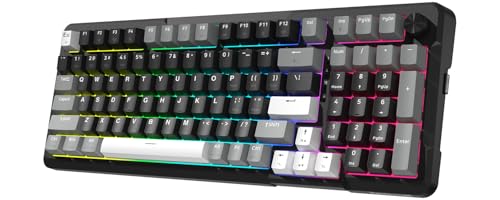
- Tri-mode wireless plus USB-C wired use
- 98% layout with dedicated volume knob
- QMK/VIA support and hot-swappable PCB
Best For: Hybrid setups that need wireless flexibility and customization
Compact Pink Favorite
RK R75 Wired Mechanical Keyboard

- 75% compact layout with arrow keys
- CNC aluminum volume knob
- Gasket mount with PBT MDA keycaps
Best For: Space-saving desks and users who like a pink, creamy-sounding board
Smart Knob Wireless
Redragon RM104 Gaming Keyboard

- Smart knob controls volume, mute, and RGB
- Tri-mode Bluetooth/2.4G/USB-C connectivity
- Software support for macros and profiles
Best For: Users who want quick knob control and wireless flexibility
Editor’s Pick
RK S98 Smart Display Knob Keyboard

- Smart display shows GIFs, battery, and connection info
- Multi-function knob adjusts volume and lighting settings
- BT 5.0, 2.4G, and USB-C support flexible connectivity
Best For: People who want a premium wireless keyboard with display features and a knob
Compact Budget Pick
DAREU EK75 Volume Knob Keyboard

- 75% wired layout keeps arrow keys in a smaller footprint
- Dedicated knob controls volume and play/pause
- Gasket mount and PBT keycaps support a softer typing feel
Best For: Users who want a compact wired keyboard with simple media control
Wireless Custom Pick

- Tri-mode wireless plus USB wired connectivity
- Hot-swappable 3-pin/5-pin design for customization
- Knob changes volume or lighting depending on mode
Best For: People who want a customizable wireless 75% keyboard for work and gaming
3D Control Value Pick
MOFII AK96 Mechanical Gaming Keyboard

- Multi-function knob handles volume, lighting, and sensitivity
- Full-size 96-key wired keyboard with USB-C connection
- 17 backlight effects and adjustable brightness/speed
Best For: full-size desk setups that want extra knob control
Creamy 75% Favorite
RK ROYAL KLUDGE R75 75% Mechanical Keyboard

- 75% layout keeps arrows and function keys
- CNC aluminum roller makes volume changes easy
- Gasket mount and PBT caps aim for a refined typing feel
Best For: compact setups that still need arrow keys and quick volume control
Compact Custom Pick
RK ROYAL KLUDGE R65 60% Volume Knob Keyboard

- 60% layout saves desk space
- Metal knob adjusts volume and presses to mute
- QMK/VIA plus hot-swap support for customization
Best For: small desks and users who want programmable controls
Thocky 96% Pick – RK R98 Pro Wired Mechanical Keyboard
If you want a mechanical keyboard with volume knob that keeps the numpad while still feeling premium, the RK R98 Pro is built around that use case. Its 98-key layout, gasket mount design, and five layers of sound-dampening foam aim for a softer, fuller typing feel without giving up work-friendly functionality.
Best For: Users who want a full-featured wired keyboard for gaming, typing, and desktop work with a tactile volume knob.
Pros:
- 98-key layout retains the numpad, arrow keys, and most functions.
- Detachable aluminum volume knob for quick audio adjustment.
- Hot-swappable PCB supports 3-pin and 5-pin switches.
- PBT MDA keycaps and pre-lubed linear switches for a smoother feel.
Cons:
- Wired-only connection may not suit wireless setups.
- 96%/98-key layout is larger than compact boards.
- Best suited to users who like a creamy, thockier sound profile.
Overall, the R98 Pro stands out as a practical balance of desk efficiency and full-size utility, especially if you want a knob without sacrificing the numpad. It also offers solid customization through the online driver for keys, macros, and RGB.
Wireless Workhorse – Redragon K742 Wireless Mechanical Keyboard
The Redragon K742 is a mechanical keyboard with volume knob for people who want flexibility as much as feel. Its tri-mode connectivity, compact 98% layout, and gasket structure make it a strong fit for mixed work-and-play setups where desk space, comfort, and switching between devices all matter.
Best For: Hybrid workers and gamers who want a wireless, hot-swappable keyboard with a compact footprint.
Pros:
- Tri-mode connectivity: Bluetooth 5.0, 2.4GHz wireless, and USB-C wired.
- 98% compact layout with a dedicated multimedia volume knob.
- Hot-swappable PCB supports 3-pin and 5-pin switches.
- QMK/VIA support for remapping keys, macros, and layers.
Cons:
- Compact layout still keeps more keys than a truly small board.
- Wireless battery life depends on whether backlighting is on.
- VIA setup may require contacting the brand for the JSON file.
For users who want a versatile board that moves easily between devices, the K742 offers a lot of control in one package. The combination of wireless options, hot-swap support, and software customization makes it especially practical for a modern desk.
Compact Pink Favorite – RK R75 Wired Mechanical Keyboard
If you want a mechanical keyboard with volume knob in a smaller layout, the RK R75 focuses on saving space without losing the useful essentials. Its 75% design keeps the arrow cluster and key functions you’re likely to use, while the aluminum CNC knob gives you quick volume control on a tidy desk.
Best For: Smaller desks, pink setups, and users who want a compact wired keyboard with a premium typing feel.
Pros:
- 75% layout saves desk space while keeping core navigation keys.
- Aluminum CNC volume knob for fast audio adjustment.
- Gasket mount with multiple sound-absorbing layers for a quieter feel.
- Hot-swappable PCB and durable PBT MDA keycaps.
Cons:
- Wired-only design limits placement flexibility.
- Smaller layout omits the numpad.
- Pink colorway may not suit every setup.
The R75 is a strong choice if you want a compact board that still feels refined and customizable. It delivers a more space-conscious layout while leaning into creamy sound, RGB options, and a premium keycap profile.
Smart Knob Wireless – Redragon RM104 Gaming Keyboard
The Redragon RM104 is a mechanical keyboard with volume knob aimed at users who want one control for audio and lighting plus wireless convenience. Its tri-mode connectivity, programmable software support, and multifunction smart knob make it a practical option for a clean desktop or a flexible gaming setup.
Best For: Gamers and multitaskers who want a wireless keyboard with a smart control knob for volume and RGB.
Pros:
- Multifunction knob adjusts volume, mutes audio, and cycles RGB modes.
- Tri-mode connectivity: Bluetooth, 2.4GHz wireless, and USB-C.
- Software support for macros, remapping, profiles, and extra buttons.
- Compatible with Windows, macOS, and major gaming consoles.
Cons:
- Information is focused on control and connectivity rather than switch details.
- Full feature set depends on software customization.
- Grayish black theme may be less distinctive than some colorways.
As a convenience-first board, the RM104 emphasizes fast access to audio and lighting settings without relying on extra shortcuts. If you want a wireless keyboard that can streamline everyday use while staying adaptable, it fits that role well.
Editor’s Pick – RK S98 Smart Display Knob Keyboard
If you want a mechanical keyboard with volume knob that goes well beyond basic media control, the RK ROYAL KLUDGE S98 stands out with its smart display, tri-mode connectivity, and heavy sound-dampening build. It’s a practical pick for users who want a customizable 96%/98-key layout with wireless convenience and a more refined typing sound.
Best For: Users who want a feature-packed wireless keyboard with display-based status info and a multi-function knob.
Pros:
- Smart display can show GIFs, date, connection mode, layout, and battery status.
- Knob controls volume, backlight brightness/speed, RGB mode/color, and connection mode.
- BT 5.0, 2.4GHz, and USB-C support flexible desktop or wireless use.
- Sound-dampening foams and top-mount design aim for a creamy, reduced-noise feel.
Cons:
- Bulkier 98-key layout takes more desk space than a true compact board.
- Feature set may be more than needed if you just want simple volume control.
Overall, the S98 is the most feature-rich option here, blending media control, display utility, and a hot-swappable build into one board. It’s a strong choice if you want your keyboard to do more than just type.
Compact Budget Pick – DAREU EK75 Volume Knob Keyboard
The DAREU EK75 is a straightforward mechanical keyboard with volume knob that focuses on compact usability and tactile comfort. Its 75% layout keeps arrow keys and essential controls, while the gasket-mounted structure and PBT keycaps are aimed at a softer, cleaner typing feel.
Best For: Buyers who want a wired 75% board with easy volume control and a compact desktop footprint.
Pros:
- 75% layout saves space while keeping arrow keys and 81-key functionality.
- Dedicated knob lets you rotate for volume and click for play/pause.
- Gasket-mounted design is built for a softer, more even typing feel.
- Rainbow backlight plus side lighting adds visual flexibility.
Cons:
- Wired-only USB-C connection may not suit buyers wanting wireless use.
- No hot-swap feature listed for switch customization.
This is a good fit if you want a simpler volume-knob keyboard with a compact layout and comfort-focused structure. It covers the essentials without adding extra display or wireless complexity.
Wireless Custom Pick – AULA F75 Pro Knob Keyboard
If you’re comparing a mechanical keyboard with volume knob for both work and gaming, the AULA F75 Pro is a strong all-rounder. It combines tri-mode wireless connectivity, hot-swappable switch support, and a multi-function knob that changes behavior depending on whether you’re in gaming or office mode.
Best For: Users who want a wireless 75% custom keyboard with hot-swap support and flexible knob control.
Pros:
- Tri-mode support works over Bluetooth 5.0, 2.4GHz, or USB wired.
- Hot-swappable base supports 3-pin and 5-pin switches.
- Multi-function knob controls lighting in gaming mode and volume in office mode.
- 4000mAh battery and 75% layout make it practical for daily use.
Cons:
- Knob functions depend on mode, so it’s less direct than a dedicated volume-only dial.
- Side-printed keycap design may not appeal to everyone.
The F75 Pro is the best choice here if you want customization and wireless flexibility in one compact board. It’s especially appealing for users who like a keyboard that can adapt between productivity and gaming use.
3D Control Value Pick – MOFII AK96 Mechanical Gaming Keyboard
If you want a mechanical keyboard with volume knob plus extra control for gaming and daily use, the MOFII AK96 takes a practical approach. Its full-size 96-key layout keeps the number pad, while the USB-C wired connection and plug-and-play design make it easy to use on Windows and Mac setups.
Best For: Users who want a full-size mechanical keyboard with a multi-function knob and customizable lighting.
Pros:
- Three-mode knob control for volume, lighting, and sensitivity
- Full-size 96-key layout with USB-C wired connectivity
- Red linear switches are tuned for fast, non-tactile input
- 17 backlight effects with adjustable brightness and speed
Cons:
- The knob is multi-function, not volume-only
- Wired-only setup may not suit wireless-focused desks
- Planned for Windows support first, with broad Mac compatibility noted
This is a good pick if you value desk-friendly control features and a larger layout over compact sizing. The AK96 leans into customization and gaming utility, with ergonomic feet and stable silicone pads rounding out the package.
Creamy 75% Favorite – RK ROYAL KLUDGE R75 75% Mechanical Keyboard
The RK ROYAL KLUDGE R75 is a strong mechanical keyboard with volume knob if you want a compact layout without losing key function. Its 75% design keeps arrows and function keys, and the CNC aluminum volume roller adds quick on-board control for everyday work or gaming.
Best For: Buyers who want a compact 75% mechanical keyboard with a premium feel and easy volume control.
Pros:
- 75% layout keeps essential navigation keys in a smaller footprint
- CNC aluminum volume roller for fast volume adjustment
- Gasket mount design with multiple sound-dampening layers
- Hot-swappable PCB supports 3-pin or 5-pin switches
Cons:
- Wired USB-C only, so there is no wireless option
- Volume control is via roller, not a traditional knob
- Designed for Windows users in the supplied details
Overall, the R75 stands out for typing feel as much as convenience. Between the PBT MDA keycaps, pre-lubed stabilizers, and RGB customization, it is a polished choice for users who want a compact board with tactile extras.
Compact Custom Pick – RK ROYAL KLUDGE R65 60% Volume Knob Keyboard
If you want a smaller mechanical keyboard with volume knob and a focus on customization, the RK ROYAL KLUDGE R65 is built around that idea. Its 60% layout saves space, while the aluminum CNC knob gives you quick volume adjustment and push-to-mute control in a compact wired design.
Best For: Users who want a compact programmable keyboard with a knob and deep customization options.
Pros:
- 60% gasket-mount design with five layers of sound-absorbing material
- Aluminum metal knob for volume control and press-to-mute
- Hot-swappable PCB supports 3-pin and 5-pin switches
- QMK/VIA support for remapping and RGB customization
Cons:
- 60% layout removes dedicated arrow and function keys
- Wired USB-C connection only
- Smaller size may take adjustment for users coming from larger boards
The R65 is the most customization-focused option here, especially if you care about programming and switch swapping. It pairs that flexibility with an easy-access knob and a compact footprint that works well on smaller desks.
How We Picked the Best Mechanical Keyboard with Volume Knob
We prioritized keyboards that combine an easy-to-use volume knob with the features buyers usually care about most: solid build quality, comfortable typing feel, useful layouts, and reliable connectivity. We also looked for models that offer real value, whether that means hot-swappable switches, gasket mounting, wireless support, or better keycap materials.
Because a Mechanical Keyboard with Volume Knob is often chosen for everyday use, we favored boards that balance convenience and customization rather than chasing gimmicks.
Quick Comparison: What Matters Most
Start by deciding how you’ll use the keyboard. A 96% or full-size layout is better if you need a numpad for work. A 75% board saves desk space while keeping arrow keys and function row access within reach. A 60% board is the most compact, but it asks you to rely more on layers and shortcuts.
Next, choose between wired and wireless. Wired models are usually simpler and lower maintenance. Wireless or tri-mode boards are better if you want a cleaner desk and flexibility across devices.
Key Buying Factors for a Mechanical Keyboard with Volume Knob
Knob Placement and Function
The knob should be easy to reach without changing your hand position. Some knobs only control volume, while others can be remapped for scroll, zoom, or media functions through software.
Typing Feel and Switch Options
Hot-swappable keyboards are ideal if you want to tune the sound or feel later. Gasket-mounted designs often deliver a softer, more cushioned typing experience, which many buyers prefer for long sessions.
Build Materials and Keycaps
Look for PBT keycaps if you want better resistance to shine and wear. Heavier cases and more refined plate designs can also improve stability and reduce hollow sound.
Battery Life and Software
If you choose a wireless model, battery capacity and software support matter. Good software can make a real difference for lighting, remapping, and macro control.
Who Should Buy Which Mechanical Keyboard with Volume Knob?
Choose a 96% or full-size board if you need a numpad for spreadsheets, data entry, or work tasks. Pick a 75% Mechanical Keyboard with Volume Knob if you want the best all-around balance of size, comfort, and practicality. Go for a 60% model if desk space is tight and you’re comfortable using shortcuts.
If you value convenience and flexibility, wireless or tri-mode options are the best fit. If you want the most predictable performance and less charging, wired boards are the safer choice. For enthusiasts, hot-swappable and gasket-mounted models offer the best path to customization over time.