
A reliable field monitor can make exposure, focus, and color decisions much easier than relying on a camera’s built-in screen. The best camera field monitors with waveform tools combine bright displays with scopes, LUT support, and monitoring features suited to your workflow.
We compared 10 popular options across screen size, brightness, resolution, connectivity, power design, and production-focused tools to help you choose a monitor for handheld shooting, studio work, or demanding outdoor setups.
Best 10 Camera Field Monitors with Waveform Picks for 2026
Best Value Waveform Monitor

- 1200-nit 5.5-inch touchscreen
- Waveform, vectorscope, histogram, and false color
- 4K HDMI loop-through and custom 3D LUT support
Best For: Compact DSLR and mirrorless production setups
Best OLED Waveform Monitor
NEEWER F700U 7-inch OLED Monitor

- 7-inch 1200-nit OLED touchscreen
- Waveform, vectorscope, false color, zebra, and peaking
- 4K HDMI loop-out plus 3G-SDI I/O
Best For: Professional HDMI and SDI video setups
Best Bright Outdoor Monitor
Desview A7 7-inch Field Monitor

- 2800-nit 7-inch touchscreen
- Waveform, histogram, vectorscope, and false color
- 4K HDMI input and output at up to 60Hz
Best For: Bright outdoor shooting and location production
Best Touch-Control Monitor
VILTROX DC-550 Pro II 1400Nits

- 1400-nit 5.5-inch touchscreen
- 4K 60Hz HDMI 2.0 input and output
- Waveform plus USB/Wi-Fi camera control
Best For: Solo creators, gimbal users, and compact rigs
Best Brightness Pick
FEELWORLD P6XL 6-Inch Touch Monitor

- 1200-nit display for outdoor visibility
- Built-in 3300mAh rechargeable battery
- Waveform, vectorscope, histogram, and 3D LUT support
Best For: Outdoor creators wanting a compact monitor with built-in power
Best Large-Screen Option
NEEWER F700 7-Inch 2000-Nit Monitor

- 2000-nit 7-inch touchscreen
- Full waveform plus extensive exposure and focus tools
- 4K HDMI loop-through and flexible NP-F power
Best For: Outdoor and extended productions needing a bright, full-featured display
Best SDI Workflow Pick
FEELWORLD FW703 7-Inch Monitor
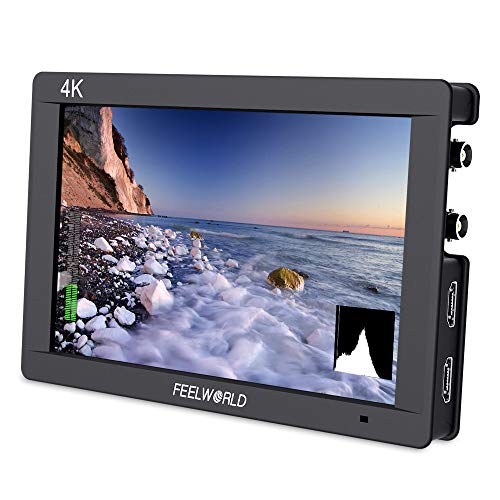
- 7-inch 1920x1200 Rec.709 IPS display
- HDMI 4K and 3G-SDI connectivity
- Waveform, vectorscope, histogram, and focus tools
Best For: Studio, broadcast, and multi-camera HDMI/SDI productions
Best Touchscreen Pick
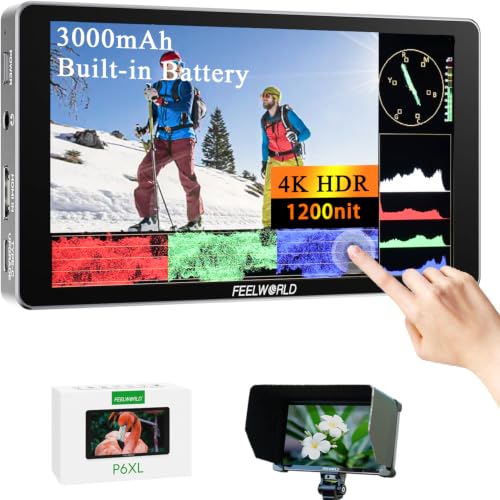
- 1200-nit Full HD touchscreen
- Waveform, vectorscope, histogram, and HDR tools
- Built-in battery with custom 3D LUT support
Best For: Mobile creators who want touchscreen control and built-in power
Best Heavy-Duty Pick
FEELWORLD F5 ProX 5.5-Inch Monitor

- 1600-nit screen for outdoor visibility
- Waveform, false color, histogram, and focus peaking
- Compatible with cameras, gimbals, and tripods
Best For: Outdoor shooters who need a very bright monitoring display
Best Lightweight Option
FEELWORLD FW568 PRO 6-Inch Monitor

- 6-inch Full HD display with 1200-nit brightness
- Waveform, vectorscope, RGB histogram, and focus assist
- NP-F or USB-C power plus 8.4V camera output
Best For: Compact rigs, gimbals, and shooters needing flexible power
Best Value Waveform Monitor – VILTROX DC-550 Pro II
The VILTROX DC-550 Pro II is a practical choice for creators who want camera field monitors with waveform tools, a bright 5.5-inch touchscreen, and broad HDMI compatibility. Its 1200-nit display, 3D LUT support, and exposure and focus assists suit both indoor and outdoor production.
Best For: DSLR, mirrorless, and video shooters who want a compact monitor with professional exposure tools.
Pros:
- 1200-nit, 1920×1080 touchscreen with anti-glare IPS viewing.
- Includes waveform, vector graph, histogram, false color, and focus assist tools.
- Supports 4K HDMI input and output, headphone monitoring, and custom 3D LUTs.
- Includes an NP-F550 battery, sunshade, cables, and carry case.
Cons:
- Its 5.5-inch screen is smaller than many 7-inch alternatives.
- Native display resolution is 1920×1080 despite accepting higher-resolution HDMI signals.
With useful accessories included and three power options, the DC-550 Pro II offers a well-rounded feature set for mobile shoots. It is especially appealing when portability and waveform-based exposure checks matter more than having the largest screen.
Best OLED Waveform Monitor – NEEWER F700U 7-inch OLED Monitor
The NEEWER F700U stands out among camera field monitors with waveform for its 7-inch OLED screen and added 3G-SDI connectivity. Its 1200-nit display, high contrast, and extensive monitoring tools make it suited to professional on-set viewing.
Best For: Videographers and production teams needing a larger OLED display with HDMI and SDI connections.
Pros:
- 7-inch 1920×1080 OLED touchscreen with 1200-nit brightness and 100000:1 contrast.
- Provides waveform, vectorscope, histogram, false color, zebra, peaking, HDR, and audio levels.
- Includes 4K HDMI input and loop output plus 3G-SDI input and output.
- Comes with two NP-F750 batteries and supports USB-C and DC power.
Cons:
- SDI cable and DC 12V adapter are not included.
- The 7-inch form factor may be less convenient for compact camera rigs.
The F700U is a strong option when accurate viewing and connection flexibility are priorities. Its OLED panel and SDI support give it a more production-oriented profile than a basic HDMI-only field monitor.
Best Bright Outdoor Monitor – Desview A7 7-inch Field Monitor
The Desview A7 is designed for shooters who need camera field monitors with waveform in bright environments. Its 2800-nit 7-inch display, 4K HDMI support, and custom LUT capability provide useful tools for checking exposure, color, and focus on location.
Best For: Outdoor filmmakers and photographers who prioritize maximum screen brightness and a larger viewing area.
Pros:
- Very bright 2800-nit 7-inch touchscreen for shaded outdoor viewing.
- Includes waveform, histogram, vectorscope, false color, peaking, and 3D LUT features.
- Accepts and outputs 4K HDMI signals up to 60Hz.
- Supports NP-F batteries, DC 12V, and Type-C power inputs.
Cons:
- The glossy screen finish may be less practical in reflective conditions.
- Its 1.9-pound weight is heavier than some compact 5.5-inch monitors.
- The listed display resolution is 1920×1080 rather than 4K.
The A7’s exceptionally high brightness is its main advantage, while its waveform and scope tools add serious exposure-control value. Choose it when outdoor legibility is more important than minimizing rig weight.
Best Touch-Control Monitor – VILTROX DC-550 Pro II 1400Nits
This VILTROX DC-550 Pro II combines a compact 5.5-inch design with camera control, 4K 60Hz HDMI 2.0, and professional monitoring tools. For creators comparing camera field monitors with waveform, it offers a fast touchscreen workflow alongside exposure, focus, color, and framing aids.
Best For: Solo operators, gimbal users, and shooters working with difficult-to-reach camera angles.
Pros:
- 1400-nit 1920×1080 touchscreen with a 160-degree viewing angle.
- Supports waveform, histogram, vectorscope, false color, peaking, 3D LUT preview, and anamorphic desqueeze.
- 4K 60Hz HDMI 2.0 input and output enable smooth loop-through monitoring.
- Can control selected camera settings through USB or Wi-Fi and includes customizable shortcut keys.
Cons:
- The 5.5-inch display provides less viewing area than 7-inch options.
- Its native resolution is 1920×1080, even though it supports 4K signals.
The DC-550 Pro II is a compelling workflow-focused monitor for compact rigs. Its camera-control features and quick-access interface are particularly useful when operating alone, while the waveform and scope tools support more precise on-set decisions.
Best Brightness Pick – FEELWORLD P6XL 6-Inch Touch Monitor
For camera field monitors with waveform, the FEELWORLD P6XL combines a bright 6-inch touchscreen with built-in power and practical exposure tools. Its 1200-nit display is suited to outdoor shooting, while waveform, vectorscope, histogram, focus assist, and 3D LUT support help with exposure, focus, and color decisions.
Best For: Outdoor creators, vloggers, photographers, and filmmakers who want a lightweight monitor with built-in battery power.
Pros:
- 1200-nit screen improves visibility in direct sunlight.
- Built-in 3300mAh battery provides up to about three hours of runtime at 60% brightness.
- Includes waveform, vectorscope, histogram, focus assist, and custom 3D LUT support.
- Compact 6-inch design with touchscreen operation and 1/4-20 mounting threads.
Cons:
- Built-in battery may offer less flexibility than interchangeable battery systems.
- The 6-inch screen is smaller than the displays on 7-inch alternatives.
The P6XL is a practical choice when portability, outdoor readability, and built-in power matter more than having the largest monitoring surface. Its exposure and focus tools make it a capable upgrade over a camera’s built-in screen.
Best Large-Screen Option – NEEWER F700 7-Inch 2000-Nit Monitor
The NEEWER F700 is a strong option among camera field monitors with waveform when you need a larger, highly visible screen and extensive monitoring controls. Its 7-inch 2000-nit touchscreen offers full waveform, vectorscope, histogram, false color, zebras, focus tools, HDR, and custom 3D LUT support.
Best For: Outdoor productions, extended shoots, and operators who want a large screen, dual-battery capability, and HDMI loop-through.
Pros:
- Bright 2000-nit 7-inch IPS touchscreen with automatic or manual backlight control.
- Provides full waveform, vectorscope, histogram, false color, zebras, focus assist, and audio bar tools.
- Supports HDMI loop in and out up to 4K and includes headphone monitoring.
- Works with NP-F batteries, Type-C charging, and DC power; supports up to 60 custom LUT files.
Cons:
- Heavier and bulkier than smaller field monitors, especially with two batteries installed.
- NP-F batteries and a DC cable may require separate purchases depending on the setup.
Choose the F700 if screen size, brightness, connectivity, and flexible power are priorities. Its broad toolset is well suited to more demanding field work, though the larger body adds weight to a camera rig.
Best SDI Workflow Pick – FEELWORLD FW703 7-Inch Monitor
The FEELWORLD FW703 is designed for production setups that need both HDMI and SDI connectivity. As one of the camera field monitors with waveform, it adds waveform, vectorscope, RGB histogram, focus peaking, false color, and custom 3D LUT support to a 7-inch 1920×1200 Rec.709 display.
Best For: Studio productions, interviews, broadcast work, and multi-camera workflows using HDMI and 3G-SDI equipment.
Pros:
- 7-inch Full HD 1920×1200 IPS screen with Rec.709 color standard.
- Includes waveform, vectorscope, RGB histogram, focus peaking, false color, and 3D LUT support.
- Supports HDMI 4K and 3G-SDI connectivity for cameras, switchers, and video systems.
- Suitable for professional indoor production and multi-camera monitoring workflows.
Cons:
- 450-nit brightness is less suited to direct-sunlight monitoring than brighter alternatives.
- Its 7-inch form factor and listed 1.85-pound weight may be substantial for lightweight rigs.
The FW703 makes the most sense when SDI compatibility is central to the production setup. It offers useful exposure and focus tools in a larger professional monitor, particularly for controlled indoor environments.
Best Touchscreen Pick – FEELWORLD P6XL 6-Inch Monitor
For creators who want camera field monitors with waveform tools and hands-on control, the FEELWORLD P6XL combines a 6-inch Full HD touchscreen with a bright 1200-nit display. Its built-in battery, HDR support, scopes, and LUT features make it a versatile option for mobile and outdoor shooting.
Best For: Filmmakers and photographers who want touchscreen operation, built-in power, and detailed exposure monitoring in a compact field monitor.
Pros:
- 1200-nit IPS touchscreen supports tap, swipe, and scroll-wheel control.
- Includes waveform options, vectorscope, histogram, audio displays, and HDR monitoring.
- Built-in rechargeable battery provides up to two hours at full brightness.
- Supports up to 32 custom .cube 3D LUTs and image overlays for composition checks.
Cons:
- Battery runtime is limited to about two hours at 100% brightness.
- Has one HDMI port listed in the supplied specifications.
The P6XL stands out when direct touchscreen access and self-contained operation matter as much as waveform monitoring. It is especially practical for shooters who need a bright, lightweight monitor with advanced image-assist features.
Best Heavy-Duty Pick – FEELWORLD F5 ProX 5.5-Inch Monitor
The FEELWORLD F5 ProX is a strong choice for shoppers comparing camera field monitors with waveform support for bright outdoor work. Its 1600-nit screen is designed for sunlight visibility, while waveform, histogram, false color, focus peaking, and LUT preview tools help with exposure and focus decisions.
Best For: Outdoor videographers, vloggers, and filmmakers who prioritize maximum screen brightness and a lightweight monitor for camera rigs or gimbals.
Pros:
- 1600-nit display is designed to remain visible in direct sunlight.
- Includes waveform, histogram, false color, focus peaking, and LUT preview.
- Mounts on cameras, cages, gimbals, tripods, and handheld setups.
- Works with DSLR, mirrorless, and cinema cameras.
Cons:
- The supplied notes do not specify the screen resolution.
- Its listed package weight is 2.82 pounds, so the complete setup may not be ideal for every lightweight rig.
If sunlight readability is the main concern, the F5 ProX offers the highest stated brightness in this roundup. Its exposure and focus tools also make it useful for production work where avoiding reshoots is important.
Best Lightweight Option – FEELWORLD FW568 PRO 6-Inch Monitor
For buyers seeking camera field monitors with waveform features and flexible rig integration, the FEELWORLD FW568 PRO offers a 6-inch 1920×1080 IPS screen with 1200 nits of brightness. It adds waveform, vectorscope, RGB histogram, focus assist, 4K HDMI input/output, and multiple power options for field production.
Best For: Videographers using stabilizers, gimbals, or compact camera rigs who need professional scopes, camera powering, and a lightweight monitor.
Pros:
- Full HD 6-inch display with 1200-nit brightness and 4K HDMI input/output.
- Provides waveform, vectorscope, RGB histogram, focus assist, and LUT preview.
- Supports NP-F battery or USB-C 5V power and can output 8.4V to a camera.
- Lightweight design is listed at 204g and includes 1/4-inch mounting threads.
Cons:
- The supplied details list a 1200-nit brightness level, which is lower than the F5 ProX.
- Battery type and included battery details are unclear in the supplied notes.
The FW568 PRO is appealing for compact setups that benefit from both monitoring and camera-power flexibility. Its combination of scopes, 4K HDMI connectivity, and low stated monitor weight makes it a practical rig-focused choice.
How We Picked These Camera Field Monitors with Waveform
We focused on monitors that provide practical exposure and composition assistance rather than simply ranking screens by resolution. Our comparison considered waveform availability, brightness, touchscreen usability, Full HD image quality, HDMI or SDI connectivity, 4K signal support, 3D LUT compatibility, power options, and included accessories such as sunshades.
Brightness matters especially for outdoor production, while larger displays can make critical focus easier. We also considered whether each model fits a compact DSLR or mirrorless rig without adding excessive weight or power demands.
Quick Comparison
- Best for maximum outdoor visibility: Choose a model rated around 2,000 nits or higher, such as the brightest 7-inch options.
- Best for compact rigs: A 5.5-inch monitor offers useful viewing space while keeping a camera build relatively light.
- Best for larger viewing: A 7-inch display is easier to share with an assistant or use for manual focusing.
- Best for SDI workflows: Look for a model with 3G-SDI rather than HDMI-only connectivity.
- Best for LUT-based monitoring: Prioritize monitors with 3D LUT loading and reliable HDMI signal support.
Key Buying Factors for Camera Field Monitors with Waveform
Waveform and Exposure Tools
A waveform monitor helps you judge luminance distribution more consistently than the screen image alone. False color, histogram, zebras, and vectorscope can add useful confirmation, particularly in high-contrast scenes or when matching multiple cameras.
Brightness and Screen Size
For frequent daylight shooting, prioritize a high-nit display and use the supplied sunshade when possible. A 5.5- or 6-inch monitor is usually easier to mount on a lightweight rig, while a 7-inch screen provides more comfortable viewing but may require stronger support and additional battery capacity.
Resolution, Inputs, and Signal Compatibility
Most monitors in this group use 1920×1080 panels, which are sufficient for monitoring detail even when receiving a 4K signal. Confirm your camera’s output format, frame rate, and connector type before buying. HDMI is common on mirrorless cameras; SDI is more appropriate for longer cable runs and professional video systems.
Power and Mounting
Check whether the monitor uses removable batteries, a built-in battery, or an external power source. Built-in batteries simplify small setups, while removable battery systems are more practical for long production days. Also verify mounting points, monitor weight, and whether the included tilt arm or sunshade matches your rig.
Who Should Buy Which Camera Field Monitors with Waveform?
Outdoor filmmakers and event shooters should favor the brightest display available within their budget. Run-and-gun creators will generally prefer a compact touchscreen with an integrated or easily replaceable battery. Studio and narrative crews may benefit from a larger 7-inch screen, waveform tools, LUT support, and SDI connectivity. Travel and lightweight-rig users should prioritize low weight, simple HDMI operation, and efficient power use over extra size.
Before purchasing, confirm the exact scope features, input limitations, battery compatibility, and included accessories for the specific model. Monitor brightness ratings and supported camera formats can vary between closely related versions.